Configuring Qodo Code Review for Your Team’s Workflows

Configuring Qodo Code Review for Your Team’s Workflows
Every engineering team reviews code differently.
Some teams want feedback as early as possible, even on draft pull requests. Others prefer to keep reviews quiet until code is ready. A team maintaining a shared infrastructure service might enforce strict standards on every change, while an experimental project may only need a lightweight review.
Qodo is designed to adapt to those differences.
Out of the box, Qodo is configured to provide useful feedback immediately after installation. But every aspect of code review can be adjusted to fit how your team works, from when reviews run to how much detail developers see and which repositories have stricter enforcement.
Qodo out-of-the-box
By default, Qodo is configured with several settings designed to give teams value right out of the box. Once installed and your repos are connected, Qodo will automatically review every pull request.
Developers receive:
- Inline comments on issues that are high severity and require action,directly in the diff
- A summary comment that posts a prioritized list of all issues Qodo identified
- An AI-generated pull request summary
Findings are prioritized based on severity and context, not just static rules. Qodo looks at both the pull request and the surrounding codebase to determine what deserves attention first. For example, introducing a security vulnerability or breaking an existing architectural pattern will appear as Action Required. A potential refactoring opportunity might be labeled Review Recommended, while a naming suggestion could appear as Optional.
This default experience works well for many teams, but can easily be changed in the Qodo portal to accommodate different workflows:
- Auto PR review can be disabled for teams that want to manually trigger review directly in the PR via the PR chat.
- Run reviews on draft PRs. By default, review is not triggered automatically on draft PRs, however it can be enabled so developers get review feedback before they commit their code.
- Auto PR summary can be disabled, or changed to be published as the native PR description instead of a standalone comment.
- In-progress review comments showing Qodo’s review is actively running, can be enabled or disabled. When enabled, users see the comment while the review is running and it is automatically removed after the review is published.
- Turn off persistent update notifications from Qodo that show a review has run on the latest commit can be disabled.
- Custom instructions for review agents add guidance to agents that is specific to your organization’s best practices, architecture preferences, and patterns to flag or avoid.
Qodo also enables users to customize some features of Qodo’s code review in a .toml file at the repository, product, group or organization level.
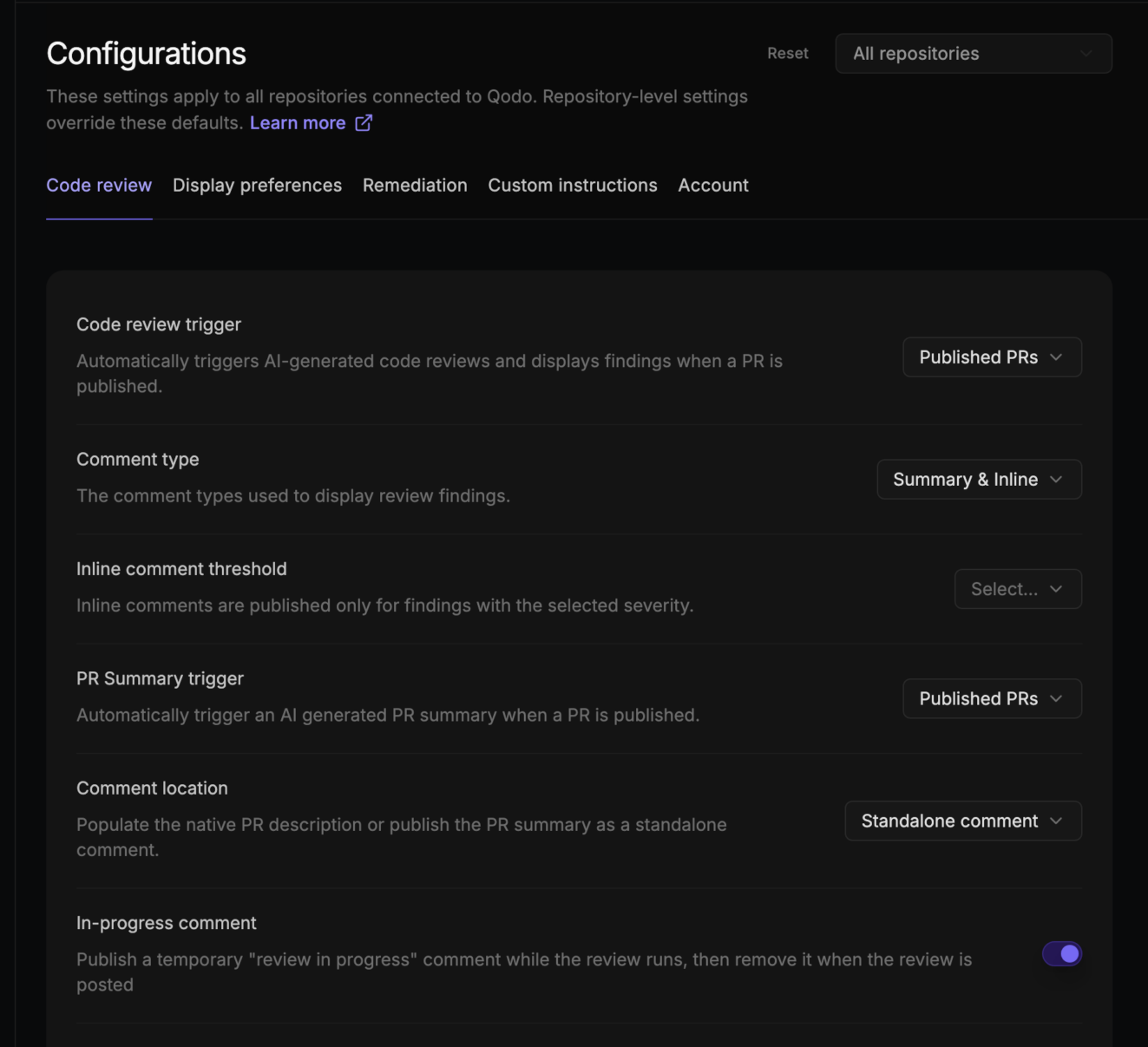
These settings let teams decide how visible and proactive they want automated reviews to be.
Setting up code review to be less verbose
Qodo has industry-leading precision and recall, and is continuously working to ensure every finding surfaced through review is not only actionable and based in contextual evidence, but also highly relevant.
Still, different teams have different thresholds for what they want to see, and different stages of a workflow call for different levels of detail. Qodo’s display preferences let you tune both where findings appear and how much of each finding is shown.
Control where Qodo issue findings appear in the PR
Each finding falls into one of three categories: Action Required, Review Recommended, and Optional. For each category, you can decide where findings appear, whether that’s inline in the pull request, in the summary comment, in both places, or not at all. The only exception is Action Required findings, which cannot be hidden to ensure critical issues are always surfaced.
For example, a team onboarding junior engineers might surface all three categories inline so nothing gets missed during review. A senior team comfortable with the summary format might keep only Action Required findings inline and move everything else to the summary to keep the diff view clean.
These display preferences only affect what developers see during review. Regardless of how findings are displayed in the pull request, Qodo continuously records every issue it surfaces in the Qodo portal. This gives engineering leaders a complete history of review findings for reporting, governance, and trend analysis, even if some findings are hidden from the pull request itself.
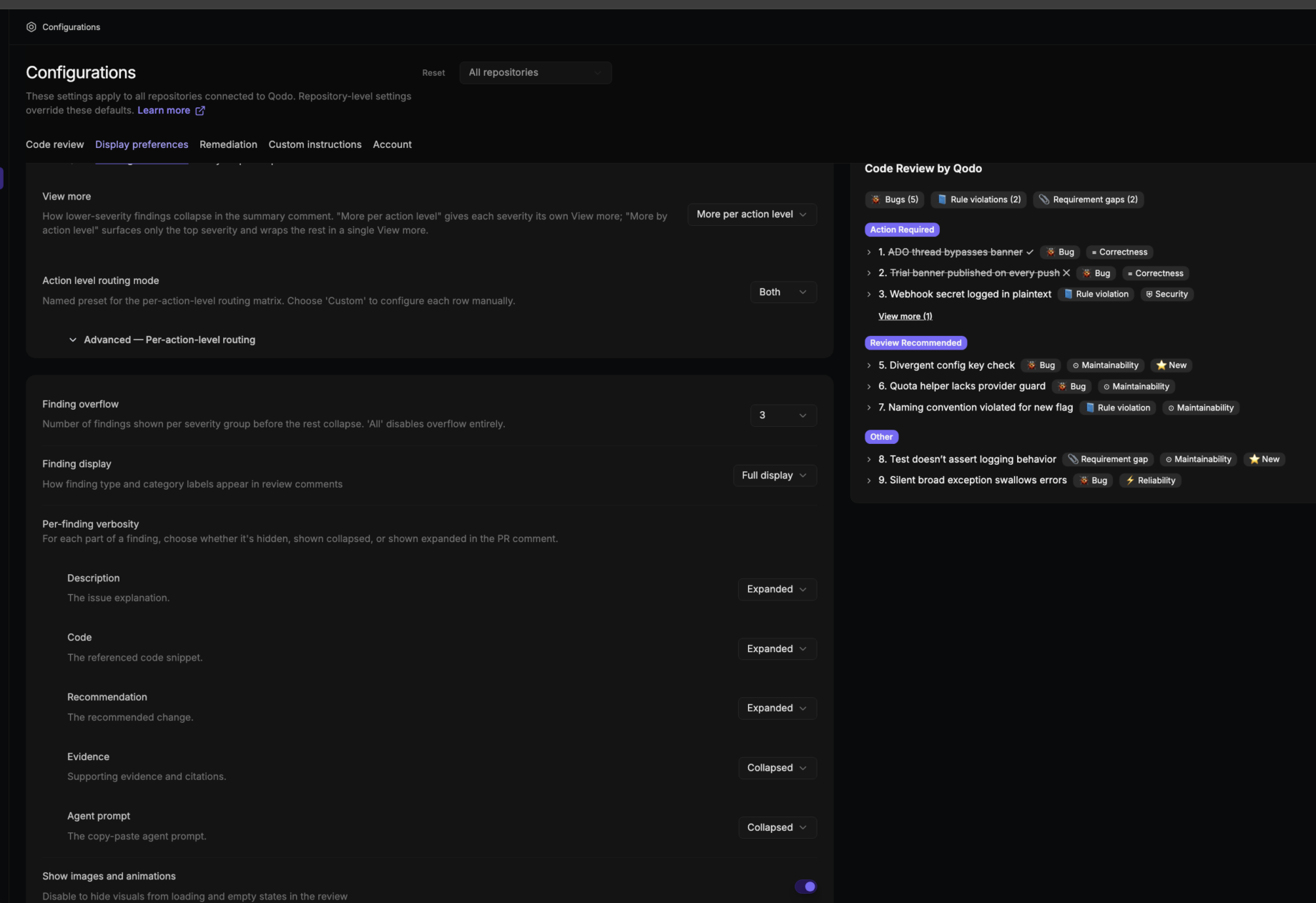
Control how much detail is shown in each finding
When Qodo surfaces an issue, each finding provides information about the issue and the recommended fix, code references, the evidence supporting the finding, and similar findings from past reviews. While this information can be extremely useful for teams that are newer to Qodo’s output or reviewing unfamiliar code, experienced teams often prefer a more compact view. Per-finding verbosity controls let you set exactly how much of each finding is shown by default.
Each component has its own visibility setting:
- Description (the issue explanation): Expanded by default.
- Code (the referenced code snippet): Collapsed by default.
- Recommendation (the suggested change): Collapsed by default.
- Evidence (supporting citations): Hidden by default.
- Agent prompt (the copy-paste agent prompt): Hidden by default.
Set each to Expanded, Collapsed, or Hidden. Expanded displays the component fully. Collapsed shows that the component exists but requires a click to read. Hidden removes it from the review output entirely.
A practical example: if your team finds the Code snippet redundant since reviewers can see the diff directly, set Code to Hidden. If you want Recommendations visible without requiring a click, set Recommendation to Expanded.
Learn more about tuning finding visibility in our docs
Enforce your team’s specific standards and conventions
Qodo will automatically scan your repos for rules and skills to discover and import your organization and team coding standards into one centralized management view in the Qodo portal. These imported rules are active immediately and will be enforced during code review. Users can also suggest rules to be enforced, however the default state remains a suggested rule until an org admin approves and activates the rule.
Let Rule Miner discover your team’s patterns automatically
Writing rules manually is time-consuming and always incomplete. Rule Miner automates the discovery process by analyzing your PR review history and surfacing rule suggestions based on patterns in how your team actually reviews code.
If reviewers consistently flag a particular issue in reviews, Rule Miner picks that up and suggests a rule that catches it automatically going forward. To use the feature it must be enabled by an admin. Once enabled, an admin can also turn on auto-approval for any rules that Qodo has mined from the PR history. Accepted rule suggestions are then enforced rules on future PRs.
Configure different behavior for different repositories
Not every repository deserves the same review policy. A production payments service typically has stricter requirements than an internal prototype or an experimental sandbox. Qodo allows every configuration setting to be scoped either globally or to specific repositories.
For example:
- Require automatic reviews on every commit for production services.
- Allow manual reviews only for experimental repositories.
- Apply stricter custom rules to customer-facing applications while keeping internal tooling more flexible.
Workspace settings serve as the default for every repository. Repository-specific settings simply override those defaults where needed. Teams can go one step further by defining repository-specific behavior inside a .toml configuration file. Those settings take precedence over portal configuration, giving developers local control when repository-specific requirements differ from organization-wide policy.
This balance allows administrators to establish consistent governance while still giving individual teams flexibility where it matters.
To learn more about customizing the code review experience, visit our documentation.
About the author