Latest updates to Qodo: October 2026

The latest release of Qodo’s Code Quality and Governance platform brings a few practical improvements to everyday workflows. Here’s what’s new in v3.1:
- Automated rule deactivation: Qodo’s rule lifecycle system now automatically turns off rules teams are consistently ignoring
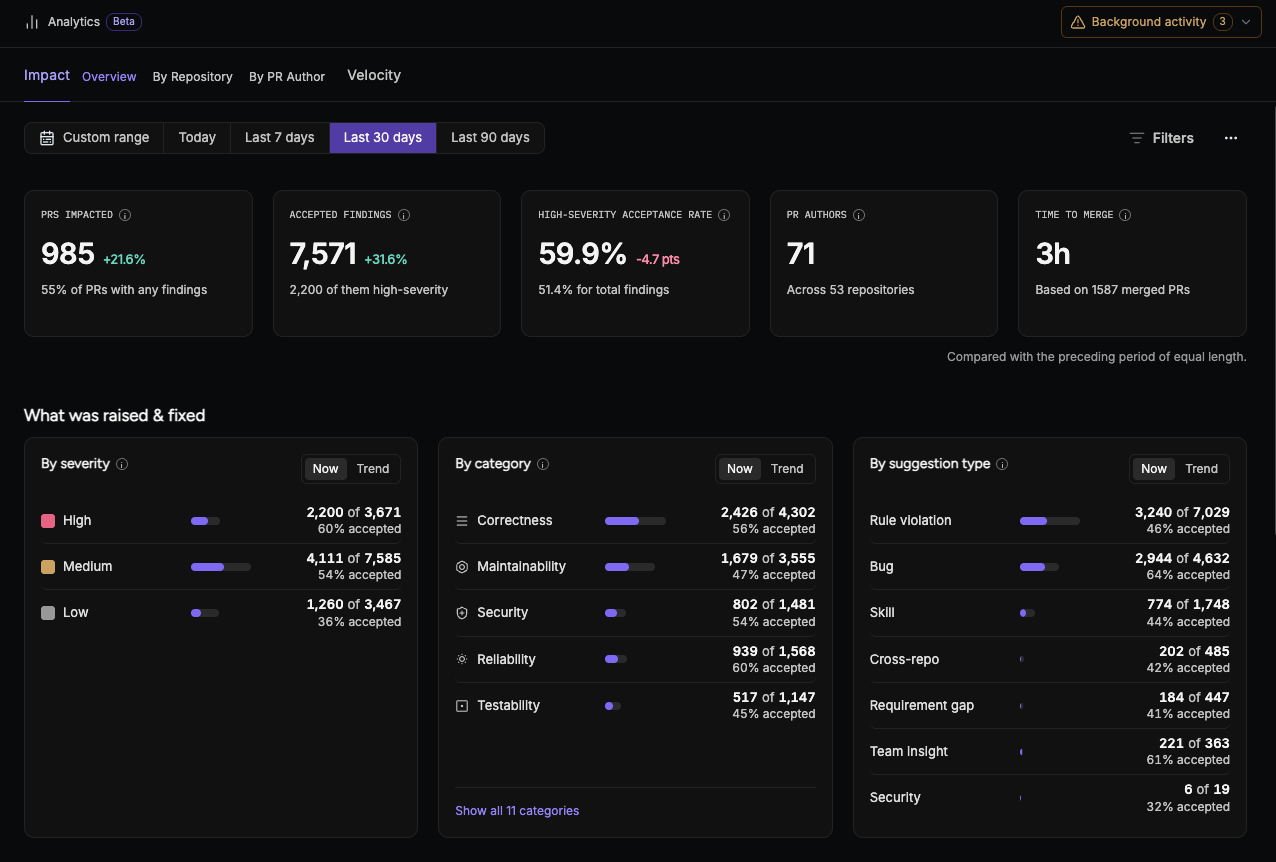
- Qodo’s new analytics dashboard moves to GA: see what Qodo caught, what your team acted on, and where
- Quick search: Easily search through the many configurations for code review that Qodo makes available
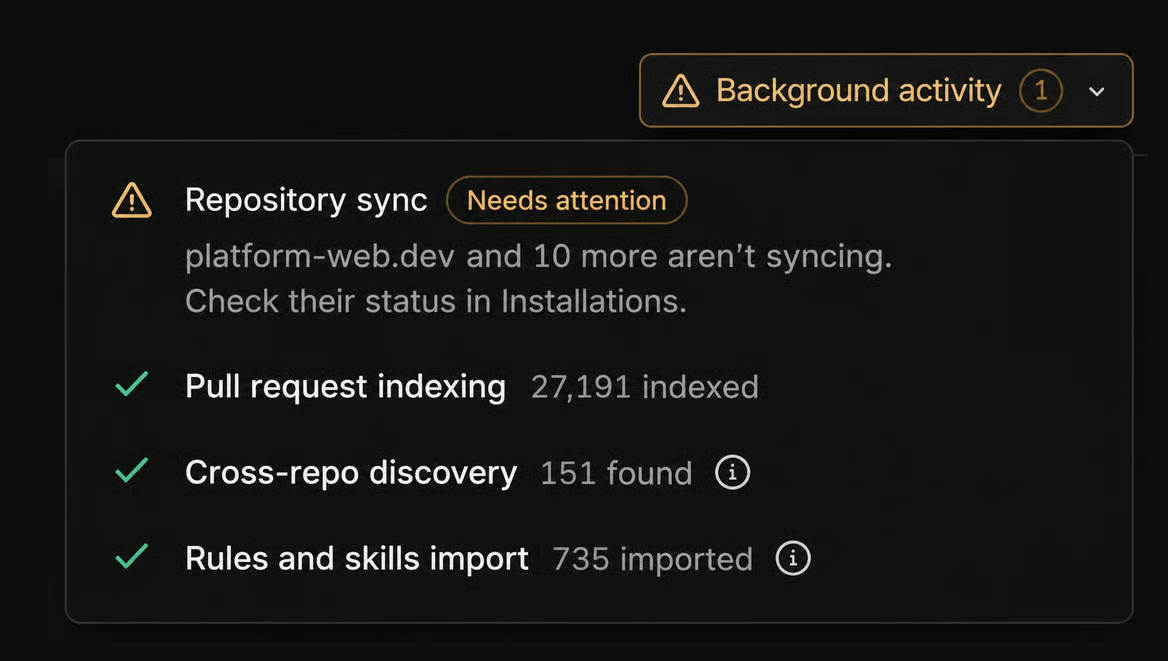
- Expanded background activity reporting: Get more visibility into installation progress, with updated status reporting for repository sync, indexing, cross-repo discovery, and rule import.
Automated rule deactivation: Keep review feedback relevant
A rule can generate feedback regularly without leading to changes. When the same findings are consistently dismissed or left unaddressed, they add noise to the review process and make useful feedback easier to overlook.
Qodo’s rule lifecycle system uses developers’ responses to findings to identify rules that teams consistently ignore. Qualifying rules are automatically muted, so their findings stop appearing as comments on pull requests.
The system looks at patterns across merged pull requests and requires enough findings with recorded outcomes before making a muting decision. A single ignored suggestion isn’t enough to mute a rule.
This helps keep review feedback aligned with what your team actually acts on, while reducing the manual work of identifying rules that repeatedly generate low-value comments.
Learn more about rule deactivation
Qodo’s new analytics dashboard is now generally available
Qodo’s new analytics dashboard gives teams a clearer view of what Qodo catches and what happens next, directly in the portal.
The dashboard shows findings raised, findings accepted, and acceptance rate, with breakdowns by severity, category, repository, and author. You can see both the volume of feedback and how much of it your team acts on.
For engineering leaders, this makes it easier to understand review activity across repositories. For teams managing code quality, it provides a starting point for investigating patterns: which types of findings are being addressed, where findings are concentrated, and where feedback may need a closer look.
Quick search across configurations
Quick search makes navigating through Qodo’s configuration options easier. Open it with ⌘K on Mac or Ctrl+K on Windows, type what you’re looking for, and select a result using your keyboard or mouse. Selecting a setting takes you directly to its location, opening the relevant tab or section and highlighting the field. That means less time clicking through configuration menus when you know what you want to change but don’t remember where it lives.
Troubleshoot Background Activity Processes
When you connect Qodo to your repositories, several things run in the background: repositories sync, pull request history gets indexed, Qodo discovers relationships between repositories, and it imports your existing rules and skills. With this release, background activity reporting now gives you a clearer view of Qodo’s setup progress, from syncing repositories and indexing PR history to discovering relationships between repositories and importing rules and skills.
Three specific improvements:
- See when indexing needs a manual retry. Pull request indexing retries on its own. If indexing fails, Qodo automatically tries again. Background activity now shows whether those retries are still running or have stopped, so you know when to retry manually.
- Installations that were never finished. Git installations with an unfinished setup step previously stayed pending without explanation, even after a retry. Qodo now identifies the incomplete setup so you know why syncing hasn’t started.
- Find the affected installation or repositories faster. When Qodo reports a problem, the accompanying link takes you directly to the installation or repositories that need attention.
About the author