Hosted Qodo Merge for GitLab (Teams & Enterprise)

Step 1
You have received a secret key from Qodo (formerly Codium) that will be used as a shared secret and identification, store it in a safe place. Each secret will be associated with a GitLab token that will be used by the hosted Qodo Merge (formerly PR-Agent) service to access your repositories.
Obviously, if you do not have a key, please contact us.
Step 2
Acquire a personal, project or group level access token. Enable the “api” scope in order to allow Qodo Merge (formerly PR-Agent) to read pull requests, comment and respond to requests.
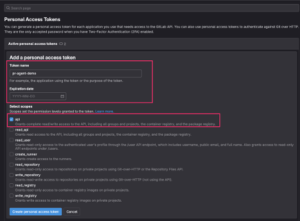
Store the token in a safe place, you won’t be able to access it again after it was generated.
Step 3
Register the access token with Qodo (formerly Codium):
Browse to https://register.gitlab.pr-agent.codium.ai/ and type in your Qodo (formerly Codium) key from step 1 and your token from step 2. This will associate your account with your GitLab token.
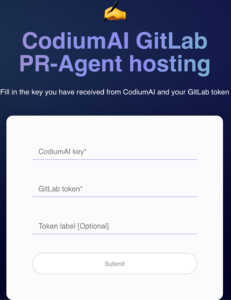
Step 4
Install a webhook for your repository or groups, by clicking “webhooks” on the settings menu. Click the “Add new webhook” button.
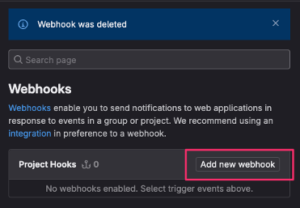
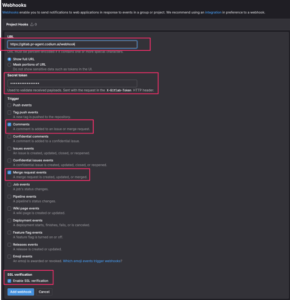
In the webhook definition form, fill in the following fields:
URL: https://pro.gitlab.pr-agent.codium.ai/webhook
Secret token: Your Qodo (formerly Codium) key
Trigger: Check the ‘comments’ and ‘merge request events’ boxes.
Enable SSL verification: Check the box.
Step 5
You’re all set!
Open a new merge request or add a MR comment with one of Qodo Merge (formerly PR-Agent)’s commands such as /review, /describe or /improve.
See the full documentation on https://github.com/Codium-ai/pr-agent
About the author