How I Use Qodo’s Agent Skills to Auto-Fix Issues in Pull Requests
You know the workflow… You open a pull request. Your AI code review runs. You get a list of issues. And then… you context switch.
Go to GitHub, read through each PR comment, jump back to your IDE or terminal, find the file, make the fix, commit, push (or you urge Claude Code to do all this). Then you go back to GitHub to check if the issue is resolved. Repeat for every item on the list.
AI code review itself can be fast. The remediation loop, however, could use a double shot of espresso.
I’ve seen developers complain about this. There’s a gap between getting quality feedback and acting on it. The path from “here’s what’s wrong” to “here’s the fix, committed and documented” involves too many surfaces and too much context switching.
So I ran an experiment.
Qodo recently shipped agent skills, purpose-built capabilities that bring code review assistance directly into your AI coding agent. Compatible with Claude Code, Cursor, Windsurf, Cline, and any agent supporting the open Agent Skills standard.
I wanted to see what happens when you close the gap between review and remediation entirely. Here’s what I found.
What Are Skills from Qodo?
Qodo’s agent skills are code review capabilities that extend your AI coding agent with code quality standards. Right now, there are two available:
get-qodo-rules fetches your repository-specific coding rules from the Qodo platform before your agent writes any code. Security requirements, coding standards, team conventions are all loaded into context automatically so your agent writes code that already aligns with your standards.
With the new Rule System Qodo has, this is a great way to bring code quality into your terminal or IDE, sooner than the PR stage. Here’s a quick walkthrough video in the terminal with a Qodo Engineer:
qodo-pr-resolver is what I focused on for this experiment. It pulls Qodo’s review issues for your current branch’s PR, lets you fix them interactively or in batch, and replies to each inline comment with exactly what was resolved and how.
You install them with a single command:
npx skills add qodo-ai/qodo-skills
Then in Claude Code and any other major AI coding agent you use, they’re available to use as simple /get-qodo-rules and /qodo-pr-resolver slash commands.
The Setup: Real Project, Real Code Review Feedback
I tested this on my own project, an MCP server and agent I built for a Python MCP agent workshop. I ran the experiment across two pull requests with different levels of complexity to see how the skill handles both scenarios.
Experiment 1: A Complex PR with 12 Issues
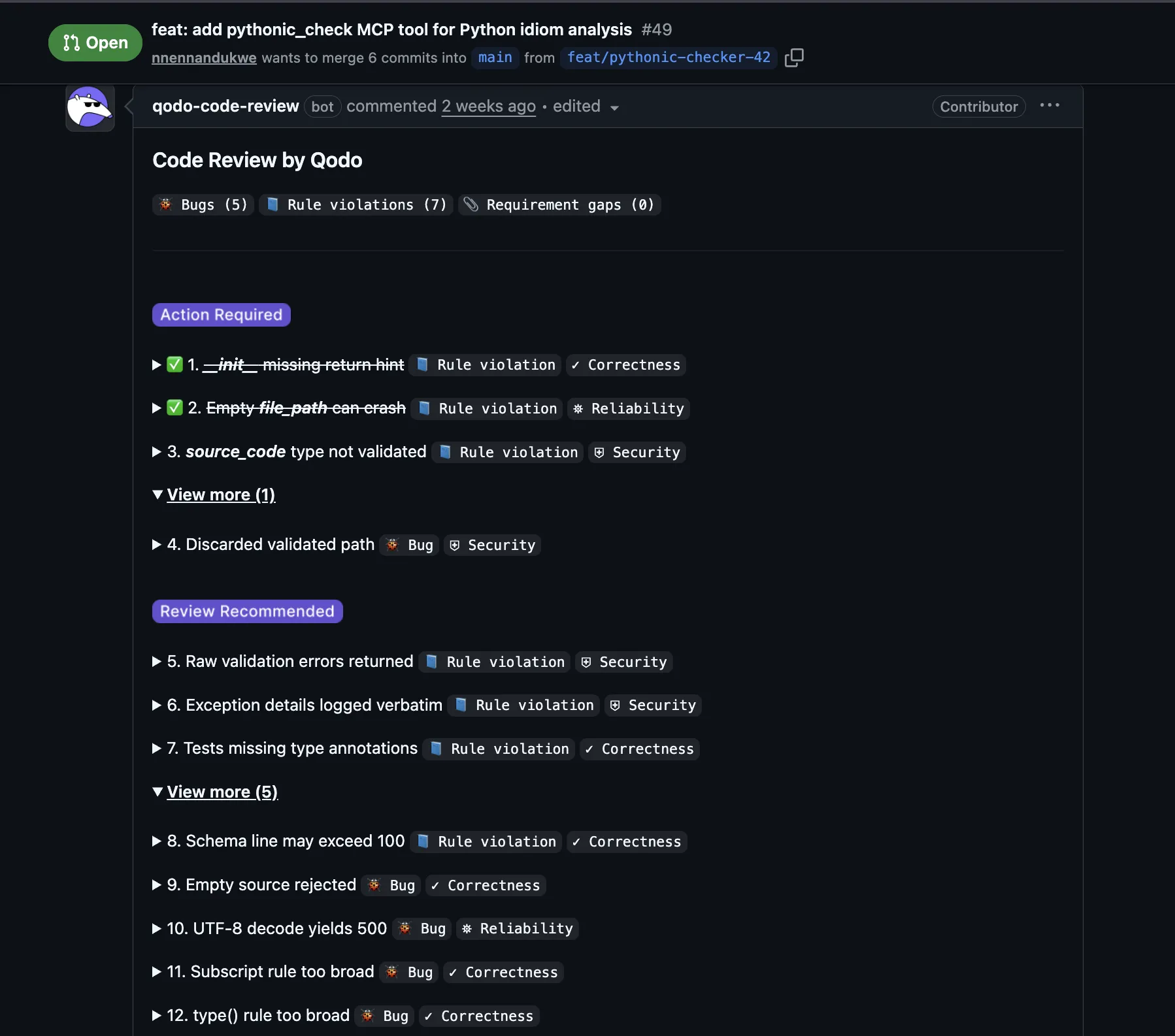
The first PR (#49) was a larger set of changes touching a significant surface area of the project. Qodo’s review surfaced 12 issues: 5 bugs, 7 rule violations, and 0 requirement gaps.
Four were marked Action Required – the kind that should block a merge. The rest fell under Review Recommended, meaning they’re worth addressing, but aren’t critical blockers.
Running the PR Resolver
In Claude Code, I ran the Qodo PR resolver skill. It analyzed the pull request, pulled down all of Qodo’s review comments that were considered worthy of blocking the PR from merging, and presented a clear summary:
Summary: 8 outstanding issues to fix (2 HIGH, 3 MEDIUM, 3 LOW)
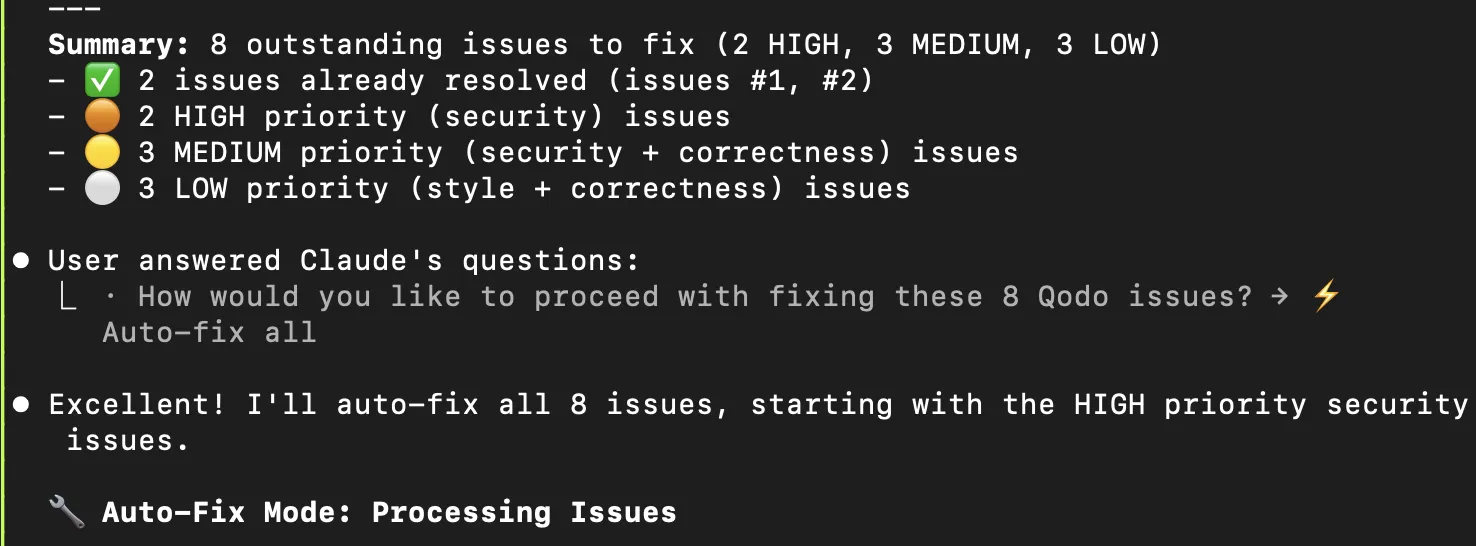
I chose “Auto-fix all,” and the skill started working through the issues starting with the highest priority security findings first. Claude Code ran on a loop addressing each issue, pulling in the proper context, and making commits per issue.
Here’s a quick screen share running /qodo-pr-resolver:
What makes this work is the context Qodo provides for each issue. Each review comment includes:
- An agent prompt: exact instructions for resolving the issue
- The precise code location where the problem lives
- A severity level (high, medium, low)
- The issue category (security, correctness, reliability, performance)
- Ticket links where applicable. If a requirement gap ties back to a GitHub issue, that context is there too
This is exactly what Claude Code needs to properly resolve each issue. Structured, actionable context with clear, agent-friendly resolution paths.
The Result: A Clean Fix Summary
Once the skill finished iterating through all the issues, it generated a complete fix summary and pushed it directly to the PR as a comment using the GitHub CLI.
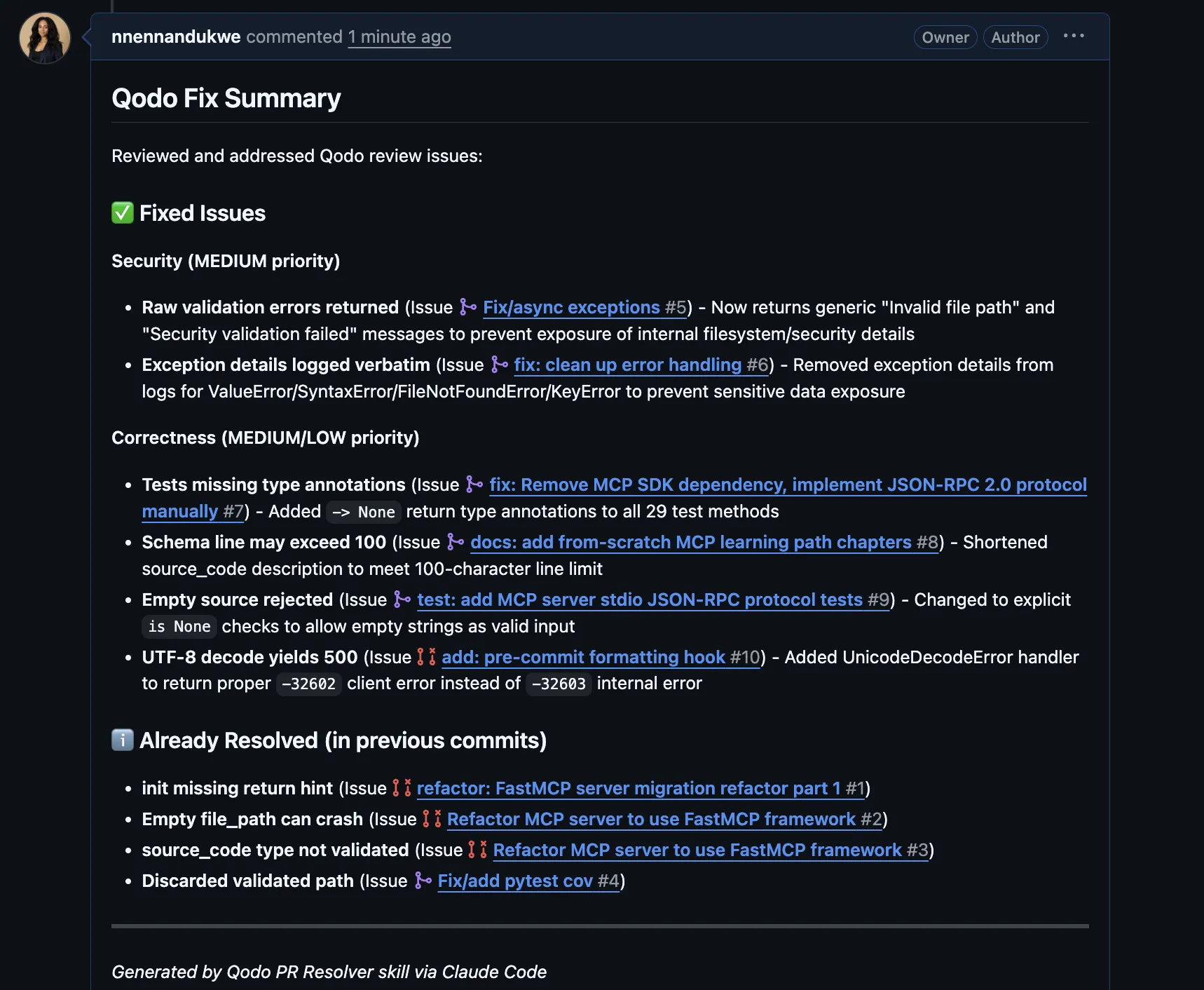
Every fixed issue is documented with what changed and why. Issues that were already resolved in previous commits are tracked separately. The whole thing is organized, linked, and ready for human review.
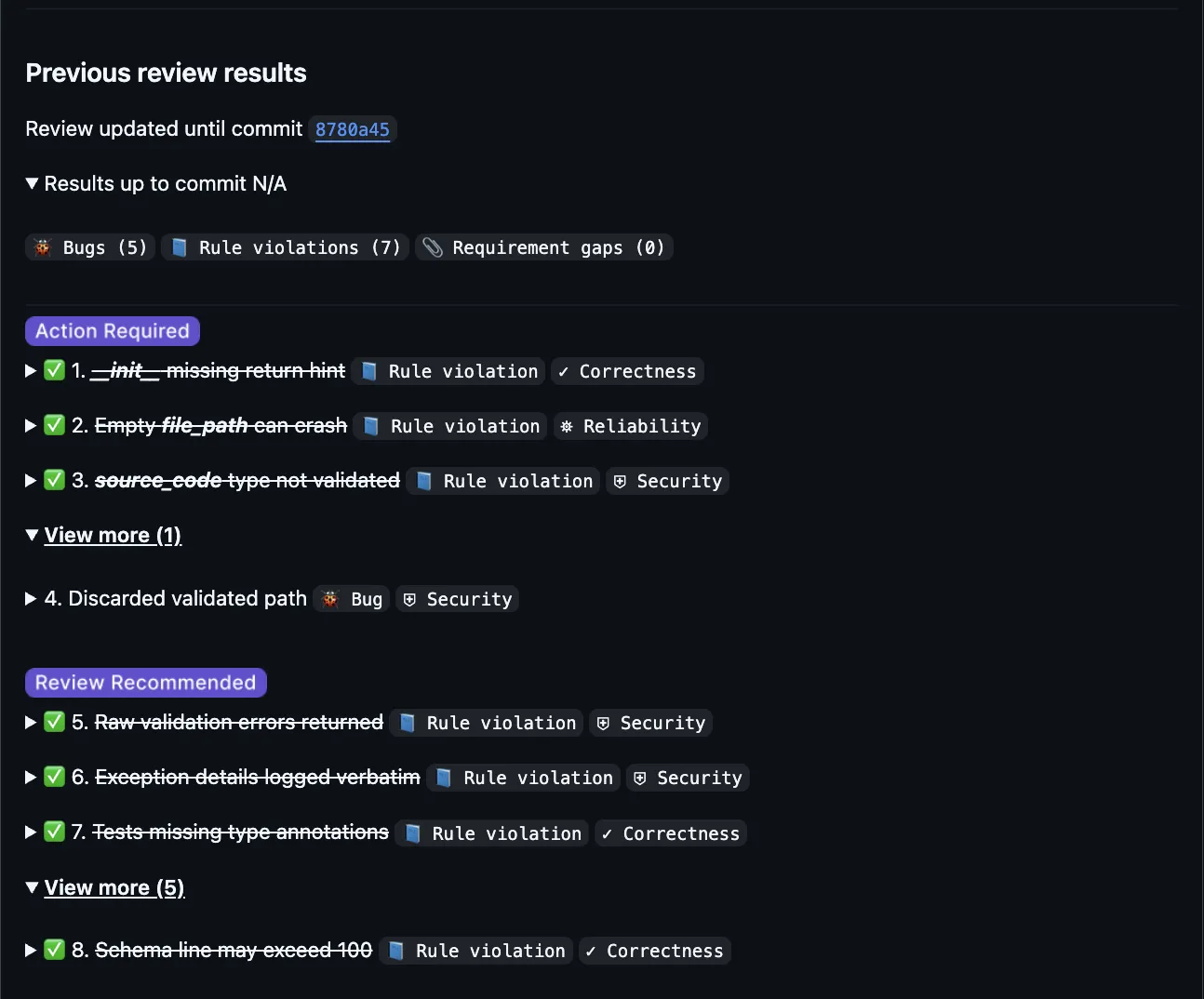
Almost all issues resolved using Claude Code and the Qodo PR resolver skill. The one that remained was an edge case that Claude Code actually couldn’t quite figure out. That means it required manual judgment, which is a great scenario for diving deeper into the code implementation and tests.
Automatic Inline Comment Resolutions
This is what surprised me with the workflow.
The Qodo PR resolver skill goes back to each of Qodo’s inline suggestions and posts a reply explaining exactly what was resolved and how it was fixed!
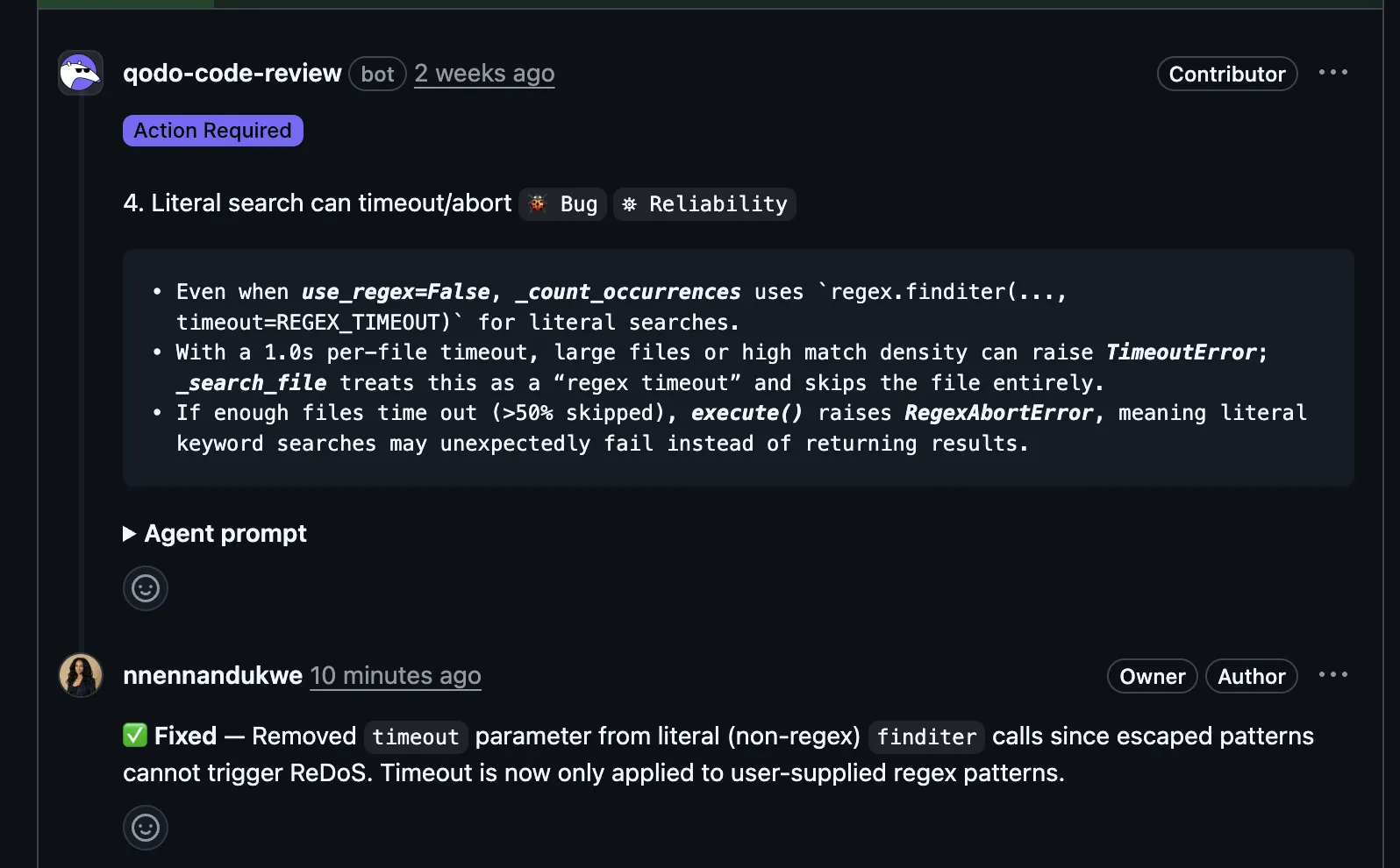
This is a big deal for developer experience. When you’re working through a PR and making changes to get it into a mergeable state, you can resolve each conversation knowing exactly what progress you’ve made.
This behavior is baked into the skill. It’s automatic; part of what gets pushed back to the pull request through the GitHub CLI. You don’t have to manually go back and update comments.
For anyone who’s worked through a PR with many review comments and lost track of what’s been fixed and what hasn’t, this alone makes the skill worth installing.
Experiment 2: A Low-Stakes PR? One-Shot Auto-Fix
The second PR (#50) was simpler: fewer issues, smaller change set, lower stakes change. So I wanted to see if the auto-fix loop with Claude Code could one-shot it.
Qodo’s review found 2 bugs, 1 rule violation, and 2 requirement gaps. Four items under Action Required, one under Review Recommended.
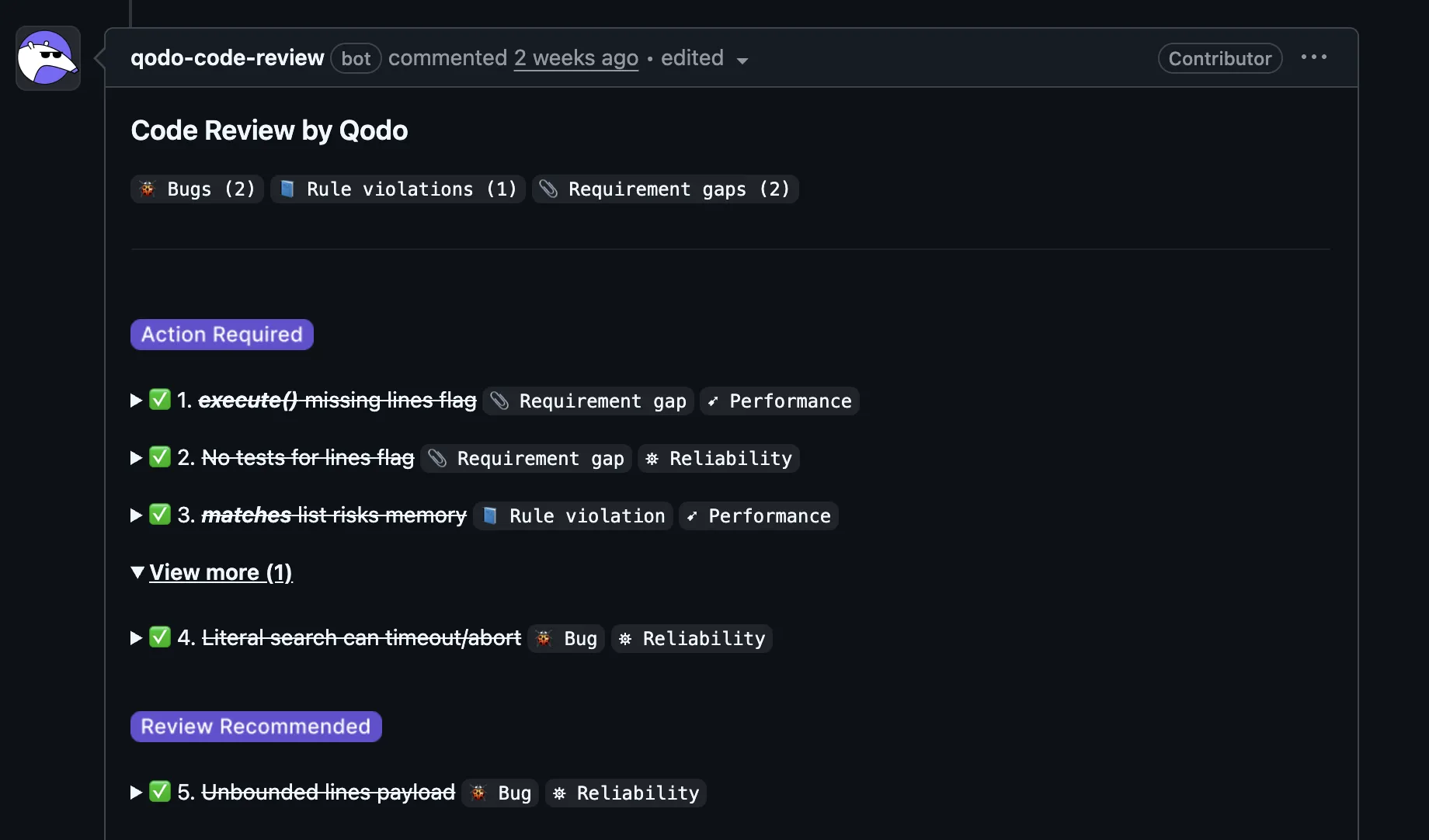
I ran the skill, chose to auto-fix, and in one pass all four Action Required items resolved.
For the one Review Recommended item, I used the agent prompt Qodo provided in the PR and solved it separately with a copy/paste into Claude Code. It went to work, and then I committed the fix.
This was a great example of how fast it is now to handle small to medium PRs with clear review feedback where you know you can get the code into a mergeable state. Run the skill, auto-fix all, push. Done. The feedback loop from “reviewed” to “resolved” compresses down to a couple minutes.
Multiple Ways to Fix Code
One thing worth noting: the skill gives you options. You can auto-fix all issues in a batch, or you can work through them interactively. And for any specific issue, you can use the agent prompt from the PR review in your coding agent.
The auto-fix mode is fastest for straightforward issues. The interactive walkthrough is useful when you need more control or discussion around the problem or implementation.
Both paths produce the same result: documented fixes, inline comment replies, and a clean summary pushed to the PR. And of course, higher quality code better suited for production.
How to Install Skills
Install Qodo’s Agent Skills in your agent:
# Install all Qodo skills
npx skills add qodo-ai/qodo-skills

# Or install individually
npx skills add qodo-ai/qodo-skills/skills/qodo-pr-resolver
npx skills add qodo-ai/qodo-skills/skills/get-qodo-rules
The skills work with Claude Code, Cursor, Windsurf, Cline, and any agent supporting the Agent Skills standard. You can also browse them on skills.sh.
Prerequisites:
- Git and Python 3.6+ (standard library only, no extra dependencies)
- The GitHub CLI (
gh) for GitHub repos or the equivalent CLI for GitLab, Bitbucket, or Azure DevOps - A Qodo account (the PR resolver works with Qodo’s review comments on your PRs)
In your AI coding agent in the terminal, invoke with:
/qodo-pr-resolver    # Fix PR review issues
/get-qodo-rules      # Fetch coding rules before writing code
The qodo-skills repo has full documentation on configuration, troubleshooting, and contributing.
Closing the Fix Loop
The gap between code review and code remediation is wider than it should be. Code reviews and fixes happen across multiple interfaces. The feedback loop often feels fragmented across tools and tabs.
Skills help to close that loop. And code review results flow directly into your coding agent.
If you’re already using Qodo for code review and an AI coding agent for development, this is the bridge between them. Try the skills on your own repo, and if they work for you, give the repo a star!
About the author