15 Best AI Code Generators in 2026

TL;DR
- Dev Teams using AI coding tools are measuring the wrong thing. Developers feel faster, but objective studies on PRs show the opposite: verification overhead, rewrites, and review friction erase the gains.
- The fix: stop treating generation as the finish line. The tools that move delivery metrics are the ones that connect to your PR workflow, understand your repository, and reduce the work that happens after code is written.
- This guide covers 15 tools tested across engineering workflows, code generators, agentic IDEs, and the code review platform that validates what actually gets merged. It covers the criteria that separate tools that improve delivery from tools that improve typing speed, and how Qodo closes the gap between “AI wrote it” and “safe to merge.”
A 2025 METR study captured something most engineering leaders haven’t fully processed yet: developers reported feeling 20-25% faster with AI tools, but objective measurement on realistic PRs showed they were actually 19-21% slower. The rewrite, verification, and review overhead erased the gains. The tools could autocomplete. They couldn’t reliably reason across real repositories, architectures, and governance constraints.
I’ve been leading engineering teams through this transition, testing tools in real workflows, figuring out where AI genuinely increases velocity and where it quietly introduces the kind of failures that show up three PRs later.
The answer is never “use more AI.” It’s using the right AI for each layer of your stack. Editor assistants for writing code faster. Repository agents for multi-file work and refactoring. A review platform to validate what actually gets merged. Each layer has a distinct job, and the teams that get consistent results in 2026 are the ones that know which tool belongs where. This guide is the result of that work.
Best AI Code Generator Tools (2026)
- Qodo
- GitHub Copilot
- Amazon Q Developer
- Windsurf
- Replit
- Gemini Code Assist
- OpenAI Codex
- Claude Code
- Kiro
- Lovable
- Cline
- Roo Code
- Augment Code
- Kilo Code
- Warp
How I Selected the Best AI Code Generators in This List
Each tool was evaluated on whether the generated code is actually usable in a production team environment, not just whether it looks right in a demo.
- Generation correctness: The first output must compile and run without obvious fixes, using real APIs and existing conventions, not invented methods or phantom dependencies.
- Structural and multi-file capability: Real features touch multiple files. We tested whether tools introduce abstractions and update related modules consistently, rather than generating isolated snippets that require manual stitching.
- Repository context awareness: Good generators reuse existing utilities and respect architectural boundaries. We evaluated how well each tool adapts to an existing codebase rather than generating from a blank slate.
- Refactoring and edit stability: Modifying existing logic safely is harder than generating new code. We assessed whether tools apply targeted changes without rewriting entire files or introducing regressions.
- PR-readiness and diff quality: Generated changes should be minimal and logically grouped. Noisy diffs increase review time and hide defects. Clean diffs matter as much as working code.
- Test generation quality: We looked beyond coverage numbers; useful tests validate real execution paths, handle edge cases, and fail for meaningful reasons. Coverage inflation was not treated as success.
- Standards and policy alignment: Generated code must follow project conventions, dependency policies, and security expectations. Repeated manual corrections erode any productivity gain.
- CI/CD compatibility: We ran generated code through linters, type checks, static analysis, and automated test pipelines. Code that consistently fails basic automation is not production-ready, regardless of how fast it was generated.
The last three criteria, standards alignment, PR-readiness, and CI/CD compatibility, are where a pre-merge code review platform like Qodo picks up where generators leave off.
1. Qodo
Qodo is not a code generator. It belongs on this list because it’s the platform that makes every other tool on it safe to use in production.
Every generator in this list such as Copilot, Windsurf, Claude Code, Cline, operates inside a context window. It sees the file, maybe the project. What it doesn’t see is your full dependency graph, the services consuming the API you just changed, or the auth check that quietly got dropped when the AI refactored the middleware. That’s not a flaw in those tools. It’s simply not what they’re built for.
Qodo is the AI Code Review Platform, the missing quality layer between “AI wrote it” and “production-ready.” It works across your entire SDLC: inside the IDE before you push, at the PR stage before you merge, and via CLI for custom review workflows across your pipeline. Most teams using Qodo already use Copilot or another generator. Qodo is what they run before merge.
Best for
- High PR volume teams
- Multi-repo organizations
- CI/CD-integrated code review enforcement
Not for
- Individual developers looking for inline autocomplete or code generation
- Teams without structured PR workflows or CI/CD pipelines
Codebase Understanding & Runtime Debugging
Qodo indexes across repositories using its Context Engine with multi-repo indexing, 10 repos or 1000, building a persistent map of dependencies, API consumers, and contract relationships. When a shared utility changes, Qodo understands which services consume it, which contracts are affected, and which downstream behaviors shift, a context that no file-level tool can provide.
At the PR stage, the Review Agent Suite deploys specialized agents for critical issues, duplicated logic, breaking changes, ticket compliance, and rules enforcement, each focused, each drawing on full codebase context. The Rules System captures what good code looks like for your organization, auto-discovered from your codebase and PR history, and continuously evolved as standards change. Rules feed the review; review feeds the rules. That closed loop is what separates Qodo from every other tool on this list. It operates across three surfaces:
- IDE Plugin for pre-PR flagging inside VS Code and JetBrains
- Git Plugin for automated review inside GitHub, GitLab, Bitbucket, or Azure DevOps
- CLI Plugin for building custom review agents across your entire SDLC
Code Quality Snapshot
Qodo automates the parts of code review that don’t scale with AI-generated output: missing and insufficient test coverage detection, organization-wide standards enforcement, 15+ automated PR workflows including merge gating, and 1-click resolution for common findings. Human review stays focused on architecture and decisions that require judgment.
Gartner ranked Qodo #1 for Code Understanding in its Critical Capabilities for AI Code Assistants report (September 2025), and named it a Visionary in the 2025 Magic Quadrant for AI Code Assistants. No other tool on this list holds that recognition.
Hands-On: Fixing a Terraform Conditional Type Error
I ran Qodo against a Terraform stack for an AWS ECS Fargate service behind an ALB with a PostgreSQL RDS database. The stack included a VPC module with optional single_nat_gateway logic.
Terraform failed with:
Error: Inconsistent conditional result types

on modules/vpc/main.tf line 69:

for_each = var.single_nat_gateway ? { 0 = 0 } : aws_subnet.public
The issue: the true branch returned { 0 = 0 } (map of numbers) while the false branch returned aws_subnet.public (map of subnet objects). Terraform requires both branches to return the same type.
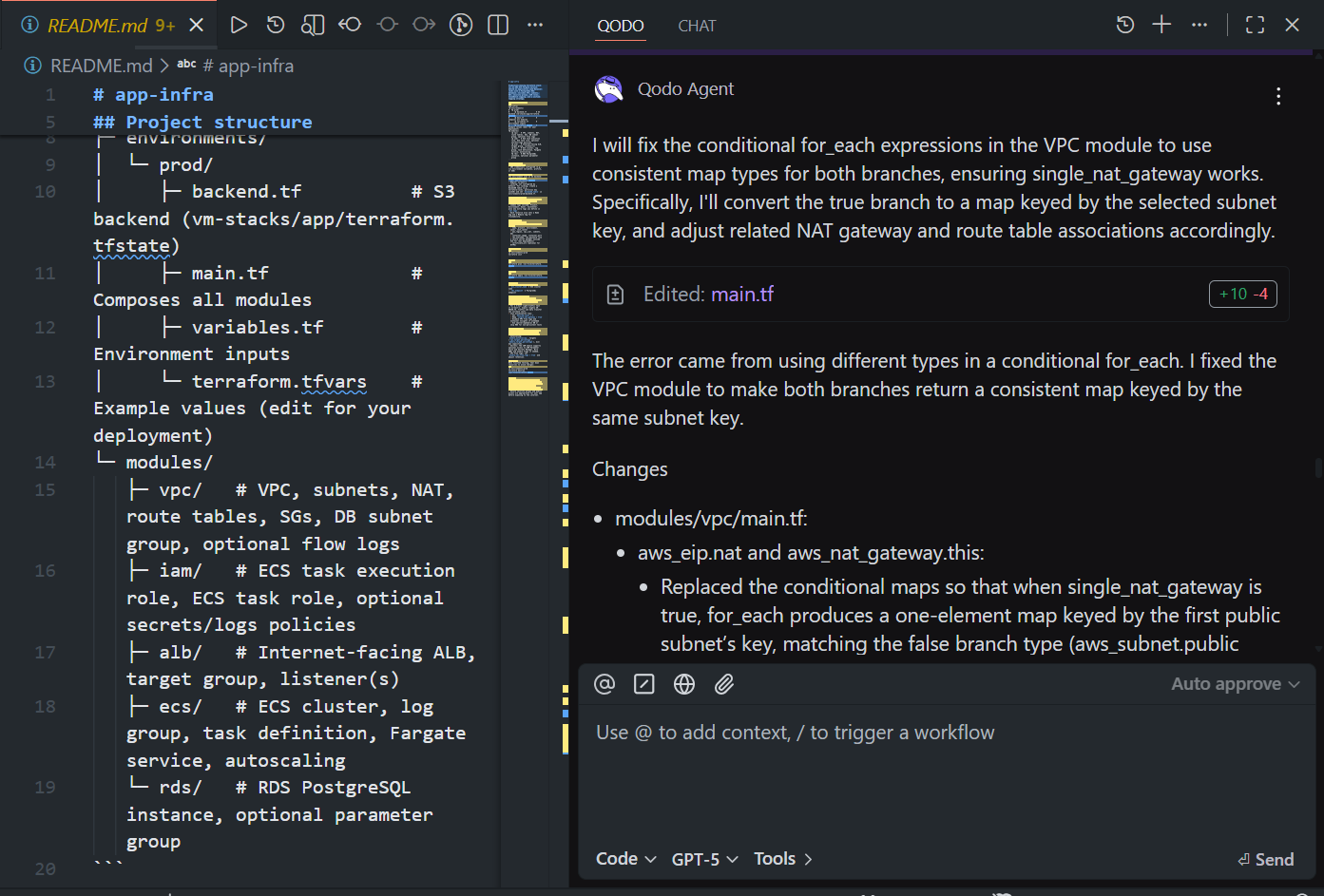
Instead of just pointing at the error, Qodo proposed a structural fix:
- Converted the true branch into a one-element map keyed by the first public subnet
- Updated aws_eip.nat and aws_nat_gateway.this to use consistent for_each maps
- Adjusted private route table associations to reference the correct NAT key
Result:
- Conditional branches now return consistent map types
- single_nat_gateway behavior preserved (one NAT, all private subnets routed through it)
- No manual type debugging required
This wasn’t autocomplete. It understood Terraform’s for_each semantics, preserved the intended network topology, and corrected the module without breaking routing logic.
Qodo’s Pricing
- 14-day trial — full platform, unlimited reviews and credits, no credit card required. At the end of the trial, an in-product screen recommends the right credit pack based on usage.
- Pro Teams (designed for up to 30 users) — unlimited users per workspace, monthly billing, customer-set overage cap, switch packs anytime, overage credits never expire. Pick a credit pack that fits your volume:
- $30/mo → ~18 reviews/mo (2,500 credits)
- $60/mo → ~36 reviews/mo (5,000 credits)
- $240/mo → ~143 reviews/mo (20,000 credits)
- …and larger packs up to ~1,200+ reviews/mo
- Enterprise (built for 30+ users) — custom pricing; adds SSO/SAML, audit logs, BYOK, governance analytics dashboard, single-tenant SaaS or on-prem, priority support and dedicated CSM
2. GitHub Copilot
GitHub Copilot is the lowest-friction AI coding assistant for teams already living in GitHub. It generates code from comments and surrounding context, full functions, tests, and configuration files, and stays focused on the editing session.
Best for
- Developers who want help writing code faster inside the IDE
- Teams adopting AI with minimal workflow changes
- Organizations are already standardized on GitHub
Not for
- Teams expecting automated PR review or merge enforcement
- Workflows requiring architectural validation or cross-file reasoning
- Organizations needing CI-level quality gates
Codebase Understanding & Runtime Debugging
Copilot operates at the file level. It uses the current file and immediately surrounding context to generate suggestions, with no visibility into shared libraries, downstream service consumers, or cross-repo dependencies. It does not run or validate the code it produces.
Code Quality Snapshot
Copilot is strong for scaffolding and boilerplate, generating functions, completing loops, writing tests, and explaining code inside the editor. It improves authoring speed but does not check whether the generated code meets system-wide constraints, naming conventions, or compliance requirements.
Hands-On: Generating a Clean Architecture CRUD Flow
I prompted Copilot inside a .NET Clean Architecture project:
Create a complete CRUD for the entity Category. The current project is based on clean architecture. PersonalNotesContext is the DB context name, and its namespace is “LSC.PersonalNotes.Infrastructure”.
As shown in the screenshot:
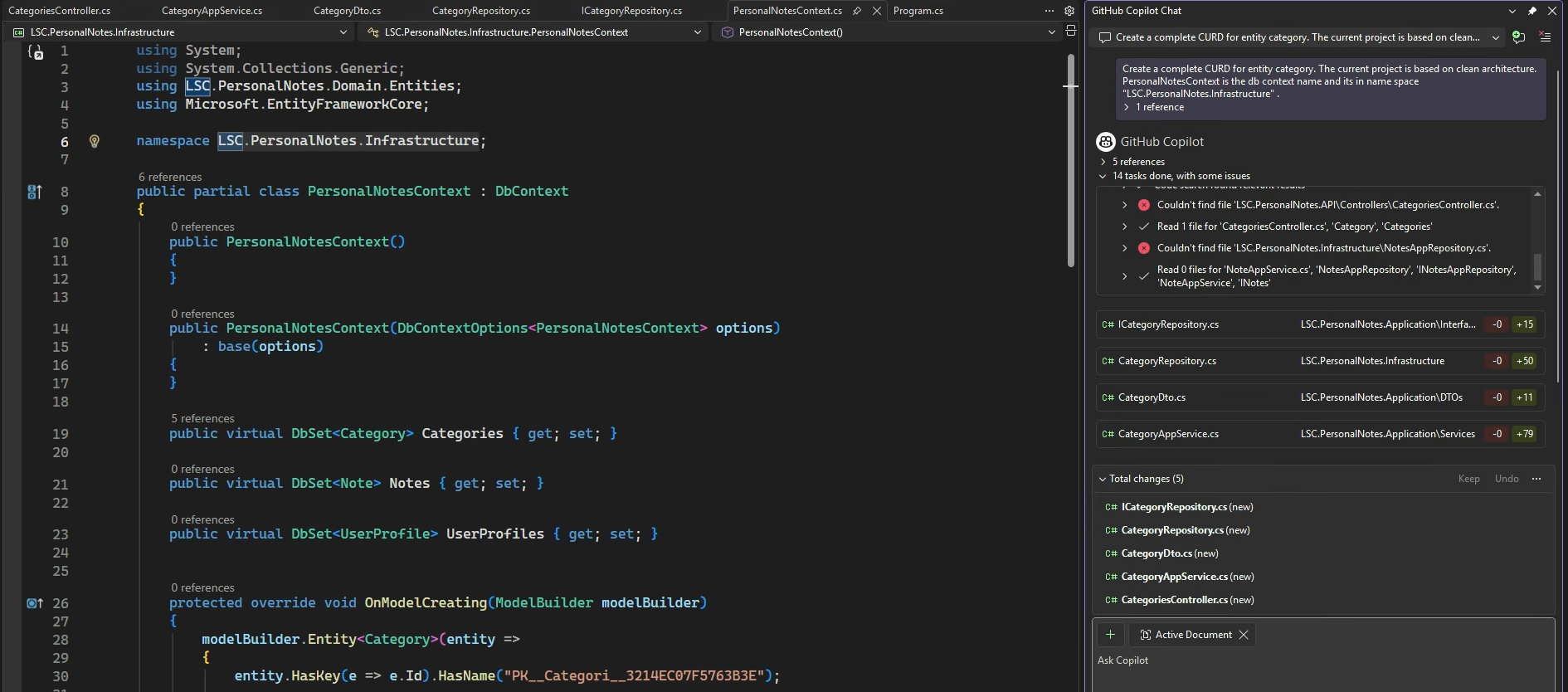
Copilot didn’t just generate a single file; it scaffolded multiple layers:
- ICategoryRepository (Application layer interface)
- CategoryRepository (Infrastructure implementation)
- CategoryDto (DTO layer)
- CategoryAppService (Application service)
- CategoriesController (API layer)
It also attempted to reference existing project structure and namespace conventions. The changes panel shows multiple new files created across Application, Infrastructure, and API layers, roughly what you’d expect when wiring CRUD properly in Clean Architecture.
What worked well:
- Correct layering separation (Application vs Infrastructure vs API)
- Proper DbContext usage (PersonalNotesContext)
- Repository + service pattern aligned with project structure
What is required for review:
- File path assumptions (some “file not found” references in the task log)
- No validation of business rules or architectural constraints
- No enforcement of cross-module contracts or existing coding standards
Copilot handled scaffolding efficiently and respected the architecture prompt, but the output still required human review for structural correctness, conventions, and integration alignment.
Pricing
- Free: $0/month (limited completions and features)
- Pro: $10/month (includes $10 in monthly AI Credits)
- Pro+: $39/month (includes $39 in monthly AI Credits)
- Business: $19/user/month (includes $19 in monthly AI Credits per user)
- Enterprise: $39/user/month
3. Amazon Q Developer
Amazon Q Developer is the AI assistant built into the AWS ecosystem. It works inside VS Code, the AWS Console, and the CLI, with deep awareness of AWS services, SDKs, IAM policies, and cloud infrastructure patterns. Outside of AWS-centered workflows, its value drops significantly.
Best for
-
Teams building primarily on AWS
-
Developers working with AWS SDKs, IAM policies, and cloud infrastructure
-
Organizations are already invested in the AWS tooling ecosystem
Not for
-
Teams working mainly outside AWS
-
Cloud-agnostic or multi-cloud development environments
-
Organizations expecting governance or pre-merge enforcement
Codebase Understanding & Runtime Debugging
Amazon Q provides project-level context with strong AWS cloud awareness. It understands IAM policies, service integrations, and cloud-native patterns well. It is not designed for cross-repo or multi-service dependency reasoning beyond the AWS layer.
Code Quality Snapshot
Amazon Q is strong for AWS-specific code, backend services, infrastructure scaffolding, SDK usage, and IAM policy generation. Outside AWS-centered scenarios, suggestions become noticeably more generic. It generates code during development; PR review and CI enforcement remain separate.
Hands-On: Asking Amazon Q to Build an S3 Upload Project
I asked Amazon Q in VS Code to create a small Python project that uploads a file to an S3 bucket using boto3, with credentials loaded from environment variables. It didn’t just give me a snippet. It generated a small project structure:
In the chat panel, it showed the proposed file changes and let me accept them before writing anything to disk. That part felt controlled, not like it was silently editing my repo.
The structure made sense. As shown in the snapshot below:
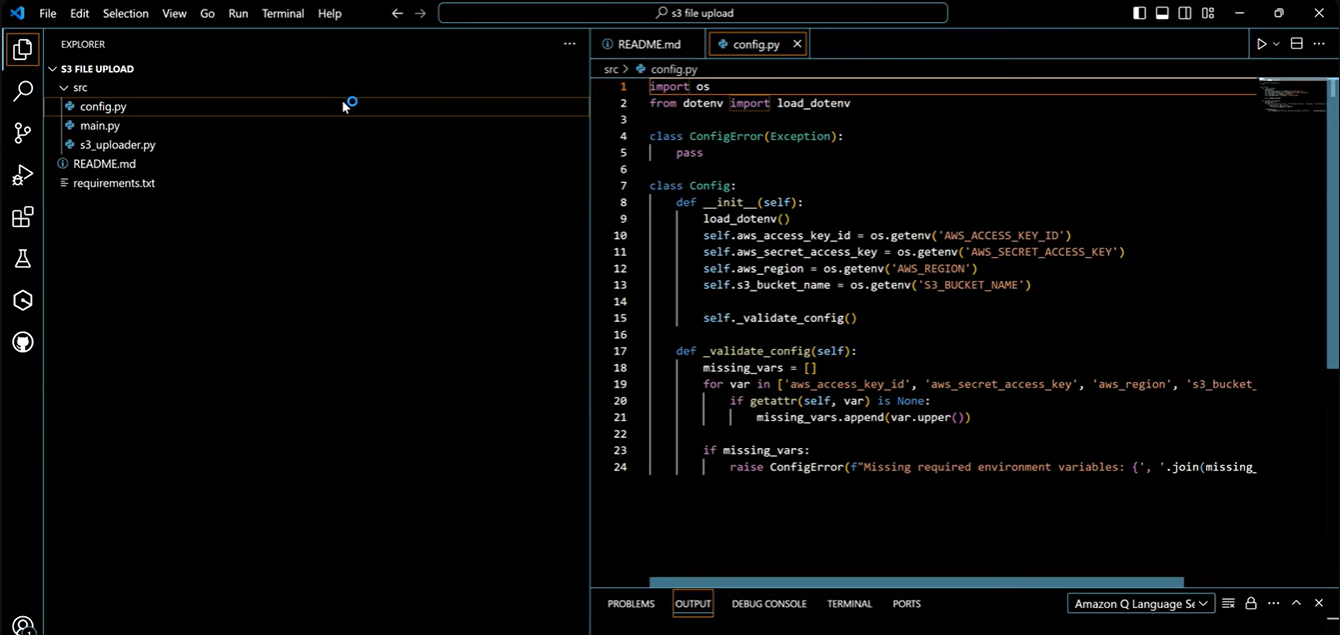
config.py loaded AWS_ACCESS_KEY_ID, AWS_SECRET_ACCESS_KEY, AWS_REGION, and S3_BUCKET_NAME from the environment and raised an error if anything was missing. s3_uploader.py initialized the S3 client and handled the upload call. main.py wired it together. After installing dependencies and exporting environment variables, it ran.
From a scaffolding perspective, it did what you’d expect:
- Correct
boto3client setup - Clean separation between config and upload logic
- A runnable entry point
What it didn’t do:
- It didn’t check whether the IAM role actually had
s3:PutObjectpermissions. - It didn’t look at bucket policies or encryption settings.
- It didn’t validate anything about how this would behave in a real deployment.
So, for AWS-specific setup work, it saves time. But it’s still generating code in isolation. Infrastructure correctness, permissions, and production-readiness are still on you, or on whatever review layer you’re using before merge.
Pricing
- Free: $0/month (50 agentic requests, 1,000 lines of code transformation per month)
- Pro: $19/user/month (higher limits, codebase customization, admin controls)
4. Windsurf
Windsurf is an AI-first IDE built around Cascade, its agent panel. Instead of just suggesting code, Cascade can read the project, edit multiple files, run terminal commands, and show you results before anything is finalized. It keeps session context, supports project-wide edits, and stores team conventions through Memories and Rules.
Best for
-
Developers who want chat-driven, multi-file edits inside the editor
-
Teams doing structural refactors across services or modules
-
Fast-moving projects where you want to generate and immediately verify code
Not for
-
Teams are locked into a specific corporate IDE
-
Organizations expecting PR enforcement or CI/CD gating
-
Environments where introducing a new editor isn’t allowed
Codebase Understanding & Runtime Debugging
Cascade works at the project level. It reads across files, maintains session memory, and can execute terminal commands directly from the panel. You can generate code, run the app, inspect logs, and iterate, all without leaving the editor.
Code Quality Snapshot
Windsurf is strong when changes touch multiple files. It previews diffs before applying them and handles SSH and dev container workflows cleanly. It’s built for refactoring and iteration speed inside a repository.
Hands-On: Cleaning Up Unused Code in a Next.js Project
I opened a Next.js project in Windsurf and asked Cascade:
Analyze the entire project and check for unused code or dead files. I can see there’s a home directory outside the src directory in the root folder. Check if the home directory is used anywhere. If not, delete it.
Cascade scanned the project and responded with a clear breakdown. It checked imports in src/app/page.tsx, reviewed component usage, and confirmed that the actual homepage components (HeroSection, FeatureGrid) were correctly located under src/components/home/.
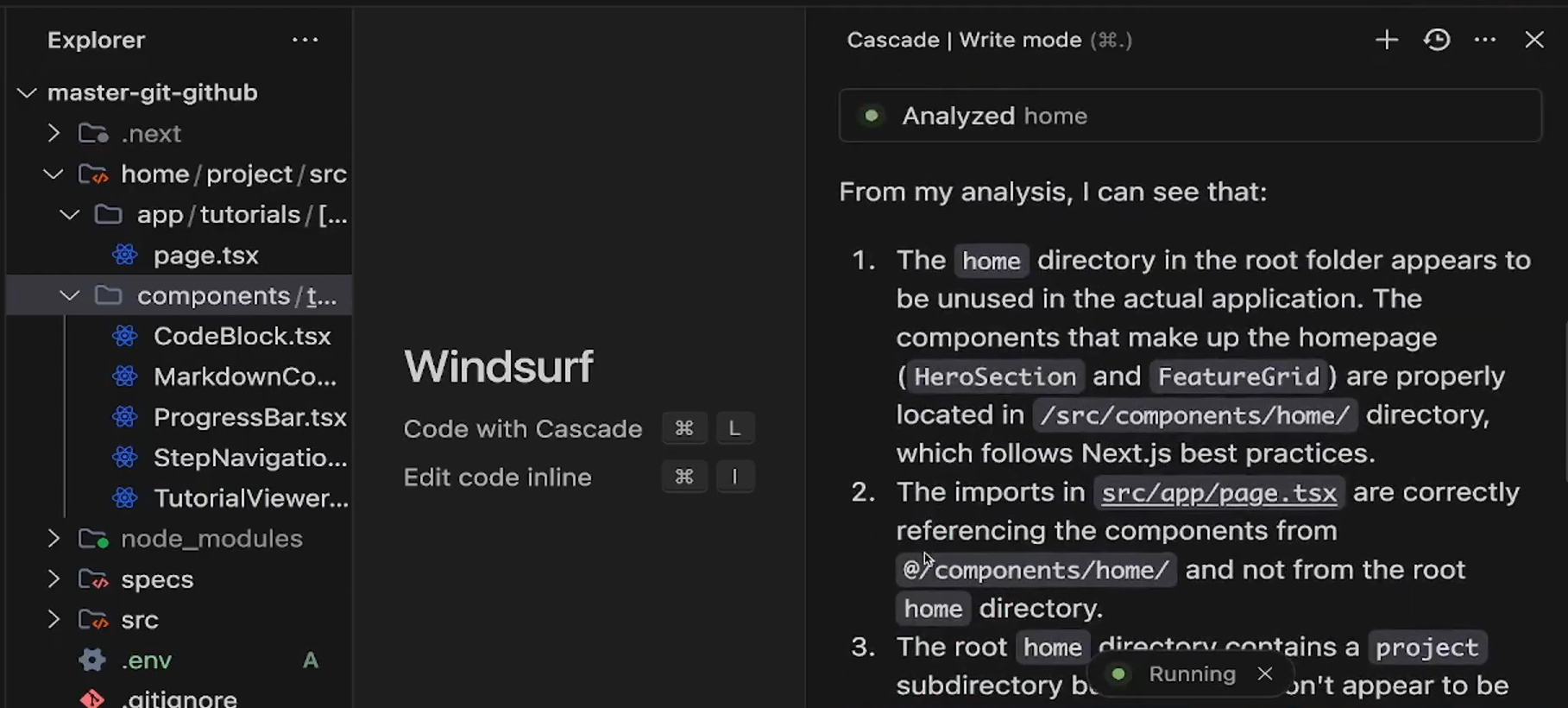
It pointed out that the home directory in the root folder was not referenced anywhere in the application. No imports, no routing usage, no runtime dependency.
Instead of blindly deleting it, Cascade explained why it was safe to remove. It showed what files were analyzed and how they were connected. After that, it proposed the deletion.
What I liked:
- It reasoned across the project, not just the open file.
- It checked imports before suggesting deletion.
- It explained the decision in plain terms before applying changes.
This is where Windsurf feels different from simple autocomplete tools. It can analyze structure, trace usage, and act on it, all inside the editor. It still doesn’t replace a full code review or CI validation, but for project-level cleanup and refactors, it’s fast and practical.
Pricing
- Free: $0/month (light usage quota, unlimited Tab completions)
- Pro: $20/month (standard usage quota, all premium models)
- Max: $200/month (heavy usage quota for power users)
- Teams: $40/user/month (standard quota, centralized billing, admin dashboard)
- Enterprise: Custom (SSO, RBAC, hybrid deployment, volume discounts)
5. Replit
Replit is a browser-based development platform that bundles an IDE, runtime, collaboration, and deployment into one environment. You open a browser tab and start coding, no local setup, no environment configuration. It’s built for moving from idea to working app quickly.
Best for
- Quick prototypes, demos, and internal tools
- Solo developers or small teams where setup time is the bottleneck
- Learning projects and experiments
Not for
- Large production systems with complex infrastructure
- Strict regulatory or self-hosted environments
- Teams needing deep CI/CD or infrastructure customization
Codebase Understanding & Runtime Debugging
Replit’s AI works at the workspace level. It understands the project running inside its environment, but only that project. There’s no cross-repo or multi-service awareness.
Where it does help is the feedback loop: you edit code, the preview updates instantly, logs show up next to your app, and you can iterate without switching tools. It’s optimized for contained apps, not distributed systems.
Code Quality Snapshot
Replit is good at generating runnable, modular scaffolding fast. It focuses on getting something working. It does not enforce architectural standards, validate production deployment patterns, or integrate with complex review workflows.
The generated app runs inside Replit’s managed runtime. If this becomes a real product, you’ll likely export it and move it into your own pipeline.
Hands-On: Turning a Simple App into a CMS with Auth
I started with a basic CMS scaffold in Replit and prompted:
|
Replit modified the project directly. It updated backend routes, adjusted API tests, added auth logic, and changed the UI to reflect a logged-in state. I didn’t manually touch routing, wiring, or server setup; it handled that inside the existing structure.
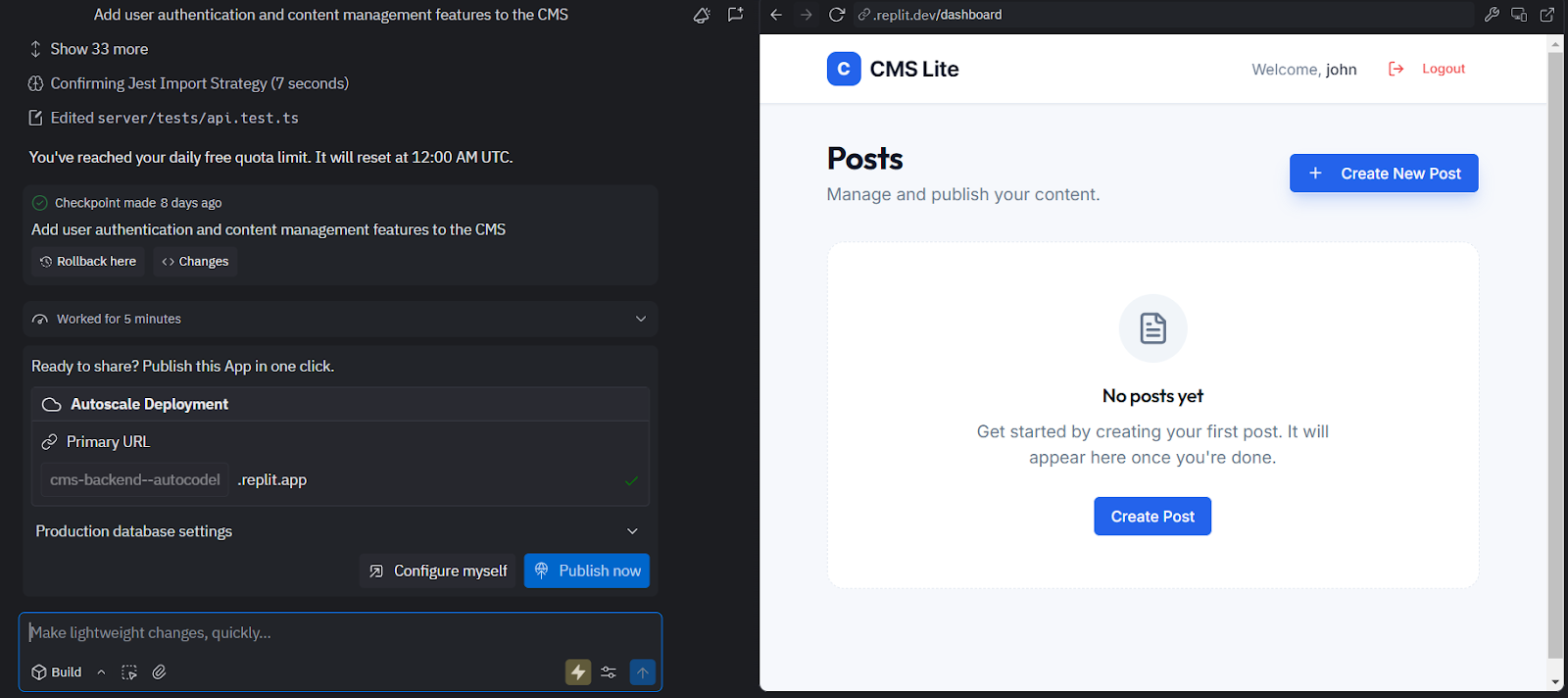
After the update, the UI showed a logged-in user (“Welcome, John”), a logout button, and post controls like Create New Post. The changes weren’t isolated to one file; they touched API logic, tests, and frontend components in one pass.
What was interesting wasn’t just that it generated code, it modified an already running app without breaking it. The project stayed functional while features were layered in.
This feels less like autocomplete and more like controlled in-place feature expansion. You’re not copying snippets into your repo, you’re evolving a live app through prompts.
For early-stage feature work, especially when the goal is to see behavior quickly, this workflow is straightforward and fast.
Pricing
- Starter: Free (limited AI credits, public apps only)
- Core: $25/month ($20/month billed annually; includes monthly AI credits, unlimited private apps)
- Pro: $100/month flat for up to 15 builders (credit rollover, priority support, tiered credit discounts)
- Enterprise: Custom (SSO/SAML, advanced privacy controls, compliance)
6. Gemini Code Assist
Gemini Code Assist is Google’s AI assistant for VS Code, JetBrains IDEs, and Android Studio. It offers inline completions, chat-based guidance, and — in paid tiers — pull request suggestions inside GitHub. Its strongest value shows up when you’re building on Google Cloud: Cloud Run, BigQuery, Firebase, and other GCP services.
Best for
- Teams building on Google Cloud
- Developers working with BigQuery, Cloud Run, Firebase, or GCP APIs
- Organizations are already standardized on Google’s developer stack
Not for
- Teams primarily building on AWS or Azure
- Organizations expecting standalone PR enforcement or merge gating
- Cross-repository governance or architectural validation
Codebase Understanding & Runtime Debugging
Gemini works at the workspace level inside the IDE. In Standard and Enterprise tiers, it can use a private repository context to improve suggestions.
Code Quality Snapshot
Gemini is solid for inline completions and structured, step-by-step code generation. It shows diffs before applying edits, which keeps changes visible.
In paid tiers, GitHub PR suggestions can help flag improvements or refactors, but it doesn’t act as a merge gate or enforce policy rules. It assists review, it doesn’t control it.
Hands-On: Styling a Gemini Chat App
I had a simple Node.js chat app connected to Gemini and deployed on Cloud Run. The responses were being rendered as plain text in a <li> element.
I asked Gemini:
Display the chat response in a styled text box.
It pointed directly to the files that needed changes (server.js and index.html) and suggested wrapping the response in styled HTML before emitting it. On the client side, it updated the rendering logic so messages appeared inside a styled container instead of raw text.
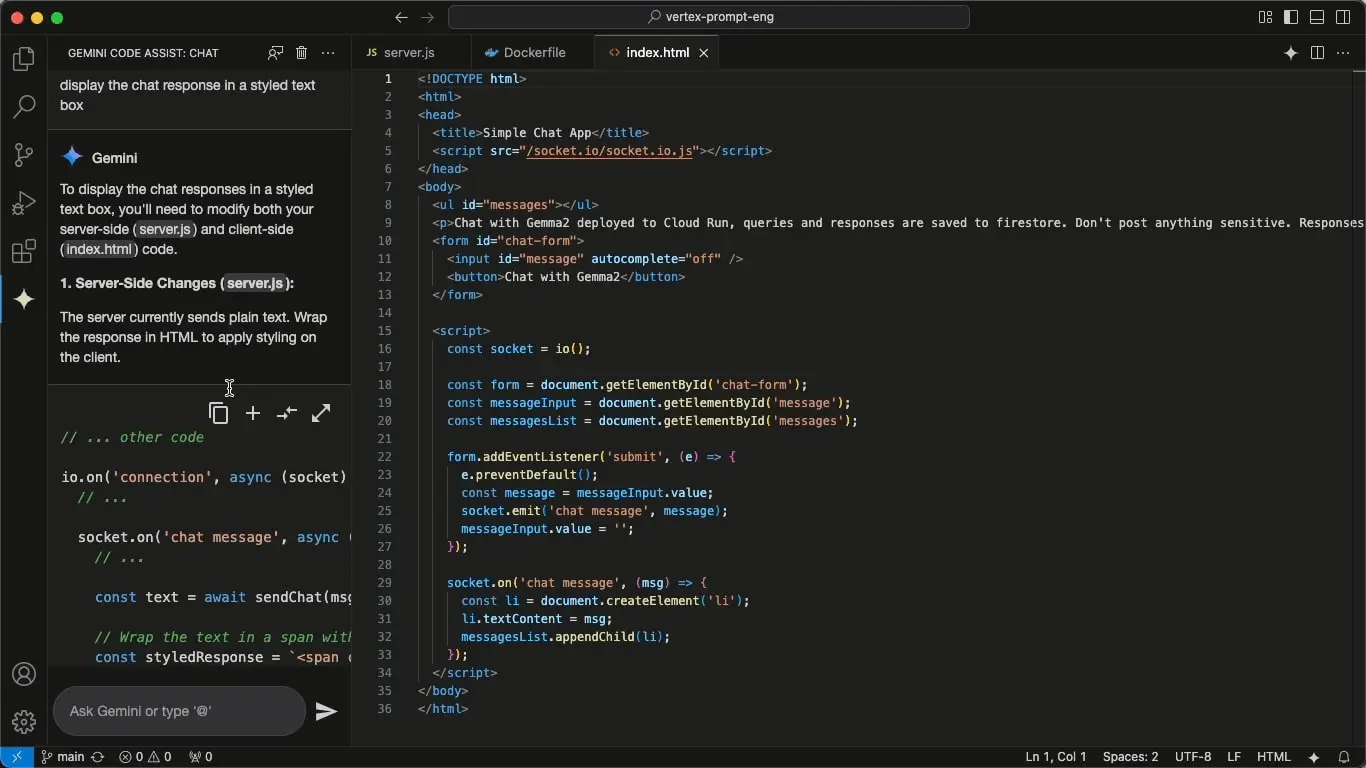
The diff preview showed exactly what would change before applying it. After accepting, the UI updated immediately, and the chat flow (Socket.IO + Cloud Run) continued working without additional configuration. For small UI or integration tweaks inside an existing cloud app, the edits were precise and context-aware.
Pricing
- Individual: Free (separate product available at codeassist.google)
- Standard: ~$19/user/month on a 12-month commitment, ~$22.50/user/month on monthly commitment (IDE code assistance, local codebase awareness, agent mode, Gemini CLI, enterprise-grade security)
- Enterprise: ~$44/user/month on a 12-month commitment, ~$53/user/month on monthly commitment
7. OpenAI Codex
OpenAI Codex is the code-generation model exposed via API. It’s not an IDE, not a plugin, and not a managed agent. It’s the model layer you embed into your own tools, pipelines, or internal platforms. If you want full control over how AI fits into your workflow, Codex is the raw building block.
Best for
- Teams building internal AI developer tools
- Engineers integrating generation directly into CI/CD or automation
- Organizations that want full control over UX, context handling, and data flow
Not for
- Developers looking for an out-of-the-box IDE assistant
- Teams expecting built-in PR review or governance
- Workflows that need managed repo awareness or agent surfaces
Codebase Understanding & Runtime Debugging
Codex only sees the prompt and context you send it. There’s no built-in repo indexing, memory, or runtime awareness. If you want retrieval, diff handling, or multi-file reasoning, you build that layer yourself.
Code Quality Snapshot
Output quality is prompt-dependent but generally clean and structured. It can generate functions, tests, refactors, or explanations reliably. Enforcement, validation, and CI integration are entirely your responsibility.
Hands-On: Repository-Level Issue Discovery via Codex API
I sent Codex a structured prompt through the API:
Go through the codebase, find issues, and propose one task to fix a typo, one to fix a bug, one to fix a documentation discrepancy, and one to improve a test.
The repository was passed as context (selected files + README content). Codex returned categorized findings with file references and concrete examples.
It identified:
- Documentation issue (README.md): words split across lines, breaking readability: Build two lightweight applications: one that toggles between Qwen3’s rea
soning modes (`/think` vs `/no_think`)
Suggested task: fix broken line wrapping in README to restore readability. - Bug candidate (reasoning_qwen3): prompt formatting without a newline when piping input into
subprocess.run, which can cause CLI parsing issues:
 prompt_with_mode = f"{prompt} /{mode}"

result = subprocess.run(

    ["ollama", "run", "qwen3:8b"],

    input=prompt_with_mode.encode(),

)
Suggested task: ensure newline termination when piping input to subprocess.
- Similar pattern in multilingual_qwen3: prompt rewriting before subprocess execution, with inconsistent formatting.
The output wasn’t generic advice. It referenced specific files, showed code snippets, and proposed discrete fixable tasks (typo cleanup, formatting fix, CLI input handling correction, test improvement).
Codex didn’t modify the repository automatically. It generated structured remediation tasks that could be turned into issues or PRs. That’s how it behaves in practice: analysis and proposal, execution is handled by whatever workflow you build around it.
Pricing
- Usage-based API pricing (per token, varies by model and tier)
- Enterprise agreements available through OpenAI sales
8. Claude Code
Claude Code is Anthropic’s terminal-based coding agent. It runs in your CLI, reads the repository directly, edits files, runs commands, and shows diffs before applying changes. It’s built for multi-step tasks, not inline suggestions.
Best for
- Engineers are comfortable working in the terminal
- Multi-file refactors across a repository
- Debugging or setup work that requires edit, run, inspect cycles
Not for
- Developers looking for IDE autocomplete
- Teams expecting built-in merge enforcement or governance
- Fully autonomous workflows without supervision
Codebase Understanding & Runtime Debugging
Claude Code operates at the repository level inside your working directory. It can open multiple files, modify them, run commands (like npm test or tsc), and iterate based on output.
It does not index across multiple repositories or understand external system dependencies. Every change is shown as a diff and requires approval before being written.
Code Quality Snapshot
Changes are presented as structured diffs instead of pasted snippets. That makes it easier to review what’s being modified. It handles configuration setup, refactors, and script-driven workflows well, but it does not replace pull request review or CI checks.
Hands-On: Setting Up Jest in a TypeScript Repo
In a TypeScript project without tests configured, I ran:
Set up Jest for this repo and configure test matching.
Claude Code scanned the repository structure and detected it was TypeScript-based. It generated a jest.config.js using ts-jest, set the test environment to node, and added patterns for both .test.ts and .spec.ts.
Before writing anything, it showed the full diff:
module.exports = {

 preset: 'ts-jest',

 testEnvironment: 'node',

 testMatch: ['**/?(*.)+(spec|test).ts'],

}
After I approved the change, it wrote the file. I then ran the test command manually and adjusted path aliases to match the project setup.
This is where Claude Code fits: it handles setup work across files, shows exactly what changed, and lets you stay in control of the repository.
Pricing
- Free: Limited usage
- Pro: $20/month
- Max: $100/month or $200/month (two distinct tiers with different usage capacities)
- Team: $30/user/month (shared billing, admin controls)
- Enterprise: Custom (SSO, RBAC, audit logs, higher limits)
9. Kiro
Kiro is a spec-driven development environment. Instead of generating code immediately, it turns a feature request into structured requirements, acceptance criteria, and implementation tasks. It’s built for teams that want clarity and traceability before code changes begin.
Best for
- Teams that want AI to plan features before implementation
- Workflows where acceptance criteria and traceability matter
- Product-driven engineering environments
Not for
- Quick snippet generation
- Autocomplete-style usage
- Ad-hoc scripting workflows
Codebase Understanding & Runtime Debugging
Kiro reads the repository and generates a structured plan tied to specific files. Its reasoning is requirement-level, not runtime-level. It does not execute code or debug failures.
Code Quality Snapshot
Each task maps back to a defined requirement with explicit acceptance criteria. Review becomes checking code against agreed conditions. CI, security, and runtime validation remain external
Hands-On: From Spec to Executable Task Plan
I gave Kiro a feature spec for an email opt-in flow and let it structure the work. Instead of jumping into code, it generated three linked artifacts: requirements.md, design.md, and tasks.md.
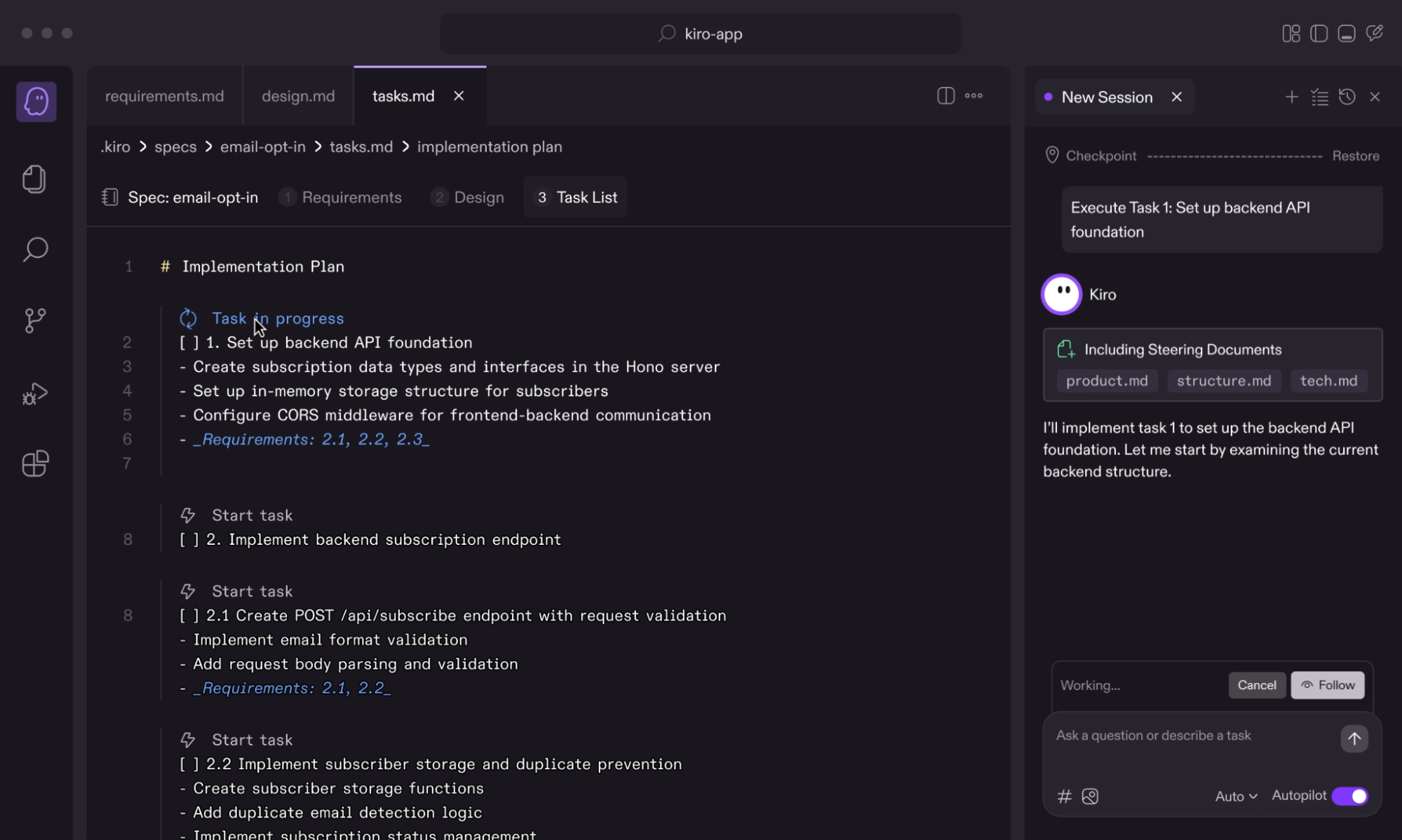
In the tasks.md view (shown in the screenshot above), it produced a structured implementation plan:
- Task 1: Set up backend API foundation
- Create subscription data types and interfaces
- Configure in-memory subscriber storage
- Add CORS middleware
- Linked back to Requirements 2.1, 2.2, 2.3
- Task 2: Implement
/api/subscribeendpoint- Request validation
- Email format validation
- Duplicate prevention logic
Each task explicitly referenced the requirement it satisfied. From there, I clicked “Execute Task 1”, and Kiro began working through the backend setup step by step, referencing steering documents like product.md, structure.md, and tech.md.
What this shows is the workflow difference: Kiro doesn’t start with a code snippet. It creates a traceable task plan tied to requirements, then executes tasks in sequence. The structure is the primary output; code follows from that structure.
Pricing
- Free: $0/month (50 credits)
- Pro: $20/month (1,000 credits; overages at $0.04/credit)
- Pro+: $40/month (2,000 credits; overages at $0.04/credit)
- Power: $200/month (10,000 credits; overages at $0.04/credit)
- Enterprise: Custom (SSO/SCIM, security controls)
10. Lovable
Lovable is a full-stack AI development platform that generates production-grade web applications from natural language prompts, frontend, backend, database, and auth, outputting editabðˇle code the team owns and can sync to GitHub. Lovable is not a code review tool. It sits at the generation end of the pipeline, not the enforcement end.
Best for
- Founders and product teams building MVPs or internal tools without a full engineering team
- Designers and PMs who need production-ready interfaces, not static mockups
- Engineering teams scaffolding new projects or prototypes quickly
Not for
- Teams needing automated PR review or merge enforcement
- Codebases requiring cross-file behavioral analysis or standards governance
- Organizations with existing engineering workflows that need review, not generation
How It Works
Lovable covers the full build cycle, from first prompt to deployed application, with GitHub sync, custom domains, and workspace collaboration built in. Applications are built inside shared workspaces, where people collaborate across one or more projects. Each project produces a codebase that can be synced to GitHub and integrated into existing engineering workflows.
Lovable has two modes:
- Plan mode for thinking through the problem, exploring options, and deciding on an approach
- Agent mode for implementing changes and verifying the outcome. Plan mode never modifies your code. Agent mode executes against an approved plan.
Code Quality Snapshot
Lovable generates working code fast. It includes built-in security checks and guidance, workspace-level roles and permissions, and audit logs at the enterprise tier. What it doesn’t do is review code after it’s written, there is no diff analysis, no merge gating, no cross-file regression detection, and no standards enforcement across PRs. The gap Lovable leaves is on the review side: generated code ships without behavioral validation, cross-file contract checks, or org-specific standards enforcement. The absence of review enforcement is intentional — Lovable is a generation tool, not a governance layer. For teams using Lovable to generate code at speed, Qodo sits downstream in the Git Plugin to catch behavioral regressions, missing null guards, broken cross-file contracts, and standards violations before generated code reaches production.
Hands-On: Building a Booking Tool from a Prompt
Lovable’s value shows up fastest on net-new builds. A prompt describing a booking tool with authentication, a calendar view, and Stripe payments produces a deployable application — frontend, Supabase backend, auth flow, and payment integration — without writing a line of code manually. Lovable generates the application in minutes and outputs a real codebase — React, Supabase, Stripe, that developers can edit directly inside Lovable’s code editor or sync to GitHub and modify in any IDE.
Pricing
- Free: 5 daily credits, up to 30 per month
- Pro: from $25/month for 100 monthly credits, scaling to $2,250/month for 10,000 credits
- Business: from $50/month, adds SSO, restricted projects, data training opt-out, and reusable design templates
11. Cline
Cline is an open-source autonomous coding agent for VS Code. It follows a Plan-Act model, proposing a plan first, then requiring approval before every file change or terminal command. It supports multiple model providers and extends via MCP.
Best for
- Developers who want agent-style automation with explicit control
- Teams preferring open-source and model flexibility
- VS Code users are comfortable reviewing staged changes
Not for
- Fully autonomous, no-approval workflows
- Built-in PR governance or CI enforcement out of the box
Codebase Understanding & Runtime Debugging
Cline builds repository awareness using AST-based analysis and agentic search. It can run commands, start dev servers, and even drive browser interactions for UI checks, but every action requires explicit approval.
Code Quality Snapshot
Changes are staged as structured diffs before being applied. The Plan/Act flow keeps edits reviewable and reduces unexpected file modifications. Governance and CI enforcement remain external.
Hands-On: Scaffolding a Go Microservice with Approval Gates
I asked Cline to create a new user-service inside a microservices/ directory and structure it with models and a repository layer. As shown in the snapshot below:
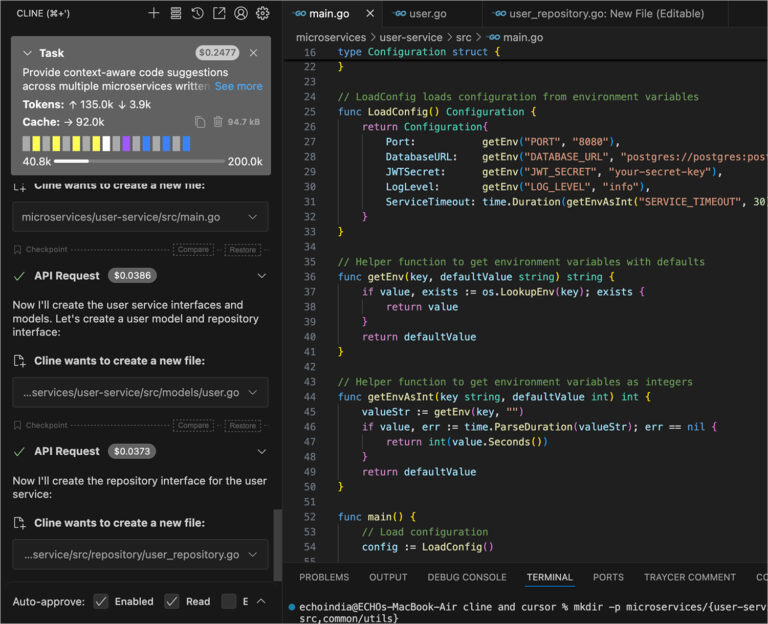
Instead of immediately writing files, Cline proposed the steps first. In the task panel (shown in the screenshot), it outlined creating:
src/main.gosrc/models/user.gosrc/repository/user_repository.go
Each file creation appeared as a pending action with a clear diff preview. Nothing was written automatically.
After I approved the actions, Cline:
- Generated a configuration struct in
main.gowith environment-based loading - Created a User model
- Defined a repository interface for user operations
Every file write required confirmation. Terminal commands (like creating directories) were also staged for approval before execution.
Pricing
- Free & Open Source: Pay only for model API usage
- Enterprise: Custom (SSO, audit logs, private networking)
12. Roo Code
Roo Code is a VS Code–based AI coding suite built around task-specific Modes (Architect, Code, Orchestrator). It supports multiple model providers and extends into async workflows through Cloud Agents that can operate in Slack or GitHub.
Best for
- Developers who want model flexibility
- Teams doing structured, multi-step refactors
- Async agent workflows outside the IDE
Not for
- Browser-only or zero-install environments
- Built-in PR governance or merge enforcement
Codebase Understanding & Runtime Debugging
Roo indexes the repository and scopes behavior through Modes:
- Architect for structure and design
- Code for implementation
- Orchestrator for coordinating multi-file changes
Cloud Agents can run tasks asynchronously and return results for review.
Code Quality Snapshot
Orchestrator coordinates complex refactors across files and runs tests after changes are applied. Results are staged for inspection. Governance and CI enforcement remain external.
Hands-On: Generating a 3D Solar System Project
I prompted Roo Code to generate a detailed 3D solar system simulation.
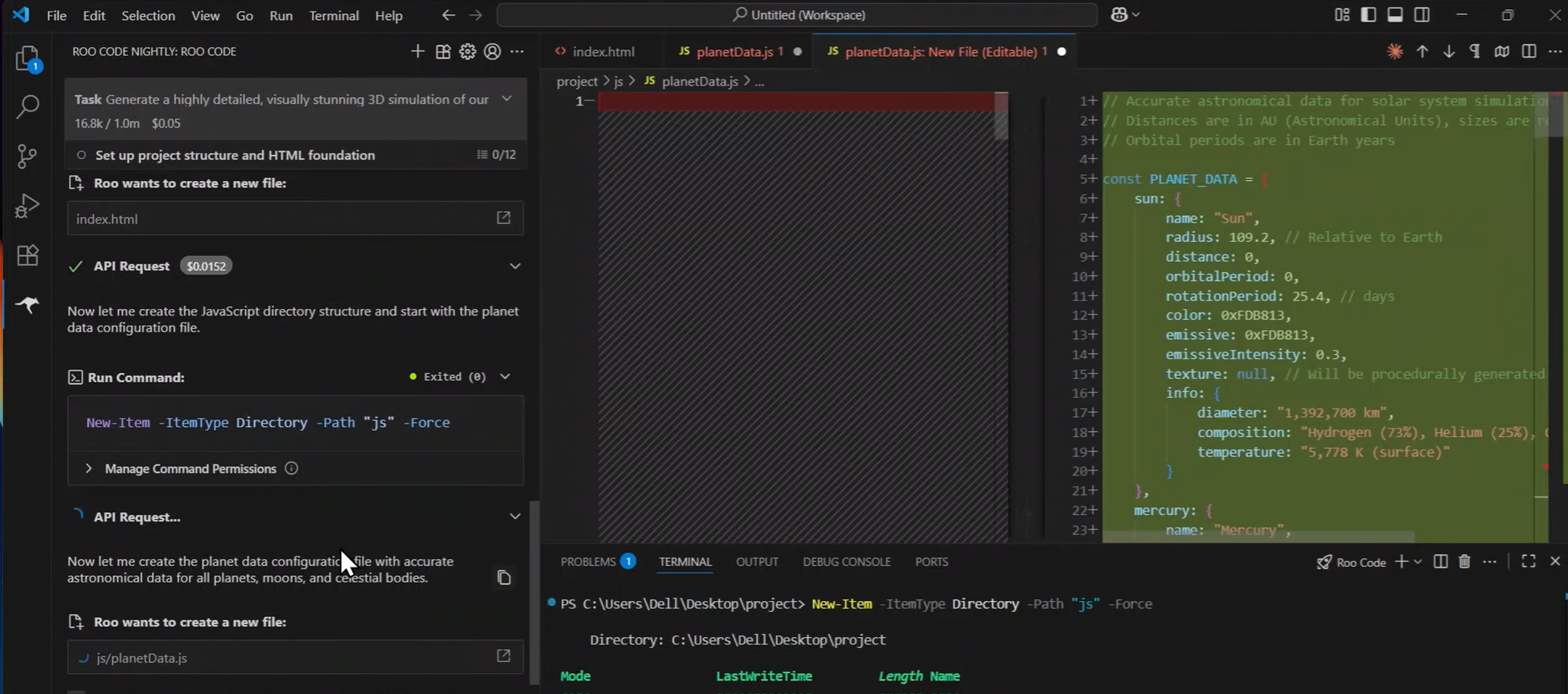
In the task panel (as shown in the screenshot), Roo first outlined the setup phase:
- Create
index.html - Create a js/ directory
- Add js/planetData.js
Before writing anything, it showed the exact file operations and the PowerShell command to create the directory:
New-Item -ItemType Directory –Path “js” -Force
Each action was visible in the task flow and required approval. Once approved, Roo created planetData.js with structured astronomical data (radius, orbital period, emissive properties, etc.) for the Sun and planets. The file wasn’t a placeholder — it contained normalized values suitable for driving a rendering layer.
Pricing
- Free: VS Code extension (pay only for model API usage)
- Roo Code Cloud: Usage-based pricing
- Enterprise: Custom plans available
13. Augment Code
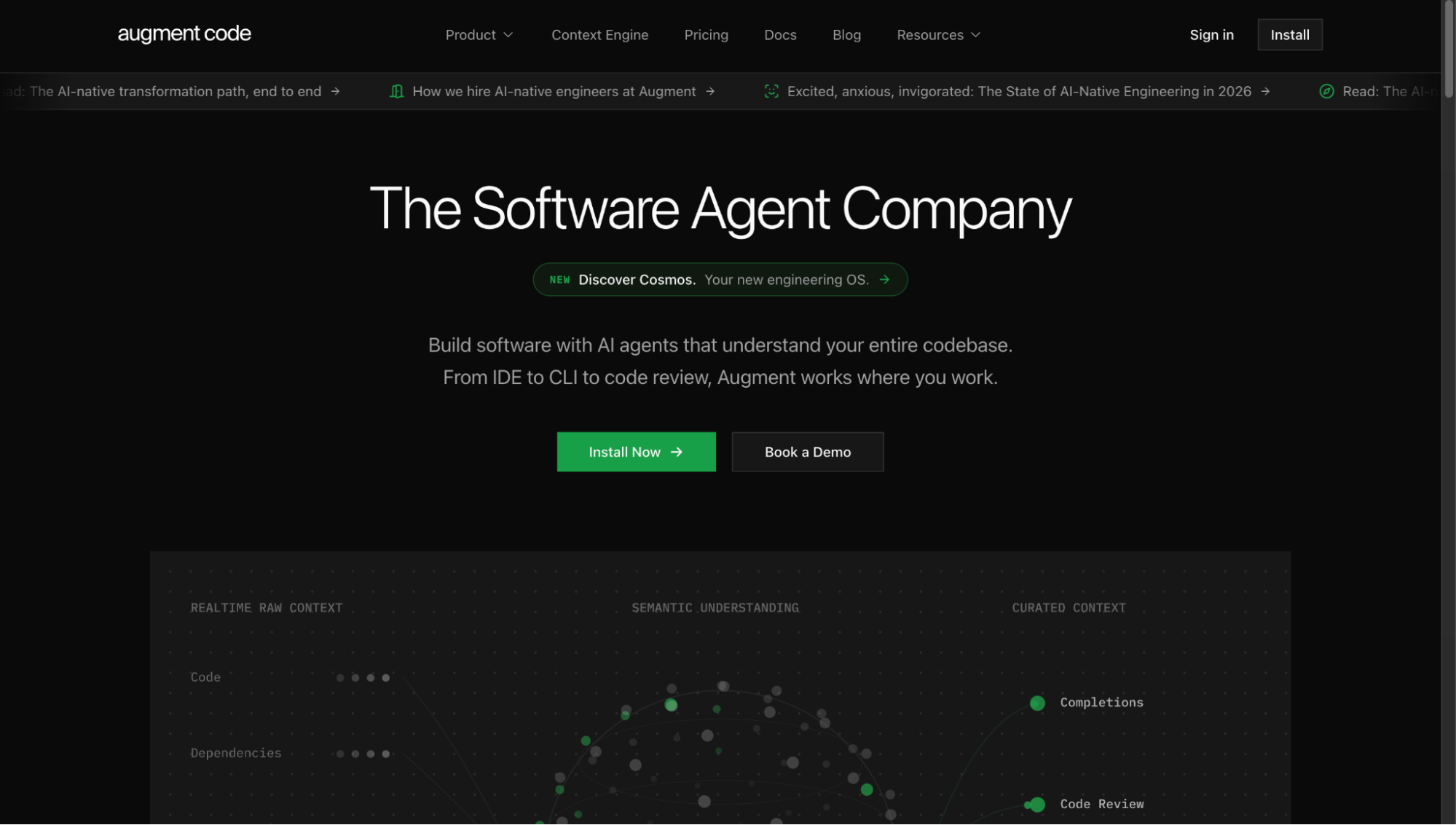
Augment Code is an AI coding platform built for large, complex, and legacy production systems. Its Context Engine indexes the full stack, code, dependencies, and history, and operates consistently across IDE, CLI, and terminal.
Best for
- Staff and principal engineers in large codebases
- Enterprise legacy modernization
- Cross-service coordination in multi-repo systems
Not for
- Small greenfield projects
- Teams looking for lightweight or free-first tools
Codebase Understanding & Runtime Debugging
Augment maintains persistent, stack-level context rather than session-scoped awareness. It indexes dependencies, change history, and routes tasks through a multi-model system based on complexity. It does not train on paid customer data.
Code Quality Snapshot
Generated changes align with the existing architecture without requiring manual context explanation. PR review performance benchmarks high for precision and recall. Enterprise deployment includes VPC and on-prem options with SOC 2 Type II and ISO 42001 certification.
Hands-On: Investigating and Fixing a Security Issue
I pointed Augment at a GitHub issue (#21667) related to a security vulnerability and asked it to investigate and propose a fix.
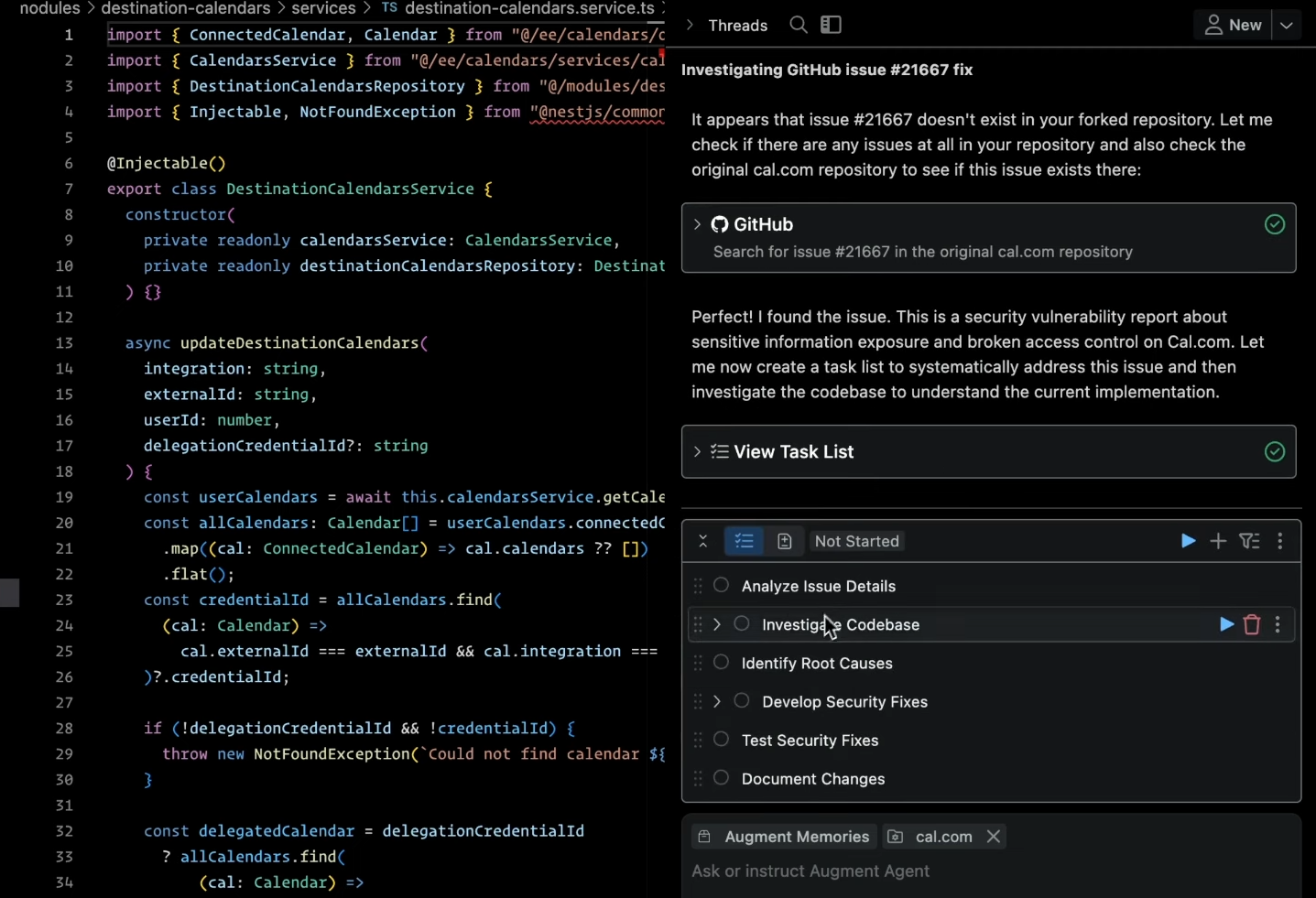
Instead of jumping straight into code, Augment created a structured task list (as shown in the screenshot):
- Analyze issue details
- Investigate codebase
- Identify root causes
- Develop security fixes
- Test security fixes
- Document changes
It first checked whether the issue existed in the forked repo, then cross-referenced the original repository. After confirming the vulnerability, it began tracing the relevant service (DestinationCalendarsService) and related repository logic.
Augment mapped how credentials were resolved, where access control checks were happening, and where they were missing. Only after that did it propose code-level changes.
Pricing
- Free: Community plan (limited usage)
- Standard: ~$20–50/user/month (usage-based)
- Enterprise: ~$59/user/month (private deployment, advanced context engine, compliance controls)
14. Kilo Code
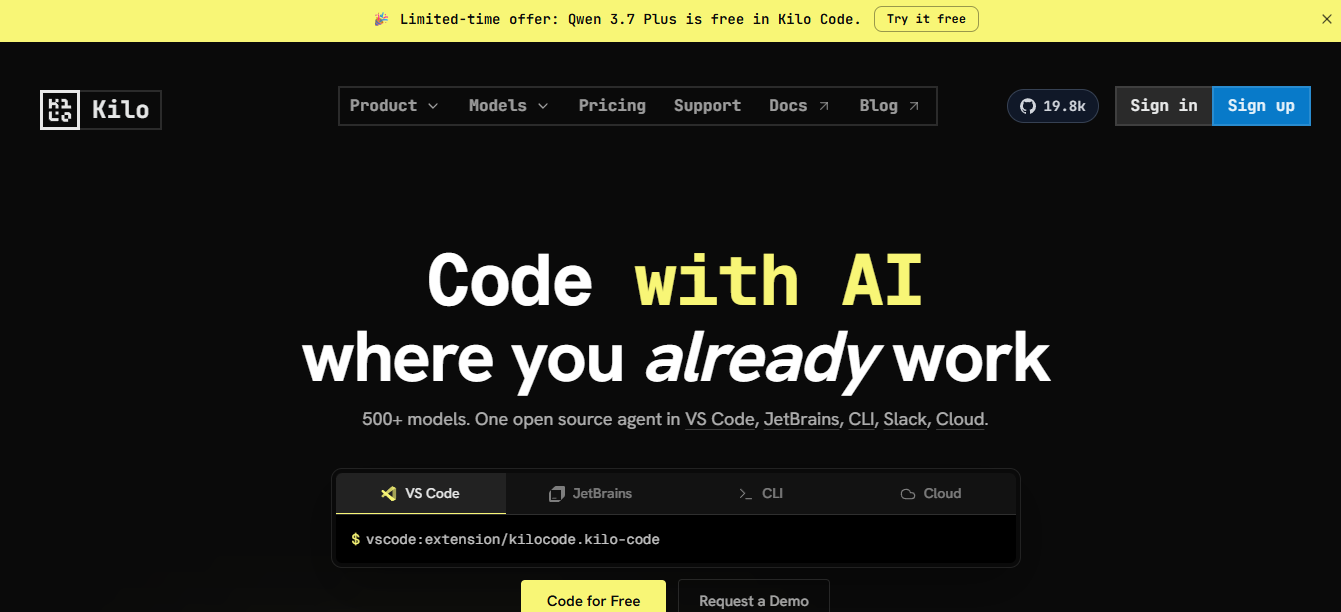
Kilo Code is an open-source coding agent available for VS Code, JetBrains, and CLI. It supports customizable Modes, project rules, MCP integration, and Kilo Gateway, a unified API layer for routing across multiple model providers with BYOK support.
Best for
- Teams that want model flexibility without provider lock-in
- Engineers needing custom modes and persistent rules
- Organizations using BYOK across multiple models
Not for
- Fully managed SaaS workflows
- Built-in PR governance or merge enforcement
Codebase Understanding & Runtime Debugging
Kilo operates with project-level context and persistent custom rules. Kilo Gateway allows routing tasks across models based on cost or capability. It does not index across repositories or trace runtime behavior.
Code Quality Snapshot
Custom modes enforce naming conventions, error handling, and response formats without repeated prompting. Collaboration and session sharing are built in; SSO is available in enterprise plans.
Hands-On: Tracing a Profile Upload Flow
I asked Kilo Code to find where the application handles a user uploading their profile image.
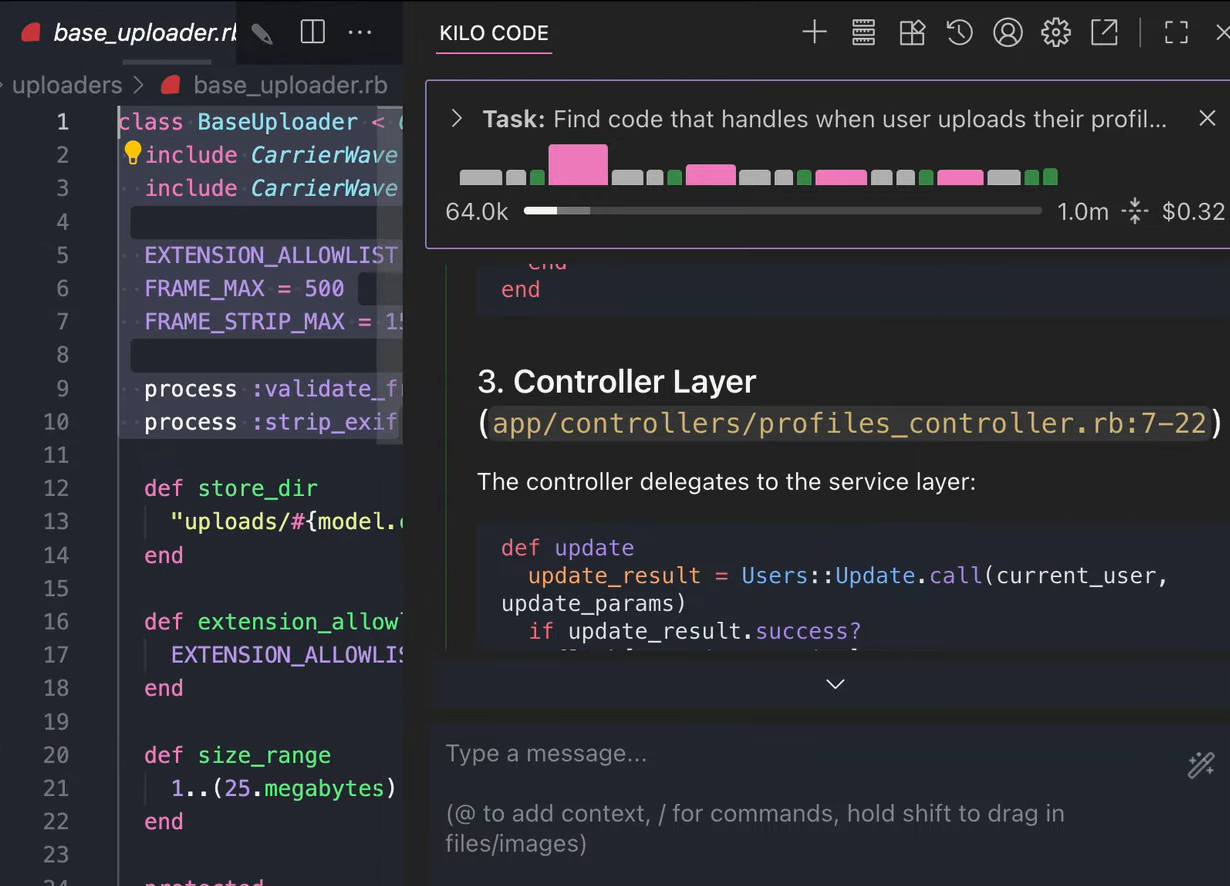
Instead of guessing, it scanned the repository and surfaced the exact controller entry point:
app/controllers/profiles_controller.rb:7-22
From there, it traced the flow:
ProfilesController#update- Delegation to
Users::Update.call - Uploader logic in
BaseUploader(CarrierWave configuration)
It showed the relevant methods inline, including validation rules like:
EXTENSION_ALLOWLIST- File size limits
(1..25.megabytes) - EXIF stripping
The key detail: it didn’t just return a file name. It mapped the request path from the controller to the service layer to the uploader configuration, making it clear where validation and storage rules are enforced.
Pricing
- Free & Open Source: Extension and CLI (pay for model usage)
- Kilo Gateway: Usage-based per token
- Teams / Enterprise: Custom plans available
15. Warp
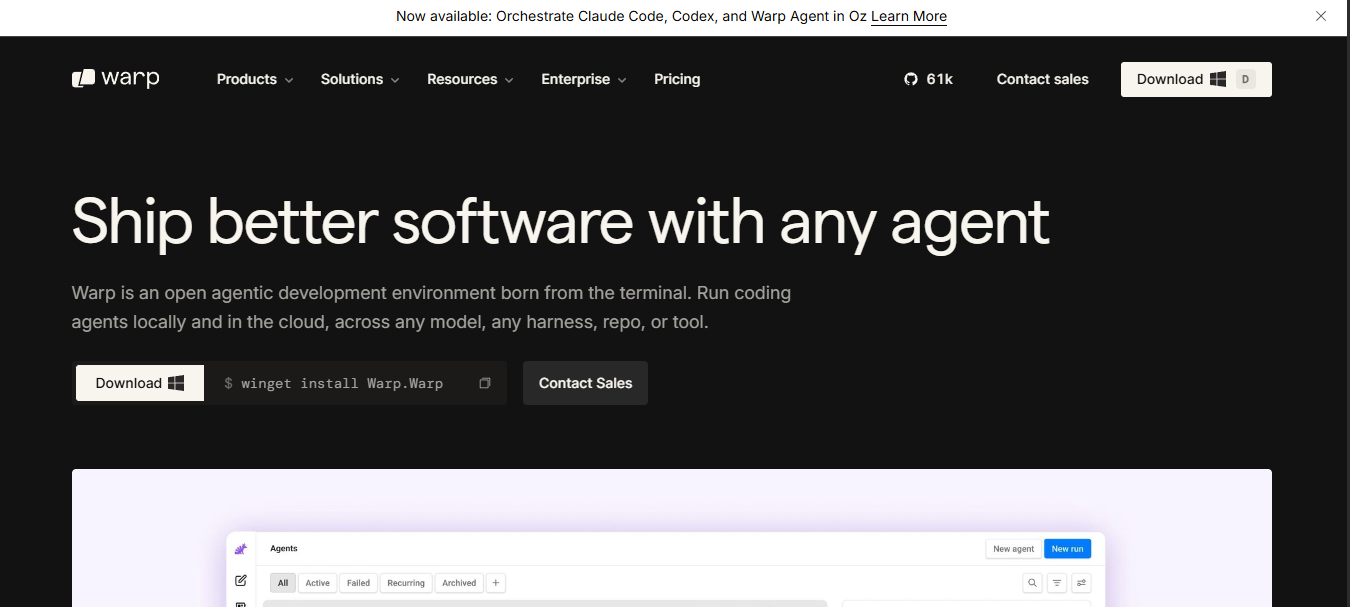
Warp is an agent-enabled terminal built for coding, testing, deploying, and debugging directly from the command line. Its AI runs through Oz, Warp’s cloud agent layer, and operates inside the same terminal environment engineers already use.
Best for
- Backend and DevOps engineers working primarily in the terminal
- Debugging infrastructure or deployment issues
- Teams that want agent support without leaving the CLI
Not for
- IDE-first or browser-first workflows
- Built-in PR governance or merge enforcement
Codebase Understanding & Runtime Debugging
Warp’s agent reads command history, parses error output, and operates in the active project directory. The conversation view and terminal share context; switching between them does not reset the state. Oz agents can also run async tasks and report back.
Code Quality Snapshot
Warp includes terminal-native code review and shared runbooks via Warp Drive. It is MCP-extensible for external integrations. Governance and CI enforcement remain external.
Hands-On: Updating Tooltip Styles Across the Codebase
I asked Warp to change all instances of the tooltip component’s background to neutral_6 and set the text color to background.
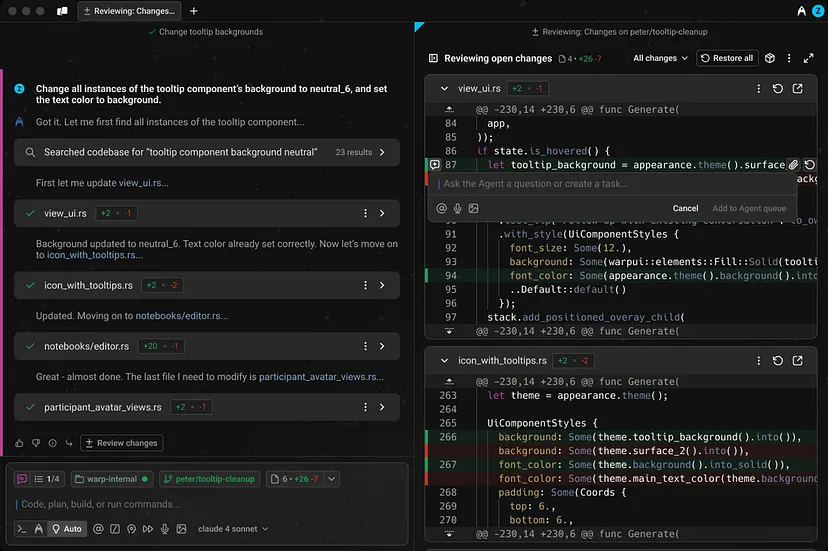
From the agent panel, it first searched the codebase for references to the tooltip background. It surfaced multiple files:
view_ui.rsicon_with_tooltips.rsnotebooks/editor.rsparticipant_avatar_views.rs
Instead of editing blindly, it staged diffs file by file. For example, in icon_with_tooltips.rs, it updated:
backgroundto use the correct theme flag valuefont_colorto align with the background contrast
Each file change was shown in a structured diff view before applying. I reviewed the changes in the side-by-side panel and then confirmed them.
Pricing
- Free: $0/month (75 AI credits/month after the first two months; all core terminal features free)
- Build: $20/user/month (1,500 AI credits/month, BYOK support for OpenAI/Anthropic/Google, unlimited Warp Drive, Add-on Credits available)
- Business: $50/user/month
- Enterprise: Custom
How Do I Know If AI-Generated Code Is Actually Safe to Push to Production?
The reason that uncertainty exists is structural, not psychological. Every generation tool in this list, such as Copilot, Windsurf, Cline, Claude Code, operates inside a context window. It sees what’s in the file, what’s nearby, maybe the project. What it doesn’t see is your full dependency graph, the services consuming the API you just changed, the test suite in a different repo that’s about to break, or the auth check that got quietly dropped when the AI refactored the middleware. That’s not a failure of those tools. It’s simply not what they’re built for.
That’s the gap Qodo is built to close. Where every other tool in this list operates at authoring time, Qodo operates across your entire SDLC, inside the IDE before you push, at the PR stage before you merge, and via CLI for custom review workflows across your pipeline. It indexes your full codebase across repositories using its Context Engine, builds a persistent map of dependencies, API consumers, and contract relationships, and runs that analysis continuously, not just at merge time.
In practice, the Review Agent Suite deploys specialized agents against every pull request: one focused on critical issues, one on duplicated logic, one on breaking changes, one on ticket compliance, one on rules enforcement. Each draws on full codebase context and PR memory, awareness of prior review decisions that no file-level tool carries. The Rules System captures what good code looks like for your organization, auto-discovered from your codebase and PR history, and continuously evolved as standards change. Rules feed the review; review feeds the rules.
The output isn’t more inline comments on the diff. It’s a structured pre-merge compliance check: what’s ready, what’s blocking, and what couldn’t be evaluated because context was missing. It won’t guess. If something is unresolved, it says so.
For teams shipping significant volumes of AI-generated code, this is the layer that makes the rest of the stack trustworthy. Generation speed is only valuable if what gets generated can actually be shipped with confidence. Qodo is what provides that confidence, not by slowing the process down, but by automating the verification that would otherwise fall on a senior engineer at 1 a.m., wondering if it’s actually safe to merge.
FAQs
What are the best AI code generators in 2026?
It depends on which problem you’re solving. GitHub Copilot, Gemini Code Assist, Amazon Q, and OpenAI Codex help generate code inside the editor or via API. Windsurf, Kiro, Cline, Roo Code, and Augment Code assist with multi-file work, agentic task execution, and repository-level work. Lovable and Replit cover full-stack prototyping and deployment. Warp and Claude Code operate natively from the terminal. Qodo is the AI Code Review Platform, it indexes your full codebase, enforces org-wide standards through an intelligent Rules System, and deploys specialized review agents across your SDLC to validate code quality before it reaches production..
How do AI code review platforms differ from code generators?
Code generators help you write code faster. AI code review platforms operate across the SDLC, inside the IDE before you push, at the PR stage before you merge, and via CLI for custom review workflows. Instead of producing code, they analyze codebase-wide context, enforce org-specific standards, detect breaking changes, and determine whether code is actually ready to ship. Qodo is purpose-built for this continuous quality enforcement layer, not for inline code generation.
Can AI code generators replace manual code review?
AI tools can automate large parts of code review, including security checks, test coverage validation, and standards enforcement. With a platform like Qodo, merge decisions can be backed by consistent, context-aware analysis before approval. Human reviewers still handle architectural intent and business logic, but objective validation can be automated at scale.
Do AI coding tools make developers faster?
The honest answer is: it depends on the tool and the task. The 2025 METR study found developers felt 20-25% faster with AI assistance, but objective measurement on realistic PRs showed they were actually 19-21% slower due to verification and review overhead. Generation speed matters less than delivery quality. The tools that move delivery metrics are the ones connected to your PR workflow, not the ones that autocomplete fastest.
What should I look for in an enterprise AI coding tool?
Deployment flexibility (SaaS, VPC, on-prem, air-gapped), written answers on data retention and training use, SSO and RBAC support, audit export, and measurable delivery outcomes. Tools that perform in demos but degrade under real team-wide use are common. Run pilots on production-representative repos and measure the outcomes that matter to your organization: reviewer hours per PR, escaped defects, and time-to-merge.
Which AI coding tools work best for large multi-repo teams?
Large teams working across multiple services benefit from tools that understand broader repository context and enforce standards consistently. Editor assistants help with local productivity but don’t provide organizational governance. AI code review platforms like Qodo are built to scale across multiple repositories, applying consistent review logic and compliance checks before merge.