Best Windsurf Alternatives in 2026: GitHub Copilot, Cursor, and Kiro Compared

TL;DR
- Windsurf is gone as you knew it. Cognition relaunched it as Devin Desktop on June 2, 2026, shifting from a focused coding assistant to a multi-agent fleet management platform. Teams that wanted a single, predictable AI coding tool are now evaluating what actually replaces it.
- GitHub Copilot, Cursor, and Kiro all help you write code faster inside the editor, but none of them independently review that code, enforce org-level standards, or verify correctness across the full repository once a PR is opened.
- The three Windsurf alternatives serve different buyers. GitHub Copilot for teams staying in VS Code or JetBrains; Cursor for individual developers who want a lightweight, standalone editor at $20/month; Kiro for teams that need AWS-backed, spec-driven development with property-based testing and structured task execution.
- Qodo is not a Windsurf alternative; it’s what you add on top of one. Teams using AI coding agents like Claude Code, Cursor, or Kiro ship more code per sprint than human reviewers can cover; Qodo closes that gap with automatic multi-agent PR review that enforces org-level standards and catches real bugs across the full repository.
The team I was on adopted Windsurf for multi-file refactoring across a large TypeScript codebase. Cascade handled edits across connected files without requiring manual context scoping at each step. Then Windsurf started throttling third-party model access, and on June 2, 2026, Cognition relaunched the product as Devin Desktop, a full IDE with an Agent Command Center built in for managing local and cloud agents from a single Kanban view. Cascade was replaced by Devin Local, rewritten from scratch in Rust and up to 30% more token-efficient. The update arrived over-the-air with no change to plan, pricing, or extensions.
Three tools cover the most common replacement scenarios. GitHub Copilot for Teams stays in VS Code or JetBrains. Cursor for individual developers who want a standalone AI editor at $20/month. Kiro for teams that need spec-driven development with AWS enterprise backing.
All three are AI code generation tools. Once a PR is opened, none of them check for regressions, naming violations, or broken dependencies across the repo. Qodo closes that gap automatically on every PR.
How GitHub Copilot, Cursor, and Kiro Work Differently
AI coding assistants use large language models to generate, complete, and refactor code inside a developer’s existing workflow. All three tools in this comparison offer inline completions, natural language chat, and agentic task execution across multiple files.
The key architectural difference is whether the tool generates code immediately from a prompt or structures the work before generating code. GitHub Copilot and Cursor both operate in the former pattern: a prompt goes in; code suggestions come out. Kiro introduces a structured layer between prompt and code: the developer describes a feature, Kiro generates requirements, a design document, and a sequenced task list, and then executes those tasks in parallel. This distinction matters most in complex features where ad hoc generation without structure leads to incomplete or inconsistent output.
A second distinction is the deployment surface. GitHub Copilot runs as an extension inside an existing editor. Cursor is a self-contained, standalone editor. Kiro runs across an IDE, a CLI and a web browser, sharing steering context and settings across all four so work can continue regardless of where a developer is working.
How We Compared These Three Tools
Each tool is assessed against five criteria that matter when switching from Windsurf:
- Development structure. Whether the tool provides only ad hoc completions and chat, or also structures work before code generation, converting prompts into requirements, design documents, and sequenced tasks.
- Context scope. Whether suggestions are generated from the files currently open in the editor, or from a broader context including full repository history, documentation, or previous sessions.
- Correctness validation. Whether the tool generates code only, or also verifies that the generated code matches the intended requirements through techniques such as property-based testing.
- Deployment options. Whether the tool operates as a cloud-only editor extension, a standalone IDE, a CLI, or a combination, and whether enterprise deployment options such as GovCloud or on-premises are available.
- Pricing model. Whether pricing is per seat or credit-based, and whether the model supports predictable team-level spending with overage controls.
Top 3 Windsurf Alternatives in 2026
1. GitHub Copilot
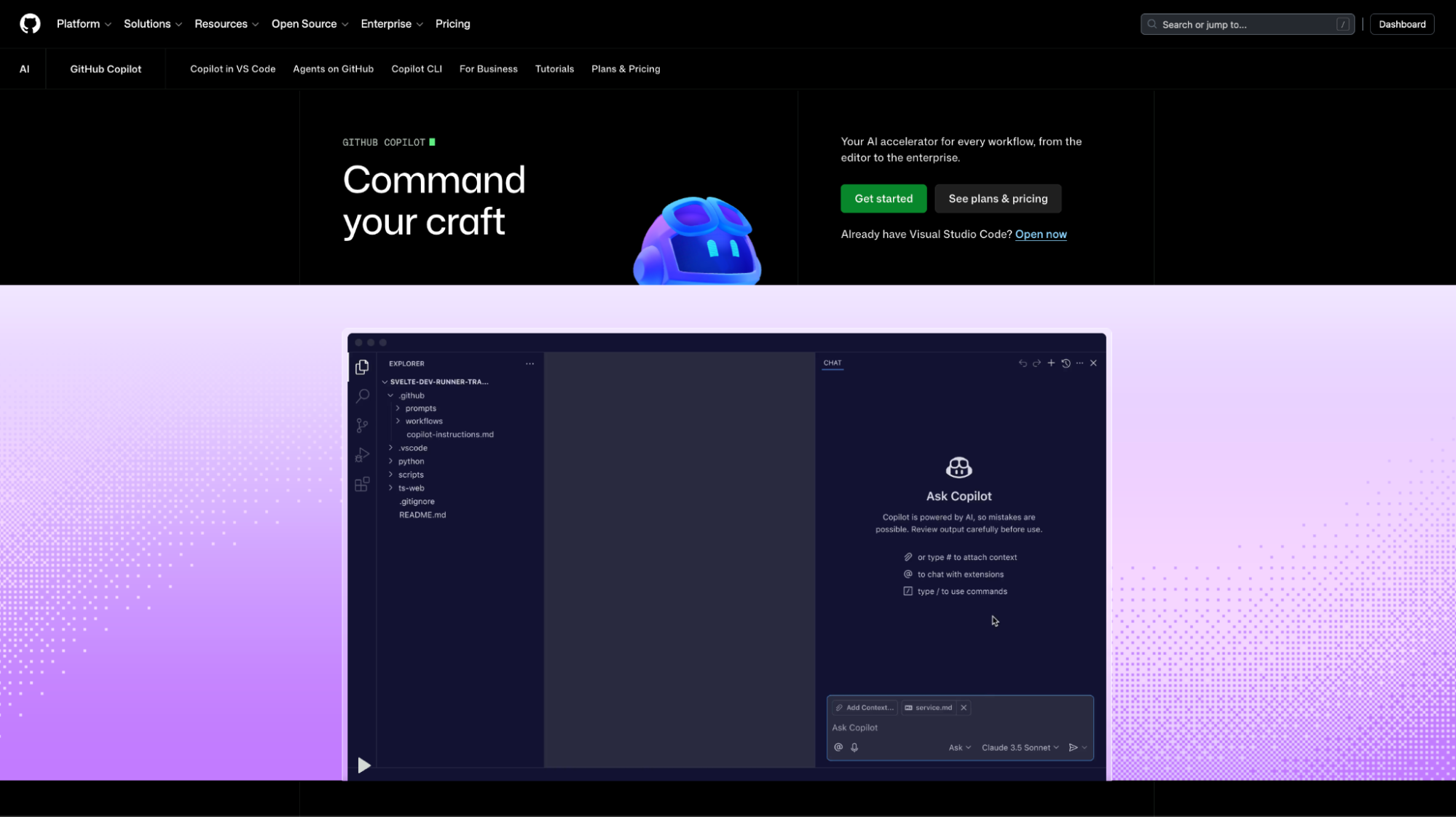
Best for: Individual developers and small teams who want AI completions and chat inside VS Code or JetBrains without switching editors, changing tools, or adding configuration.
How GitHub Copilot Works
GitHub Copilot is developed by GitHub in partnership with OpenAI. Copilot installs as a single extension in VS Code, JetBrains, Neovim, or GitHub’s web editor and generates inline suggestions immediately after installation. Copilot supports more than 20 programming languages and adapts to framework conventions without requiring language-specific configuration.
GitHub Copilot generates suggestions from the files currently open in the editor and the recent context within the session. Copilot does not retrieve from the full repository, commit history, or documentation by default. GitHub Copilot Enterprise adds internal knowledge bases that can be indexed on a team’s documentation, improving the relevance of suggestions for teams with specialized or proprietary codebases.
GitHub Copilot for Business and Enterprise also adds pull request summaries, code walk-throughs, and policy controls at the organization level. These capabilities make Copilot’s highest tier more relevant for teams that want AI assistance extended slightly into the PR workflow, though the core product remains editor-focused.
Why Teams Choose GitHub Copilot
- Zero-configuration setup activates within minutes; no repository indexing, server setup, or integration configuration is required before first use.
- GitHub ecosystem integration: Enterprise tier adds PR summaries, code walk-throughs, and GitHub Actions integration without switching tools or adding new platforms.
- Wide language coverage: supports Python, TypeScript, Java, Go, Ruby, Rust, C#, C++, and more without language-specific configuration.
GitHub Copilot’s Limitations
- Context is limited to open files and does not retrieve from the full repository by default; cross-file accuracy drops without manual context expansion.
- No org-level standards enforcement; suggestions follow general conventions, not team-specific naming patterns, architectural rules, or compliance requirements.
- Cloud-only deployment; no on-premises or air-gapped option; teams with strict data residency requirements cannot use GitHub Copilot.
Pricing
| Plan | Price | Included |
| Free | $0 | Basic AI coding features for individuals |
| Pro | $10/user/month | Advanced completions, chat |
| Business | $19/user/month | Team policy controls, license management |
| Enterprise | $39/user/month | Knowledge bases, PR summaries, enhanced security |
2. Cursor
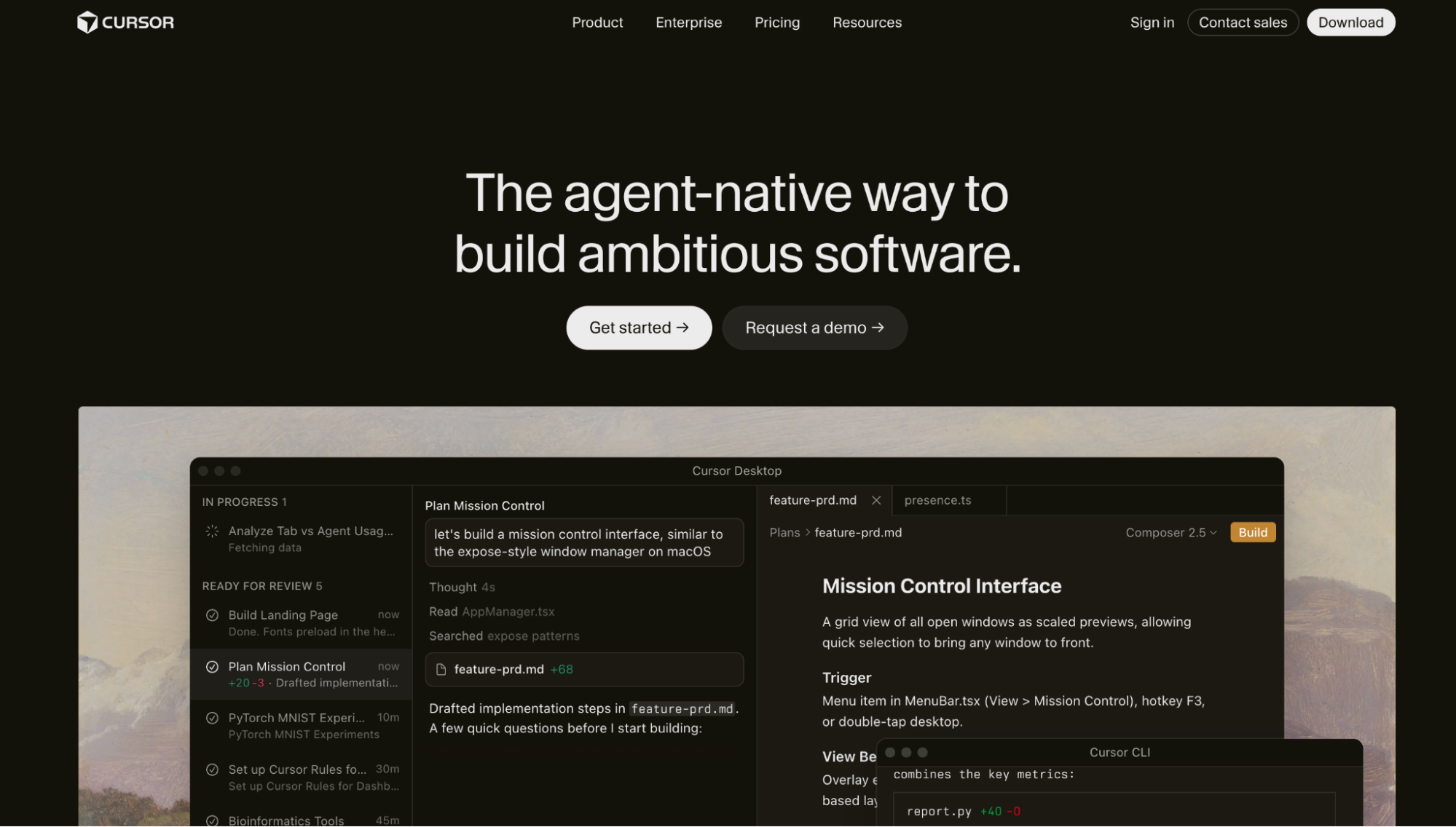
Best for: Individual developers who want a lightweight, standalone AI editor with integrated chat and minimal setup, and who do not require enterprise governance features or structured feature planning.
How Cursor Works
Cursor is a standalone AI code editor built on VS Code’s foundation. Cursor ships with real-time inline completions, an integrated chat assistant, and terminal AI access inside a single editor window. Cursor installs in minutes and starts generating suggestions without a repository indexing step or credential configuration beyond account login.
Cursor’s completions use the same model selection as other AI editors, including GPT-4o, Claude Sonnet, and Gemini variants, with GitHub Copilot integration available as an add-on for teams that want dual-suggestion coverage. Context defaults to the files currently open in the editor. Cursor supports manual context expansion using @file and @folder commands to include specific files or directories in the generation context.
Why Developers Choose Cursor
- Minimal setup: installs as a self-contained application; no repository indexing, server setup, or integration configuration before first use.
- Chat, completions, and a terminal in one window: all three surfaces are combined, removing the need to switch between a plugin, a separate chat interface, and a terminal.
- Lowest individual cost: Pro plan at $20/month includes unlimited completions and 500 premium model requests.
Cursor’s Limitations
- No cross-file context by default; requires @file or @folder commands to include files outside the current view; accuracy drops in multi-service or large codebases without manual scoping.
- No enterprise governance, no RBAC, audit logs, private model hosting, org-level policy enforcement, or on-premises deployment.
- No PR or CI integration; operates inside the editor only; does not connect to pull request workflows or CI pipelines.
Pricing
| Plan | Price | Included |
| Hobby | $0 | 200 completions, 50 requests/month |
| Pro | $20/user/month | Unlimited completions, 500 premium requests |
| Business | $40/user/month | All Pro features + centralized billing, SSO |
3. Kiro
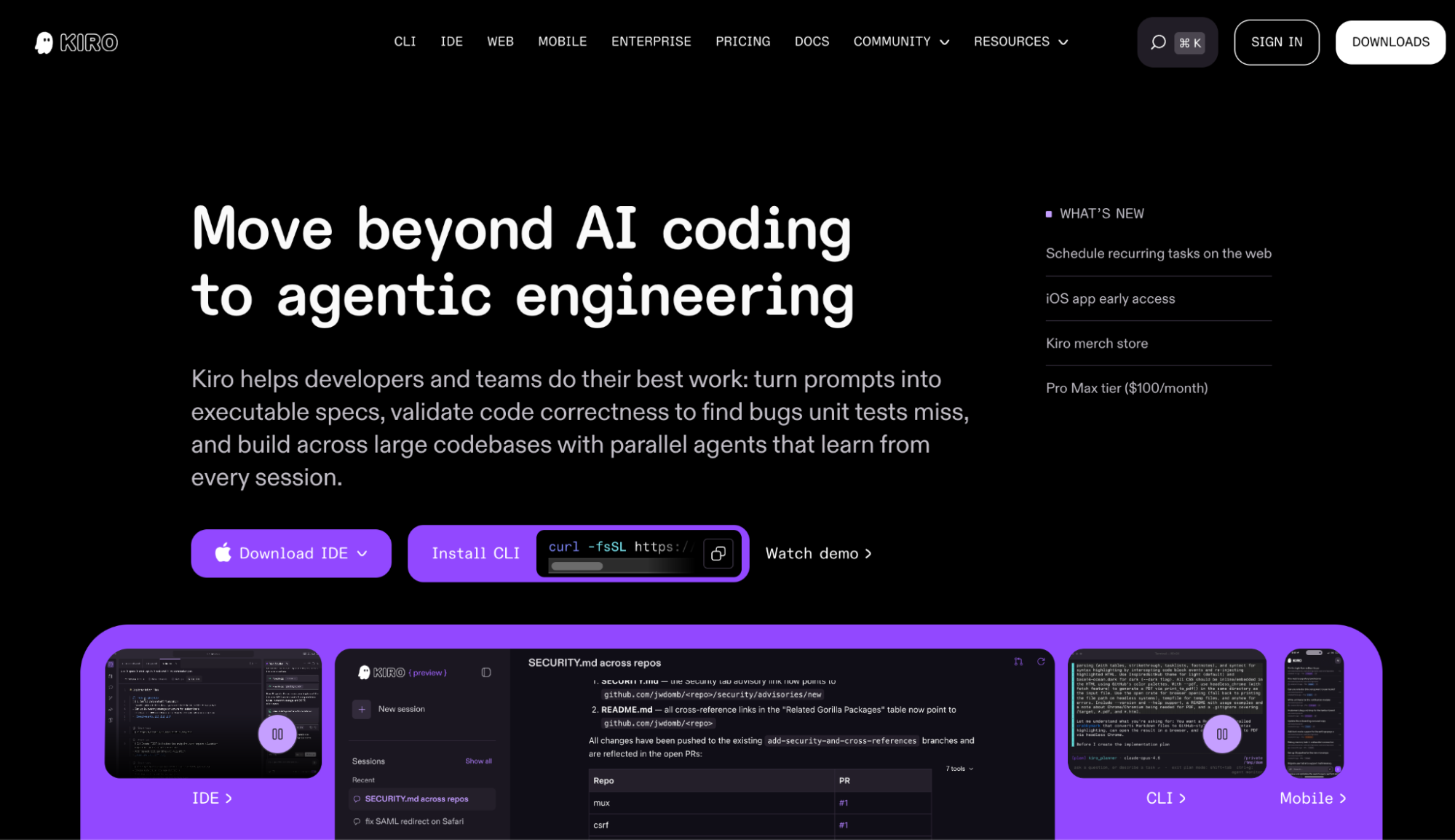
Best for: Engineering teams that need structured feature development, turning prompts into executable specifications before writing code, with property-based correctness testing, parallel agent execution, and enterprise controls backed by AWS infrastructure.
How Kiro’s Spec-Driven Development Works
Kiro is an agentic IDE built and operated by AWS. Kiro is positioned around moving beyond ad hoc AI coding into what the product calls agentic engineering, structured, spec-driven development, where requirements and design are documented before implementation begins. Kiro runs across four surfaces: an IDE, a CLI, a web interface, and mobile, with steering files and learned context shared across all four.
Kiro is based on Code OSS and supports Open VSX extensions, VS Code settings, themes, and keybindings. Developers migrating from Windsurf or VS Code can import their existing settings, themes, and compatible plugins during the Kiro onboarding flow.
Kiro’s primary differentiator is the Specs system. When a developer describes a feature or bug fix, Kiro generates three structured artifacts before writing any code: a requirements.md file with user stories and acceptance criteria, a design.md file with technical architecture, sequence diagrams, and tasks.md file with discrete, sequenced implementation tasks. The spec structure documents the reasoning behind implementation decisions, giving teams a traceable record that persists beyond the immediate session.

Why Teams Choose Kiro
- Spec-driven development translates a prompt into requirements, design docs, and sequenced tasks before code is written; it creates a traceable record of implementation decisions for the team.
- Property-based correctness testing generates tests that verify code properties across all inputs, catching edge cases that pass unit tests but fail under real-world conditions.
- Parallel task execution builds a dependency graph from spec tasks and runs independent ones concurrently; trigger everything with a single Run All Tasks command.
- Hooks for workflow automation define triggers that run background tasks automatically, such as updating docs on code change or running tests on file save.
- AWS enterprise backing includes IAM authentication, SAML/SCIM SSO, usage dashboards, cost controls, IP indemnity, governance controls, and AWS GovCloud availability for regulated industries.
- ACP compatibility supports the Agent Client Protocol; Devin, Codex, Claude Agent, and custom in-house agents run inside Kiro alongside the native agent.
- Auto model selection: Auto mode picks the best model per task by complexity, latency, and cost; developers can also specify Claude Opus 4.8, Sonnet 4.6, DeepSeek v3.2, and others explicitly.
Kiro’s Limitations
- Credit-based pricing requires usage estimation; simple prompts cost under one credit; complex spec tasks cost more. Teams must choose a tier based on estimated volume and pay $0.04 per overage credit.
- Spec workflow has a learning curve; the three-phase requirements-design-tasks structure adds upfront steps that slow down quick exploratory edits or simple one-line changes.
- Standalone IDE required, not an extension for VS Code or JetBrains; specs, Hooks, and parallel task execution are only accessible inside the Kiro editor.
Pricing
| Plan | Price | Credits/month | Notes |
| Free | $0 | 50 | Claude Sonnet 4.5 + open weight models |
| Pro | $20/user/month | 1,000 | Premium models incl. Claude Opus 4.8 |
| Pro+ | $40/user/month | 2,000 | Premium models |
| Pro Max | $100/user/month | 5,000 | Premium models |
| Power | $200/user/month | 10,000 | Premium models |
| Team plans | Same per-user tiers | Same | Adds consolidated billing, SSO, usage analytics, and enterprise security |
| Enterprise | Custom | Custom | Contact AWS sales |
All paid plans allow overage at $0.04 per additional credit. Credits do not roll over month to month.
Windsurf Alternatives: Side-by-Side Feature and Pricing Comparison
| Feature | GitHub Copilot | Cursor | Kiro |
| Primary purpose | AI completions inside the existing editor | Standalone AI code editor | Agentic IDE with spec-driven development |
| Spec-driven workflow | Not available | Not available | Available, requirements, design, tasks |
| Property-based correctness testing | Not available | Not available | Available catches edge cases that nit tests miss |
| Parallel task execution | Not available | Not available | Available, dependency graph-based waves |
| Hooks/automation triggers | Not available | Not available | Available, background task automation |
| Context scope | Open files only | Open files + manual @file / @folder | Session context shared across IDE, CLI, and EB |
| IDE model | Extension in VS Code, JetBrains, Neovim | Standalone Cursor editor | Standalone Kiro IDE, Code OSS base |
| CLI support | Not available | Not available | Available, Kiro CLI |
| Web interface | Not available | Not available | Available, loud sandbox sessions |
| Mobile support | Not available | Not available | Available, early access |
| ACP compatibility | Not available | Not available | Available, runs alongside Devin, Codex, and Claude Agent |
| MCP server support | Not available | Not available | Available |
| Enterprise SSO | GitHub Enterprise org settings | Business plan | SAML / SCIM via AWS IAM Identity Center |
| GovCloud / on-premise | Not available | Not available | Available AWS GovCloud regions |
| Usage dashboards | Limited | Not available | Available, with team plans |
| IP indemnity | Available | Not available | Available |
| Models supported | GPT-4o, Claude, Gemini | GPT-4o, Claude, Gemini | Claude Opus 4.8, Sonnet 4.6, DeepSeek v3.2, Auto |
| Free tier | Yes, basic features | Yes, 200 completions, 50 requests | Yes, 50 credits |
| Entry paid tier | $10/user/month | $20/user/month | $20/user/month |
| Team/enterprise tier | $39/user/month (Enterprise) | $40/user/month (Business) | Custom via AWS sales |
| Pricing model | Per seat | Per seat | Credit-based with prepaid overage |
Which Windsurf Alternative Should You Use?
| Tool | Best Buyer Profile | Primary Strength | Primary Limitation |
| GitHub Copilot | Individual devs and small teams staying in VS Code or JetBrains | Zero-setup completions, deep GitHub ecosystem integration | Open-file context only, no on-prem, no policy enforcement |
| Cursor | Solo developers and side projects needing fast AI in a lightweight editor | Minimal install, integrated chat and terminal, $20/month Pro | No governance, no PR/CI integration, manual cross-file scoping |
| Kiro | Teams building complex features need structure, correctness validation, and AWS enterprise controls | Spec-driven development, property-based testing, parallel agents, GovCloud | Standalone IDE required, credit-based pricing, spec workflow learning curve |
Teams already in the GitHub ecosystem should evaluate GitHub Copilot first. GitHub Copilot requires no new tooling, works inside the editors teams already use, integrates with GitHub Actions and pull request workflows, and has the lowest adoption friction of the three alternatives.
Individual developers and solo engineers who want fast AI completions with the lowest setup overhead should use Cursor. Cursor installs in minutes, costs $20 per month on the Pro plan, and combines completions and chat in a single surface without requiring a repository configuration step.
Engineering teams building complex features that need structure before code generation, correctness validation beyond unit tests, or AWS-backed enterprise infrastructure should evaluate Kiro. Kiro’s spec-driven workflow is the clearest architectural difference from any other Windsurf alternative.
Teams in regulated industries or AWS-native organizations have an additional structural reason to choose Kiro over the alternatives.
Why Teams Add Qodo Alongside Their AI Coding Assistant
Picking a Windsurf alternative replaces the editor. It does not replace code review.
A developer using Cursor or Kiro can generate and commit code three to four times faster than writing by hand. The number of engineers reviewing that code stays the same. Each reviewer covers more PRs per sprint, with less time per diff, which is when regressions in shared services, naming convention violations, and broken cross-repo dependencies slip through undetected.
Qodo runs automatically on every PR the moment it is opened. It deploys specialized agents in parallel, one for regressions, one for breaking changes, one for rules violations, one for ticket compliance, and reviews against the full repository, not just the diff. The engineers who wrote the code in Copilot, Cursor, or Kiro do not need to change how they work. Qodo sits in the PR workflow and catches what the editor never saw.
What Qodo Does That No AI Coding Assistant Does
PR-native multi-agent review
Qodo’s Git plugin integrates with GitHub, GitLab, Bitbucket, and Azure DevOps and automatically triggers a review on every pull request. Qodo deploys specialized review agents in parallel on each PR: agents for critical issues, duplicated logic, breaking changes, ticket compliance, and rules enforcement. No manual trigger or reviewer assignment is required. Here is what Qodo’s review output looks like on a pull request from the dotnet/aspnetcore repository:
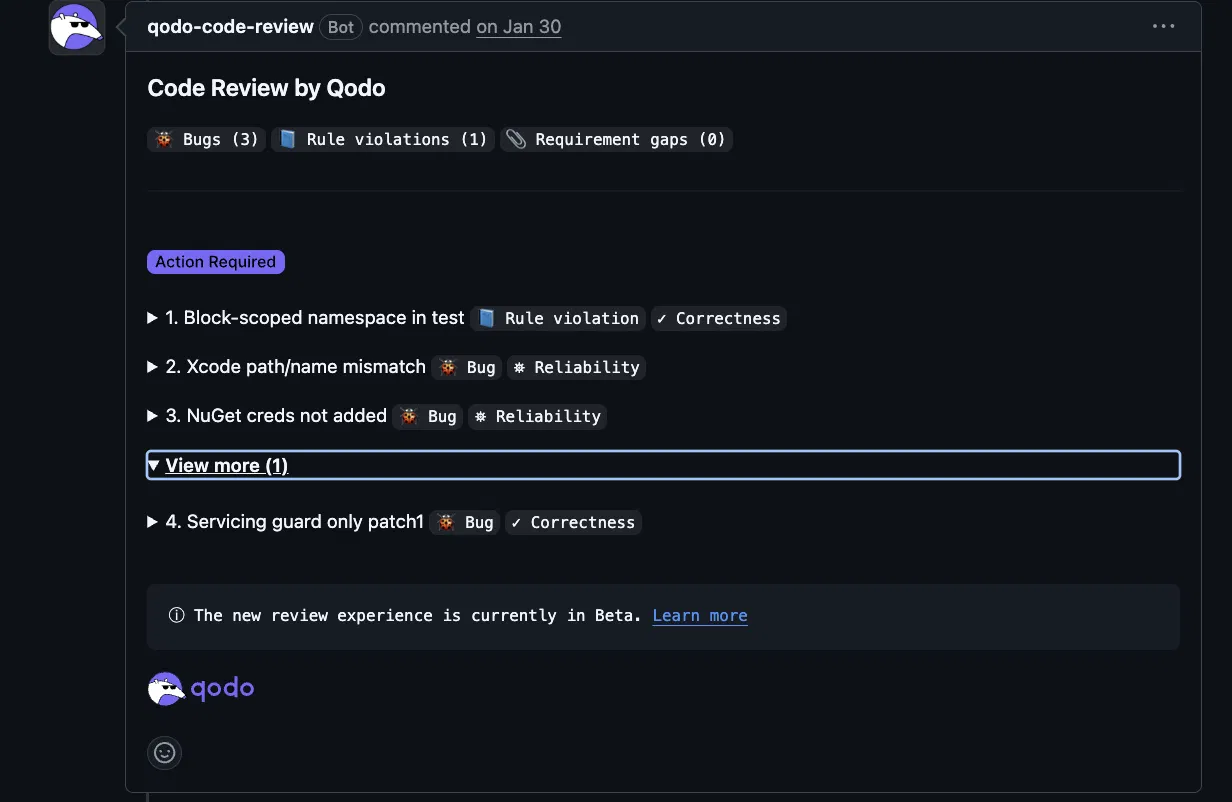
The summary header categorizes every finding by type: Bugs, Rule violations, and Requirement gaps, so engineers see severity and scope before reading a single inline comment.
Org-level rules with lifecycle management. Qodo’s rules system learns coding patterns from the codebase and PR history and surfaces rule suggestions automatically. Rules capture what good code looks like for a specific organization, not generic LLM defaults, and the same rules are exported to the Qodo IDE plugin, so developers see consistent guidance while writing code. Repeated reviewer comments become rule suggestions; violations and fixes feed back into whether existing rules are working or need refinement.
Full codebase and cross-repo context. Qodo’s Context Engine indexes the full repository using semantic vector analysis, cross-repo dependencies, and PR history, not just the current PR diff. This allows Qodo to detect architectural drift, breaking changes across service boundaries, and duplicated logic that a diff-only review cannot surface. Gartner ranked Qodo number one for code understanding.
The finding below shows what that cross-file analysis looks like in practice. Qodo caught a CI configuration inconsistency that a reviewer scanning only the changed line would likely miss:
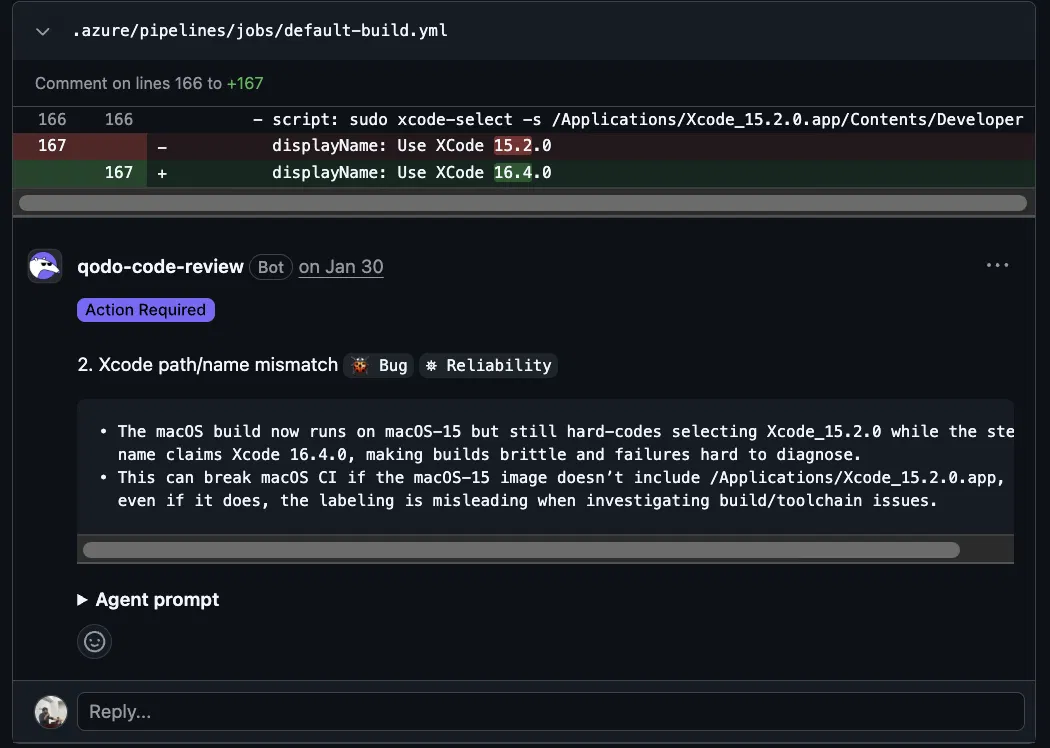
The Action Required badge, combined with the Reliability label, signals that this is a build-breaking inconsistency, not a style suggestion. The macOS CI agent will fail or produce misleading toolchain errors until the path and display name match the upgraded image.
A second finding from the same PR demonstrates the same depth of cross-functional analysis, this time in a shell script that registers new NuGet feeds without the corresponding credential injection:
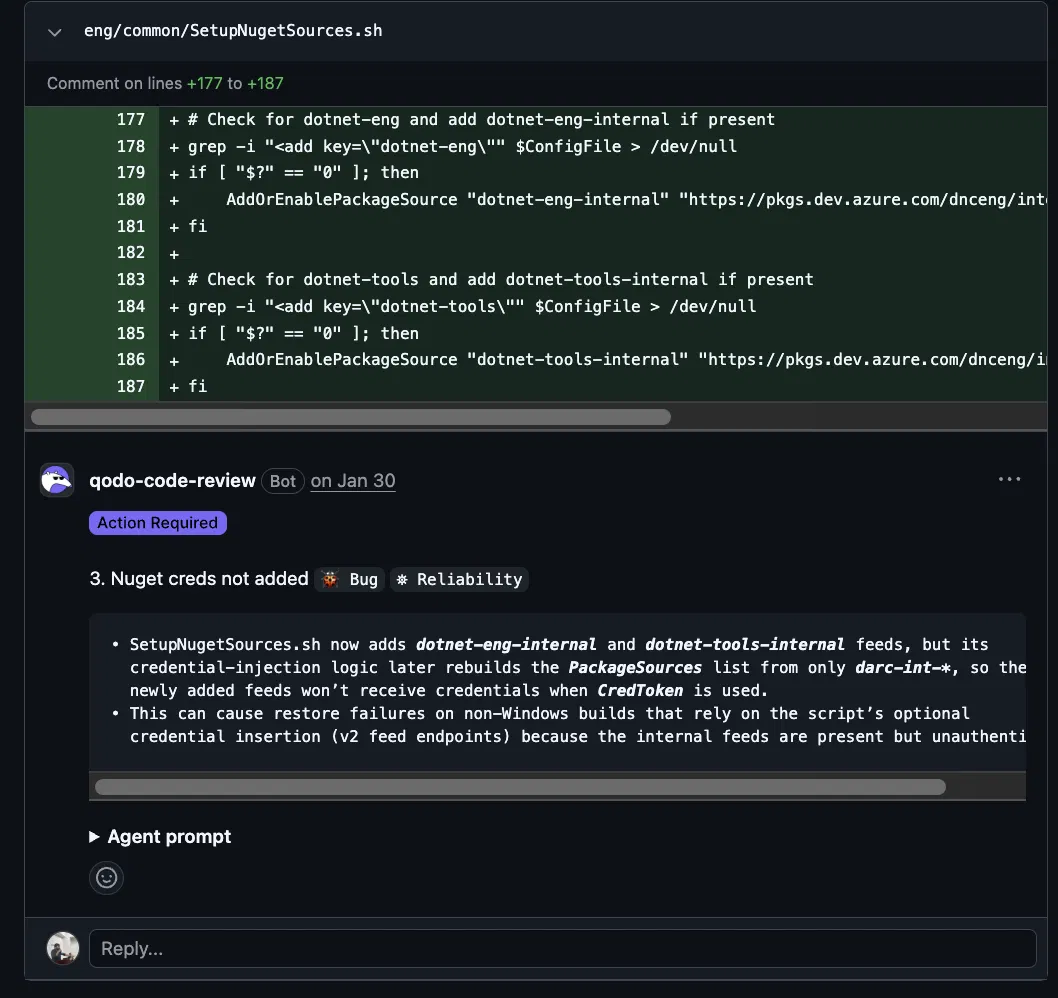
Qodo traced the registration logic and the credential loop independently, identified that the new feeds fall outside the loop’s scope, and flagged the restore failures that would follow a finding that requires understanding two separate code paths across the same file.
Enterprise deployment options. Qodo supports cloud SaaS, single-tenant cloud, on-premise, and air-gapped deployment with SOC 2 Type II compliance, BYOK, SSO/SAML, audit logs, and a governance analytics dashboard on the Enterprise plan.
How Qodo Works Alongside Any Windsurf Alternative
Developers write code in GitHub Copilot, Cursor, or Kiro. When a PR is opened, Qodo’s Git plugin automatically triggers its multi-agent review- no developer action required. Qodo delivers context-aware review comments, critical issue flags, and structured remediation with one-click resolution directly in the pull request interface.
The Qodo IDE plugin runs locally in VS Code and JetBrains, surfacing the same organization-specific coding standards while developers write code. The same rules that govern the PR review appear in the editor, so the feedback loop between writing and review is consistent across both surfaces, regardless of which AI coding assistant a developer uses. The IDE plugin exposes two distinct review workflows, one for uncommitted local changes before a commit is made, and one for committed changes already on an open branch:
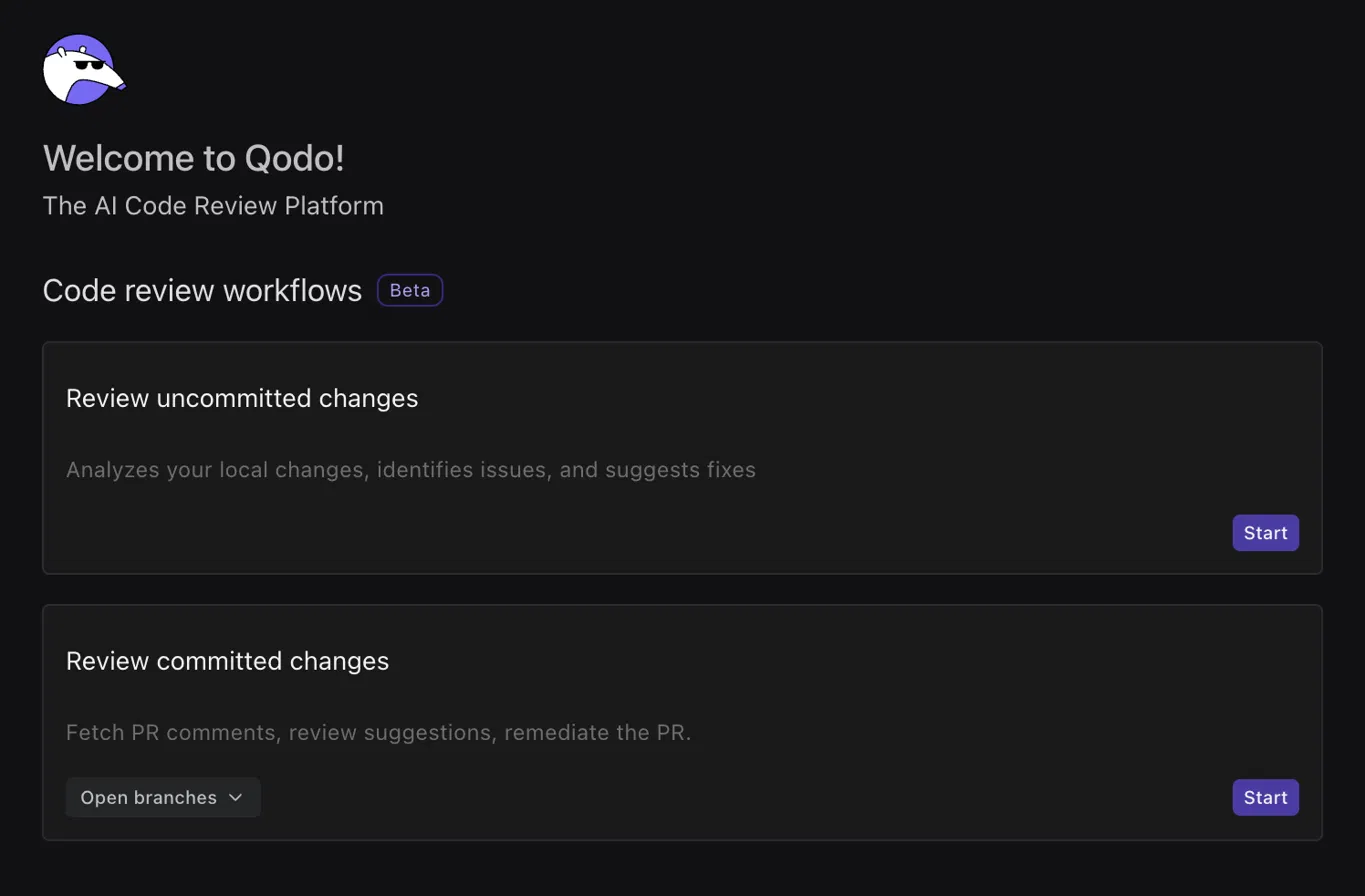
The Review committed changes workflow pulls existing PR comments and review suggestions directly into the developer’s local environment, so remediation happens inside the IDE without switching back to GitHub.
Qodo Pricing
Qodo prices on usage, not seats, $0.012/credit, pooled across the team, no rate limits, no annual commitment on Pro Team.
| Plan | Price | What’s Included |
| Trial | Free for 14 days | Full platform, unlimited reviews and credits, no credit card |
| Pro Team-Starter | $30/mo | 2,500 credits (~18 reviews/mo) |
| Pro Team-Standard | $60/mo | 5,000 credits (~36 reviews/mo) |
| Pro Team-Scale | $240/mo | 20,000 credits (~144 reviews/mo) |
| Pro Team-Larger packs | Custom | Up to ~1,200+ reviews/mo |
| Enterprise | Custom (30+ users) | Everything in Pro Team + SSO/SAML, audit logs, BYOK, cross-repo capabilities, governance analytics, single-tenant SaaS or on-prem, priority support, dedicated CSM |
Conclusion
Teams staying in VS Code or JetBrains with no tooling change should start with GitHub Copilot. Individual developers who want a standalone AI editor at the lowest cost should use Cursor. Teams building complex features that need documented requirements, correctness validation, and AWS enterprise controls should evaluate Kiro. All three increase the volume of code a developer can ship per sprint, which is exactly when unreviewed regressions, naming violations, and broken cross-repo dependencies start slipping through. Qodo runs on every PR regardless of which tool wrote the code, reviews against the full repository, and catches what diff-only review misses before anything merges.
FAQs
What happened to Windsurf?
Windsurf became Devin Desktop on June 2, 2026. Cognition, the company behind the Devin AI software engineer, which had acquired Windsurf’s founding team, relaunched the product as an agent fleet management platform with an Agent Command Center for dispatching and monitoring multiple local and cloud agents. Existing Windsurf users received Devin Desktop as an over-the-air update with no change to plan or pricing.
What is the best Windsurf alternative for individual developers?
Cursor is the most direct Windsurf alternative for individual developers who want fast AI completions in a standalone editor. Cursor installs without repository configuration, costs $20 per month at the Pro tier, and combines completions, chat, and terminal access in a single window. GitHub Copilot is the better option for developers who prefer to stay in VS Code or JetBrains without adopting a new editor.
What is the best Windsurf alternative for enterprise teams?
Kiro is the strongest Windsurf alternative for enterprise teams. Kiro is built and operated by AWS, supports SAML/SCIM SSO via AWS IAM Identity Center, is available in AWS GovCloud regions, includes usage dashboards and governance controls, and introduces spec-driven development that gives distributed teams a structured approach to AI-assisted feature work. GitHub Copilot Enterprise is the alternative for teams that prioritize staying inside the GitHub ecosystem with no tooling change.
What is Kiro, and how is it different from other Windsurf alternatives?
Kiro is an agentic IDE by AWS that introduces spec-driven development, converting prompts into structured requirements, design documents, and executable tasks before writing any code. GitHub Copilot and Cursor both generate code directly from a prompt. Kiro also adds property-based correctness testing, parallel task execution via dependency graphs, a Hooks system for workflow automation, and a multi-surface deployment model across IDE, CLI, web, and mobile.
Is Kiro’s spec-driven development different from vibe coding?
Spec-driven development in Kiro starts from a prompt like vibe coding, but generates structured artifacts, requirements, design, and tasks, before writing code. Vibe coding generates code immediately from a prompt without documented reasoning or structured planning. Kiro’s spec workflow is designed for complex features where tracking decisions, preventing regressions, and documenting intent for team review matter. Kiro’s documentation recommends using vibe mode for quick exploratory work and spec mode for features where structure and correctness matter.
Is Qodo a Windsurf alternative?
Qodo is not a Windsurf alternative. Windsurf, GitHub Copilot, Cursor, and Kiro are AI coding assistants that help developers write code inside an editor. Qodo is an AI Code Review Platform that runs in the pull request workflow and CI pipeline. It verifies whether code is correct, compliant with org-level standards, and safe to ship after it has been written. Many teams use a coding assistant for generation and Qodo for review.
Can I use Qodo with GitHub Copilot, Cursor, or Kiro?
Qodo is designed to work alongside any AI coding assistant. Qodo’s Git plugin integrates with GitHub, GitLab, Bitbucket, and Azure DevOps and automatically reviews every pull request, regardless of which tool wrote the code. Qodo’s IDE plugin for VS Code and JetBrains surfaces the same organization-specific coding standards while developers write, so feedback is consistent between the editor and the PR review.
How much does Kiro cost?
Kiro Free includes 50 credits per month with access to Claude Sonnet 4.5 and open weight models. Kiro Pro costs $20 per user per month with 1,000 credits and access to Claude Opus 4.8 and other premium models. Kiro Pro+ is $40 per month with 2,000 credits. Kiro Pro Max is $100 per month with 5,000 credits. Kiro Power is $200 per month with 10,000 credits. All paid plans allow overage at $0.04 per additional credit. Team plans at the same tiers add consolidated billing, SAML/SCIM SSO, usage analytics, and enterprise security controls.
What replaced Windsurf’s Cascade agent?
Devin Local replaced Cascade as the primary local agent in Devin Desktop. Cognition rebuilt Devin Local from scratch in Rust. Devin Local is described as up to 30% more token efficient than Cascade and supports subagents and modern agentic features. The legacy Cascade agent remained available through July 1, 2026, as a migration option for teams transitioning to Devin Desktop.
GitHub Copilot vs Cursor: which is better for switching from Windsurf?
GitHub Copilot is better for teams that want to stay in VS Code or JetBrains with no editor change, particularly teams already integrated with GitHub Actions and GitHub’s pull request workflow. Cursor is better for individual developers who prefer a standalone AI-first editor with integrated chat and a $20 per month price point. GitHub Copilot Enterprise adds PR summaries and knowledge base indexing at $39 per user per month. Cursor Business adds team features at $40 per user per month.
Does Kiro work with ACP-compatible agents like Devin?
Kiro supports the Agent Client Protocol (ACP), the same open-source protocol used by Devin Desktop. ACP-compatible agents, including Devin, Codex, Claude Agent, and OpenCode, can run inside Kiro alongside the native Kiro agent. Teams that want to test or run ACP-compatible agents across multiple environments can use Kiro as an ACP-compatible host alongside Devin Desktop.
About the author