Streamlining Open Source Code Reviews with the Qodo Chrome Extension

Open source development thrives on collaboration and the power of community-driven innovation. GitHub has become the cornerstone of this collaborative effort, enabling developers worldwide to contribute, review, and refine code together. However, the process of reviewing pull requests (PRs) is often complex and time-consuming, requiring deep context and an understanding of vast codebases. As open-source projects grow, so do the challenges associated with maintaining code quality and integrity. Here, tools like Qodo’s PR review agent come into play, simplifying and enhancing the PR review process.
The importance of PR Reviews in open source projects
PR reviews are the backbone of open-source development, and choosing the right open source code review tools is what makes them scalable. They serve as a critical checkpoint where code changes are scrutinized, feedback is provided, and potential issues are identified before merging. In large projects, this process ensures that new contributions align with the project’s standards and do not introduce bugs or vulnerabilities. However, the sheer volume of PRs in popular repositories can overwhelm maintainers, making it difficult to provide thorough reviews consistently. Automating and streamlining this process can significantly reduce the burden on maintainers while maintaining high code quality.
Qodo’s PR review agent: enhancing code reviews without leaving GitHub
In 2023, Qodo developed and launched its PR review agent, a powerful tool designed to streamline the PR review process, and later released it as a free Chrome extension for open source repos on GitHub. With a feature-rich chat interface directly in the GitHub environment, developers could use the Chrome extension to analyze pull requests, automate reviews, highlight changes, suggest improvements and ensure code changes adhere to best practices. The AI-powered feedback provided by the agent helps reviewers and contributors alike to navigate complex code changes more efficiently.
Whether managing a large enterprise codebase or a smaller, sensitive project, Qodo facilitates efficient and thorough code reviews, maintaining high standards of code quality and security across all types of repositories.
How did the Chrome extension work?
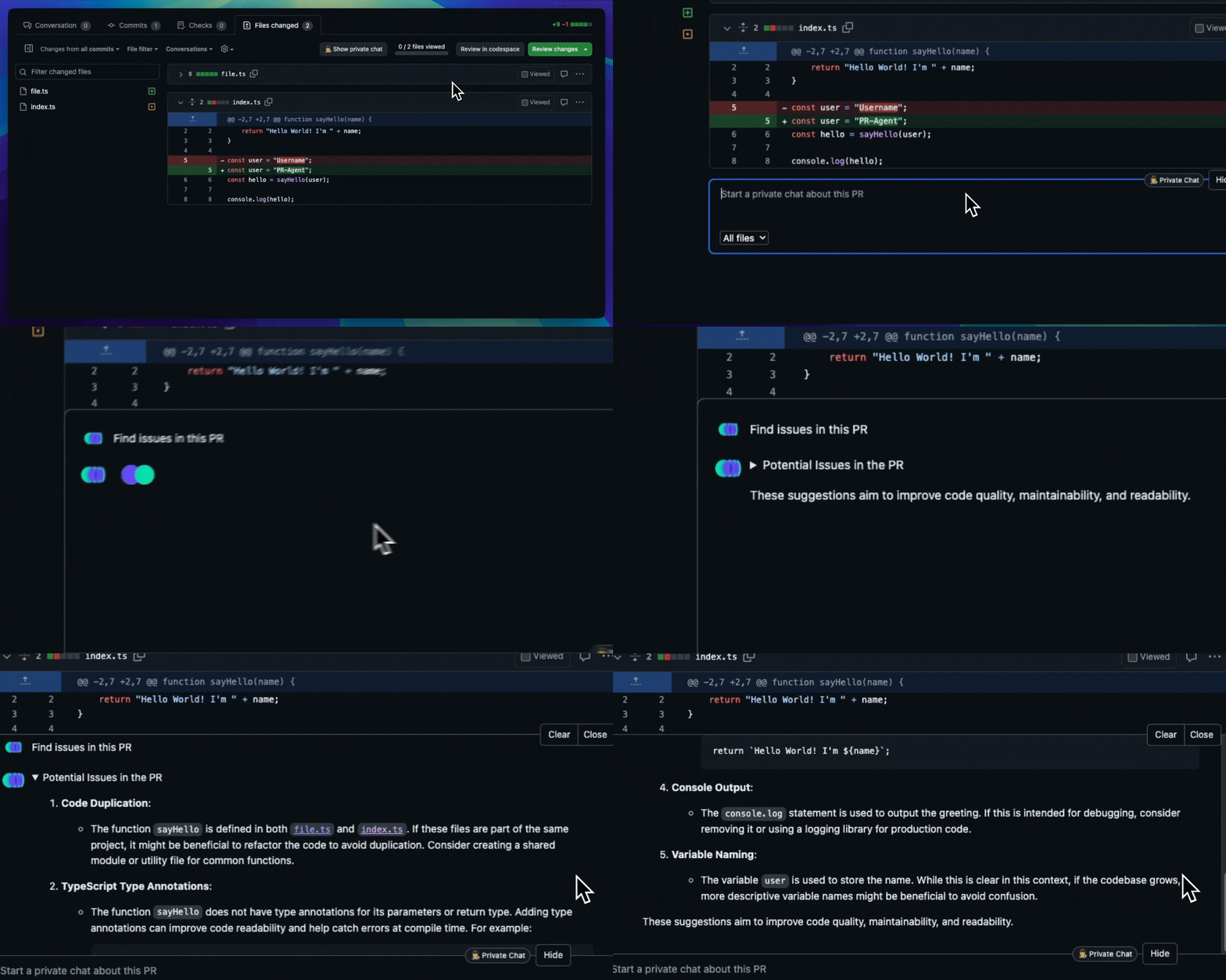
Once installed, the Chrome extension added chat boxes in both the conversation and file-changed tabs in a GitHub repo. These chat boxes serve as a coding assistant, where you can ask questions about specific code modifications and receive insights into how these changes impact the overall project. The chat sessions in the file-changed tab are private, and not visible to other users.
Keeping Your Code Safe
Security is a top priority for Qodo, and the PR review agent was designed with this in mind. The extension does not send code to external services, and all interactions are handled locally within the GitHub environment. Additionally, chats are not saved, ensuring that code and conversations remain private and secure.
What the Chrome extension offered
Qodo offers many features designed to enhance and streamline the PR review process on GitHub. These features, accessible through an intuitive chat box embedded within each PR, are tailored to meet the needs of developers who want to improve the quality, security, and efficiency of their code. Here’s a breakdown of the key functionalities:
Chat: get clarifications and answers about the PR
The embedded chat within the file-changed tab allows developers to ask specific questions about the PR, based on the code changes. The chat is private and only visible to the user, and operates as a threaded conversation, enabling users to ask follow-up questions. Whether you’re unsure about a particular implementation or need clarification on the impact of a change, Qodo provides context-aware answers that help resolve uncertainties. This feature is particularly useful for developers who want to ensure that their code aligns with the project’s standards and goals before it’s merged.
Describe: generate a comprehensive PR description
Creating a well-structured PR description is crucial for facilitating smooth code reviews. Qodo’s /agentic_describe command automates this process by generating a detailed description for your PR. It includes a suggested title, type, summary, and a step-by-step walkthrough of the code changes. Additionally, the tool recommends labels, helping to categorize and prioritize the PR effectively. This feature ensures that all relevant information is communicated clearly, making it easier for reviewers to understand the purpose and scope of the changes.
Review: automated feedback for PR quality and security
Qodo’s automated review provides feedback on your PR, focusing on potential issues that may affect the code’s quality or security. This includes identifying possible bugs, vulnerabilities, and areas where the code may not follow best practices. By highlighting these concerns early in the review process, Qodo helps developers address them before the code is merged, reducing the likelihood of introducing errors or security flaws into the project.
Improve: receive suggestions for code enhancement
With the /agentic_review command, Qodo goes beyond simple code review by offering actionable suggestions to enhance your code. This includes recommendations for optimizing code efficiency, adhering to best practices, and addressing potential issues that might have been overlooked. The AI-powered tool analyzes your code and suggests refinements that can make it more robust, maintainable, and performant.
How to Get Started
About the author