Claude Code Alternatives: Agentic Execution, Local Dev, and the Review Layer Your AI Stack Is Missing

TL;DR
- Claude Code is a prompt-driven, cloud-only assistant designed for tasks such as explaining functions or generating code snippets. It works well for individual use, but it stops at interaction; there’s no agent reuse, no CI/CD integration, and no execution in your local environment.
- The limitation shows up when you move to team workflows. Code isn’t just generated; it needs to be reviewed, validated, and executed consistently across pull requests, pipelines, and services, where prompt-by-prompt interaction doesn’t scale.
- Goose runs fully local with persistent sessions and offline support. Kiro translates natural language into AWS, Docker, and Kubernetes commands directly in the terminal. OpenAI Codex acts as an AI pair programmer, helping generate, debug, and automate code across development workflows. Goose, Kiro, and Codex all answer the same question: how do you generate or execute code faster. None of them answer what happens after the code is written.
- Qodo is the AI Code Review Platform that sits on top of every code generation tool, catching bugs, contract violations, security gaps, and coverage gaps on every PR, regardless of which tool authored the code.
- This guide breaks down how each tool operates in real workflows, where they fit across CI/CD pipelines, local development, and AWS environments, and how to choose based on how your team builds and ships.
I’ve been using Claude Code in a team setting as an SDE2 for the past few months; most of that time has been spent on PR reviews, service integrations, and debugging across a shared codebase.
Claude Code handles multi-step tasks, navigates large codebases, and executes workflows that would otherwise take hours. But the more we relied on it for team workflows, the more one gap became visible: Claude Code doesn’t verify what it produces.
Claude Code generates and modifies code. What it doesn’t do is ensure that code aligns with your architecture, meets your coverage thresholds, or is actually safe to merge into a shared main branch. That gap compounds when AI is authoring 30–40% of your commits, every unreviewed pattern gets replicated across the next ten PRs that follow the same scaffold. At that point, the question isn’t “how do we generate code faster?”, that’s largely solved.
The questions now become:
- How do you ensure generated code follows your standards across every PR, not just the ones a senior engineer reviews?
- How do you catch contract violations between services before they surface in integration testing?
- How do you enforce security and architectural rules before code reaches production?
- How do you run these checks continuously, triggered by CI rather than manually by a developer?
The bottleneck shifts from generation to validation and governance. Most tools in the “Claude Code alternatives” category focus on improving generation, better UX, different models, and faster completions. This post focuses on a different layer: tools that enforce what gets shipped, not just what gets written.
When to Look for a Claude Code Alternative
The gaps in Claude Code’s execution model become blockers in specific engineering environments. Here are three conditions where switching or supplementing it makes technical sense:
1. Multiple model backends are part of your workflow
If your team routes different tasks across models, for example, using Anthropic models for reasoning-heavy code changes, Google Gemini for latency-sensitive endpoints, and open-source models (like Llama or Mistral) for internal or on-prem workloads, Claude Code’s restriction to the Claude model family forces you to maintain separate tooling paths for each of those workflows.
2. Integrated code validation is required
Claude Code generates and explains code, but it doesn’t execute validation layers such as test coverage enforcement, static analysis (e.g., type checks, linters), or repository-level policies (security rules, architectural constraints). Teams that rely on these guarantees have to run them downstream in CI or as separate pipeline steps, rather than as part of the generation workflow itself.
3. Cost structure and execution model matter
Teams automating high-frequency workflows, such as running PR review agents, regression checks, or refactoring passes across dozens of pull requests per day, encounter unbounded per-request costs with cloud-only execution. Tools that support local models or infrastructure-based execution shift this into a predictable compute cost tied to your own environment.
Only 28% of developers report being confident in AI-generated code (Qodo Report). As a result, teams are adding local execution, CI-triggered enforcement, and model-level flexibility into their toolchains instead of relying on a single interactive coding agent.
Tools like Qodo’s CLI pl expose agents as CLI commands or webhook-triggered services; Goose CLI runs agent workflows locally with open-weight models; Amazon Q CLI maps natural language instructions directly into AWS operations, each addressing a specific limitation in Claude Code’s execution model.

Quick Comparison of Claude Code Alternatives in 2026
If you’re deciding whether to stick with Claude Code or switch to a CLI tool, here’s a side-by-side breakdown that highlights what each tool is designed for and where it fits best.
| Feature | Claude Code | Qodo | OpenAI Codex CLI | Goose | CLI |
| Category | Prompt-driven coding assistant | AI Code Review Platform | Agentic terminal coding agent | Local-first session agent | Session-based terminal agent |
| What it does | Generates and explains code on demand | Runs automated, context-aware PR review via the Review Agent Suite, enforces coding policies, and continuously learns from your codebase and PR history | Executes agentic coding tasks locally with OS-level sandboxing | Runs persistent local dev sessions with full tool access | Multi-step local dev sessions with Git-aware context and team convention enforcement |
| Pricing Model | Pro: $17/mo (annual) or $20/mo (monthly) | Free 14-day trial, Pro Teams from $30/month & Enterprise Plan built for 30+ users | Free with ChatGPT Plus, Pro, Business, Edu, Enterprise | Free + model API costs | Free: 50 credits/mo; Pro: $20/mo |
| Local Execution | No (cloud-only) | Runs locally, optional web UI | Yes, sandboxed to working directory | Fully local; offline with Ollama | Local sessions; model inference via hosted APIs |
| Custom Agents | Supports subagents for task-specific workflows | Review agent suite with 15+ agentic review workflows, PR review, rules enforcement, breaking changes, ticket compliance, triggered automatically on every PR | Approval-gated agentic execution; codex exec for CI | Agents with configurable tools and persistent session context | Custom agents with pre-approved tool access per workflow |
| Standards enforcement | None | Enforceable rules with auto-discovery, lifecycle management (Discover, Measure, Evolve), and continuous learning from PR history | None | None | Steering files per repo |
| Model Flexibility | Claude only (Sonnet, Opus, Haiku) | Claude, GPT-4, Gemini, Mistral, local, swappable at runtime | GPT-5.x, Ollama-compatible local models | Claude, GPT, Gemini, LLaMA, Mistral via 20+ backends | Sonnet 4.5 (Auto), Sonnet 4, Haiku 4.5, Opus 4.6 |
| Best Fit | One-off tasks | Teams generating code at pace who need consistent review, governance, and enforcement on every PR, not just the ones a senior engineer gets to know. | Agentic local execution and CI automation | Offline automation, persistent local sessions | Multi-step local dev, team-convention enforcement
|
1. Qodo
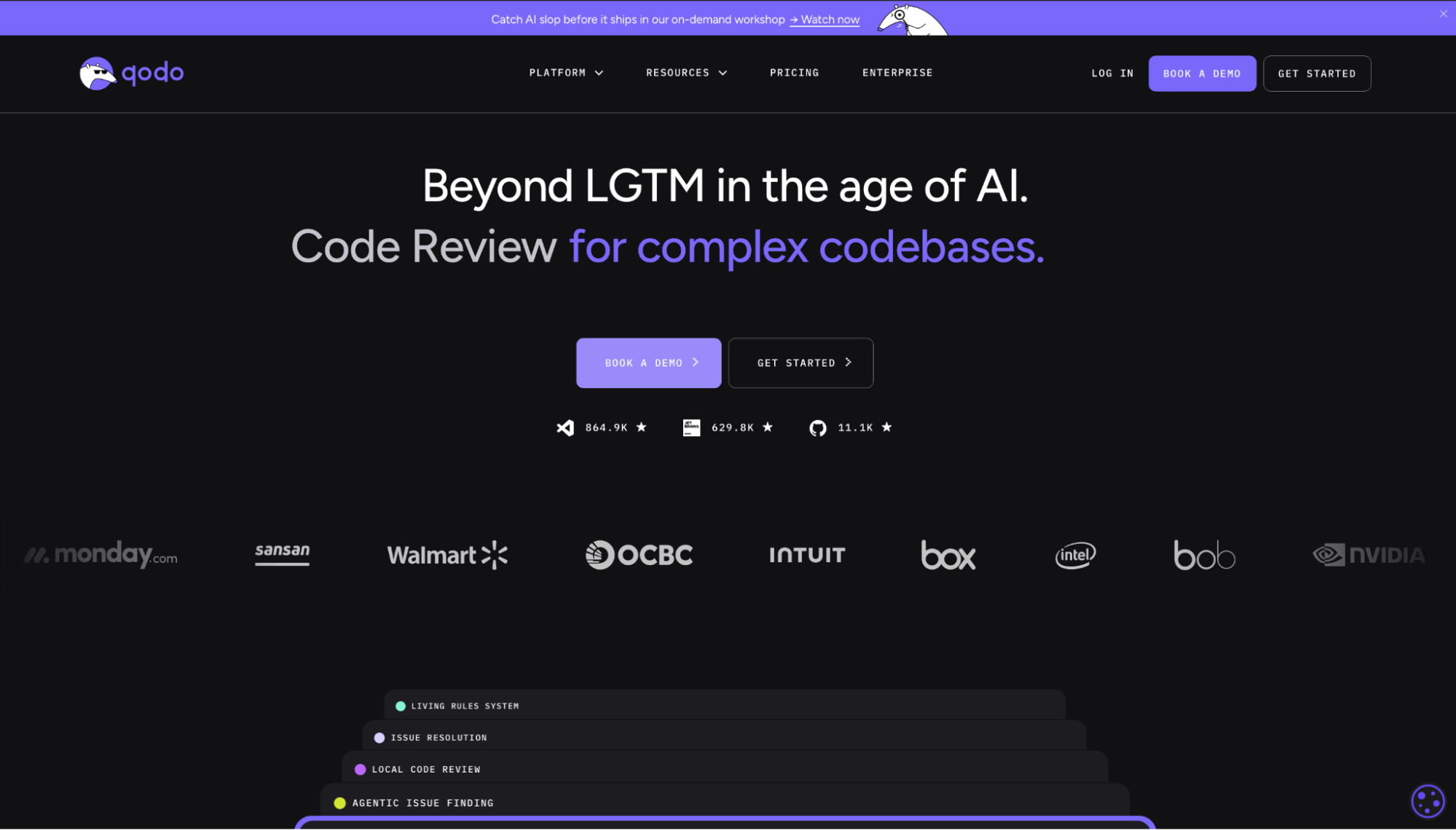
Qodo is the AI Code Review Platform, the missing quality layer in your AI stack. While Claude Code generates code through prompt-driven workflows, Qodo operates on a different layer: continuous validation and enforcement across every change in your codebase.
As AI-generated code flows through production PRs, the failure modes shift, including broken service contracts, missing test coverage, security gaps, and architectural drift. These aren’t caught during generation. They surface in CI, staging, or production. Qodo turns code review from a manual step into an automated system that runs on every PR, independent of who reviews it.
It operates across the full SDLC, flagging issues in the IDE before they reach a PR, running context-aware review on every merge request in Git, and enforcing validation in CI/CD to block unsafe changes. The result we get is that the same validation logic runs on every PR, not just the ones a senior engineer gets to.
Key Features
With Qodo’s CLI Plugin, each review agent is a YAML file checked into the repo that defines the task, the model to invoke, and the tools it can access (git diffs, shell output, filesystem). Agents trigger on PRs, commits, or pipelines, not on user prompts. Switch between Claude, Gemini, Mistral, or local LLMs at runtime without touching the agent definition.
Common agents teams run:
- Critical Issues Agent: Detects real bugs, security vulnerabilities, and runtime risks, beyond what linting catches.
- Breaking Changes Agent: Surfaces cross-dependency impact before a merge breaks another service.
- Duplicated Logic Agent: Catches repeated patterns and copy-paste code across the codebase.
- Ticket Compliance Agent: Verifies the PR actually matches the requirements in the linked ticket.
- Rules Enforcement Agent: Applies your team’s coding standards, auto-discovered from your codebase and PR history, on every merge.
Hands-On: Running a Real Codebase Audit on Orderflow
I ran Qodo against a small TypeScript microservice project named Orderflow, built specifically to demonstrate common production gaps in early-stage backends. It has an API gateway, an auth service, an order service, and a payment client. The usual at an early-stage backend. From the repo:
cd orderflow

qodo --ui
Then it launched a web app running on http://localhost:3000 as shown in the snbapshot below:
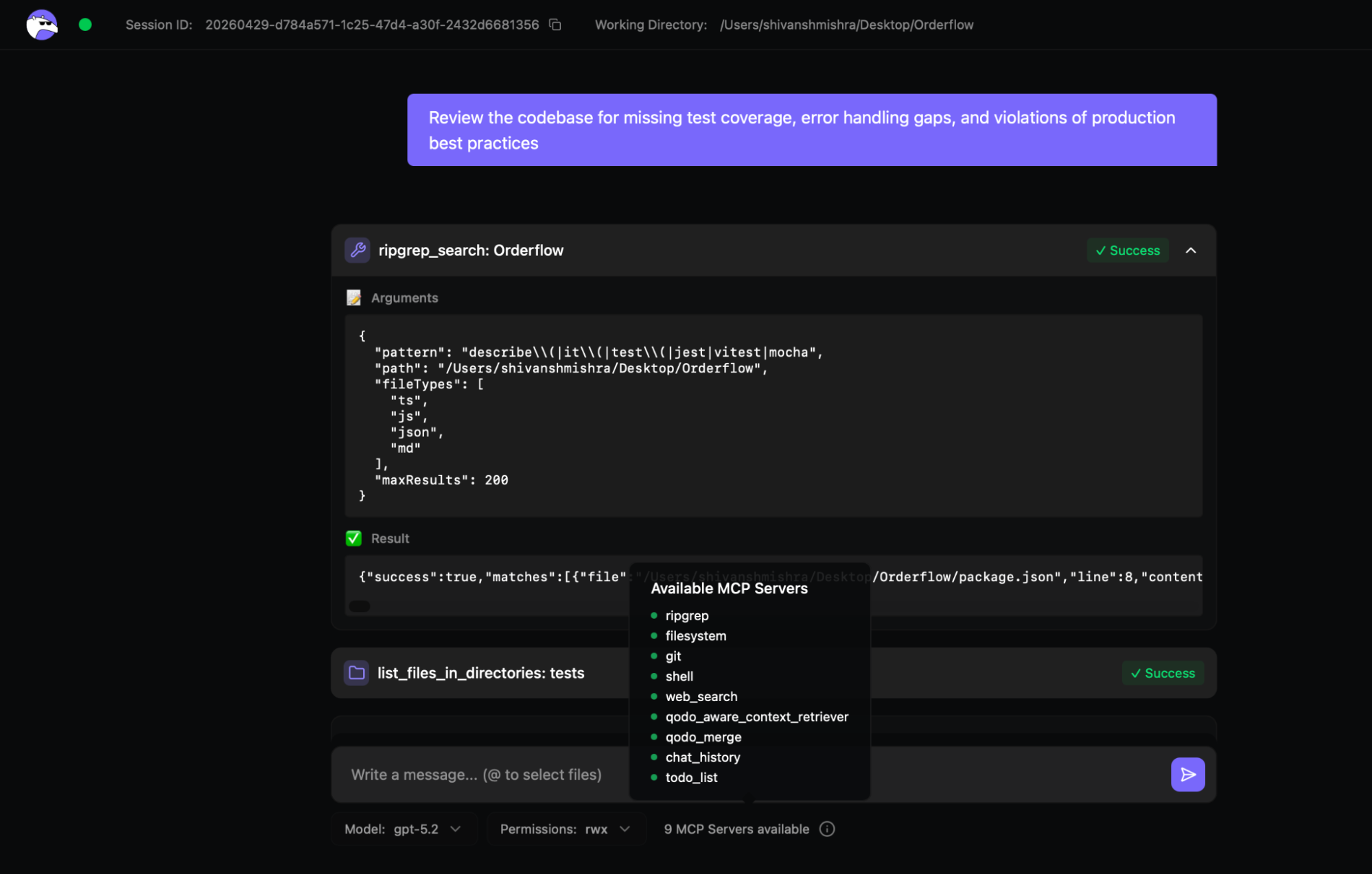
In the UI, I gave it a single prompt:
"Review the codebase for missing test coverage, error handling gaps, and violations of production best practices."
First thing it picked up immediately, there’s basically no test coverage:
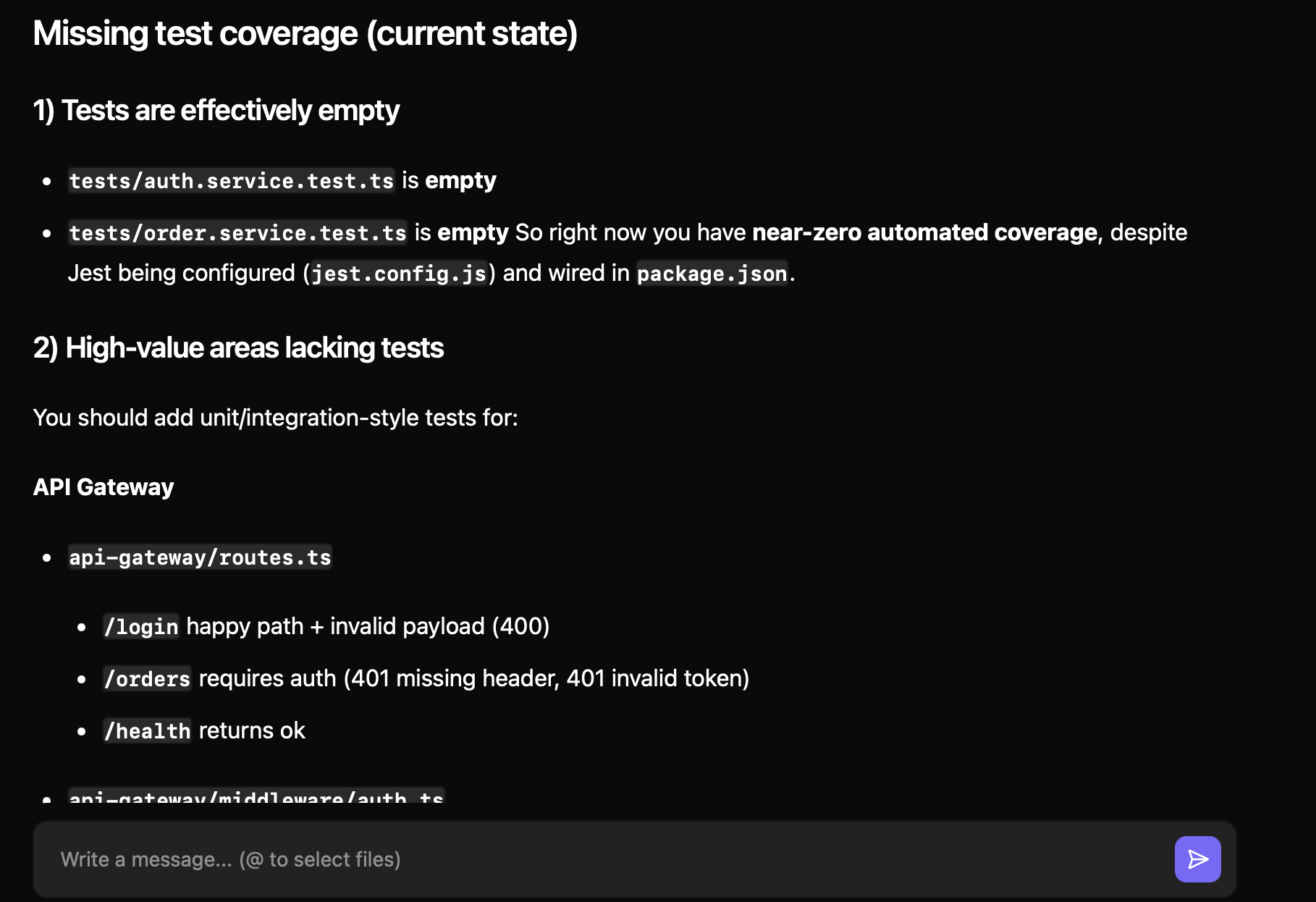
Jest is wired up, but nothing meaningful is actually being tested. It also pointed out exactly where that matters: auth middleware header parsing, order service payment success vs failure paths, payment client retry and timeout behavior, and token invalid/expired handling.
Then it moved into error handling issues, which were more serious than I expected:
- The global error handler returns err.message directly and leaks internal details to clients
- The order controller turns everything into a 500 with no separation between validation, auth, or downstream failures
- Rate limiting is applied after routes and requests hit business logic, before being limited
Then the production-level risks:
- The rate limiter is in-memory and never expires, which is not usable beyond a single instance
- JWT secret defaults to “dev-secret” with no fail-fast if the env variable is missing
- Payment retries don’t use idempotency, which means duplicate charges are possible on transient failures
- Correlation IDs stop at the gateway and are not propagated to downstream services
- Notification worker and payment service files are empty with no surface-level indication
It didn’t just list issues; it ranked them by what breaks production first:
- P0: Stop returning err.message to clients; move rate limiting before routes; fail fast on missing JWT secret
- P1: Add idempotency to payment retries; replace the in-memory rate limiter; add process-level error handlers
- P2: Add unit tests for auth middleware, order service, and token logic; add supertest integration tests for gateway endpoints
None of this required opening files manually, jumping between services, or running multiple tools. It analyzed the repo as a system. This is exactly the kind of review that usually depends on someone experienced catching it in a PR, or it slipping through and showing up later in production. With Qodo, this runs on every PR. Not as a one-off audit, as a system guarantee.
Strengths
- Review Agent Suite runs on every PR, coverage is consistent, not dependent on reviewer availability.
- Covers the full SDLC: IDE Plugin for local review, Git Plugin for automated PR review, CLI Plugin for agentic quality workflows.
- Model-agnostic: swap between Claude, Gemini, Mistral, or local LLMs at runtime without changing agent logic.
- Event-driven by default, agents trigger on commits and PRs, not on user prompts.
- Reusable agents versioned in the repo, treated as code, reviewed like code, deployed like code.
Limitations
- Not a code generation tool, Qodo pairs with tools like Claude Code and doesn’t replace them.
- Initial configuration is required to connect your repo, set context preferences, and enable the rules system before enforcement begins..
- Initial configuration is required to connect your repo, set context preferences, and enable the rules system before enforcement begins.
Pricing
- 14-day trial — full platform, unlimited reviews and credits, no credit card required. At the end of the trial, an in-product screen recommends the right credit pack based on usage.
- Pro Teams (designed for up to 30 users) — unlimited users per workspace, monthly billing, customer-set overage cap, switch packs anytime, overage credits never expire. Pick a credit pack that fits your volume:
- $30/mo → ~18 reviews/mo (2,500 credits)
- $60/mo → ~36 reviews/mo (5,000 credits)
- $240/mo → ~143 reviews/mo (20,000 credits)
- …and larger packs up to ~1,200+ reviews/mo
- Enterprise (built for 30+ users) — custom pricing; adds SSO/SAML, audit logs, BYOK, governance analytics dashboard, single-tenant SaaS or on-prem, priority support and dedicated CSM
2. OpenAI Codex CLI
Codex CLI is OpenAI’s terminal coding agent, open-source, built in Rust, and runs locally. You give it a task in plain English; it figures out which files to touch, which commands to run, and executes, with your approval level controlling how much it does autonomously.
It’s a closer comparison to Claude Code than Goose was; both are agentic, terminal-first, and come from the major AI labs. The difference is in the execution model: Codex runs with OS-level sandboxing by default, and it’s tightly integrated with the OpenAI model stack and the ChatGPT account system.
Key Features
- Approval modes: Three levels: read-only with explicit approvals, auto with full workspace access but approval required outside it, and full access with network. You pick how much rope the agent gets before it asks.
- Model flexibility: GPT-5.5 is the current recommended default for complex tasks; GPT-5.4 mini is for faster, lighter work. Switch mid-session with /model or set it in config.toml.
- codex exec for CI: Non-interactive mode that pipes cleanly into pipelines. Output to stdout or JSON, resumable by session ID.
- MCP support: Connect external tools and context sources via Model Context Protocol.
- Image input: Attach screenshots or design specs directly in the prompt; useful for UI work or explaining visual bugs.
- PR review: Once connected to a GitHub repo, Codex reviews PRs as they move from draft to ready, matching the stated intent of the PR against the actual diff rather than
Common Use Cases
- Codebase exploration: Ask it to explain how something works; it reads files and traces dependencies rather than guessing from a prompt
- Refactoring: Describe the change, Codex finds affected files, edits them, and runs tests to verify
- Test generation: Point it at a module, ask for coverage; it writes and runs the tests in the same session
- CI automation: codex exec with –json for scripted, non-interactive pipeline tasks
- PR review: Connects to GitHub and reviews PRs automatically on status change, no manual trigger
Hands-On: Moving Middleware in a Live Codebase
I gave Codex a fix from the suggestions made after an audit, where the Express rate limiting middleware in api-gateway/server.ts was registered after the route handlers, so endpoints like /login and /orders were executing before rate limits were applied.
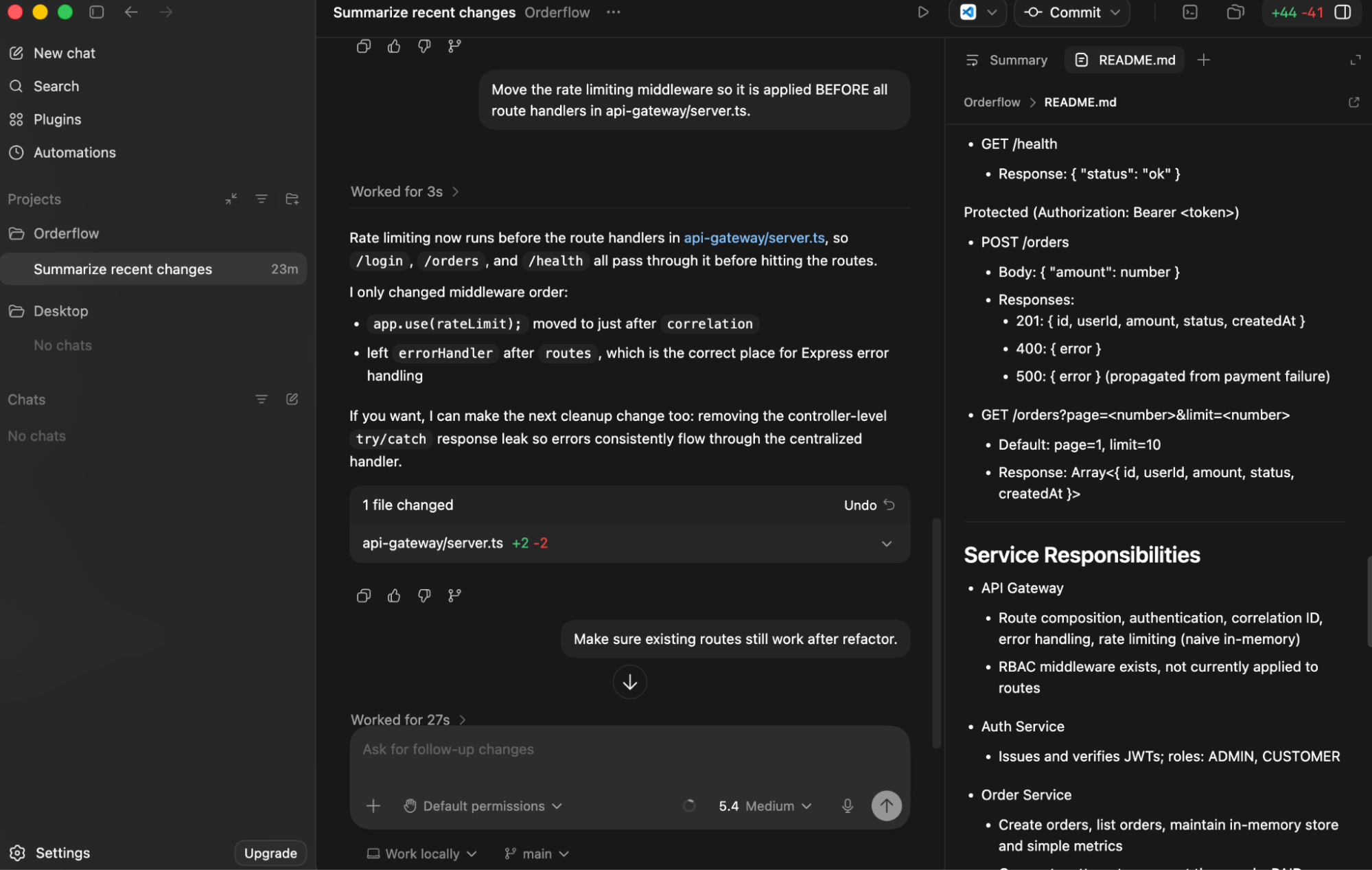
It moved app.use(rateLimit) before the route handlers, kept errorHandler correctly after routes, and modified only a single file. Then I asked it to verify the change by asking to: “Make sure existing routes still work after refactor.”
It validated the change: the compile check passed, it fixed a small TypeScript issue it encountered (req.ip possibly undefined), and it attempted a runtime check but couldn’t complete it due to sandbox limits. It also called out the gap clearly; tests are incomplete, so runtime behavior isn’t fully verified. The key difference is that it didn’t stop at applying the fix; it followed through on validation and made the remaining uncertainty explicit.
Strengths
- Sandbox keeps Codex inside the active workspace by default, with no file access or network calls outside the project without explicit approval
- GPT-5.5, GPT-5.4, GPT-5.4 mini, or local models via Ollama, switch with –model per task
- codex exec pipes into CI cleanly with –json output and session resume
- Open source, Rust-native, fast cold starts, no runtime overhead
- PR review connects directly to GitHub, no webhook setup required
Limitations
- All model inference goes to OpenAI’s servers, code stays local, but prompts don’t
- No persistent memory across sessions by default; resume is explicit, not automatic
- Usage limits are tied to your ChatGPT plan tier. Heavy CI usage can burn through included limits faster than expected
- Windows native support is still experimental; WSL2 is the more reliable path on Windows
Pricing
Included with ChatGPT Plus, Pro, Business, Edu, and Enterprise plans. API key usage is billed at token rates, GPT-5.4 at $2.50 input / $15 output per million tokens, GPT-5.4 mini at $0.75 / $4.50. Users who hit included limits can buy additional credits without upgrading their plan tier.
3. Goose
Goose is a local-first open-source AI agent built around persistent sessions. Where Codex CLI is designed to be triggered by pipelines, and Qodo runs enforcement on every PR, Goose is built for the opposite end: long, continuous working sessions where you’re moving through a problem step by step and can’t afford to re-explain context every time you switch tasks. The default setup routes through hosted model APIs such as Anthropic, OpenAI, and Gemini.
Key Features
- goose session: starts a session in the terminal; goose session –resume picks up where the last one ended, context intact
- MCP extensions: 70+ connectors for Git, shell, browser, filesystem, databases, Google Drive; installed individually via goose configure
- Recipes: a workflow captured as a YAML file, versioned in the repo, runnable in CI, or shareable with the team without re-explaining the steps
- Subagents: a parallel agent spawned mid-session to handle a side task, reviewing a file, processing output, running a search, without interrupting the current conversation thread
- Offline execution: configure a local Ollama model, and every command runs on-device with no outbound calls
Hands-On: FastAPI + MySQL in One Session
I started a fresh session from the terminal with no prior context, just the requirement typed directly as a prompt, as shown in the snapshot below:
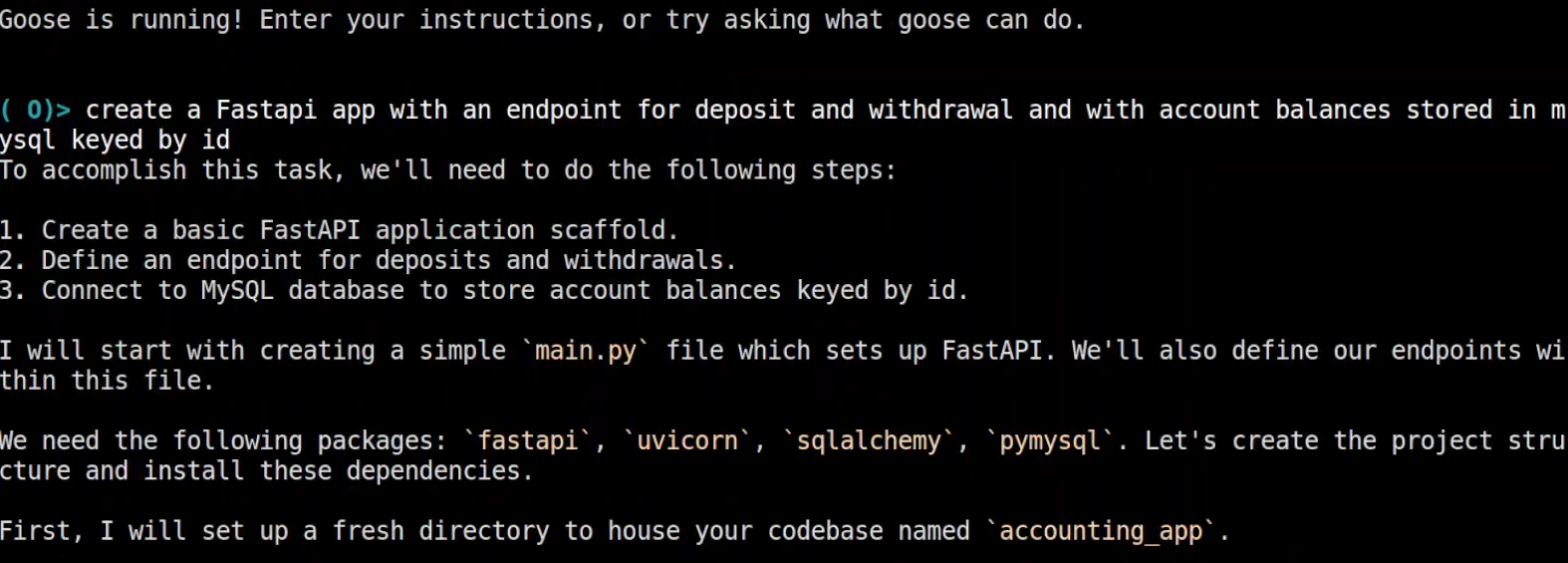
Before writing a single file, Goose stated exactly what it was going to do:
- Create a basic FastAPI application scaffold
- Define endpoints for deposits and withdrawals
- Connect to MySQL to store account balances keyed by ID
Then it executed in order, created accounting_app/, wrote main.py with both route handlers, identified and installed fastapi, uvicorn, sqlalchemy, pymysql, and wired up the SQLAlchemy MySQL connection.
Strengths
- A debugging or refactoring sequence that spans 10 steps doesn’t require re-explaining what you were doing; the session holds that context across every command
- With a local Ollama model, every prompt stays on-device and there is no API call, no per-command cost, and no failure if the hosted API goes down
- MCP extensions give the session direct access to Git diffs, shell output, filesystem state, and external services, the same task context a developer has, available to the agent without copy-pasting
Limitations
- No built-in CI trigger or webhook endpoint, wiring Goose into a pipeline means scripting around goose session, not a native integration
- Each MCP extension installs separately; there’s no batch configuration for a full toolset on a new machine
- Offline execution requires a locally running Ollama instance set up before the first session; if the local model isn’t running, Goose doesn’t fall back automatically
Pricing
Free and open source. Local Ollama models run at infrastructure cost only. Hosted model API usage, Anthropic, OpenAI, Gemini, bills at each provider’s standard token rates.
4. Kiro CLI
Kiro is a terminal AI agent built around interactive chat sessions, custom agents, and Git-aware context selection. In a team, Kiro is what a developer runs locally when they’re working through a multi-step debugging session and need the agent to hold context across a dozen back-and-forth commands.
By default, Kiro routes prompts through its “Auto” mode, a mix of Sonnet 4.5 and specialized task models. Pin to a specific model, Sonnet 4, Haiku 4.5, Opus 4.6, when you need consistent behavior across runs.
Key Features
- kiro-cli starts a session; kiro-cli chat –resume picks up where you left off; kiro-cli chat –resume-picker lets you choose from any previous session
- /context add opens a Git-aware fuzzy finder, files show with status indicators (M, A, ?), and recently modified files surface first
- Custom agents: pre-approve tools per workflow; a PR review agent with read and grep access runs without confirmation prompts, a default session stops before every file write
- Hooks: PreToolUse blocks before a tool runs, Stop fires at the end of each turn; wire npm test or lint here instead of appending to every prompt
- Steering files: .kiro/steering/*.md files read at session start; workspace or global scope; must be explicitly included in custom agent configs
- Headless / CI: kiro-cli chat –no-interactive “prompt” with KIRO_API_KEY; Pro tier and above only
Hands-On: Building a CRUD API with MongoDB
I had an existing MERN project locally, tasks-mern, a basic Express backend with no API routes yet. Instead of running kiro-cli directly, I launched it with a custom backend agent I’d defined with shell and filesystem access pre-approved.
One prompt:
"Build out the full CRUD tasks api on the backend for tasks. Use the tasks-mern database as the database in MongoDB and populate the database with 5 tasks."
Before writing a single file, Kiro read the project, scanned the directory, pulled server.js and package.json to understand what was already wired up.
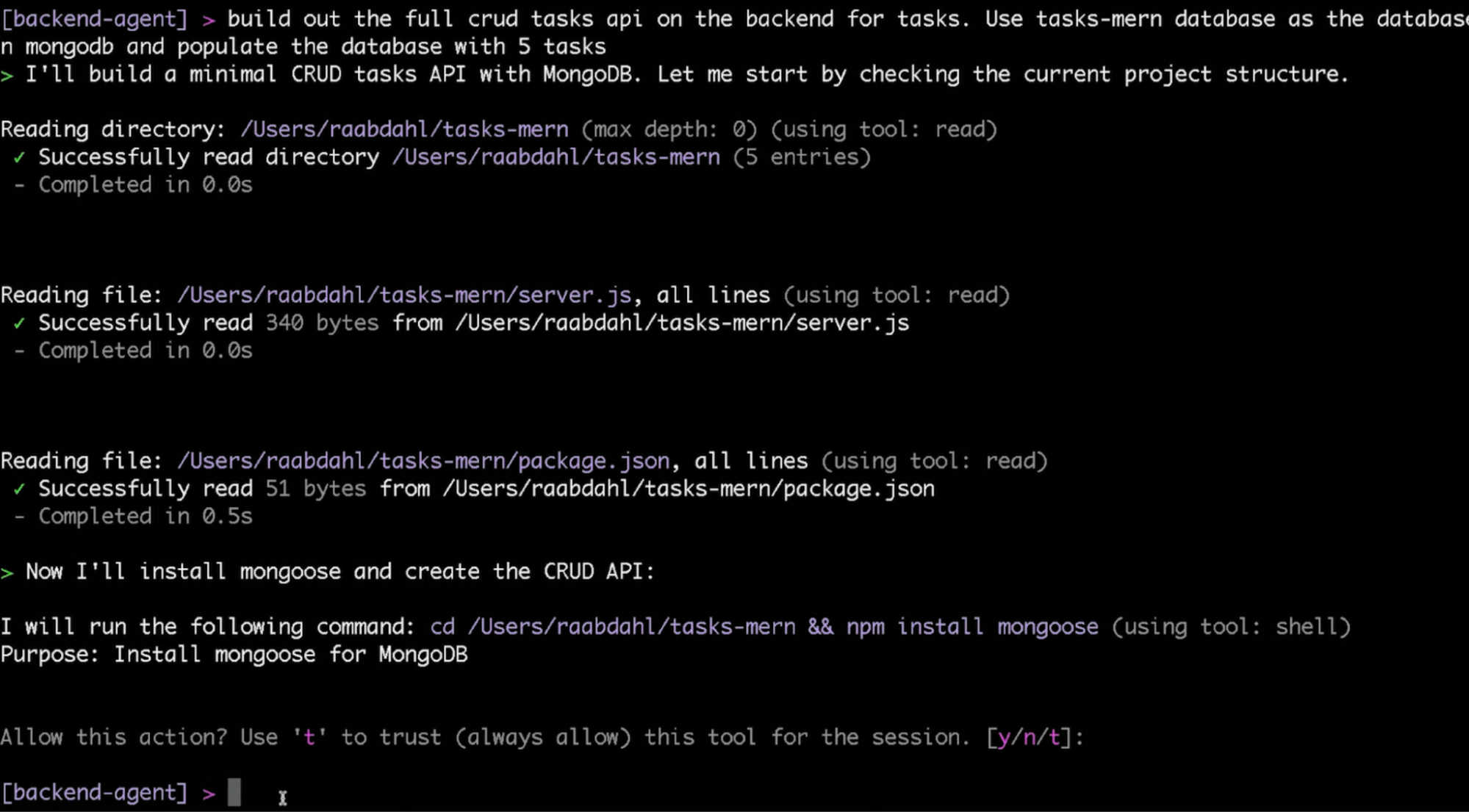
Then it moved to mongoose:
cd /Users/raabdahl/tasks-mern && npm install mongoose
Shell commands still stop for confirmation even inside a custom agent unless you’ve pre-approved them. I typed y. For the rest of the installs, I flagged trust this tool for the session, and it stopped asking.
From there, it built without interruption: created the Task model, wired up the CRUD routes, then created seed.js and populated the database with 5 tasks, titles, descriptions, and completion statuses, all inserted in a single script run.
The whole thing read like watching someone work through it methodically, checking what exists, installing what’s missing, building in order, and seeding at the end. No back-and-forth, no clarifying questions.
Strengths
- Define a custom agent for PR review, read and grep access, no shell execution, and every kiro-cli –agent pr-review run skips the 6–8 confirmation prompts that a default session would stop for
- /context add surfaces modified files by Git status, so the agent’s context starts from what’s actually changed in the branch, not what you manually remember to include
- kiro-cli chat –resume in the same directory the next morning loads the full previous session, conversation history, what files were open, and what the agent was working on
- Steering files enforce team conventions at the workspace level, checked into the repo, and every developer’s session follows the same rules without per-machine setup
Limitations
- A team merging 20 PRs a day and triggering a Kiro review agent on each one will drain the Pro tier’s 1,000 monthly credits in under two weeks before individual developers have used Kiro for a single session
- No local or offline model support, every prompt routes through Kiro’s hosted model stack
- Headless mode requires Pro tier or above; Free tier users can’t run Kiro in CI
- Windows requires Windows 11
Pricing
Free tier: 50 credits/month. Pro: $20/month for 1,000 credits. Pro+: $40/month for 2,000 credits. Power: $200/month for 10,000 credits. Overage on paid plans at $0.04/credit. New users get 500 bonus credits on first sign-up, usable within 30 days.
Qodo in Enterprise Engineering Workflows
In enterprise software development, automation tools must be secure, reproducible, and compatible with existing infrastructure. Teams responsible for developer experience often need to enforce standards across multiple services while supporting flexible workflows. These requirements include version control, auditability, model flexibility, and the ability to integrate into CI/CD systems without introducing new security risks.
Qodo’s CLI Plugin is designed to support enterprise needs by allowing developers to define task-specific review agents as YAML files, versioned alongside application code and triggered from the command line or within automated pipelines. These agents can be versioned alongside application code and triggered from the command line or within automated pipelines. For example, teams can configure an agent to review pull requests and run it consistently across projects using a simple command like:
qodo pr-review --path=src/
Agents have access to real project context through Qodo’s Context Engine, which provides read access to Git diffs, shell output, and filesystem content, enabling each agent to operate based on the actual state of the codebase. This provides read access to Git diffs, shell output, and filesystem content, enabling the agent to operate based on the actual state of the codebase. This can improve the relevance and precision of generated output during tasks such as changelog generation or test result summarization.
Security in Qodo is managed at the CLI level. API keys are generated and scoped via terminal commands and stored in environment variables or CI secrets. There is no reliance on browser-based sessions or external UI authentication, which aligns with common enterprise practices for managing secrets and automation permissions. All agent executions produce traceable outputs, including logs, diffs, and inline suggestions. These can be stored with build artifacts or sent to monitoring systems, supporting audit and compliance needs. Qodo also supports multiple language models. Teams can switch between models, including cloud-based or locally hosted, by passing the –model parameter at runtime. This makes it possible to adjust based on cost, performance, or privacy considerations without altering the agent’s logic.
Conclusion
Claude Code is a prompt-driven assistant, give it a task, get a response. It works well for one-off tasks like explaining a function or generating a snippet. It stops there: no agent reuse, no CI hook, no local execution. When AI is authoring 30–40% of your commits, that’s a gap in your review process, not a tooling preference.
Each tool in this guide fills a different part of that gap:
- OpenAI Codex CLI: agentic local execution with OS-level sandboxing; stays inside the workspace by default, codex exec for non-interactive CI runs
- Goose: persistent local sessions; configure a local Ollama model and no prompt leaves the machine, no per-command cost, no API dependency
- Kiro: multi-step local dev with Git-aware context selection, pre-approved tool access per workflow, team conventions enforced via steering files in the repo
None of them answer what happens after the code is written. That’s a different problem, not which agent writes the code, but whether what gets merged is correct, aligned with your standards, and safe to ship. Qodo runs that layer: the Review Agent Suite triggers on every PR, the Rules System learns from your codebase and PR history, and enforcement runs independently of which tool wrote the code.
Claude reasons. Qodo enforces.
FAQs
What is the best Claude Code alternative for enterprise use?
If you need CI integration, reusable review agents, model flexibility, and secure context-aware automation, Qodo is the strongest option. It supports Claude, GPT, Gemini, and local models, and is designed to enforce quality at scale, not just assist individual developers.
Can I use Claude Code for enterprise codebases?
You can, but expect limits. Claude Code is cloud-only, usage-based, and lacks agent reusability. It’s better suited for individual tasks than large-scale team automation or CI/CD environments.
What is Claude Code best for, and what is it not?
Claude Code works well for small, ad hoc tasks, refactoring a function, understanding a snippet, or asking coding questions. It’s less effective for automated workflows, large diffs, or repeatable team-wide processes.
Is Claude Code secure and SOC 2 compliant?
Yes, Claude runs on Anthropic’s infrastructure, which follows standard cloud security practices and offers SOC 2 compliance. That said, if you’re working in regulated or air-gapped environments, local-first tools like Goose CLI or model-isolated setups with Qodo might be a better fit.
About the author