Top 5 VS Code Extensions for Developers in 2026: Engineering-Focused Evaluation

TL;DR
VS Code is the first checkpoint in most review pipelines. With over 73% of developers using it as their primary editor, the extensions running inside it determine what gets caught before a pull request opens, and what reaches the merge stage undetected.
Most extensions analyze code within the file currently being edited, using predefined rules or patterns. File-level analysis misses issues like breaking an API response or data format that another service depends on: problems that typically come up during PR review or in production, not in the editor.
Qodo’s code review triggers a review workflow inside VS Code that runs PR-level and CI-level checks locally before a push. Qodo shifts review left, catching cross-file and cross-service issues before they reach the pull request stage.
Teams layer tools by stage: Copilot or Continue for completions, SonarLint for known patterns, Qodo for review-depth enforcement before push.
Introduction
There are 50 million monthly active users on VS Code, making it the most widely used development environment by a significant margin. That reach is exactly why the extensions running inside it matter more than most teams realize, and why AI coding has pushed commit volume past what PR review processes can absorb. VS Code extensions flag findings at the file level, so contract violations between services, missing auth on new endpoints, and AI-generated code that breaks production assumptions all pass through to the merge stage.
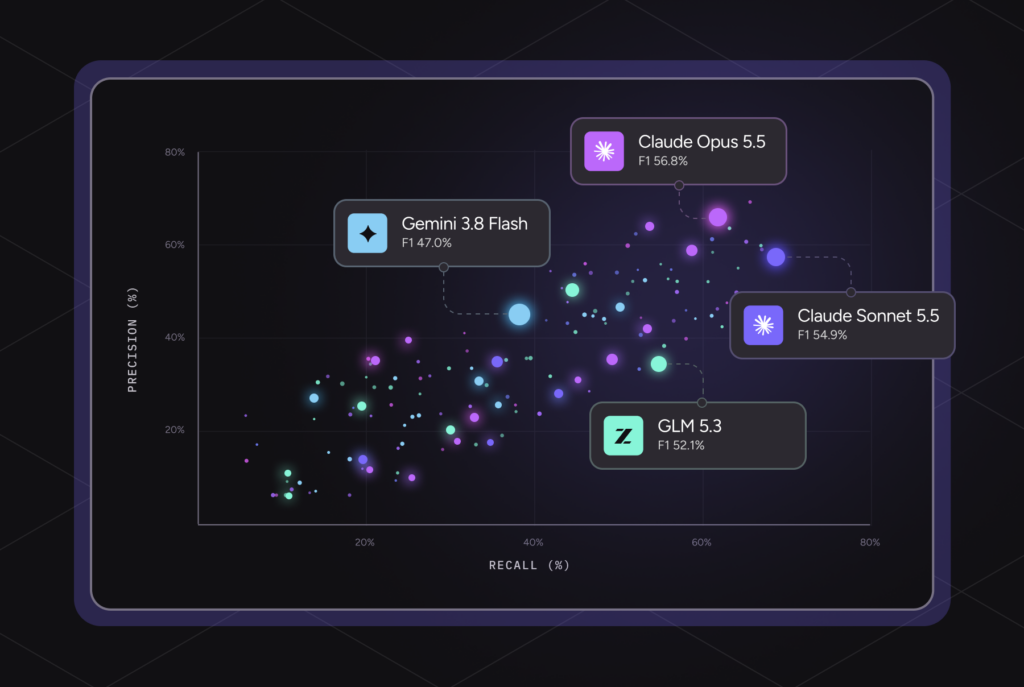
As a senior developer, I’ve been using Qodo, the AI Code Review Platform, as a VS Code extension. It has 2M+ installations, reviews 4M+ pull requests every year, and runs across 10 repositories or 1,000. In Gartner’s 2025 Critical Capabilities report for AI Code Assistants, Qodo ranked first in Code Understanding, reflecting enterprise demand for tools that provide deeper context than Copilot or Cursor can across large, distributed codebases.
Gartner does not endorse any vendor, product or service depicted in its research publications, and does not advise technology users to select only those vendors with the highest ratings or other designation. Gartner research publications consist of the opinions of Gartner’s research organization and should not be construed as statements of fact. Gartner disclaims all warranties, expressed or implied, with respect to this research, including any warranties of merchantability or fitness for a particular purpose.
This guide evaluates the top VS Code extensions in 2026 through that lens: not just developer experience, but governance, review quality, cross-repo context, integration flexibility, and operational scalability in real production environments.
Why Teams Quietly Disable VS Code Extensions After Feature Rollout?
Enterprise engineering teams now evaluate extensions very differently than they did a few years ago. The focus is no longer limited to faster autocomplete or editor convenience. Teams now prioritize extensions that improve PR quality, reduce review overhead, and integrate cleanly across GitHub, GitLab, Azure DevOps, Bitbucket, and Jira workflows.
The extensions that continue getting adopted at scale usually succeed in four areas: scalability across large multi-repo environments, context-rich review capabilities, low operational friction for developers, and strong governance and enforcement controls for engineering and security teams.
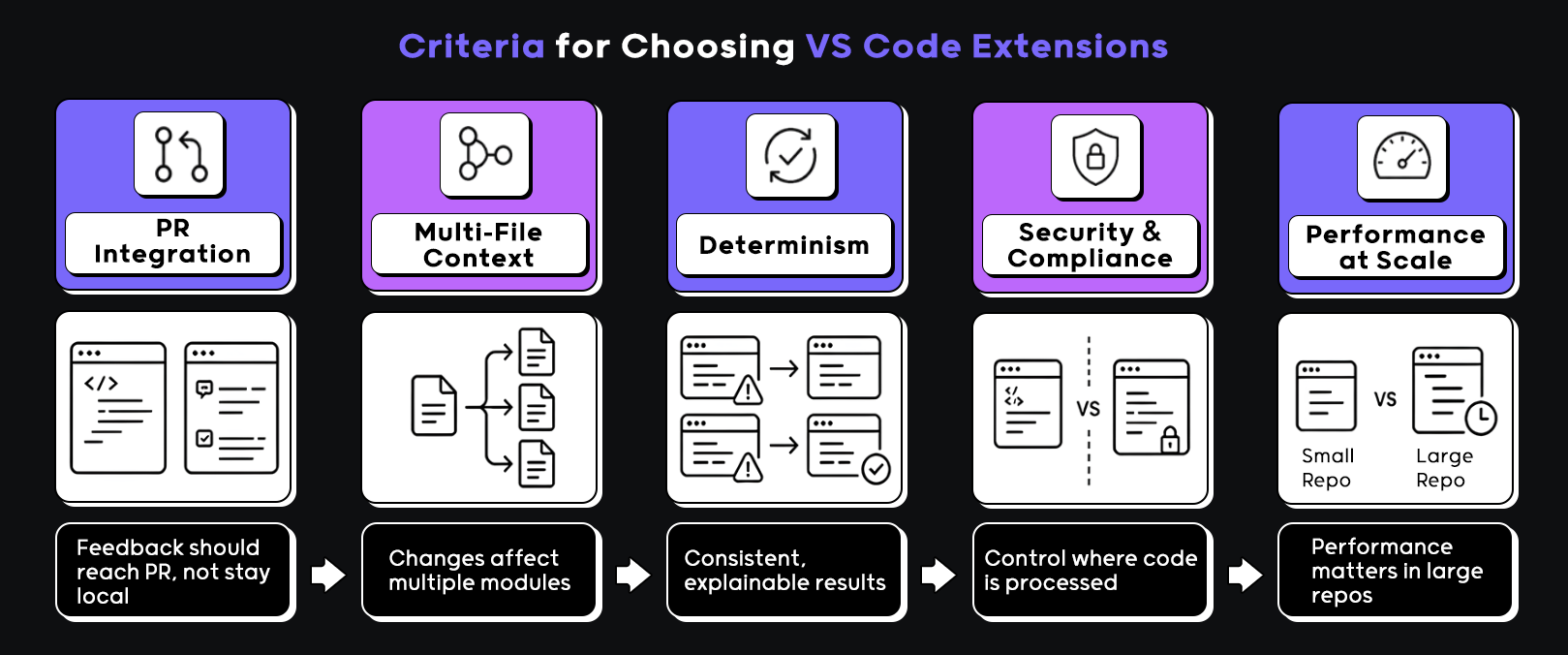
Editor-Only Suggestions Stay Local: PR Integration Creates Shared Review Visibility
The first thing I looked at was whether the extension connects to pull request workflows or just lives inside the editor. Suggestions that never leave your local environment don’t help reviewers, and they don’t create any shared understanding across the team. Tools that integrate with PRs require a different design, their output is visible to reviewers, not just the author, so every suggestion has to hold up to scrutiny.
Examples where this shows up:
- Suggestions that cannot be surfaced in PR comments or review tools
- No shared visibility into what the tool flagged during development
- Developers fixing issues locally that reviewers never see
Single-File Autocomplete Misses Contract Violations at Service Boundaries
Next is how the tool handles context. A lot of extensions are still operating at a single-file level. That works for autocomplete, but it breaks down the moment a change touches multiple modules, shared utilities, or API contracts. In real codebases, most bugs don’t sit neatly inside one file. They show up at the boundaries, and tools that can’t follow those boundaries miss the point entirely.
Examples where this breaks down:
- Updating a shared interface without catching downstream usage
- Refactoring a utility function but missing dependent modules
- Changing API response structure without updating consumers
Non-Deterministic Output Becomes a Trust Problem Across Teams
When non-deterministic output varies by prompt phrasing or model temperature, two developers reviewing the same function get conflicting advice, one is told to add a null check, the other is told to remove it. Teams stop relying on the output and start treating it as noise.
If a tool gives different answers for the same input, or changes behavior based on minor variations in prompts, it becomes hard to trust. In a team setting, that turns into friction because two developers might get different suggestions for the same problem. Auditability ties into this as well. If a tool flags something or suggests a fix, you need to understand why, especially in regulated environments or when something goes wrong later.
Examples of issues here:
- Different suggestions for identical code blocks across machines
- No explanation for why a change was recommended
- Difficulty tracing decisions during audits or post-incident reviews
With those criterias, here is how each of the top five VS Code extensions holds up, starting with the one built specifically for review depth. Now let’s go through each of the VS code extensions in further detail.
Top 5 VS Code Extensions In 2026
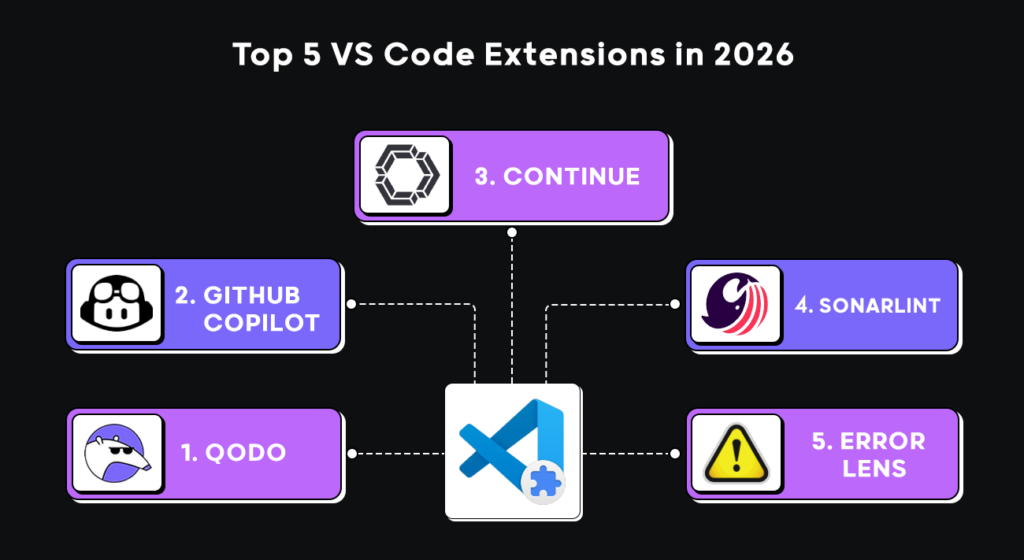
Best 5 VS Code Extensions in 2026 Comparison
| Capability | Qodo | GitHub Copilot | Continue | SonarLint | Error Lens |
| Pre-push review feedback | Yes | No | No | Limited | No |
| Cross-file behavioral analysis | Yes | No | No | No | No |
| Cross-repository context | Yes | No | No | No | No |
| PR workflow integration | Yes | Limited | No | Limited | No |
| Rule-based static analysis | Yes | No | No | Yes | No |
| Merge gating and enforcement | Yes | No | No | Limited | No |
| Inline error visibility | Limited | Limited | Limited | Yes | Yes |
| Code generation and completions | Limited | Yes | Yes | No | No |
| Multi-model support | No | No | Yes | No | No |
| Enterprise deployment options | Yes | Limited | Yes | Yes | No |
| Best for | Pre-push review, cross-file enforcement | Code generation, scaffolding | Refactoring, code explanation | Rule-based static analysis | Inline error visibility |
1.Qodo: AI Code Review Platform
Best for: Enterprise engineering teams that need pre-push review depth, cross-file behavioral analysis, and organizational rule enforcement, catching issues before they reach pull requests and CI pipelines.
Qodo is the AI Code Review Platform, the missing quality layer in your AI stack. It operates across your entire SDLC, combining a purpose-built Context Engine with a Review Agent Suite to bring up real issues before they reach production. It analyzes code changes with repository-wide awareness, indexing dependencies, shared logic, configurations, and PR history across 10 repositories or 1,000, to flag issues that single-file tools miss.
That cross-repo context becomes especially important in enterprise environments with multi-repo sprawl, distributed ownership, and mixed technology stacks where isolated file-level suggestions are rarely enough.
Qodo adds the most value when developers modify existing logic, refactoring shared utilities, updating API contracts, or adding execution paths, not when generating net-new code from scratch.
This positioning is what separates Qodo from editor-only AI assistants. Qodo acts as the reasoning, governance, and enforcement layer inside enterprise SDLC workflows, helping engineering organizations reduce PR cycle time while making sure a consistent code review quality across GitHub, GitLab, Azure DevOps, Bitbucket, and Jira-integrated environments.
Pros
- Bring up review-level issues early, before a pull request is opened
- Works across files, not limited to the active editor context
- Groups feedback by severity, which makes prioritization easier
- Connects local development feedback with PR-level review workflows
- Helps enforce consistent standards across teams and repositories
- Reduces repetitive review comments on common issues
- Flags non-obvious problems like config issues or unused code paths
Cons
- Requires some initial setup to align with project conventions
- Suggestions include severity labels and explanations; developers decide what to apply and when.
Hands-On: Testing Qodo Against Real Review Friction in a Multi-File Project
For my evaluation, I used the Qodo IDE extension to review a set of uncommitted changes instead of reviewing a single file in isolation. This better reflects a typical development workflow, where multiple files are modified before a pull request is opened.
The review went beyond identifying syntax issues or style violations. Qodo analyzed the changes against the project’s configured review standards, highlighting areas where the implementation diverged from established engineering practices. Rather than producing generic feedback, the review was tailored to the rules and skills configured for the project, making the suggestions feel relevant to the codebase instead of being one-size-fits-all recommendations.
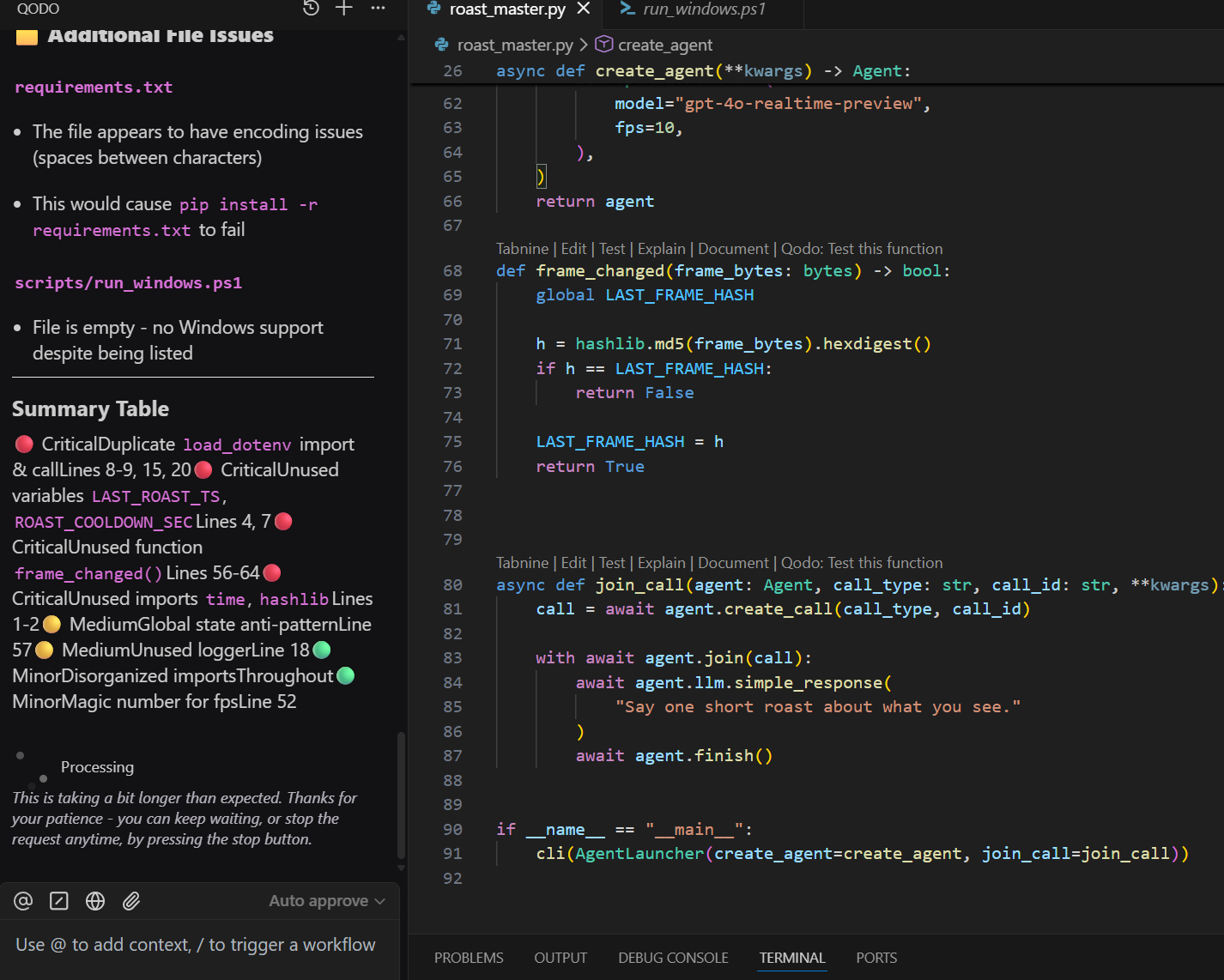
Looking at the code-level feedback, it picked up duplicate imports of load_dotenv, unused variables like LAST_ROAST_TS and ROAST_COOLDOWN_SEC, and an unused function. There was also a note about relying on global state in frame_changed, along with smaller things like disorganized imports and a hardcoded value for fps. None of these are immediate blockers, but they’re the exact comments that tend to show up during review cycles.
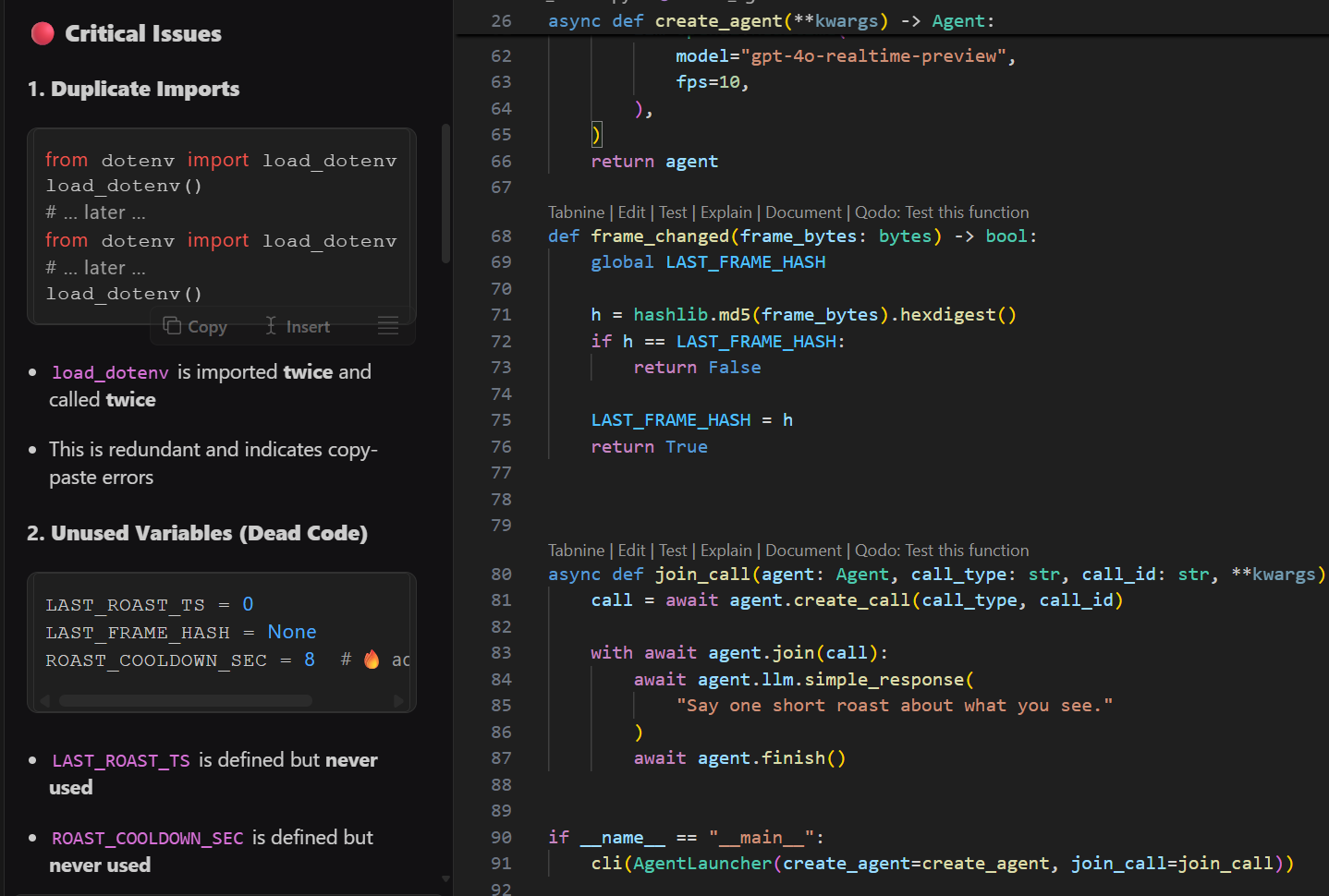
The output was grouped by severity, critical issues like duplication and dead code at the top, followed by medium and minor concerns, which makes prioritization faster than scanning scattered inline hints. It reads more like a structured review than a group of editor warnings, which makes it easier to decide what to fix first before pushing changes.
Best Fit
Qodo is the right fit for enterprise engineering teams where pre-push review depth, cross-file behavioral analysis, and organizational rule consistency are primary concerns. Qodo is most valuable when teams are modifying existing logic across shared services, not when generating net-new isolated code.
Pricing
- Free Trial: 14-day free trial: Unlimited reviews, unlimited credits, Git and IDE integrations, Rules System, Shift-left Review Skills, Dashboard & Analytics. No credit card required.
- Pro Team: $30/user/month: 2,500 review credits per user each month, unlimited code reviews, Rules System, Git and IDE integrations, Shift-left Review Skills, Dashboard & Analytics, customer-defined overage caps, and standard support.
- Enterprise: Custom pricing – Everything in Pro Team, plus Cross Repo Review, Governance Analytics Dashboard, Advanced Self-Learning, BYOK (Bring Your Own LLM Keys), SSO/SAML, Audit Logs, Single-Tenant SaaS or On-Prem/Air-Gapped deployment, Priority Support, and a Dedicated Customer Success Manager.
2. GitHub Copilot
Best for: Developers who need fast inline code generation: creating functions, writing boilerplate, and implementing common framework patterns without leaving the editor.
GitHub Copilot is one of the most widely adopted AI coding tools inside VS Code because of how naturally it fits into day-to-day development workflows. The experience is built around inline assistance.
As developers write code, Copilot generates suggestions based on the active file, surrounding context, naming patterns, and recent edits, allowing teams to move through repetitive implementation work much faster.
The tool is primarily optimized for code generation and developer velocity. It works well for scaffolding functions, generating boilerplate, writing repetitive patterns, and implementing common framework workflows across languages like JavaScript, Python, Java, Go, and TypeScript.
Because suggestions appear directly inside the editor, developers can accept, modify, or ignore them without interrupting their workflow, which is a major reason for its broad adoption across engineering teams.
Pros
- Speeds up repetitive tasks like writing tests, boilerplate, and common patterns
- Keeps you in the editor without needing to search for examples externally
- Adapts reasonably well to patterns already present in the current file
- Reduces initial effort when scaffolding new functions or components
Cons
- Limited awareness of dependencies across multiple files or services
- Output can vary for similar inputs, which affects consistency
- Requires manual review to ensure correctness in non-trivial logic
- Data handling and code processing may raise concerns in regulated environments
Hands-on: Measuring How Well Copilot Handles Repetitive Coding Tasks
To test GitHub Copilot, I gave it a fairly common task: update a simple site to pull artist data from a CSV, wire up navigation between pages, and complete a basic contact form. Instead of writing everything manually, I let Copilot generate changes across multiple files like index.htm, about.htm, and contact.htm.
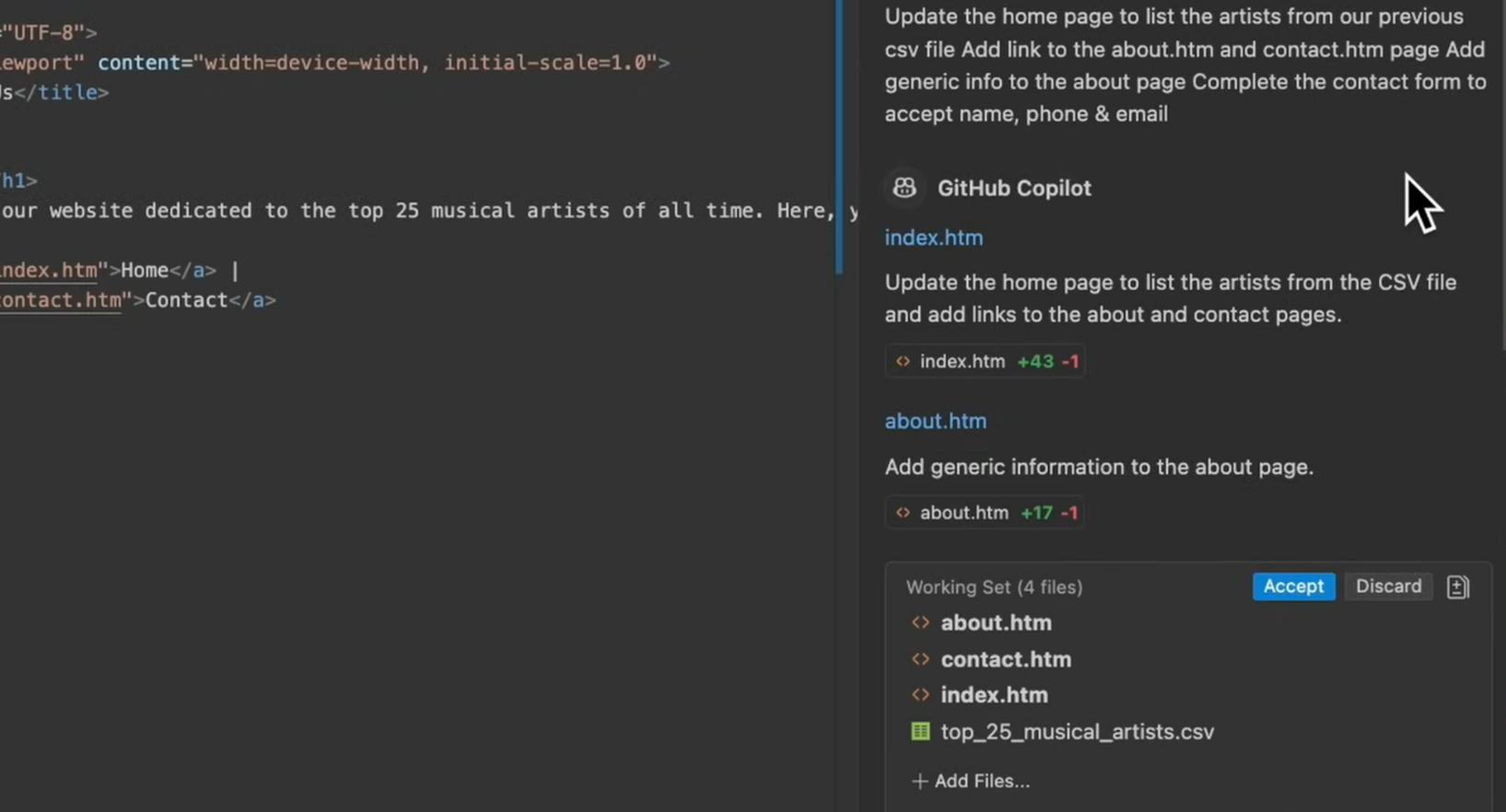
It created a working number of edits in one go, including updating the homepage to list artists from the CSV and adding links between pages. The structure was mostly correct, and it handled repetitive parts like HTML layout and linking without much input. For this kind of scaffolding, it saves time since you don’t have to manually stitch together multiple small changes.
The output requires verification, CSV parsing edge cases, form validation logic, and cross-file dependencies aren’t checked. Copilot generates a working draft; it doesn’t confirm the draft is correct.
It gets you to a working draft quickly, but you still treat that output as something to verify rather than something to merge as-is. Copilot suggests. Qodo enforces. Copilot increase the velocity of code generation; Qodo validates whether what was generated is safe to ship.
3. Continue (Open-Source AI Assistant for VS Code)
Best for: Developers who want natural language interaction with their codebase, explaining unfamiliar code, refactoring selected logic, and working with multiple AI models including local setups.
Continue is an open-source VS Code extension that lets you interact with code using natural language. You can ask it to explain code, generate functions, refactor logic, or modify selected blocks.
It supports multiple models, including local and hosted options, which gives teams flexibility in how they run it. Instead of being tied to a single backend, it acts more like a layer that connects your editor to different AI models.
The interaction is mostly chat-driven, but it also works directly on selected code, which makes it useful for targeted edits.
Pros
- Works directly inside VS Code as a proper extension
- Supports multiple models, including local setups
- Useful for refactoring and explaining existing code
- More control compared to pure autocomplete tools
Cons
- Requires setup, especially when configuring custom or local models
- Running a weaker local model reduces latency but produces more hallucinated completions, a tradeoff each team has to calibrate against their tolerance for manual review.
- Less consistent than tightly integrated tools
- Can feel slower compared to inline autocomplete for small tasks
Hands-on: Using Cursor to Navigate and Modify Existing Codebases
I used Continue while going through a piece of code I hadn’t written, a function handling graph links between nodes. Instead of manually tracing it, I selected the function and asked, “what does this do?”. The response broke the logic down step by step, explaining how the key is built, how the lookup works, and when a new link object gets created.
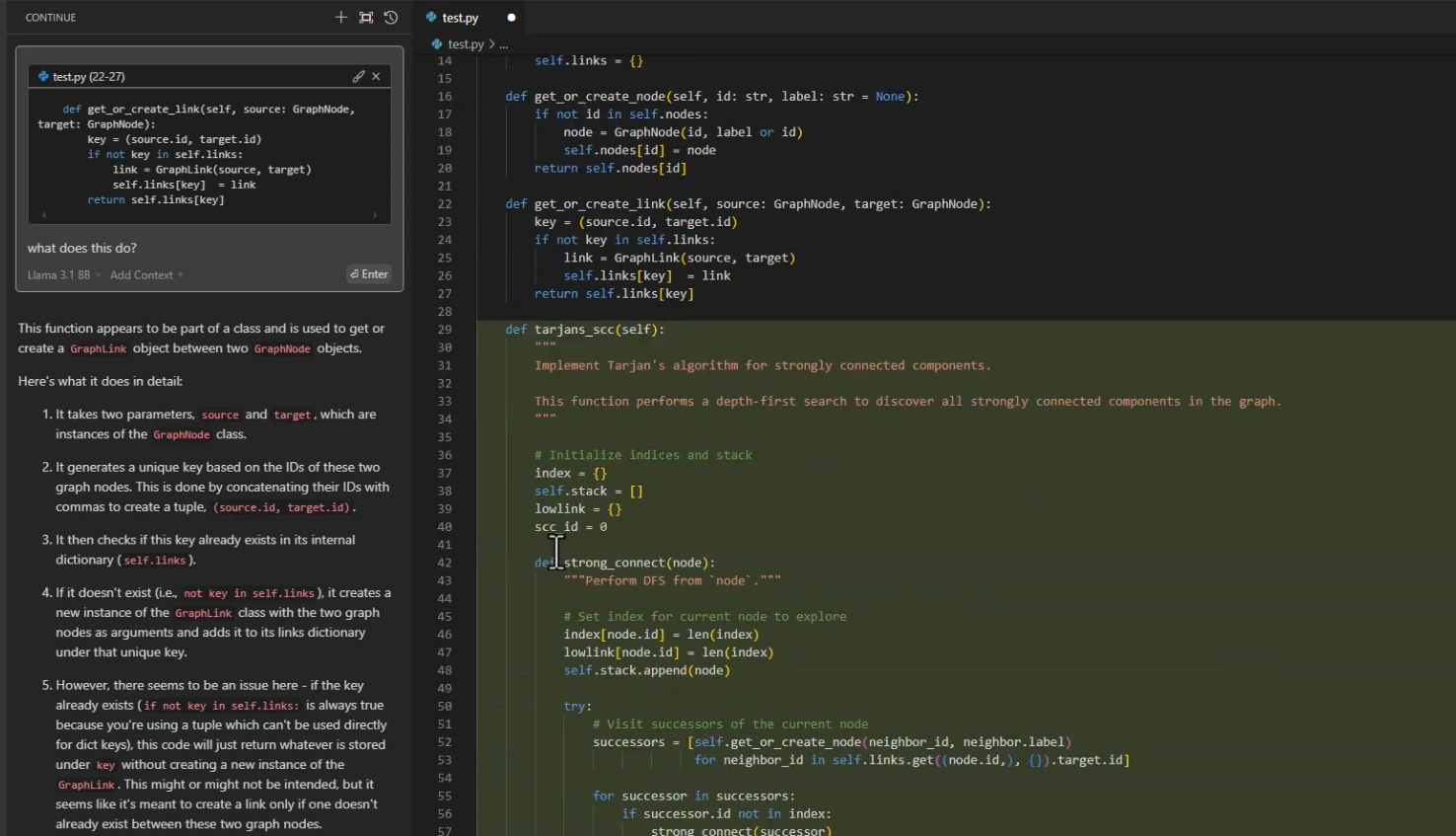
What helped was how it structured the explanation. It didn’t dump a paragraph, it walked through the function in ordered steps, which made it easier to follow alongside the code. It also called out a potential issue in how dictionary keys were being handled, something that’s easy to miss if you’re just skimming.
This is useful when you’re reading unfamiliar code or reviewing something before making changes. It speeds up understanding, especially in cases where the logic isn’t immediately obvious. You still go back to the code to verify, but you spend less time figuring out what the function is trying to do.
4. SonarLint
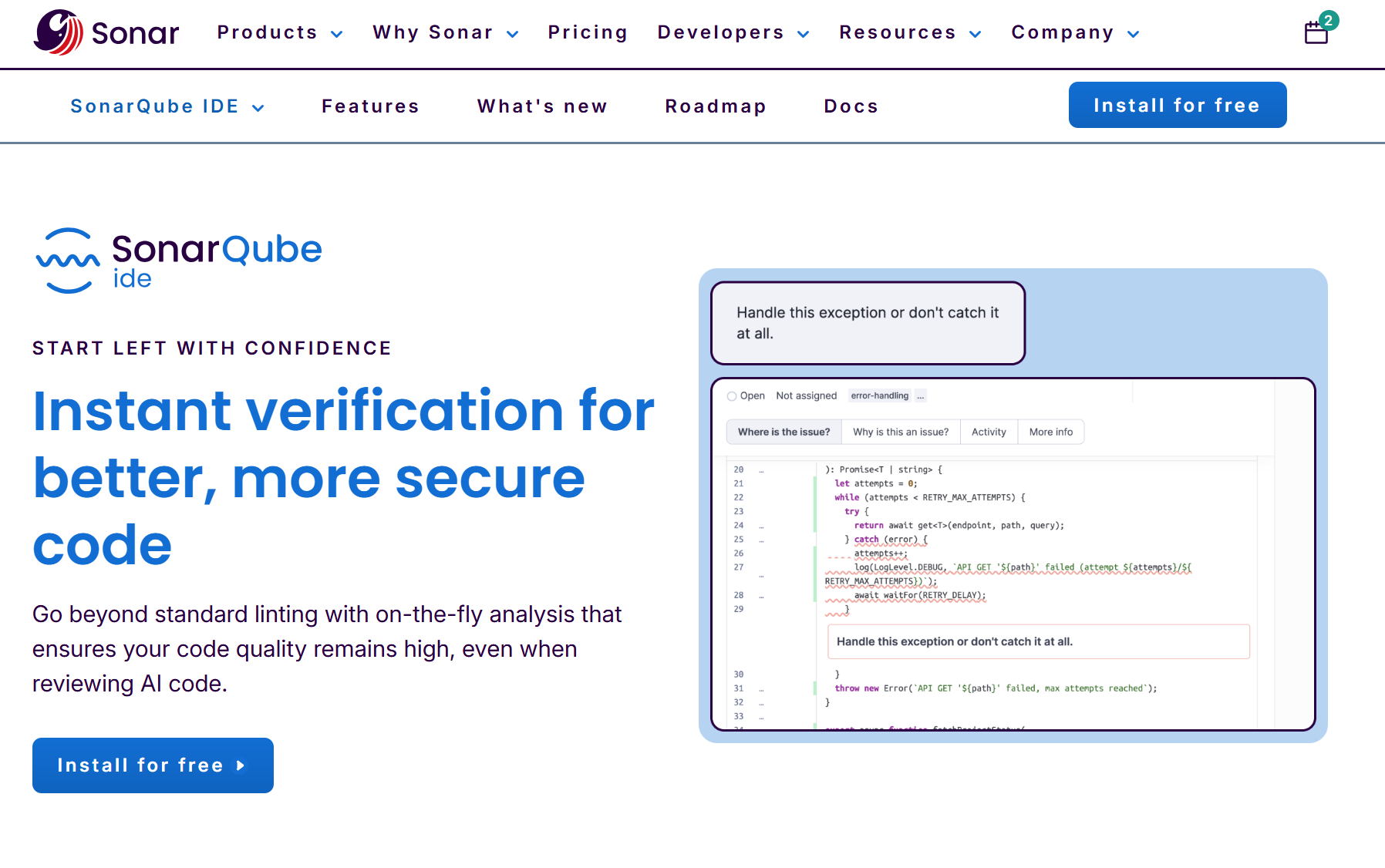
Best for: Development teams that need consistent, rule-based static analysis inside the editor, synchronized with SonarQube or SonarCloud so that IDE findings match CI pipeline enforcement.
SonarLint runs static analysis directly inside VS Code. It scans your code as you write and flags issues such as bugs, code smells, and security vulnerabilities based on rules.
It can work on its own, but it becomes more useful when connected to SonarQube or SonarCloud. When connected to SonarQube, the rules applied as you type match the rule that runs in CI/CD pipelines; a SonarQube violation in the editor will block the pipeline with the same rule ID.
The model is rule-based, not generative. Every issue it raises maps to a defined rule, which makes its behavior predictable.
Pros
- Predictable results based on well-defined rules
- Catches common bugs and code quality issues early
- Syncs with SonarQube for consistency between IDE and CI
- No dependency on prompt quality or AI interpretation
Cons
- Can generate noise if rules are not tuned for the codebase
- Limited ability to understand context beyond defined patterns
- May miss issues that depend on cross-file or runtime behavior
- Requires configuration to stay relevant in larger projects
Hands-on: Minimizing Context Switching During Debugging
While working on a small Java file, I used SonarLint to see what it would catch during normal editing. The example was simple, comparing two strings using ==. As soon as the code was written, SonarLint flagged it and pointed out that string comparisons should use .equals() instead.
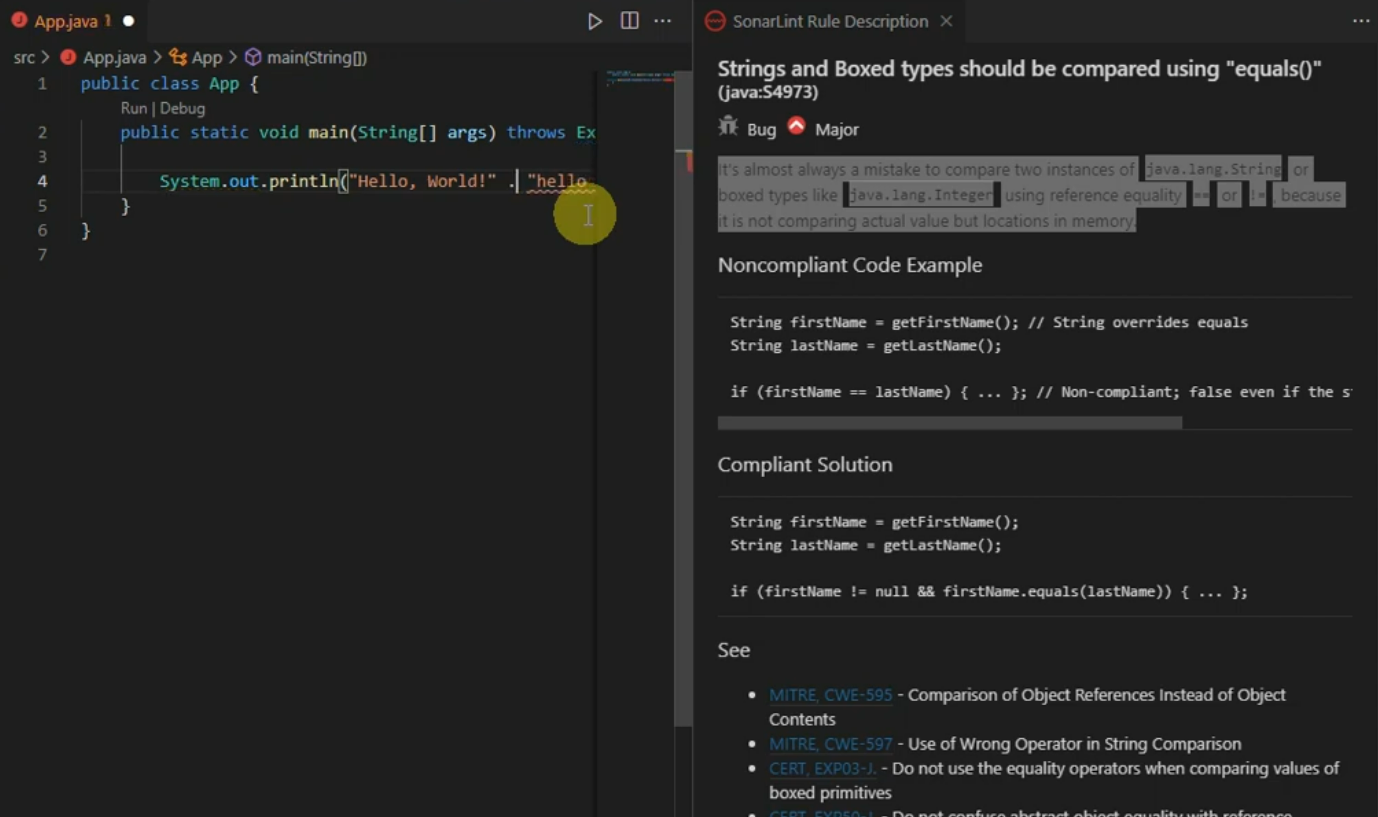
What’s useful here is the explanation that comes with the warning. It doesn’t just mark the line, it explains why the comparison is incorrect, how reference equality differs from value equality, and shows a compliant fix. It also links to related standards like CWE references, which helps if you want to understand the reasoning beyond just fixing the line.

Rule-based warnings that appear the moment a violation is written fit naturally into the coding flow, no panel switching, no deferred review step. You write something, it flags a known issue immediately, and you fix it before moving on. It’s not trying to interpret intent or analyze the whole system, it sticks to well-defined rules and surfaces them consistently while you work.
5. Error Lens (Inline Error Visibility in VS Code)
Best for: Developers who want compiler and linter diagnostics rendered inline in the editor, eliminating the need to hover over underlines or switch to the Problems panel to understand what went wrong.
Not every useful extension needs to understand your entire codebase. Error Lens focuses on one thing, making errors and warnings impossible to miss. Error Lens takes diagnostics from linters, compilers, and language servers and renders them directly inline in the editor.
Error Lens doesn’t add new analysis, it takes existing diagnostics from your linter or compiler and renders them inline at the offending line, so you see the error message without hovering or switching to the Problems panel.
Pros
- Displays errors and warnings inline, no need to hover or switch panels
- Works with existing tools like ESLint, TypeScript, and compilers
- Minimal setup, works out of the box
- Helps catch issues immediately while typing
Cons
- Can feel noisy in files with many warnings
- Depends entirely on other tools for diagnostics
- Limited control if you prefer a less intrusive UI
Hands-on: Minimizing Small Review Comments During PRs
While working on a TypeScript file, I had a simple type mismatch, assigning a string to a boolean field (action.enabled = ”). With Error Lens enabled, the error didn’t just sit as a red underline. It showed up directly inline, right next to the code, saying Type ‘string’ is not assignable to type ‘boolean’.
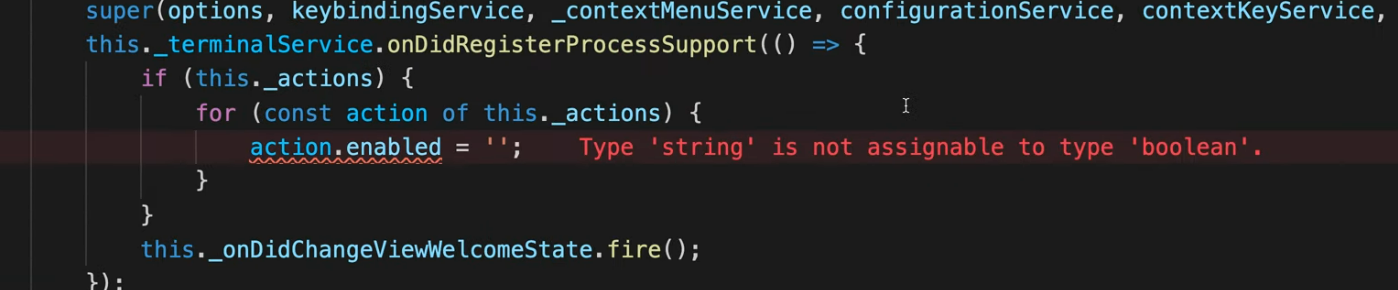
That small change in visibility makes a difference. You don’t have to hover over the line or check the Problems panel to understand what went wrong. The message is already there, in context, which makes it easier to fix immediately without breaking flow.
This lowers the time spent chasing basic issues. You write something, see the exact problem instantly, and correct it before moving on. It doesn’t add new analysis, it just makes existing feedback harder to miss, which is often enough to speed things up.
Pros
- Displays linting and compiler errors inline instead of hiding them in the terminal or Problems tab
- Makes debugging faster during active development workflows
- Reduces context switching while fixing syntax and validation issues
- Works well with ESLint, TypeScript, Python, and most standard VS Code diagnostics
- Useful in large files where warnings are easy to overlook
- Helps junior developers identify issues earlier without repeatedly running builds
- Lightweight extension with minimal setup required
Cons
- Can make the editor visually noisy in projects with heavy linting rules
- Less useful in mature codebases already overloaded with warnings and technical debt
- Does not improve review quality or provide deeper code understanding
Which VS Code Extension Fits Which Developer?
| Developer Profile | Best Fit | Primary Reason |
|---|---|---|
| Enterprise team needing pre-push review and cross-file enforcement | Qodo | PR-level analysis before push, cross-repo context, governance rules |
| Developer focused on code generation speed | GitHub Copilot | Fast inline completions, broad language support, scaffolding |
| Developer explaining or refactoring unfamiliar code | Continue | Natural language explanation, multi-model support, open-source |
| Team needing IDE-to-CI rule consistency | SonarLint | Synchronized rules between editor and pipeline, predictable output |
| Developer wanting inline diagnostic visibility | Error Lens | Zero-configuration inline rendering of existing linter output |
The Missing Layer in Most Review Workflows
Qodo’s Review Agent Suite runs specialized agents such as Critical Issues, Duplicated Logic, Breaking Changes, Ticket Compliance, and Rules Enforcement and each agent is using full codebase context indexed by the Context Engine.
In most enterprise environments, quality checks are fragmented. Some happen in the editor, others during pull request review, and the rest in CI. The gaps between these stages are where issues slip through, non-conventional commit messages, missing license headers, or untested edge cases making it into PRs or even production.
Qodo closes these gaps by applying consistent, context-aware review across every stage of SDLC. In development environments covering monoliths and microservices , it flagged an average of 800 potential issues from reaching production each month, while saving Monday.com developers roughly one hour per pull request.
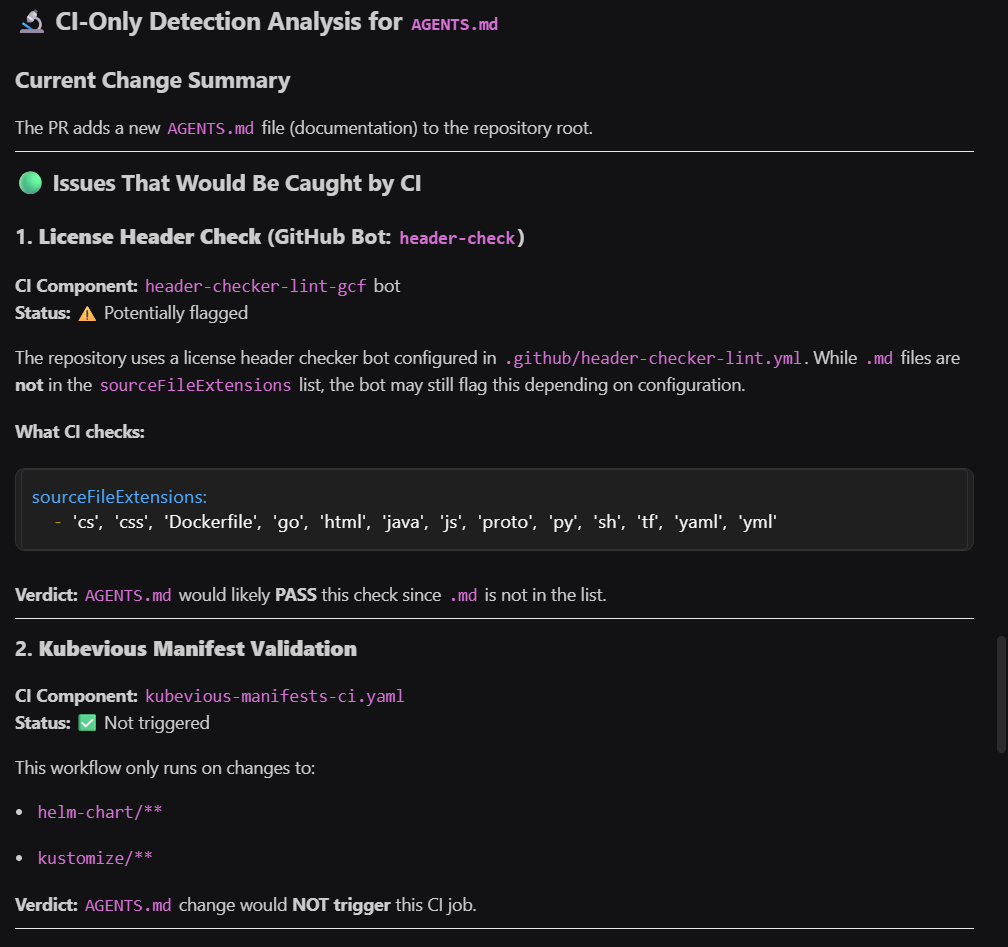
I ran a /review on a simple documentation change (AGENTS.md) before committing.
The output wasn’t just basic linting. It came back as a structured review, the kind you’d expect after opening a pull request. The first section listed “Code Quality Issues (Would Be Flagged in PR Review)”. It flagged the commit message (temp commit for Qodo review) as non-conventional and suggested formats that match the repo’s history, like docs: add AGENTS.md repository guidelines. It even showed examples from existing commits to make it clear what “correct” looks like in this repo.
It also pointed out the future date issue (Updated at: 2025-10-14) and flagged it as likely incorrect. There was another note about missing references to .github/workflows/, which ties back to how the repo is structured. These are not breaking issues, but they are exactly the kind of comments that usually come back during review and slow things down.
Rules feed the review: compliance and review agents enforce standards captured from your codebase and PR history. Review feeds the rules: recurring reviewer comments trigger new rule suggestions, and violations inform which rules need updating. One closed loop, constantly improving code quality.
Code Quality Across the SDLC
Gartner ranked Qodo #1 for Code Understanding in its Critical Capabilities for AI Code Assistants (September 2025), a ranking none of the other tools in this list holds
Running review on a documentation change shows exactly how those gaps get caught before they become PR comments.
The next part moved into CI-only detection analysis, and this is where it starts mapping directly to enterprise workflows. It checked license header enforcement and referenced the actual config file (.github/header-checker-lint.yml). It explained that .md files are not part of the enforced extensions, so this change would pass that check.
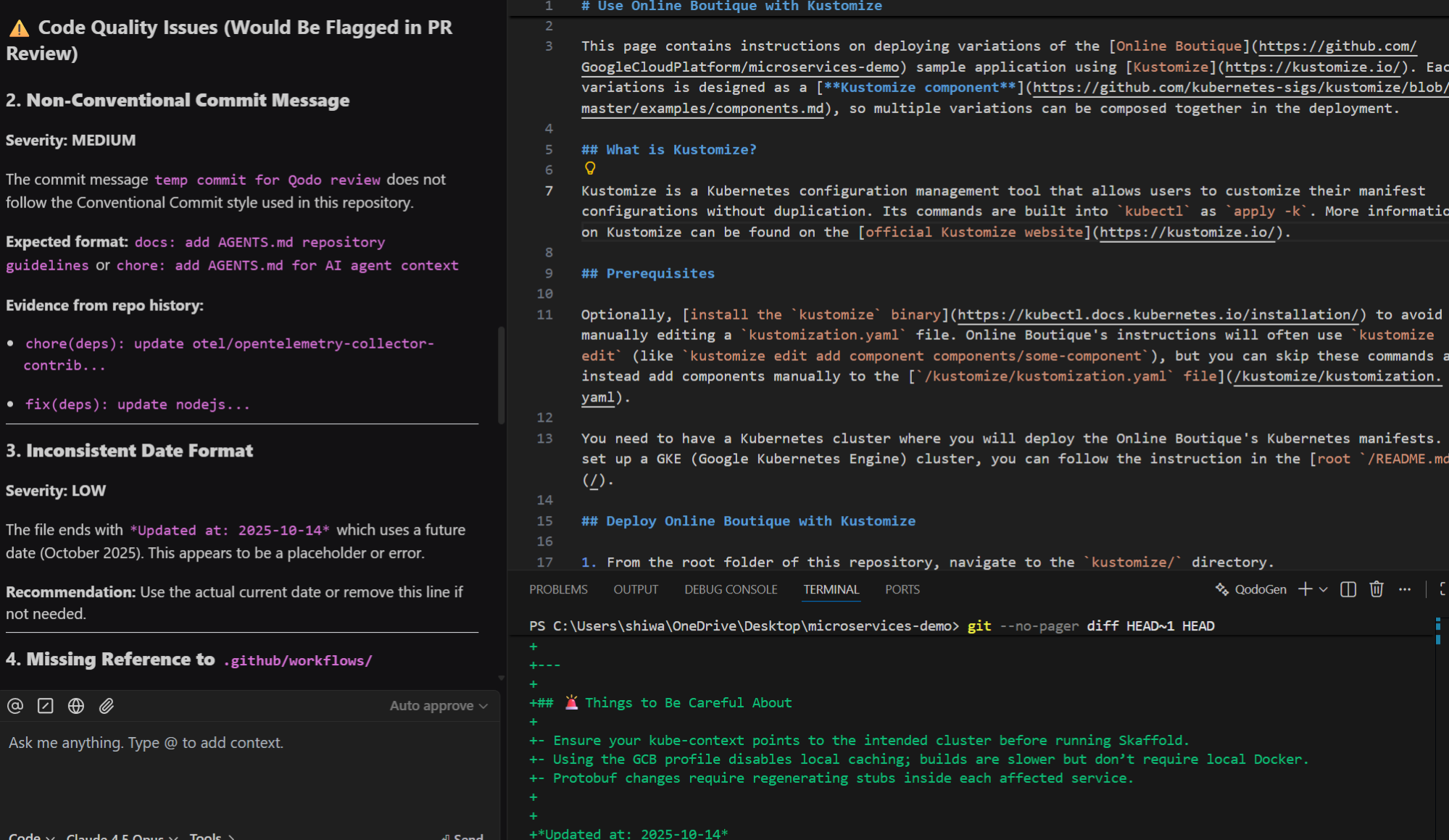
It also evaluated which workflows would run. Since the change was documentation-only, it clearly stated that certain validations like Kubevious wouldn’t trigger. Then it summarized everything with a final outcome, CI would run, but nothing would fail. In a larger setup, CI feedback arriving after push means a developer has already moved on, returning to fix a flagged issue requires reloading context, rewriting the commit, and re-triggering a full pipeline run.
- what will run
- what won’t
- and why
That removes one full feedback cycle.
Qodo’s Shift-Left Review Catches Commit Errors Before the Pipeline Runs
All of this happened locally, before committing or pushing. No pipeline runs, no waiting for reviewers. The commit message format, date issue, and workflow references were all visible while still editing. Fixing a non-conventional commit message before pushing takes 10 seconds. Fixing it after a reviewer comments requires rewriting the commit, force-pushing, and waiting for CI to rerun, often a 15-to-30-minute interruption across two context switches.
For enterprise teams, this is where time gets saved. Not in writing code faster, but in not revisiting the same change multiple times.
Knowing Which CI Checks Will Run Before You Push Removes One Full Feedback Loop
The CI breakdown answers questions that usually come up only after pushing code. It shows which checks will run, which ones won’t, and the expected outcome.
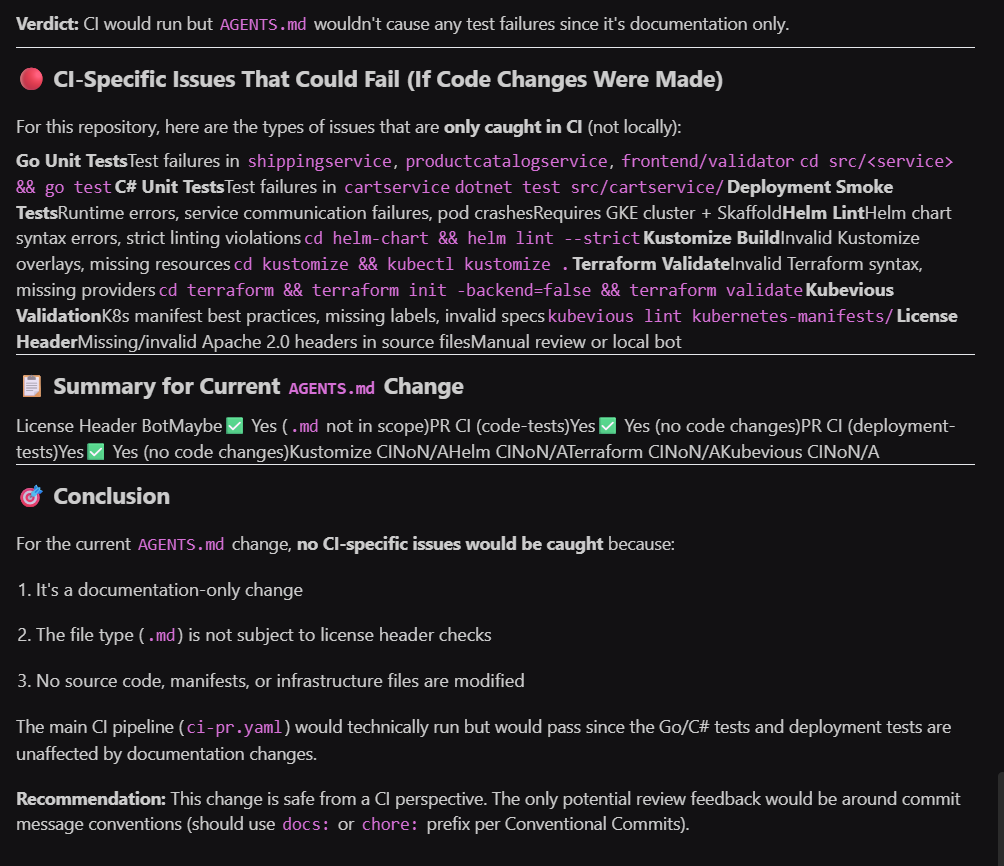
For this change, it clearly stated that CI would pass because no relevant files were modified. That level of visibility helps developers understand the impact of their changes without waiting for pipelines to complete. In larger systems where CI can take several minutes or longer, having that clarity upfront avoids unnecessary delays.
Overall, the experience felt like running a full PR and CI check locally, with output tied to actual repository rules and workflows. For enterprise teams, the value comes from lowering down repeated cycles and keeping feedback consistent across stages.
Conclusion
A /review on a documentation change caught a non-conventional commit message, a future date, and a missing workflow reference, before a single pipeline ran. That gap between “written” and “reviewable” is what these tools flag, each at a different point in the workflow Autocomplete tools speed up code generation, static analysis tools catch predefined issues, and review-focused platforms like Qodo bring contextual review feedback into the editor before pull requests are opened.
The /review outputs, CI breakdowns, and AGENTS.md verdicts showed the same issues that cause PR back-and-forth, caught locally, before the pipeline ran. The strongest workflows combined these categories together, improving consistency, minimizing review cycles, and helping teams maintain code quality as projects scale.
FAQs
1. Do VS Code extensions replace code reviews?
No. They reduce the amount of basic feedback that shows up during review. Human reviewers still focus on design decisions, edge cases, and system-level impact.
2. Which extension actually improves code quality, not just speed?
Tools like Qodo and SonarLint focus on validation rather than generation. They catch issues early, before they reach PR or CI.
3. Can I use multiple extensions together without conflicts
Yes. Most teams run Copilot or Continue for inline completions, SonarLint for static analysis, and Qodo for pre-push review checks; the tools operate at different workflow stages and don’t generate overlapping output.
4. Are AI code assistants safe for enterprise codebases?
It depends on how they handle data. Some tools send code externally, while others support local or controlled environments. This needs to be evaluated based on your organization’s security requirements.
5. How do you measure if these tools are actually helping?
Track three things: PR cycle time (open to merge), re-review rate (how often a PR is sent back after the first round), and where CI failures first appear, pre-push or post-push. If re-review rate drops and CI failures move earlier in the pipeline, the tools are working.
About the author