Understanding Code Complexity and How to Measure It Effectively
TL;DR
- Code complexity grows silently through architectural choices, over-engineering, inconsistent practices, and poor documentation. This hidden complexity increases maintenance effort, slows delivery, and raises the risk of introducing subtle bugs.
- Metrics like cyclomatic complexity, cognitive complexity, Halstead effort, and lines of code help quantify complexity objectively. They highlight high-risk modules, guide testing priorities, and inform refactoring decisions. Without metrics, subtle complexity often goes undetected until it causes issues in production.
- Even small functions can be deceptively difficult to understand. Nested conditionals, redundant logic, and hidden dependencies increase cognitive load and testing effort. Over time, many such functions accumulate, slowing feature delivery and making debugging harder.
- Large systems, especially microservices, introduce complexity through service interactions rather than individual code lines. Changes in one service can affect others, creating unpredictable outcomes. Understanding these interactions is important for maintainability and reliable feature updates.
- AI can create clean-looking snippets for small tasks, but lacks awareness of long-term architecture setup. This often leads to duplicated logic, unnecessary abstractions, inconsistent patterns, and hidden technical debt. Human oversight is required to prevent accumulating complexity in larger projects.
- Tools like Qodo provide context-aware AI-driven analysis that identifies complexity hotspots and enforces coding standards. They highlight hidden technical debt, suggest actionable fixes, and help maintain modular, readable, and testable code.
- Qodo integrates with Git and supports commands like /review, /implement, and /ask. These features ensure that new code aligns with architectural standards and reduces shallow architectural choices or over-engineering.
As a team lead, I’ve seen how often code complexity accumulates hidden technical debt such as tightly coupled dependencies, inconsistent error handling, and opaque data flows that make even small updates risky. In one of my projects, a small update to the order processing flow ended up touching more than we expected. Services, database triggers, and even monitoring scripts had to be changed. Since error handling wasn’t consistent and the dependencies weren’t well understood, that simple change introduced gateways for other bugs, such as mismatched transaction counts and duplicate records in daily summaries that later showed up in the reporting module.
And I’m not surprised to discover that complex code often requires 2.5 to 5 times more maintenance effort compared to simpler codebases of the same size. Another study showed that automated code health metrics can detect modules prone to defects better than manual reviews (arXiv, 2024). These statistics confirm what many of us see in large production projects: the more complex the code becomes, the more hidden technical debt accumulates, making the system harder to maintain, slower to extend, and increasingly prone to bugs.
Over time, code complexity can lead to longer release cycles, higher operational costs, and greater risk when implementing new features, emphasizing the need for proactive complexity monitoring and management throughout the software lifecycle.
In this article, I will focus on how complexity grows, how to measure it using proven metrics, how to reduce it, and where tools like Qodo help in keeping complexity under control.
What is Code Complexity?
Code complexity is the effort required to understand, modify, and maintain software code. It reflects how code structure, logic, and interactions affect developer productivity and the risk of introducing bugs. Complexity is influenced not only by lines of code or conditional statements, but also by nested structures, the number of decisions, hidden dependencies, and how modules interact.
Below are two examples to illustrate code complexities and how they affect developer productivity:
Example (a): Low complexity
def is_even(num):
    if num % 2 == 0:
        return True
    return False
This function has a single clear purpose: check if a number is even. There is only one decision point (if num % 2 == 0) and no loops or nested conditions. A developer can immediately understand the logic, and testing is straightforward since there are only two possible outcomes: True or False. The cognitive load is minimal, and the function can be safely modified without worrying about unintended side effects.
Example (b): Higher complexity
def process_numbers(numbers):
    results = []
    cache = {}

    for n in numbers:
        # Initial filter
        if n in cache:
            passed_initial = cache[n]['passed_initial']
        else:
            passed_initial = n % 2 == 0 and n > 10
            cache[n] = {'passed_initial': passed_initial, 'passed_secondary': None}

        if not passed_initial:
            results.append(f"{n} rejected at initial filter")
            continue

        # Secondary filter with redundant checks
        secondary = False
        if n % 3 == 0:
            secondary = True
        elif n % 5 == 0:
            secondary = True
        elif n % 3 == 0 and n % 5 == 0:  # Redundant
            secondary = True

        # Exclusion condition
        if n % 7 == 0:
            secondary = False

        cache[n]['passed_secondary'] = secondary

        if secondary:
            results.append(f"{n} passed complex filter")
        else:
            results.append(f"{n} rejected at secondary filter")

    return results
This function example introduces patterns that increase maintainability challenges. It adds redundant checks, like verifying divisibility by 3 and 5 multiple times, and uses a cache dictionary unnecessarily for a simple loop, which adds cognitive overhead without real benefit.
The nested logic, multiple flags, and extra bookkeeping make the flow harder to read and follow, even though the task itself is simple. These small inefficiencies pile up in larger projects, creating hidden technical debt, inconsistent patterns, and over-engineered code paths.
Here’s an image that compares low and high complexity functions.

In the image, the left side shows a high complexity function with nested loops, redundant checks, and multiple flags, resulting in high cognitive load, test effort, and risk of bugs. The right side shows a simple function with a single decision point, keeping cognitive load, testing effort, and bug risk low. We can easily see how small differences in code structure can significantly impact maintainability and developer effort.
Even though both snippets are short, the second one requires significantly more cognitive effort and thorough testing. In a large codebase, hundreds of such functions accumulate and make the system slower to extend, harder to debug, and riskier to refactor. Let me show another example of system-level complexity:
Example (c): System-level complexity
For example, if there is a microservices system handling customer onboarding. A single signup request triggers such as validation service (checks user input), authentication service (creates login credentials), billing service (provisions subscriptions), etc
Even though the code for each service might be simple individually, the overall system complexity comes from the interactions between services. A change in one service’s API can break the signup flow.
Debugging requires tracing multiple services, understanding dependency chains, and coordinating updates across teams. This is a real example of how complexity in large systems is often hidden in service interactions rather than the code itself. But, how does code complexity initially increase? I will share some key factors in the next sections.
How Does Code Complexity Increase in AI Generated Code?
AI-generated code can feel clean and simple for small tasks, but complexity tends to spike as the project grows. Unlike a developer, who maintains a mental map of the entire system, most AI tools generate isolated fragments without understanding long-term architecture.
But what’s the main cause for that complexity increase? Let me clear them one-by-one:
Context Blindness
AI doesn’t retain memory across sessions, so each code snippet is generated in isolation. This often results in duplicated logic, inconsistent naming, or repeated patterns. For example, generating refund logic twice might produce one function that updates the database directly and another that calls a service layer, creating two parallel implementations that behave differently and require reconciliation. Similarly, repeated utility functions like date parsers or validation checks may appear in multiple places rather than being centralized.
Replacing Expertise Without Judgment
AI can handle simple coding tasks, but it doesn’t understand the long-term implications of design or performance decisions. It might produce code that “works” but ignores framework conventions or performance implications.
For example, it could generate synchronous database queries in a high-throughput service, causing bottlenecks under load, or use generic error handling that swallows important exceptions, leading to debugging challenges later.
Shallow Architectural Choices
AI can put together the basic pieces of a system, but it doesn’t consider long-term maintainability. It may embed business logic directly in controllers instead of creating a service layer, or tightly couple modules that should be independent.
For example, an AI-generated order processing handler might mix payment logic, inventory updates, and notification sending in a single function. This works for a small demo but becomes difficult to extend, test, or refactor as the system grows.
Unreliable Self-Review
AI can suggest improvements or “fixes,” but it often changes code unnecessarily, introducing churn and inconsistent patterns. For example, it might reorder function parameters or refactor naming conventions mid-project, leaving the codebase inconsistent. Without human review, these incremental variations accumulate, making the system unpredictable and harder to maintain.



Code Complexity Metrics
As we have seen, code complexity grows silently through factors like poor documentation, architectural choices, over-optimization, and inconsistent practices. These factors not only make code harder to understand but also increase the risk of bugs, slow down feature delivery, and amplify maintenance effort.
Measuring code complexity is essential because it turns these abstract risks into quantifiable insights. Metrics provide objective signals that highlight the most important areas of a codebase. They help teams identify functions or modules that are difficult to maintain, understand, or extend, allowing proactive interventions before problems escalate.
Beyond just numbers, complexity metrics inform testing strategies, guide refactoring efforts, and improve predictability in development cycles. For senior developers and technical leads, these metrics are a practical tool to prioritize technical debt, allocate resources effectively, and maintain long-term code quality.
Here are the key metrics commonly used to measure complexity, along with explanations of their practical impact on software development:
Cyclomatic Complexity (CC)
Cyclomatic complexity measures the number of independent execution paths through a function or module. Every branch, loop, or conditional increases the number of paths, which directly impacts testing effort and the cognitive load required to understand the code. Here’s a diagram that explains the same:
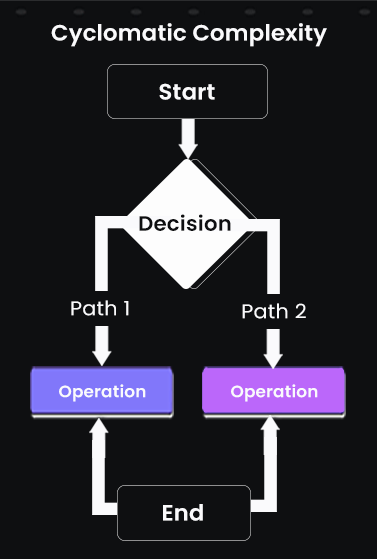
In the diagram, we can see that each branch represents an independent execution path in the function, helping developers understand the number of test cases needed to cover all paths. Higher values indicate more complex logic and potential maintenance challenges.
For example, consider the following function:
def calculate_discount(user, price):
    if user.is_vip:
        if price > 100:
            return price * 0.8
        else:
            return price * 0.9
    else:
        if price > 200:
            return price * 0.95
        return price
This function has five independent paths through its logic. Each additional conditional or nested decision increases complexity, requiring more test cases to ensure correctness. In a real-world development cycle, functions like this often appear in pricing or billing modules.
High cyclomatic complexity here can delay releases because QA teams must cover all possible paths to avoid edge-case bugs. It also affects refactoring decisions: developers need to carefully analyze the impact of changes across all paths to prevent unintended behavior in production systems.
Halstead Metrics
Halstead metrics quantify complexity by counting operators and operands in a function or module. These metrics estimate the mental effort needed to understand the code, as well as potential error rates.
Here’s a short flowchart that shows how Halstead metric work:
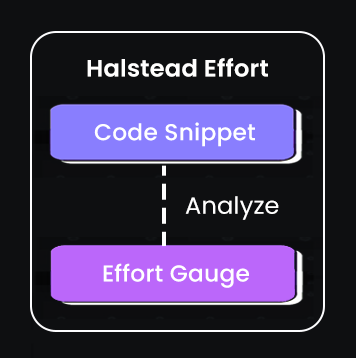
This metric evaluates complexity based on the number of operators and operands in the code. It estimates the effort required to implement or understand the code, linking logical operations to development effort.
def sum_even_numbers(nums):
    total = 0
    for n in nums:
        if n % 2 == 0:
            total += n
    return total
Here, operators include =, for, if, %, +=, return, and operands include total, n, nums, 0, 2. In practice, functions with high Halstead effort indicate areas where developers will need more time to understand, modify, or debug code. For example, in a data-processing pipeline, a highly intricate function may slow down feature additions or increase the likelihood of introducing errors when modifying logic.
Cognitive Complexity
Cognitive complexity measures how difficult code is to read and reason about, penalizing nested loops, recursion, and mental jumps required to follow logic.
def validate_order(order):
    if order.type == 'express':
        if order.weight > 10:
            return False
        else:
            if order.destination in restricted_areas:
                return False
    return True
Even though cyclomatic complexity is relatively low, understanding nested conditions requires mental effort. Here’s flowchart that shows cognitive complexity working:
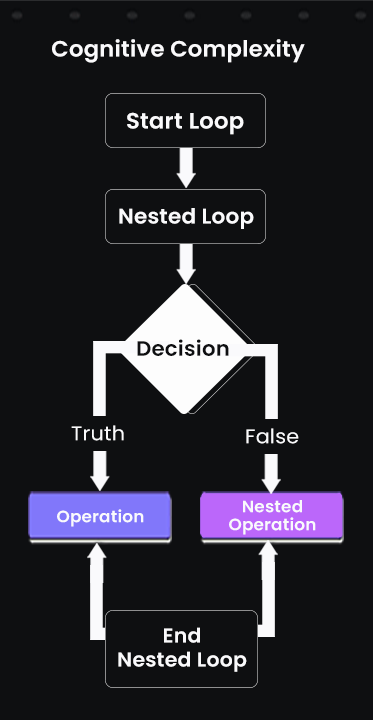
This diagram depicts nested loops and decision points using boxes and arrows. It reflects the mental effort required to understand the function, accounting for nesting and branching. The more layers and conditions, the higher the cognitive load for anyone reading or modifying the code.
Lines of Code (LOC)
Lines of Code is a simple but effective metric to gauge the size and potential complexity of a function or module. While not sufficient alone, longer functions usually contain more branching, loops, and interdependencies.
Here’s a flowchart for LOC:
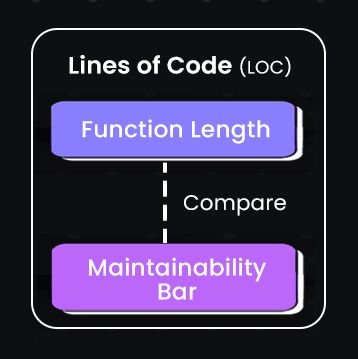
In the above diagram, we can see the function length comparison with a maintainability bar. Longer functions tend to be harder to maintain and understand, while shorter functions typically improve readability and reduce potential for errors.
Let me take an example:
def process_orders(orders):
    for order in orders:
        if order.type == 'express':
            apply_express_rules(order)
        elif order.type == 'standard':
            apply_standard_rules(order)
        # multiple additional conditions for rare cases
        log_order(order)
        update_database(order)
A function like this, with 50+ lines, requires more testing and careful maintenance. In practice, long functions handling important business logic increase the likelihood of bugs and slow down development because developers must read and understand every branch before making changes.
Using Code Complexity Metrics Across the SDLC
Code complexity metrics can be applied throughout the software development lifecycle to guide technical decisions and reduce risk. Let me explain you with a flowchart that explains which metrics can be used when across the SDLC:
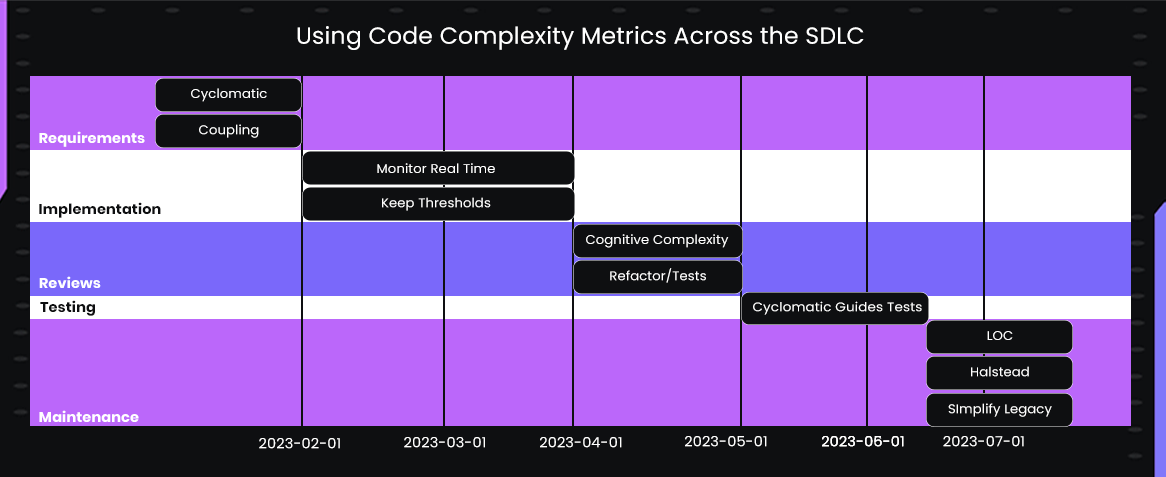
During the requirements and design phase, metrics like cyclomatic complexity and coupling help anticipate potential maintenance challenges in planned modules, particularly when multiple branches or interdependent services are involved.
During implementation, developers can monitor metrics in real time to ensure new functions stay within maintainable thresholds, preventing hidden complexity from accumulating.
In code reviews and pull requests, high-complexity functions identified through cognitive complexity or coupling metrics receive targeted attention, guiding refactoring, additional comments, or extra unit tests.
During testing, cyclomatic complexity directly informs the number of test cases required to cover all execution paths and edge cases. In maintenance and refactoring phases, tracking LOC, Halstead effort, and coupling highlights legacy modules that need simplification, while cognitive complexity signals areas where new developers may require additional guidance or documentation.
At release and monitoring stages, complexity metrics support deployment decisions and ongoing technical debt management by identifying risky modules that require closer observation or phased rollout. Using these metrics consistently throughout the SDLC ensures that teams maintain a predictable, maintainable, and high-quality codebase.
Understanding these metrics and how they are used in SDLC is important, but applying them effectively requires the right tools and processes. In the next section, I will explore how Qodo uses these metrics to manage complexity throughout the development lifecycle, providing practical, hands-on solutions for high-quality code.
Why I Chose Qodo to Manage Code Complexity?
As a team lead responsible for multiple modules and tight release schedules, managing code complexity has always been one of the biggest challenges I face. Over time, I noticed that traditional code review processes and static analysis tools only catch obvious issues, leaving subtle complexity hidden until it causes delays or bugs in production. That’s why I shifted to using Qodo in my development cycle.
I really prefer Qodo because it integrates deeply into the development workflow, providing contextual insights rather than generic warnings. Its AI-driven analysis understands the architecture of our codebase, checks new changes against established coding standards, and highlights areas where complexity might grow silently.
With RAG-powered suggestions, Qodo can pull relevant examples, best practices, and historical code patterns from the codebase to inform its recommendations. Unlike other tools, it doesn’t just point out problems, it offers actionable, context-aware guidance that my team can implement immediately, reducing the back-and-forth during code reviews.
My Hands-On Experience with Qodo
Recently, I led a project to build a Product Recommendation Service for a large e-commerce platform. The service needed to combine user browsing history, purchase patterns, inventory data, and seasonal promotions to generate personalized product suggestions in real time.
I asked Qodo to add a Top Category Recommendations feature, and it generated a new service module (category_recommender.py) along with updates in endpoints.py. The code pulls recent browsing data, fetches product categories, applies action weights (cart, wishlist, review, view), and combines this with time-based decay and viewing duration to calculate scores.
Here’s a snapshot of the output:
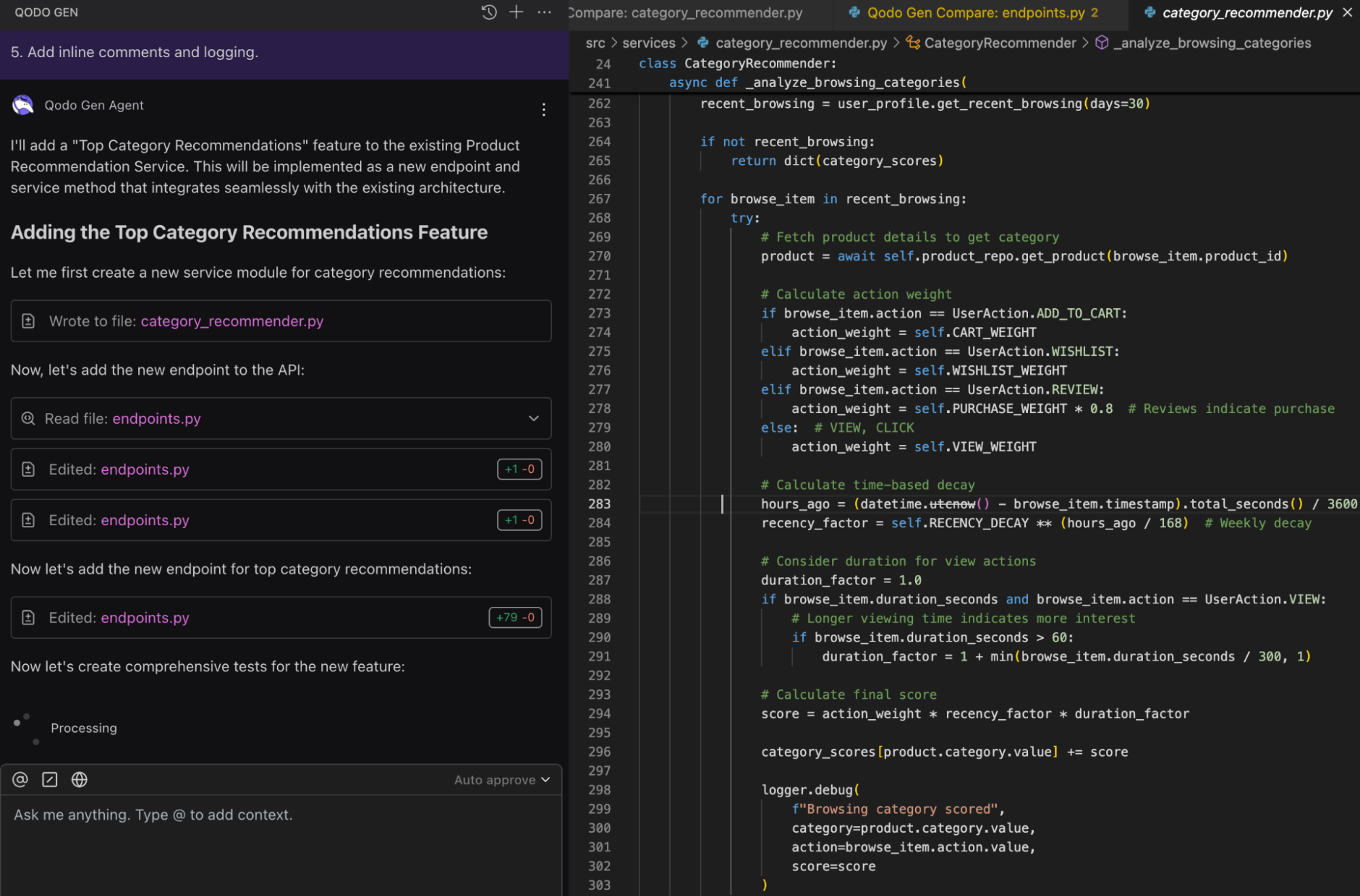
It also added a trend analysis that compares recent, previous, and older activity to detect rising or declining interest, with debug logs sprinkled throughout for traceability.
Qodo kept things modular, it created a separate service instead of bloating existing files, which makes the codebase more maintainable and testable. The scoring logic is definitely complex since it blends weights, decay, duration, and trends, but the structure and logging keep it understandable.
Testing Code Complexity with Qodo
When I asked Qodo to review complexity, it reported that the get_top_categories method has a cyclomatic complexity of 8, which is moderate and still acceptable. Here’s a snapshot:
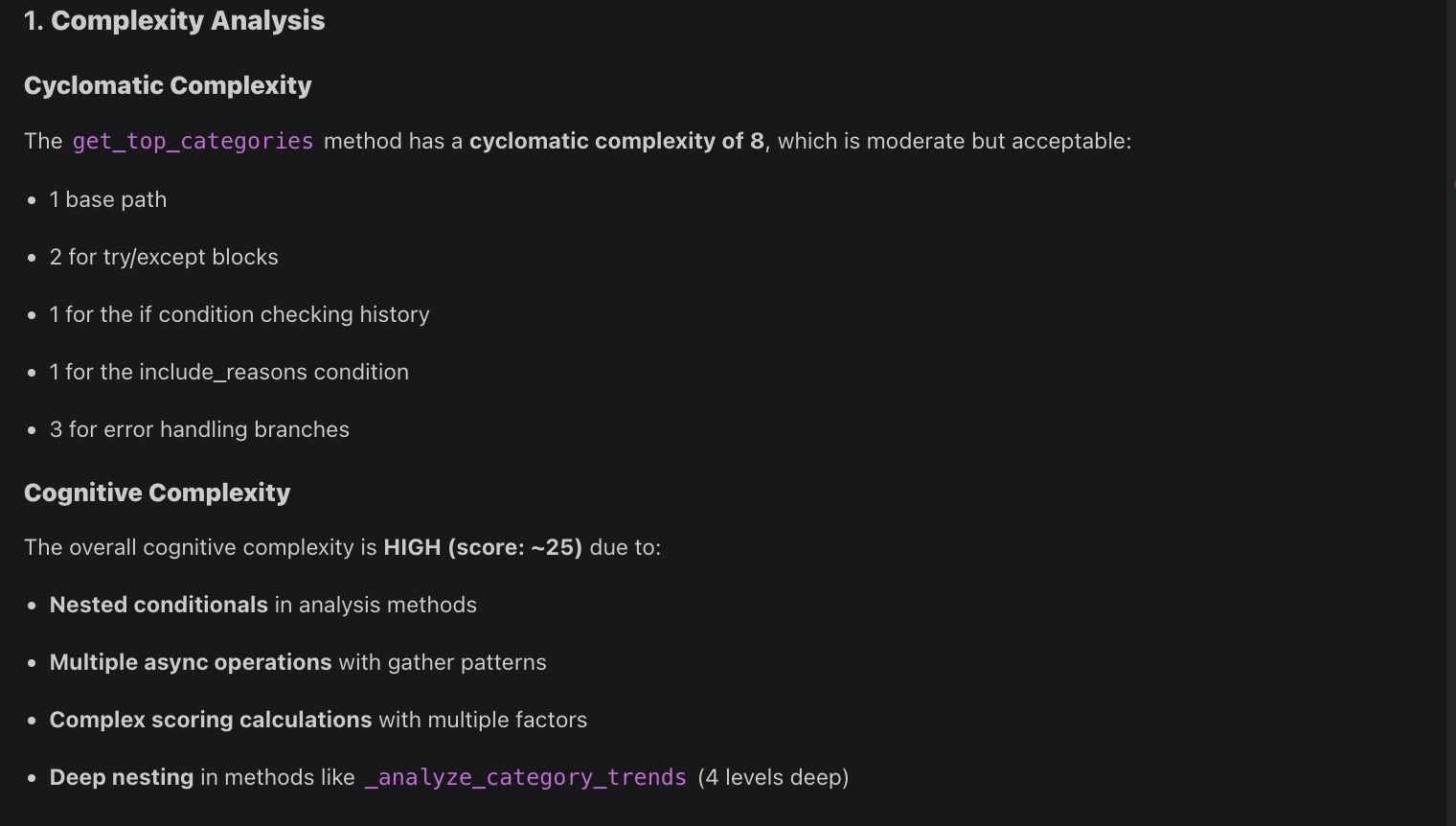
This number comes from the base execution path, two try/except blocks, conditional checks for browsing history and reasons, plus a few error handling branches. However, the cognitive complexity score came out high (~25).
That’s because the methods use nested conditionals, multiple async operations, fairly intricate scoring formulas, and deep nesting in _analyze_category_trends that goes four levels down. In other words, while the branching logic isn’t excessive, the mental effort to follow the flow is much higher.
The second report flagged three medium severity issues as shown in the below screenshot:
The first is a performance concern caused by an N+1 query problem: every browsing item triggers a new product fetch, which means a user with 100 history items could hit the database 100+ times.
The second is a memory risk since all purchases are loaded into memory and sorted, something that could blow up with users having thousands of purchases. The third issue is the use of hard-coded magic numbers for weights and decay factors, like PURCHASE_WEIGHT = 3.0 or RECENCY_DECAY = 0.95. While these defaults are fine, they hurt configurability and make tuning harder later.
Qodo also provided actionable suggestions to improve the implementation as shown in the image and I can easily ask it to continue to implement those suggestions as well.
It recommended using batch loading to resolve the N+1 query problem, refactoring complex logic into separate analyzer classes to reduce cognitive load, making weights configurable via environment variables or configuration files instead of hard-coding them, and adding edge case tests to strengthen robustness.
Qodo and Managing Code Complexity
Qodo is the tool I rely on to maintain high-quality code during reviews. It integrates directly with our Git workflow and analyzes pull requests to detect complexity growth, enforce coding standards, and highlight maintainability risks. What stands out is that it doesn’t just point out issues, it explains why a piece of code may become harder to maintain and suggests actionable fixes.
For example, when reviewing a feature, Qodo can detect functions with high cyclomatic or cognitive complexity, flag areas where modules are tightly coupled, and highlight code that may increase future technical debt.
Commands like /review give an automated assessment of changes, /implement can refactor code to reduce complexity, and /ask lets me query the reasoning behind suggestions. Using Qodo consistently ensures that new features are modular, readable, and easier to maintain, preventing hidden complexity from accumulating silently.
Conclusion
Managing code complexity is one of the most persistent challenges in software development, especially as systems grow and evolve. From my experience, hidden complexity can slow feature delivery, increase defect rates, and make onboarding new developers more difficult.
Using Qodo has changed how my team approaches this problem. Its AI-driven analysis ensures that every new feature aligns with architectural standards, highlights potential complexity risks, and provides actionable suggestions to keep the codebase maintainable. For senior developers and team leads managing large, evolving systems, incorporating Qodo into the development workflow transforms how complexity is controlled and maintained across the software lifecycle.
FAQs
What is the difference between cyclomatic and cognitive complexity?
Cyclomatic complexity measures the number of independent execution paths through a function, which helps estimate testing effort. Cognitive complexity evaluates how difficult it is to read and understand the code, considering nesting, conditional logic, and flow, giving insight into maintainability.
Why does code complexity matter in large-scale systems?
High complexity increases the risk of bugs, slows down feature delivery, and makes maintenance harder. It also affects onboarding new developers, as they spend more time understanding intertwined logic instead of implementing features.
How does Qodo identify complexity in a codebase?
Qodo uses AI-driven analysis to detect high cyclomatic and cognitive complexity, tightly coupled modules, and code patterns that may increase future technical debt. It provides detailed reports highlighting risk areas along with actionable recommendations.
Can Qodo help reduce complexity during code reviews?
Yes, Qodo helps reduce complexity during code reviews. Using Qodo , teams can run /review on pull requests to identify complexity hotspots, enforce coding standards, and suggest refactoring. Commands like /implement can automatically restructure code to reduce coupling and improve readability.
Does Qodo provide suggestions for optimizing existing complex code?
Absolutely. Qodo analyzes the code, flags performance or maintainability issues, and proposes concrete steps such as extracting helper functions, batch processing, or making configurable parameters, ensuring changes do not compromise modularity or readability.
About the author