5 Open Source Code Review Tools: What Works and What Doesn’t at Scale
TL;DR
- Open source code review tools are built for repository-level workflows, managing diffs, enforcing rules, and structuring pull request collaboration
- They review what changed in the PR, but don’t account for how that change impacts other services, shared contracts, or dependent systems.
- Tools like Gerrit, Phabricator, SonarQube, GitHub, and Qodo each address different parts of the review workflow, approvals, static analysis, and PR-based collaboration
- As codebases grow across multiple services and repositories, review needs to account for how changes interact across those boundaries, not just within a single PR, in this guide, we break down where each tool fits and how to evaluate them for enterprise use
Open source code review tools operate on pull request diffs, they analyze what changed, apply rule-based checks, and enforce merge conditions at the repository level. They evaluate diffs, enforce rules, and help teams collaborate on changes within a repository. That model works well until the impact of a change extends beyond what’s visible in the PR.
As Qodo’s Global Community Manager and someone who spends a lot of time at the intersection of cloud native engineering and developer tooling, I’ve had this conversation with engineering teams more times than I can count. The pattern is consistent: teams adopt AI coding tools, velocity goes up, and the review queue quietly becomes the most dangerous part of the SDLC.
The problem: AI coding tools have fundamentally changed the volume and velocity of what lands in that queue. According to the 2025 DORA State of DevOps Report, high-performing teams now deploy on demand with lead times measured in hours, and AI-assisted development is a significant driver of that throughput increase.
Review capacity hasn’t kept up. As Itamar Friedman(Co-Founder of Qodo) puts it:
“ You can call Claude Code or Cursor and, in five minutes, get 1,000 lines of code. You have 40 minutes, and you can’t review that”
Itamar Friedman
Open source tools handle the basics well, formatting, static checks, and rule-based flags within a single repo. As systems scale, that’s no longer enough. Cross-repo contract drift accumulates undetected. Review depth varies by who’s assigned. CI passes, but behavioral bugs get flagged in production. Senior engineers become the bottleneck on anything high-risk.
In this guide, I evaluate five open source code review tools through an enterprise lens: where they work, where they fall short, and what to look for as your codebase and team grow.
What Actually Matters When Evaluating Code Review Tools at Scale
Most tools get evaluated on setup time, language support, and GitHub stars. At enterprise scale, those signals don’t tell you much. The criteria that actually matter only become visible when something breaks in production, or almost does.
Here are the five things worth evaluating, and why each one is a gap in most open source options.
| Criterion | The real risk | What to check |
| Diff vs. system understanding | File-scoped tools miss cross-service contract breaks | Can it surface-breaking changes across service boundaries, not just within the modified file? |
| PR-native enforcement | Findings outside the PR don’t block the merge under review pressure | Does it post inline on changed lines and integrate as a blocking status check? |
| Signal-to-noise ratio | High noise trains teams to ignore everything, including critical regressions | Does it classify findings by severity and surface critical issues first? |
| CI pipeline stability | Flaky or slow review steps get bypassed, and enforcement disappears quietly | Is it deterministic across runs, and can it fail gracefully without blocking delivery? |
| Centralized standards management | Standards in multiple places are enforced inconsistently across repos, teams, and AI tools | Can rules be centrally managed, scoped by team or repo, and measured for real impact? |
Each of these criteria has a failure mode that doesn’t show up in a demo. It shows up in production.
1. Does it understand the change, or just the diff?
Most tools tell you that a field has changed. They don’t tell you what breaks when it does. That gap shows up fast in systems where services share contracts. A developer makes a BillingClient field mandatory and removes the validation fallback. The diff compiles, tests pass. What nobody sees: three downstream services still send payloads without that field and will fail at runtime. The risk isn’t in the modified file. It’s in every service that consumes it.
What to check: Can the tool surface breaking changes across service boundaries, not just within the modified file?
2. Does it live inside the pull request, or alongside it?
A finding nobody acts on isn’t a finding; it’s a log entry. And findings that live outside the PR almost never get acted on. So, for example, a JWT validation change ships under review pressure because the scanner flagged it outside the PR. No inline comment, no merge block. By the time someone sees the report, the change is already in.
What to check: Does the tool post inline on changed lines and integrate as a blocking check in your Git workflow, not a separate report?
3. What’s the signal-to-noise ratio at real PR volume?
When PR volume doubles, a tool that wasn’t noisy before suddenly is. And once developers start skimming findings, they skim all of them. A circuit breaker gets quietly replaced with a direct HTTP call. The tool flags line spacing. The reliability regression gets buried and ships.
What to check: Does the tool classify findings by severity and surface critical issues first? Can you tune what it prioritizes for your team?
4. Does it strengthen your CI pipeline, or introduce fragility?
One flaky review step is enough to normalize bypass behavior across the whole team. It doesn’t happen with a decision; it happens gradually. Developers start adding bypass labels to keep delivery moving. Within weeks, the tool is technically active but practically ignored. Nobody can tell you exactly when that happened.
What to check: Is the tool deterministic across runs? Can it fail gracefully without blocking delivery?
5. Can you define, enforce, and evolve standards from one place?
Standards documented in three different places aren’t standards; they’re suggestions. And suggestions don’t survive at scale. Think about a naming convention that lives in Confluence, gets encoded slightly differently in ESLint, and gets enforced a third way through PR comments. When a new AI coding tool joins the stack, it applies none of them. There’s no single place to see it happening.
What to check: Can rules be centrally managed, scoped by repo or team, and measured for whether they’re catching issues, or just generating noise?
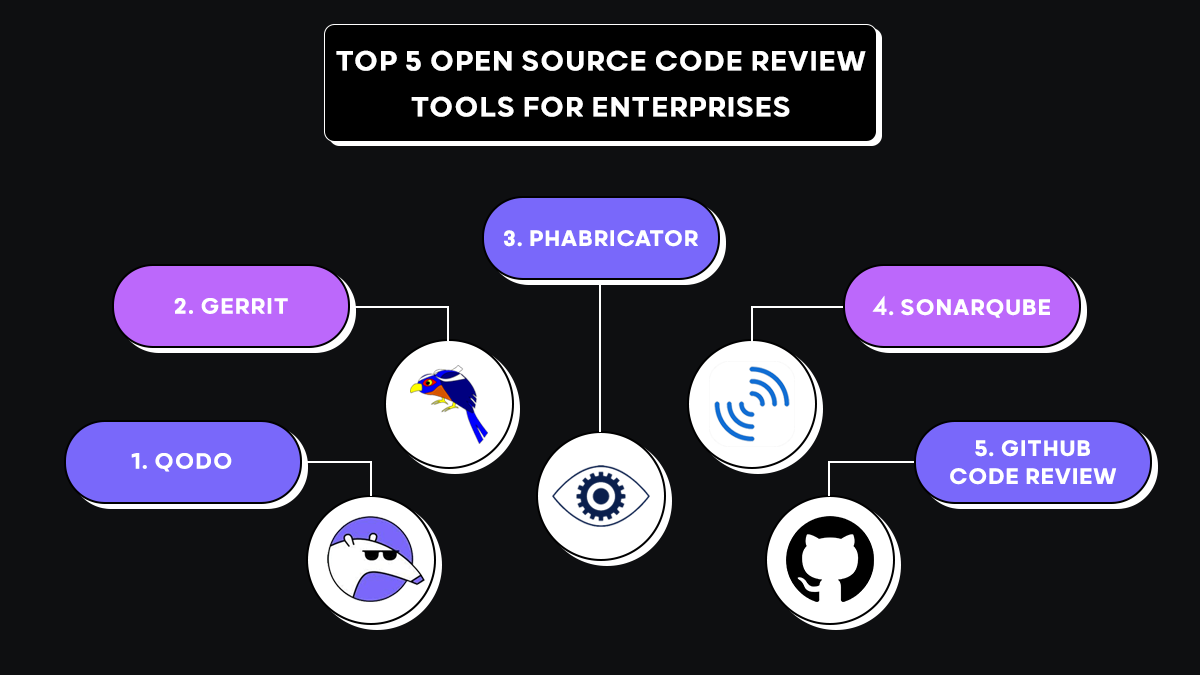
Top 5 Open Source Code Review Tools
1. Qodo
Most review tools focus on the files changed in the PR diff such as source code, test cases, and config or schema updates. Qodo evaluates how those changes impact related services and dependencies.
It doesn’t just check syntax or match known patterns. It reads the diff in context, what was modified, added, or removed, and evaluates it against how the rest of the repository actually behaves. That distinction matters when a change looks clean in isolation but carries real risk once you trace its impact across services.
Qodo works across two usage models.
- Individual developers get it free for personal or open-source projects, AI-assisted PR review, and automated feedback directly in their repositories.
- Enterprise teams use it as a governance layer for large-scale codebases, where PR volume, repository interdependencies, and compliance requirements need consistent automated review.
Qodo for Individuals vs Enterprises
| Capability | Individual Developers (Free for OSS & Personal Projects) | Enterprise Teams |
| Cost | Free to use for open-source and individual repositories | Paid enterprise platform |
| Primary Goal | Improve pull request quality and catch issues early | Enforce code quality, security, and governance across teams |
| Review Scope | Single repository pull request reviews | Multi-repository analysis and dependency reasoning |
| Policy Enforcement | Basic review insights and suggestions | Enforceable rules, merge gates, and governance controls |
| Collaboration | Developer-level feedback inside PRs | Organization-wide review standards and compliance visibility |
| Integrations | Standard Git platform integrations | Deep integrations with Jira, Azure DevOps, CI/CD pipelines |
| Deployment | Cloud usage | Cloud, on-premise, or air-gapped enterprise deployment |
Hands-On: How Qodo Reviews Deployment and Rollout Risk in a Real PR
In this pull request, I asked Qodo directly inside the review thread:
| “Does this change alter deployment behavior, startup order, or rollout assumptions? Is this safe to deploy independently?” |
Instead of giving a generic answer, Qodo analyzed the diff and structured the response around deployment safety, coordinated releases, and schema evolution. That structure made the risk immediately clear.
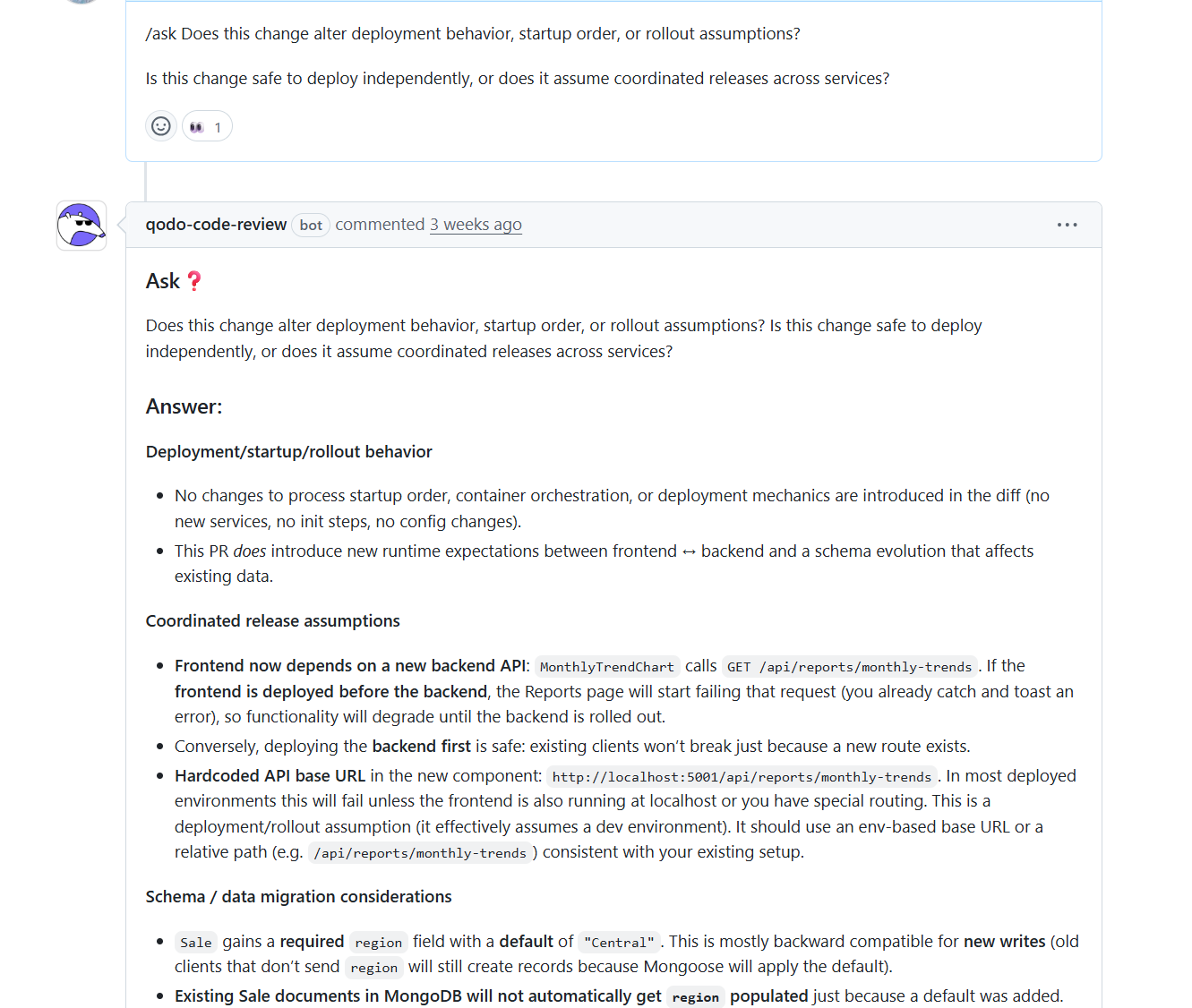
Deployment & Startup Behavior: Qodo first confirmed that no changes were introduced to container orchestration, process startup order, or deployment mechanics. There were no new services, init steps, or config changes.
That immediately reduced infrastructure-level concern. However, it also detected that a new runtime dependency was introduced between frontend and backend, which changed rollout implications even though the infrastructure remained untouched.
Coordinated Release Assumptions: Qodo identified that the frontend now calls a newly added backend API endpoint. If the frontend is deployed before the backend, requests to that endpoint will fail. That means the rollout is not fully independent and requires ordering awareness.
It also flagged a hardcoded localhost base URL, which assumes a development environment and would fail in most deployed setups. In this single review, Qodo evaluated deployment independence, runtime coupling, environment assumptions, and schema evolution.
Pros
- Evaluates system-level impact, not just syntax
- Reduces policy drift across repositories
- Supports enterprise compliance workflows
- Scales review quality with increasing PR volume
- Strengthens enforcement without adding manual overhead
Cons
- Initial setup requires repository indexing to help with full context analysis. This is typically a one-time step for most environments.
- Enterprise-grade configuration may exceed the needs of very small teams.
Pricing
- Developer: Free, 30 PRs/month, 75 IDE/CLI credits, community support
- Teams: $30/user/month (billed annually) | Unlimited PRs, 2500 credits/user, standard private support
- Enterprise: Custom pricing with Multi-repo context engine, enterprise dashboard, SSO, on-prem, and air-gapped deployment
2. Gerrit
Gerrit’s core model is patch sets, not pull requests, structured, traceable, and built for teams where process discipline matters more than speed.
A change enters a structured review queue. Reviewers comment on specific lines, the developer addresses the feedback and submits a new patch set, and the cycle continues until the change earns the approvals required to merge. Every revision is tracked. Nothing gets squash-merged and lost. Access controls are unusually granular; you can configure exactly who can vote, what each vote means, and what combination is required before a change is submitted.
Hands-On: Reviewing a System-Level Dependency Change in Gerrit
In this example, the change is reviewed in Gerrit, showing a side-by-side diff of init/devices.c, a file involved in early system initialization and device setup. The change in review introduces a new header:
#include <sys/system_properties.h>, in init/devices.c.
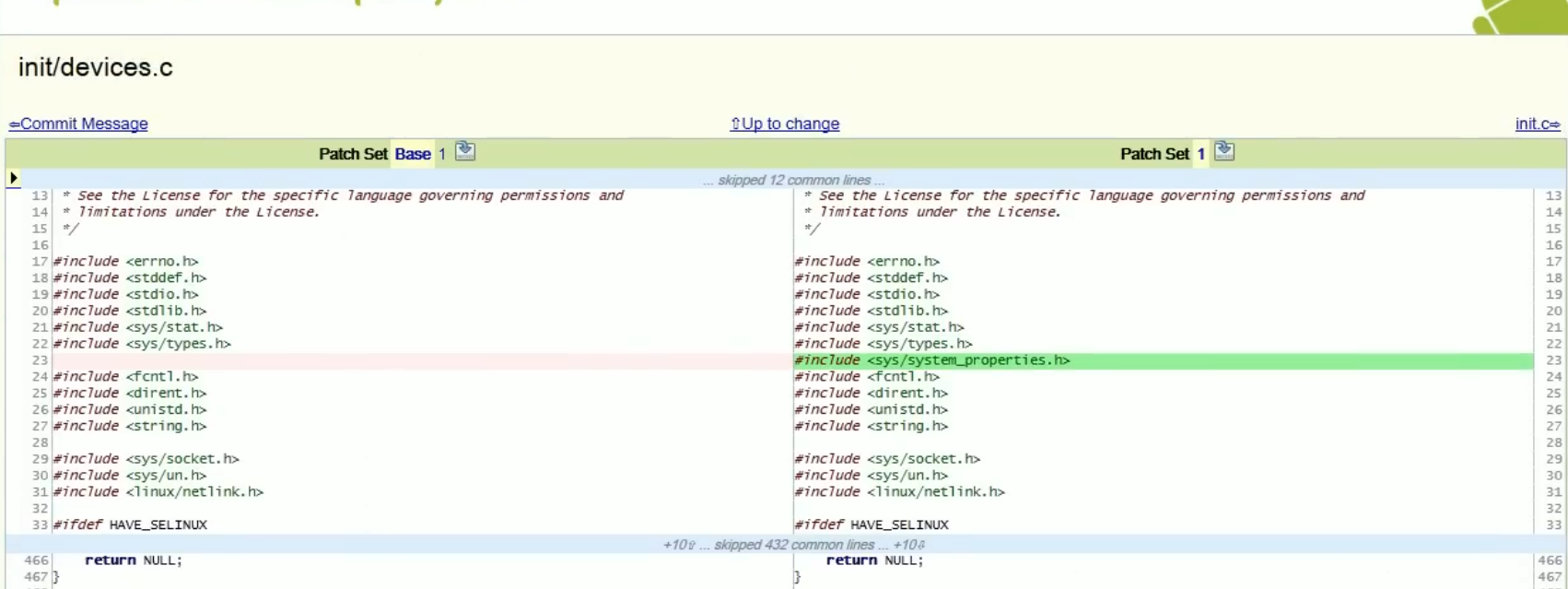
Gerrit tracks each revision as a distinct patch set and ties line-level comments to that specific version. When the developer submits a fix, you can see exactly what changed between iterations. The review history stays intact.
What it doesn’t do is tell you whether that header affects build dependencies, whether it’s available across all target platforms, or whether similar changes elsewhere are handled differently. That analysis is entirely on the reviewer. Gerrit enforces how review happens. It doesn’t help with what to look for.
Pros
- Supports structured review workflows
- Provides granular permission controls
- Allows configurable approval chains
Cons
- Limited to diff-level human review
- No system-level contextual reasoning
- No cross-repository awareness
- Self-hosted deployment requires dedicated infrastructure management and operational support
Pricing
Gerrit is free and open source
3. Phabricator (Differential)
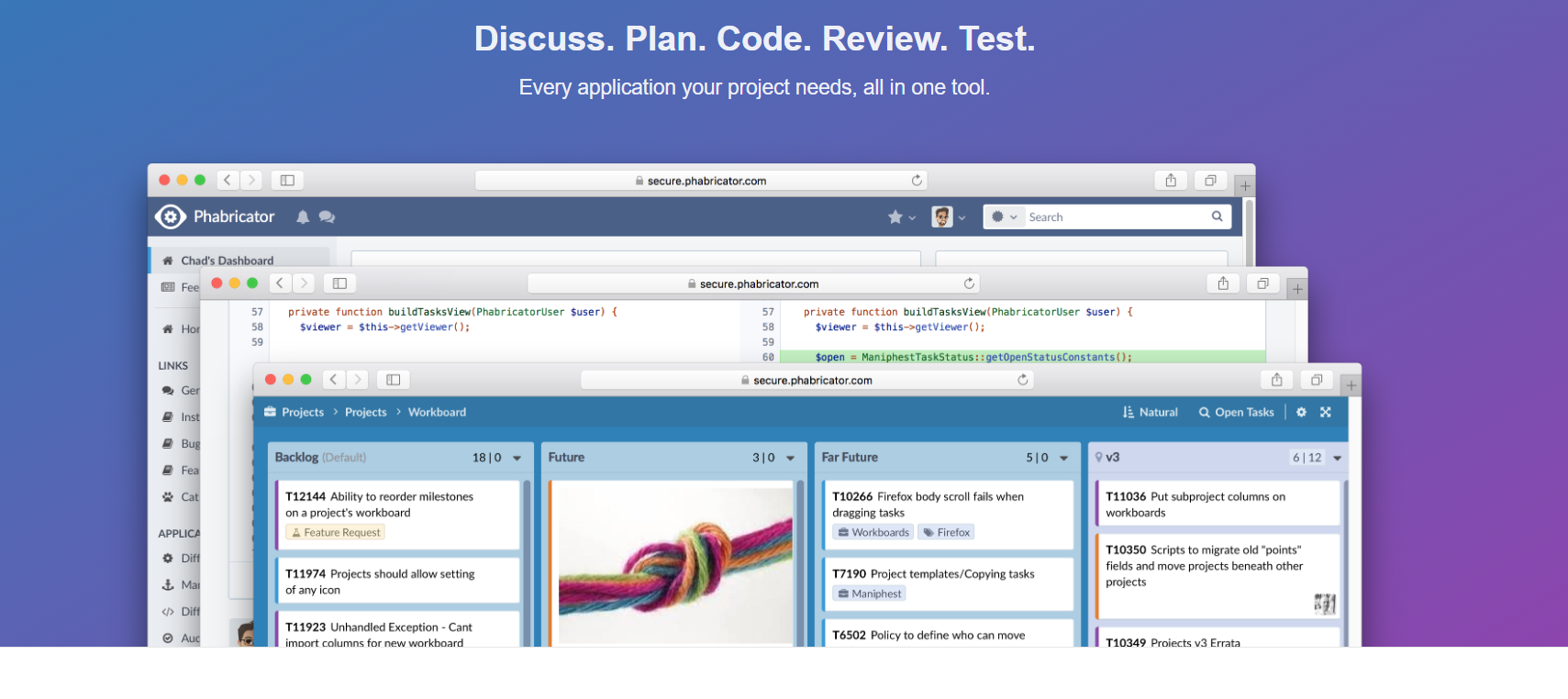
Phabricator combines code review, task tracking, and repository browsing in one self-hosted interface. It’s built for teams that want everything in one place and are willing to run their own infrastructure to get it.
The review workflow lives in Differential. Instead of opening a pull request through the Git UI, developers create a revision using arc diff from the command line. Reviewers inspect it, leave inline comments, and request changes.
Revisions move through defined states: Needs Review, Needs Revision, Accepted. When the change is ready, arc land merges it. The full history of that progression stays in the interface.
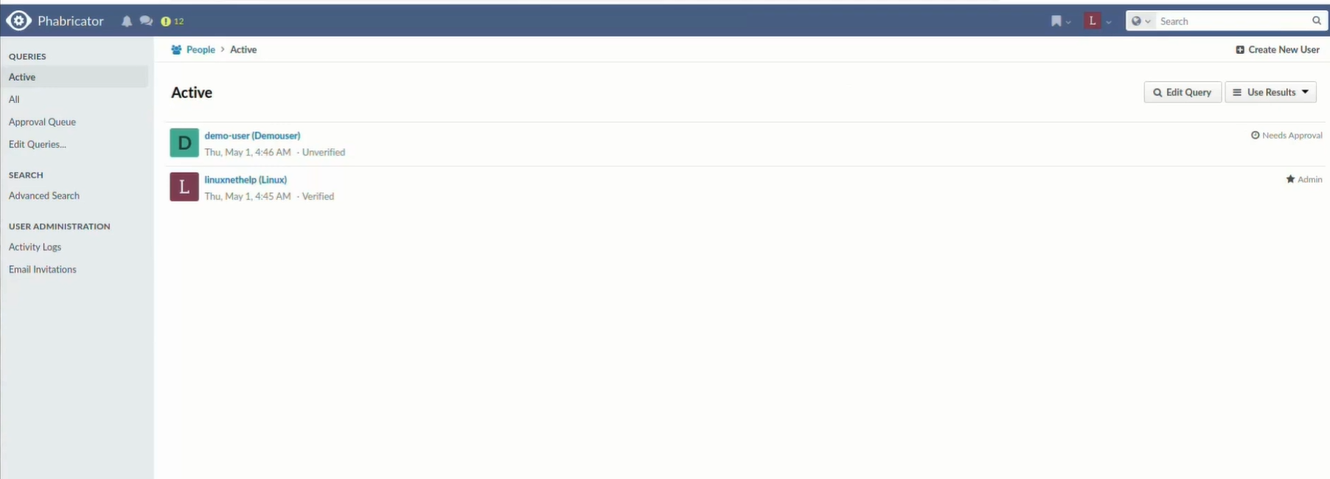
Hands On: Managing My Development Team in Phabricator
In this view, I am interacting with the People application, which serves as my administrative backbone for managing the development team. From here, I can perform tasks such as reviewing the Approval Queue for new joiners, manually verifying accounts, and assigning administrative privileges. For instance, the demo-user in the screenshot is currently flagged as Unverified and Needs Approval, requiring me to step in as an admin before they can contribute to any repositories or project boards.
Once a developer runs arc diff, the changeset appears in Differential for review. Reviewers leave inline comments tied to specific lines. Each update to the revision is tracked, so you can see how feedback was addressed across iterations, not just whether it was. Revisions move through clear states and only land in the main branch after approval via arc land.
What Phabricator gives you is structure and traceability. What it doesn’t give you is any automated reasoning. The depth of analysis depends entirely on who reviews the change and how carefully they read it. There’s no cross-repo context, no signal about whether a change breaks something downstream, and no automated flags on security or architectural patterns.
Pros
- Helps in structured discussion around changes
- Supports revision history tracking
- Integrates review with planning workflows
Cons
- Relies on manual review depth
- No automated governance reasoning
- No built-in cross-repository intelligence
- Limited enforcement capabilities
Pricing
Phabricator is free and open source
4. SonarQube
SonarQube has been a staple in enterprise CI pipelines for a while. It does static analysis well, supports 30+ languages, and gives engineering leaders a consistent dashboard view of code health that’s hard to replicate by assembling individual linters.
The quality gate model is its most useful enterprise feature. You define pass/fail thresholds, coverage requirements, maximum new vulnerabilities, acceptable duplication rates, and SonarQube enforces them as a merge condition. That creates a floor. Code that doesn’t meet the standard doesn’t get through.
Hands On: Assessing Project Quality in SonarQube
In this view, I am using the Projects dashboard to evaluate the health of the “Petclinic” codebase. As an admin or lead, I can immediately see that the project has passed its Quality Gate, meaning it meets the minimum standards for production readiness.
However, the interface highlights a critical security gap: while there are 0 Bugs, the project has 9 vulnerabilities, resulting in a poor ‘D’ rating. This tells me that although the app might function correctly, it contains high-risk code that could be exploited, requiring me to prioritize these security fixes before the next deployment.
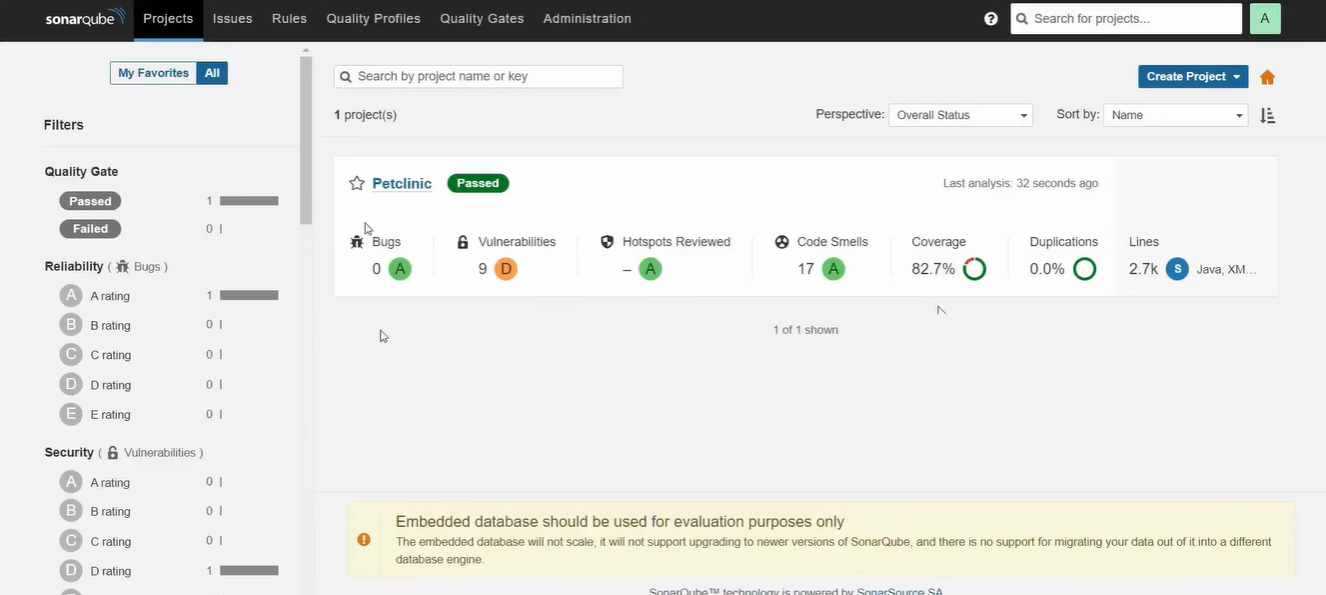
Beyond security, I can use this screen to manage long-term technical debt and maintainability. The report shows 17 Code Smells, which are maintainability issues that I can drill down into to see exactly which lines of code need refactoring.
This dashboard allows me to move from a high-level summary to specific line-by-line feedback, ensuring our standards for reliable and secure software are consistently met.
Where it stops: SonarQube finds rule violations and known patterns. It doesn’t reason about how a change behaves in context, whether a new field causes validation failures on existing records, whether removing a circuit breaker affects downstream services, or whether the pattern introduced conflicts with how the rest of the system is built. Rules are also static. They don’t adapt to your codebase or learn from PR decisions.
Pros
- Enforces consistent coding standards across teams regardless of experience level
- Detects issues early, lowering the cost of fixing bugs after production release
- Provides clear metrics and historical trends for visibility into code health
Cons
- May generate false positives that require manual review and dismissal
- Deep scans on large repositories can increase build and deployment time
- Initial setup and rule configuration can be complex
- Rules are static and manually configured, with no adaptive learning from PR decisions or team-specific patterns
Pricing
- Free: $0, upto 5 users, 50k lines of code, community build
- Team: $32/month, Unlimited users, AI CodeFix, secrets detection, 30+ languages
- Enterprise: Custom pricing | SSO, enterprise SLA, portfolio management, 6 additional enterprise languages
5. GitHub Code Review (Pull Requests + Actions)
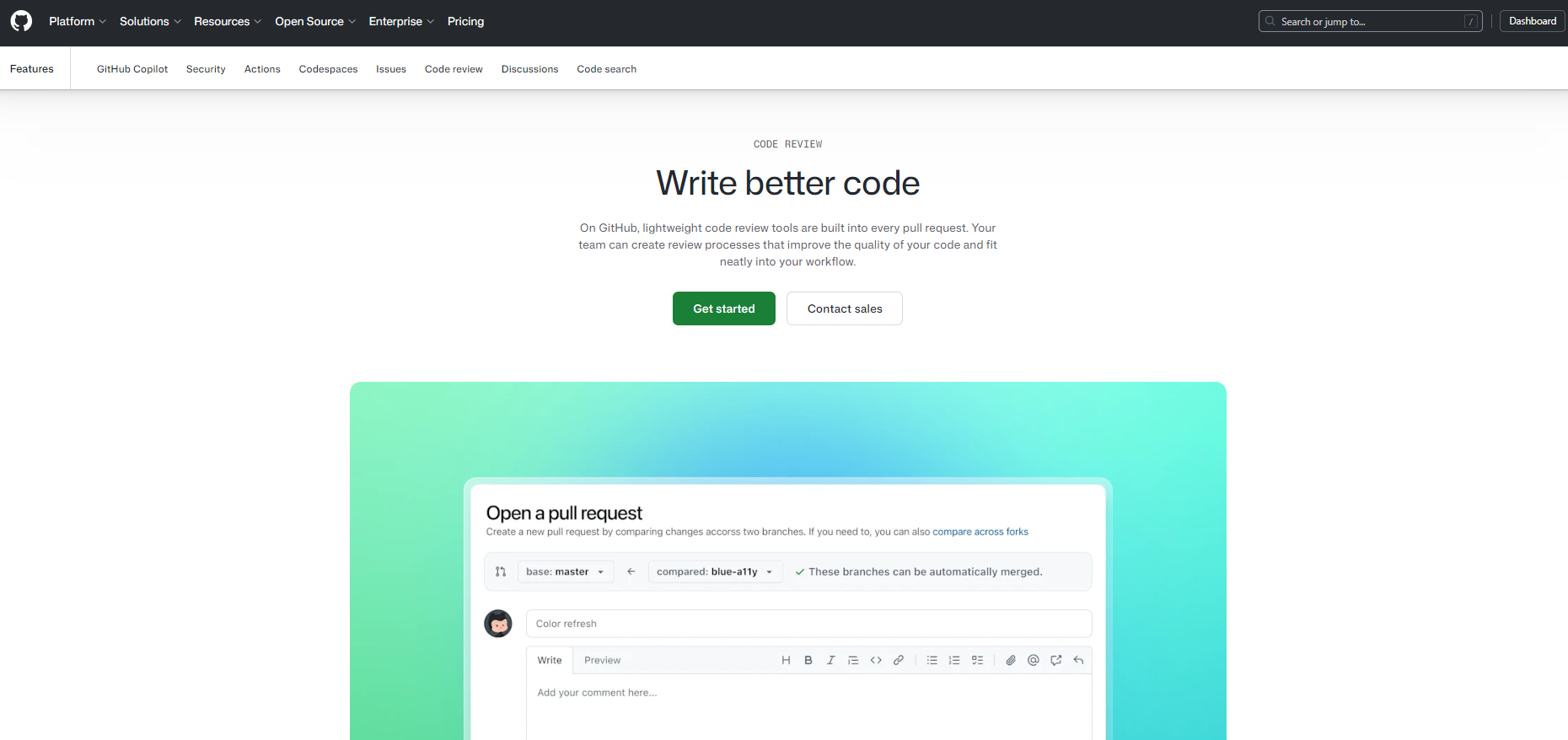
GitHub’s pull request system is where most teams already live. That’s its biggest advantage: there’s no migration, no separate interface, no context switching. The review happens where the code is.
It supports inline comments, multi-line suggestions that authors can apply with a single click, threaded discussions, required reviewers, branch protections, and status checks that block merge until conditions are met.
Hands On: Performing a Collaborative GitHub Code Review
In the provided image, I am actively reviewing a pull request by providing targeted, actionable feedback directly on the code diff. Using the suggestion feature, I can propose a specific code change: recommending the use of a getter method p.getY() instead of direct property access.
It wraps the proposed fix in a special Markdown block that the author can apply to their branch with a single click, directly from the GitHub UI.
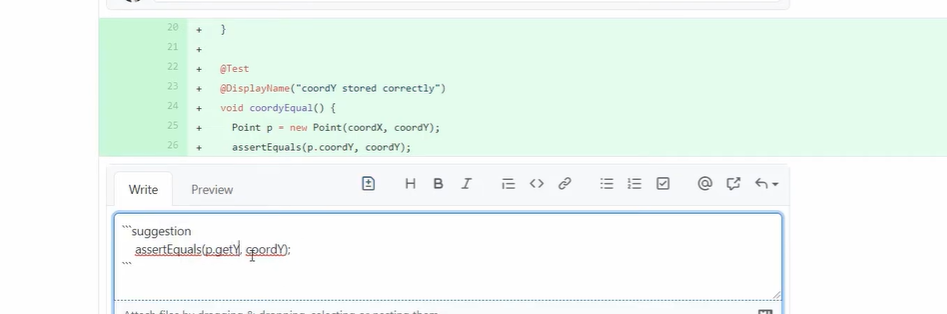
Effective GitHub reviews serve as a dialogue rather than a one-way critique. By clicking and dragging over specific line numbers, I can also provide multi-line suggestions to handle more complex logic adjustments, such as updating entire function implementations or test assertions.
Once review comments are added, the author can look into the requested changes or respond with additional context if trade-offs are involved. In many teams, this workflow is reinforced through branch protection rules and required status checks, which avoid code from being merged until defined review conditions are met.
For example, a repository may require at least one or two reviewer approvals, passing CI checks, and resolved review comments before the merge button becomes available. These controls ensure that proposed changes are not only discussed but also validated against automated tests and team-defined review policies.
This combination of reviewer feedback, automated checks, and branch protection helps teams maintain consistent code standards for functionality, design, and maintainability before code reaches the main branch.
Pros
- Supports PR-based collaboration
- Allows configurable merge protections
- Integrates with external automation tools
Cons
- Context limited to repository scope
- Requires multiple third-party tools for deeper analysis
- Enforcement quality depends on configuration discipline
- Review depth constrained by human bandwidth
Pricing
- Free ($0/user/month): Basic pull request reviews for small teams and open source
- Team ($4/user/month): Enforced review workflows with CODEOWNERS and repo rules
- Enterprise ($21/user/month): Org-wide governance, compliance, and scalable review controls
Why is Qodo built for enterprise code review?
Enterprise engineering teams aren’t struggling because they lack tooling. They’re struggling because review capacity hasn’t kept up with code generation.
AI-assisted development has fundamentally changed what lands in the review queue. Developers generate scaffolding, integration code, tests, and refactors in minutes. The bottleneck has shifted from writing code to validating it.
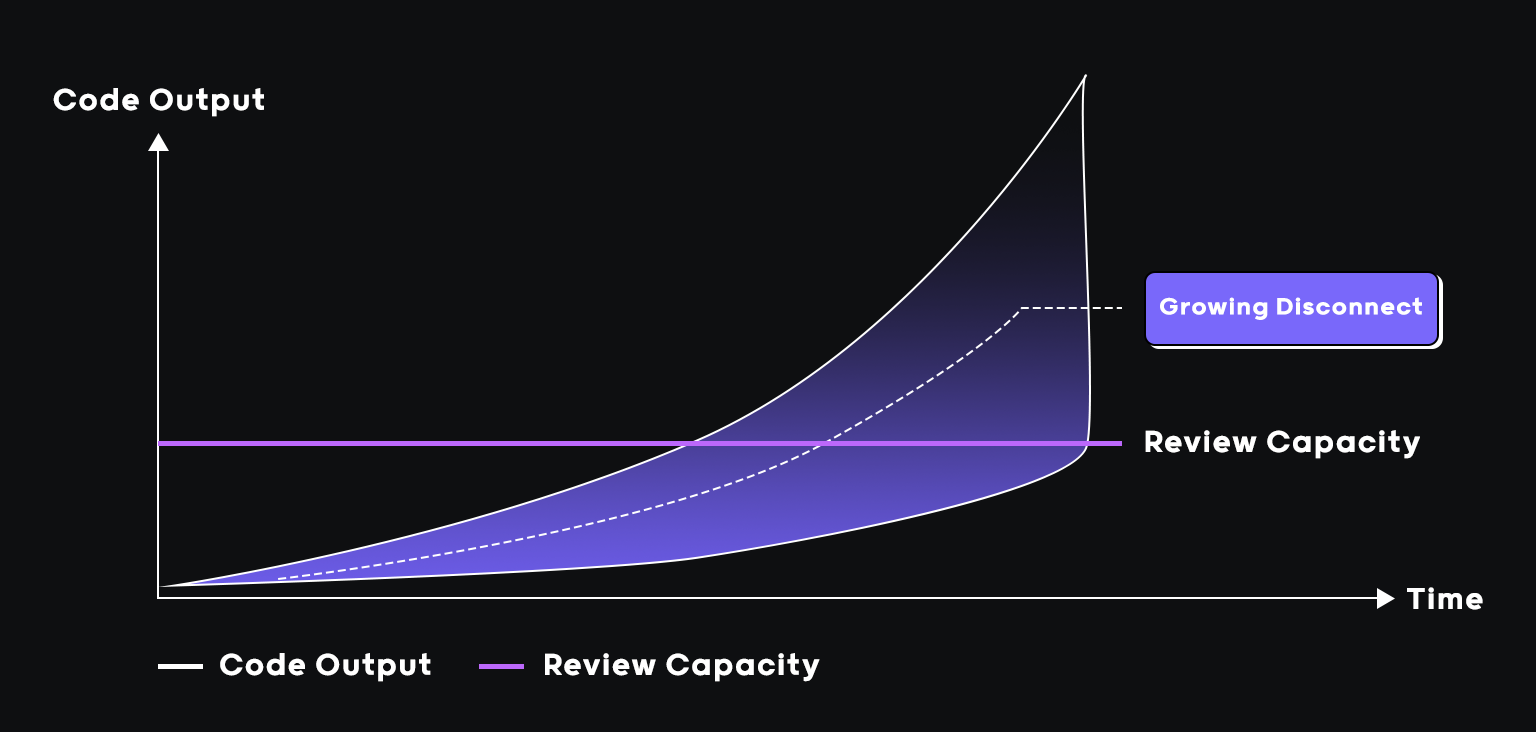
AI code review as the counterbalance to AI code generation
Faster code generation using vibe coding tools increases the risk surface, not just the volume. AI-generated code often:
- Follows syntactic correctness but misses architectural alignment
- Introduces duplicated utilities instead of reusing shared modules
- Passes unit tests while violating cross-service contracts
- Adheres to patterns superficially but ignores governance requirements
Traditional open source tools operate at the file level. They flag style issues and known patterns. They don’t reason about intent, system impact, or policy alignment. Qodo evaluates pull request diffs in context, across repositories, against secure coding standards and governance expectations. Instead of identifying rule violations, it reasons about whether a change is safe to merge into the broader system.
Scaling governance without scaling headcount
As PR volume grows, enterprises hit one of two outcomes: senior engineers become review bottlenecks, or review depth decreases to maintain throughput. Neither scales.
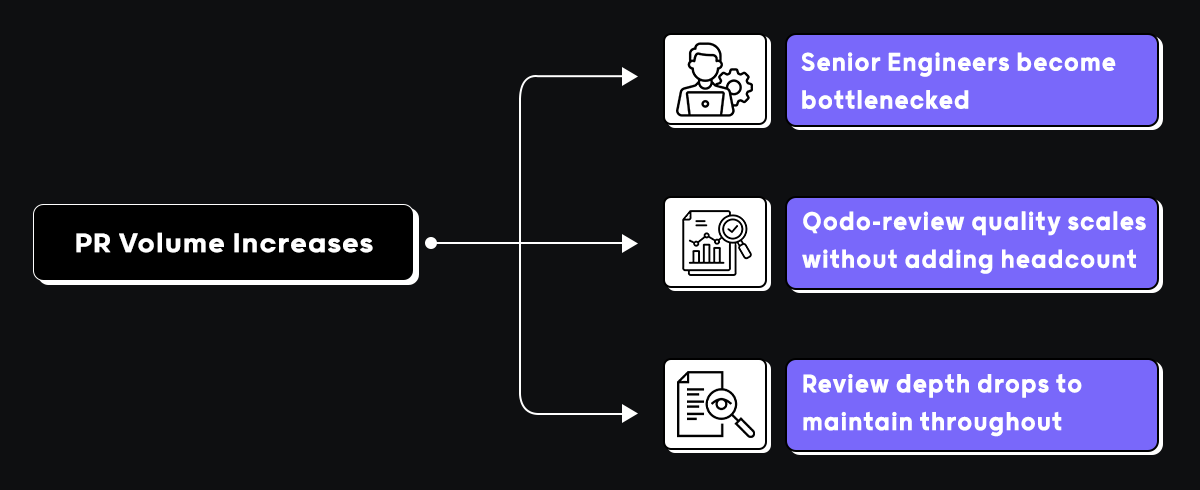
Qodo strengthens merge decisions by analyzing diffs for system-level impact, detecting contract violations across services, flagging missing validation or insecure patterns, identifying duplication across repositories, and generating structured, traceable review artifacts, without adding headcount to the review queue.
Hands-on: scaling code integrity with Qodo
I used Qodo to test exactly this: the gap between high-speed AI code generation and actual production readiness.
I asked Qodo directly inside the PR thread whether the change alters deployment behavior or assumes coordinated releases across services. It came back with a structured answer across three areas: deployment and startup behavior, coordinated release assumptions, and schema migration considerations.
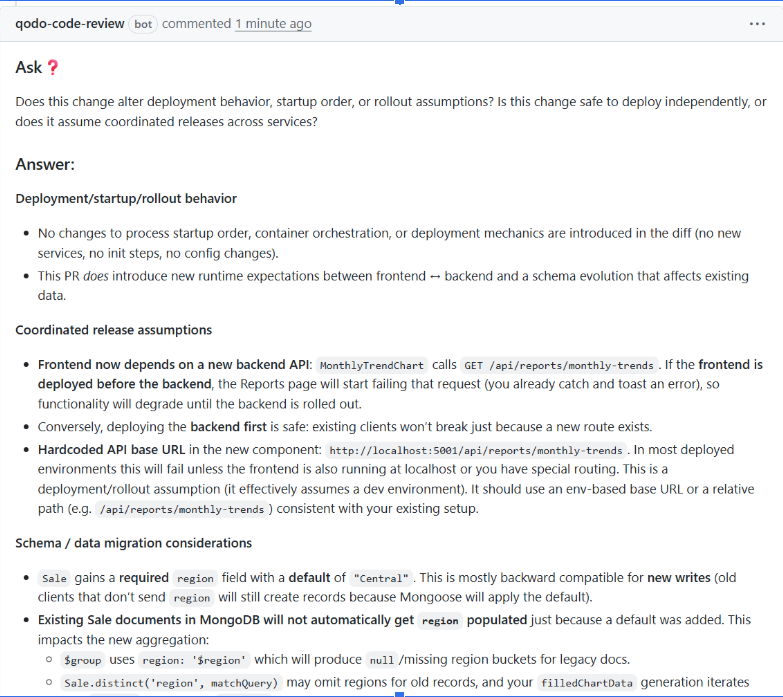
It confirmed no changes to process startup order or container orchestration, but flagged that the frontend now depends on a new backend API. MonthlyTrendChart calls GET /api/reports/monthly-trends. If the frontend deploys first, the Reports page starts failing until the backend is rolled out. It also caught a hardcoded API base URL, http://localhost:5001/api/reports/monthly-trends, that assumes a dev environment and fails in most deployed setups.
On the schema side, existing Sale documents in MongoDB won’t automatically get the new region field populated. That means $group uses region: ‘$region’, which produces null for legacy docs, and filledChartData generation iterates over records that may omit regions entirely.
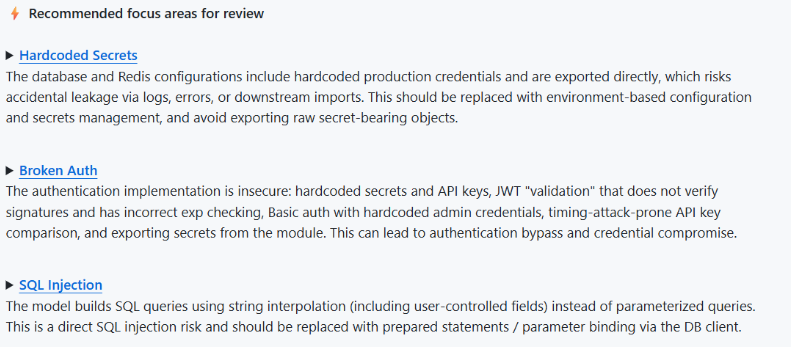
On security, Qodo’s recommended focus areas flagged three critical issues: hardcoded secrets across database and Redis configurations that risk accidental credential leakage, broken auth with JWT validation that doesn’t verify signatures and uses timing-attack-prone API key comparison, and SQL injection from string interpolation on user-controlled fields instead of parameterized queries.
At monday.com, Qodo prevents an average of 800 potential issues from reaching production every month while saving developers approximately one hour per pull request.
Conclusion
Gerrit, Phabricator, SonarQube, and GitHub each take a different approach to code review. Some focus on structured approvals, others on static analysis, or keeping review inside the pull request. At the repository scope, they work well. Most enterprise teams already have one or more of them in place, and that doesn’t change.
What changes as systems grow is where the risk actually lives. A schema change that breaks three downstream services looks clean in isolation. A rollout that assumes deployment ordering, nobody documented passes every check. Review depth varies by who’s assigned on a given day. These aren’t failures of tooling; they’re failures of scope. File-level analysis was never designed to catch them.
Qodo addresses the gap these tools leave, reasoning about how a change behaves across the broader system, enforcing standards consistently across repositories, and scaling review quality without adding headcount to the queue. Most teams that adopt it run it alongside the tools already in their stack, not instead of them.
As AI coding velocity increases, the volume and complexity of what lands in the review queue increase with it. At some point, the question isn’t which open source tool to use. It’s whether your review process can keep pace with how fast your team now writes code.
FAQs
What are open source code review tools?
They’re platforms that give teams a structured way to review code before it merges, pull request workflows, inline comments, approval controls, and Git integration. The basics of getting a second set of eyes on a change before it ships.
Are open source code review tools enough for enterprise teams?
For smaller teams, usually yes. At enterprise scale, the gaps start showing, PR volume increases, repositories multiply, compliance requirements tighten, and file-level review stops catching what actually breaks in production.
What is the main limitation of traditional open source review tools?
They operate at the file or repository scope. They catch rule violations and formatting issues well. What they don’t do is reason about how a change behaves across services, cross-service contracts, architectural consistency, and system-level impact. That’s where things slip through.
How does AI-assisted development impact code review?
It increases both the speed and volume of what lands in the review queue. Developers generate scaffolding, tests, and refactors in minutes. The bottleneck shifts from writing code to validating it, and review processes that worked fine before start becoming the constraint.
How does AI code review differ from static analysis?
Static analysis detects predefined rule violations and known vulnerability patterns. AI code review evaluates changes in context, reasoning about intent, system impact, and behavioral risk that rule-based tools aren’t designed to catch.
Why do enterprises adopt platforms like Qodo?
At scale, the gaps in file-level review become expensive, repeated review cycles, inconsistent standards across teams, and issues that pass CI and break production. Platforms like Qodo add a review layer that reasons across repositories and enforces standards at merge time, without adding headcount to the queue.
How do engineering leaders measure whether their code review process is working?
Most tools don’t make this easy, findings show up per PR but rarely aggregate into a picture across teams, repositories, or time. The signals that actually matter are PR cycle time relative to change size, issue detection rate compared to production incident rate, consistency of review coverage across teams, and how often high-severity findings get waived versus resolved. Platforms like Qodo surface these through rules analytics and structured review data, giving leaders visibility into whether their review process is actually working, or just running.
What are the best open source AI code review tools?
The most widely used open source AI code review tools include tools like SonarQube, ReviewDog, and Danger, alongside newer AI-native options. Most cover basic static analysis and linting but lack full codebase context and don’t learn from your PR history. Qodo’s developer plan is free and gives you AI code review that goes beyond open source alternatives — with context-aware analysis, rules enforcement, and 30 PRs/month at no cost.
Is there an open source alternative to Cursor for code review?
Cursor is a code editor with inline AI assistance, not a code review tool. For open source alternatives focused on code quality and review, tools like Continue.dev or Aider are commonly used. If you need AI code review specifically (not just code generation), Qodo is free for individual developers and reviews code in your IDE and at the PR level without requiring a new editor.
Is there an open source alternative to CodeRabbit?
CodeRabbit is a commercial AI PR review tool. There’s no direct open source equivalent that matches its feature set. If cost is the driver, Qodo offers a free tier with 30 PRs/month and unlike CodeRabbit, Qodo reviews with full codebase context rather than diff-only analysis, which means fewer irrelevant comments and higher signal.
What is the best open source AI coding assistant in 2026?
Strong open source options include Continue.dev (IDE integration), Aider (CLI-based), and Sweep (PR automation). These are primarily generation and assistance tools. For code review specifically catching logic errors, enforcing standards, detecting breaking changes, Qodo’s free plan covers individual developers with no open source dependency required.
What are the best open source AI tools for automated code review?
Open source tools like SonarQube, Semgrep, and ReviewDog handle static analysis and rule-based checks. Fully automated AI code review (understanding intent, PR history, cross-repo context) isn’t well-covered by open source tooling yet. Qodo fills that gap and is free for individual developers with a paid tier for teams that need org-wide rules enforcement and multi-repo coverage.
What are the best open source CLI AI coding assistants?
Aider, GPT-Engineer, and Continue.dev CLI are popular choices for AI-assisted coding from the terminal. These are generation-focused tools. Qodo also offers a CLI plugin for agentic quality workflows, running code review and quality checks locally, free for individual use, with no GUI required.
What are the best open source code review tools?
Gerrit, ReviewBoard, and Phabricator are established open source code review platforms. For AI-powered review catching issues that static analysis misses, like logic errors, architectural drift, and security gaps, open source tooling has significant limitations. Qodo is free for individuals and offers AI code review with full codebase understanding across GitHub, GitLab, Bitbucket, and Azure DevOps.
What are open source static code analysis tools?
Popular open source static analysis tools include SonarQube (Community Edition), Semgrep, PMD, Checkstyle, and ESLint. These tools catch pattern-based issues and enforce syntax rules but don’t understand code intent or architectural context. Qodo’s AI code review complements static analysis by surfacing the deeper issues static tools miss — logic errors, breaking changes, duplicate logic and is free for individual developers.
Is Qodo open source?
Qodo has a strong open source presence, including PR-Agent (15K+ GitHub stars) and the Qodo-Embed-1.5B code embedding model. The commercial Qodo platform is not fully open source, but it’s free for individual developers: 30 PRs/month, IDE plugin, and CLI access at no cost.
What are open source alternatives to Claude Code or Codex for code review?
Claude Code and OpenAI Codex are general-purpose AI assistants, not purpose-built code review tools. Open source alternatives in that space include Continue.dev and Aider. For AI code review specifically enforcing standards, detecting breaking changes, reviewing PRs in context, Qodo is free for individuals and purpose-built for review rather than generation.
About the author