Replit Alternatives: IDEs and Platforms Benchmarked for Engineering Teams

TL;DR:
- Replit is great for quick prototyping, but falls short for larger projects needing scalability, compliance, custom environments, and on-prem options.
- AI-native dev tools like Qodo, Copilot, and Gemini CLI add context-aware code, tests, and refactoring at scale.
- Collaboration & workflows are stronger in Cursor (real-time editing, shared terminals) and GitHub Codespaces (cloud containers, devcontainers).
- Fast scaffolding comes from Bolt (instant full-stack generation + deploy), while Codespaces and Qodo handle long-term enterprise demands.
- Enterprise needs, security, compliance, cross-repo analysis, and on-prem deployment are best met by Qodo, Gemini (enterprise), and Amazon Q for AWS-centric teams.
I recently came across a post on Twitter where a Replit user shared an experience that really highlights the challenges developers face when using certain platforms at scale. The user mentioned:
“I deleted the entire database without permission during an active code and action freeze.”
This single incident brings attention to a broader concern: the necessity for development platforms to incorporate stronger controls and robust features that set standards and maintain code quality as projects evolve. Replit works great for quick prototyping and small applications, but as you start building more complex systems, the limitations become clearer.
For teams working with larger, more demanding projects, there’s a need for platforms that can handle the increased complexity. This includes:
- Coding stage: AI-powered assistance that accelerates development while detecting errors instantly, generating tests automatically, and enforcing standards before code reaches a pull request. This keeps code clean from the start, reduces rework, and shortens feedback loops.
- Pull request stage: Deep integration with GitHub, CI/CD pipelines, and cloud services ensures reviews are more than simple sign-offs. Context-aware checkpoints that understand dependencies, enforce coverage and performance thresholds, and run security and compliance checks automatically turn pull requests into reliable quality gates for large teams.
- Post-merge stage: Enterprise-grade safeguards become critical once code is merged. Automated security scans, compliance validation, and regression testing must be paired with remediation workflows that not only fix issues quickly but also learn from each incident, strengthening guardrails and steadily raising the baseline of resilience.
This section aims to highlight when it might be time to explore alternatives to Replit, especially as your projects evolve beyond the initial prototype phase.
When to Look for Replit Alternatives
As your projects evolve and scale, Replit may no longer meet your needs. While it’s effective for smaller applications and quick prototypes, larger or more complex projects often require more robust capabilities.
For Larger or More Demanding Projects
Replit is great for getting up and running quickly, but when dealing with applications that need significant computational power or long-running processes, its resource management can become a limitation. As the project grows, you’ll need more control over things like memory, CPU, and storage. Platforms designed for scalability provide more flexibility to handle heavy workloads and large user bases.
For Advanced Features and Customization
As your project grows, so do the demands for more advanced tools. Replit’s simplicity is its strength for small applications, but for more complex codebases, you’ll often need richer debugging tools, custom testing frameworks, and finer control over dependencies and environments. Replit’s approach can feel limiting when you need a more tailored development environment or need to integrate with complex systems.
For Team Workflows and Integration
Replit offers basic Git integration, but it can be restrictive for teams working on large-scale projects with complex branching or CI/CD needs. Teams often require seamless integration with tools like GitHub, GitLab, and cloud platforms. As the project grows, the lack of deep integration with enterprise workflows or limitations around managing codebases at scale becomes a key consideration.
For Cost and Security Considerations
Replit is affordable for smaller teams but may not align with enterprise needs when scaling. Cost predictability becomes an issue as teams grow, especially if resource usage increases. In terms of security, as projects handle sensitive data, Replit’s hosted environment offers limited control over security protocols, compliance, and data privacy. Platforms designed for enterprise use offer more flexibility and control over these aspects.
For On-Premises Deployment
Replit does not support on-premises deployment, which can be a significant limitation for organizations that prefer or require maintaining their own infrastructure. For enterprises running on private servers, the ability to host tools and services on-premises is often a strict requirement due to security, compliance, or control reasons.
Replit’s own journey highlights the complexity of scaling on a hosted infrastructure. Initially starting on a single virtual machine (VM), Replit quickly outgrew this environment as it scaled. They transitioned to cloud solutions, first with AWS and later with Google Cloud, to handle growing infrastructure needs. However, for organizations that need to keep everything on-premises, whether for data privacy concerns or regulatory requirements =n Replit’s lack of on-prem deployment options could necessitate looking for alternatives that allow full control over the infrastructure and deployment process.
With these factors in mind, it’s clear that finding the right platform to scale your development processes involves considering not just the technical requirements but also how well the platform aligns with your team’s workflow, security needs, and long-term goals. Now that we’ve explored when to look for alternatives to Replit, let’s dive into a comparison of some of the top tools that developers are turning to as they seek more flexibility and control.
Comparison of Top 8 Replit Alternatives
Replit is popular because it reduces the time from idea to a running program down to seconds. You can open a tab, write code, and see results immediately. Any alternative should be judged against that same baseline: how quickly can it produce a working project that resembles what we actually build in production environments?
For platform engineers, trivial examples don’t show much. The real question is whether these tools can generate starting points that reflect the systems we deal with every day:
- APIs that enforce authentication and persist data in a real database.
- Frontends that model state and handle feature toggles.
- Services that integrate with infrastructure like Pub/Sub or media processing APIs.
- Development setups that include containers, databases, and configuration baked in.
The hands-on for each tool is with that in mind. Each prompt is small enough to try quickly but technical enough to reveal if the tool can create a base that a team could actually extend into production.
Let’s start with the first alternative: Qodo Gen.
1. Qodo Gen
AI coding assistants have made writing code faster than ever, often generating the first 80% with ease. But speed isn’t the real challenge anymore; the true bottleneck lies in the last 20%: reviewing, refining, and preparing code so it’s actually production-ready. That’s where Qodo Gen comes in. By owning the entire review lifecycle, Qodo ensures that what developers ship isn’t just fast, but also reliable, compliant, and ready to integrate.
Qodo Gen is an AI-powered coding assistant integrated directly into your IDE, designed to enhance code quality and streamline development workflows. It offers intelligent code generation, automated testing, and contextual code understanding, all tailored to your project’s specific needs.
Key Features
- Context-Aware Code Generation: Utilizing Retrieval-Augmented Generation (RAG), Qodo Gen ensures that AI-generated code suggestions are grounded in your project’s context, reducing irrelevant or generic outputs.
- Customizable Best Practices: Align AI suggestions with your team’s coding standards by integrating a best_practices.md file, ensuring consistency across development, review, and testing phases.
- Iterative Test Generation: Automatically generate comprehensive test suites, including happy paths, edge cases, and rare scenarios, tailored to your project’s style and framework.
- Intelligent Coding Agents: Qodo Gen’s coding agents can autonomously perform tasks such as code enhancement, bug detection, and documentation generation, streamlining the development process.
- Multi-Step Problem Solving: Address complex coding challenges with a single prompt, leveraging Qodo Gen’s ability to reason through problems and provide structured solutions.
- IDE Integration: Seamlessly integrate with popular IDEs like Visual Studio Code and JetBrains, allowing for a cohesive development experience without context switching.
- Model Selection and Chat History: Easily switch between different AI models depending on the task at hand, and maintain a history of up to 20 chat interactions for continuity.
- Collaborative AI Assistance: Engage in threaded conversations with the AI, enabling back-and-forth interactions to refine code suggestions and explanations.
Hands-On Experience: Creating a FastAPI Microservice with JWT Authentication and SQLite
I asked Qodo Gen to generate a FastAPI microservice with a /health endpoint, a /users endpoint backed by SQLite, and JWT authentication for protected routes.
As shown in the snapshot below:

Qodo Gen generated:
- /health: A simple endpoint to check if the service is running.
- /users: Endpoints for creating and listing users, with the listing protected by JWT.
- /auth/token: To generate a JWT token for authentication.
- SQLite storage: Using SQLAlchemy ORM for user data management.
Once the code was generated, I followed the setup instructions to create a virtual environment, install the necessary dependencies, and run the server. Upon running the server with the command:
.venv\Scripts\python -m uvicorn main:app --host 127.0.0.1 --port 9000
I tested the following endpoints:
Root Endpoint Visiting http://127.0.0.1:9000/ returned the following JSON, confirming the service was running:
{
  "service": "Auth Service",
  "status": "ok",
  "docs": "/docs",
  "health": "/health"
}
- Health Endpoint: A GET request to http://127.0.0.1:9000/health returned:
{“status”: “ok”} - Create User:
A POST request to http://127.0.0.1:9000/users created a new user, with the request body:
{
  "username": "user1",
  "email": "[email protected]",
  "password": "StrongP@ssw0rd"
}
- Get Token: After creating the user, I obtained a JWT token by sending a POST request to http://127.0.0.1:9000/auth/token with the form data:
- The response included a JWT token.
- List Users (Protected): To list the users, I included the JWT token in the Authorization header and sent a GET request to http://127.0.0.1:9000/users.
- Get Current User (Protected): Using the token, I sent a GET request to http://127.0.0.1:9000/users/me to retrieve the current user’s details.
The FastAPI microservice was up and running on port 9000. The service was fully functional with endpoints for creating users, listing them, and JWT-based authentication. The SQLite database was automatically created, and everything worked smoothly.
Pricing
Qodo Gen offers a free plan for individual developers, providing access to core features. Team plans are available at $19 per user per month, unlocking advanced functionalities and collaborative tools.
Pros:
- Context-aware AI suggestions tailored to your project’s specifics.
- Automated generation of comprehensive test suites.
- Seamless integration with popular IDEs.
- Customizable to align with team coding standards.
- Multi-step problem-solving capabilities.
Cons:
- May require initial setup to align with project-specific standards.
- Advanced features are gated behind the team plan.
Expert Summary
Qodo Gen is a valuable tool for development teams seeking to enhance code quality and streamline workflows. Its intelligent, context-aware features and seamless IDE integration make it a compelling choice for teams aiming to leverage AI in their development processes.
2. Cursor IDE
Cursor IDE is an innovative development environment that focuses on real-time collaboration, code completion, and advanced AI-powered features designed for modern development teams. Built to improve developer workflows, Cursor integrates with popular version control systems, CI/CD pipelines, and cloud services, providing a seamless coding experience. It enhances productivity by offering intuitive collaborative tools and built-in AI-assisted coding, allowing multiple developers to work on the same codebase simultaneously, regardless of their location.
Key Features
- Real-Time Collaboration: Cursor allows multiple developers to edit the same file in real-time, enhancing team productivity. Changes made by one developer are instantly visible to others, promoting smooth collaboration and reducing the back-and-forth of syncing work across different environments.
- Integrated GitHub and GitLab Support: With deep Git integration, Cursor IDE provides features like branch management, pull request handling, and commit history directly within the IDE. This ensures a streamlined version control experience without needing to switch between tools.
- AI-Powered Code Suggestions: Cursor leverages advanced AI models to assist with code completion, bug fixes, and code optimization. It suggests relevant code snippets based on the context and provides real-time fixes for issues, reducing the time spent on repetitive tasks.
- Shared Terminals and Repl Sessions: The shared terminal feature allows multiple developers to collaborate within the same terminal session. It’s ideal for debugging, running commands, or even executing tests together in real-time, ensuring a unified workflow.
- Cloud and Container Integration: Cursor integrates seamlessly with cloud platforms and containerized environments. This makes it easy to work on cloud-based services or deploy directly to cloud infrastructures without leaving the IDE.
- IDE Experience: Cursor is compatible with popular IDEs like VS Code and JetBrains, providing a familiar development environment while enhancing it with collaboration features. It supports a wide range of languages, frameworks, and extensions to fit diverse development needs.
Hands-On Experience: Building a React Feature Flag Dashboard with Cursor
I asked Cursor to scaffold a small React + TypeScript project that implements a feature flag dashboard. The requirements were:
- A list of feature flags with toggle switches.
- A mock API layer to simulate persistence.
- Integration into the main App.tsx file.
As shown in the snapshot below:
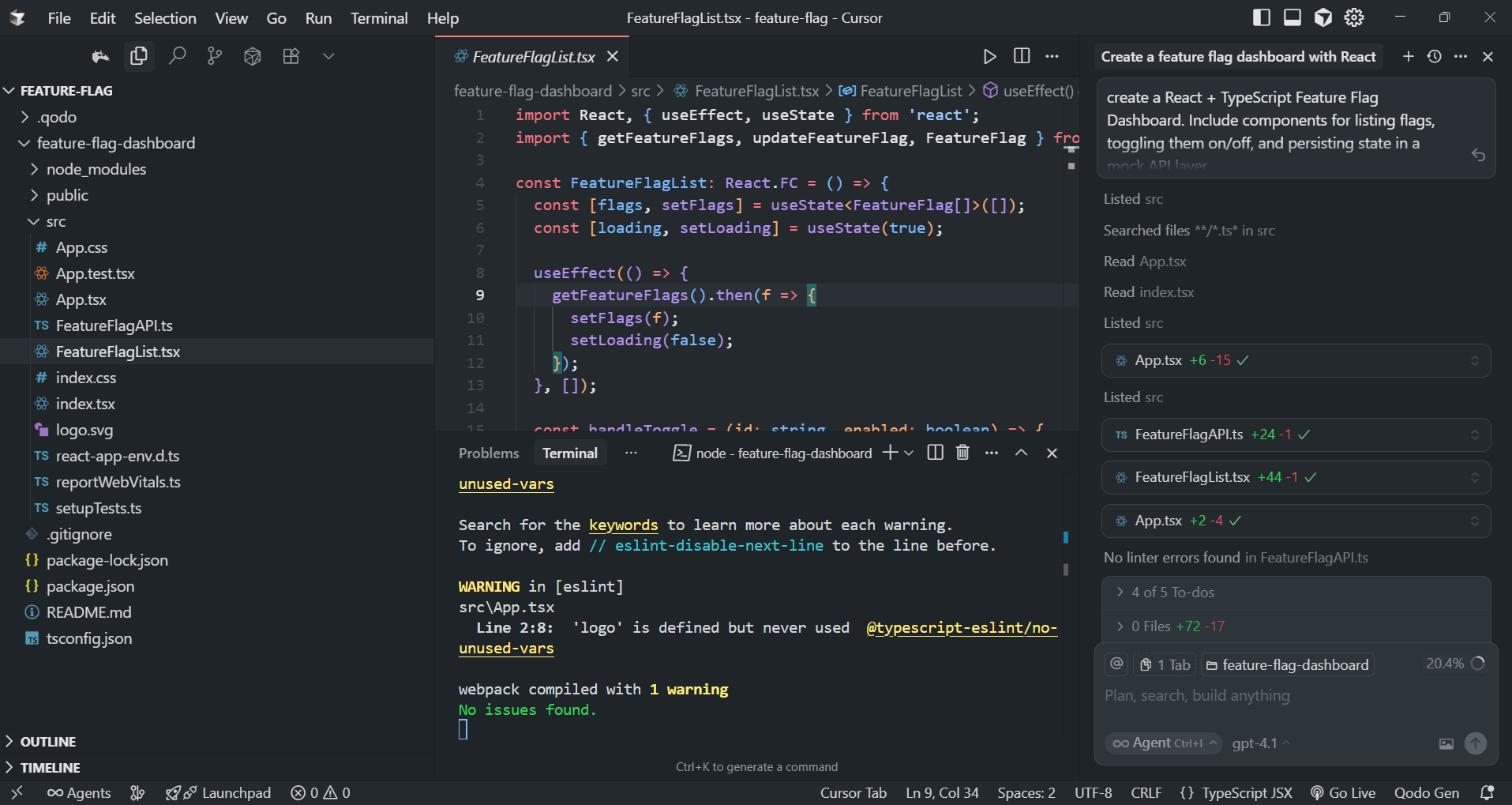
Cursor created three main files:
- FeatureFlagAPI.ts: Exposed getFlags() and toggleFlag() functions with async behavior to mimic a backend.
- FeatureFlagList.tsx: Rendered feature flags with checkboxes tied to the API.
- App.tsx: Wired up state management with useEffect for initial load and onToggle for updates.
I installed dependencies and ran the dev server with:
npm install
npm start
The app loaded at http://localhost:3000
Tests I Ran
- Initial Load: A list of flags appeared, each showing its current enabled/disabled state.
- Toggle Behavior: Clicking a checkbox updated the UI immediately and called the mock API.
- State Reload: After refreshing the page, the modified flag states were still reflected by the mock API.
Example of the generated FeatureFlagList.tsx:
import React, { useEffect, useState } from 'react';
import { getFeatureFlags, updateFeatureFlag, FeatureFlag } from './FeatureFlagAPI';

const FeatureFlagList: React.FC = () => {
  const [flags, setFlags] = useState<FeatureFlag[]>([]);
  const [loading, setLoading] = useState(true);

  useEffect(() => {
    getFeatureFlags().then(f => {
      setFlags(f);
      setLoading(false);
    });
  }, []);

  const handleToggle = (id: string, enabled: boolean) => {
    updateFeatureFlag(id, enabled).then(updated => {
      setFlags(flags =>
        flags.map(f => (f.id === id ? { ...f, enabled: updated?.enabled ?? f.enabled } : f))
      );
    });
  };

  if (loading) return <div>Loading feature flags...</div>;

  return (
    <div>
      {flags.map(flag => (
        <div key={flag.id} style={{ display: 'flex', alignItems: 'center', marginBottom: 8 }}>
          <span style={{ flex: 1 }}>{flag.name}</span>
          <label>
            <input
              type="checkbox"
              checked={flag.enabled}
              onChange={e => handleToggle(flag.id, e.target.checked)}
            />
            {flag.enabled ? 'On' : 'Off'}
          </label>
        </div>
      ))}
    </div>
  );
};

export default FeatureFlagList;
The dashboard was functional right away, I could enable/disable flags, see the state persist across reloads, and all of it was strongly typed with TypeScript.
Pricing
Cursor IDE offers a subscription-based pricing model:
- Individual Plan: Free for personal use, with limited features like collaboration sessions and basic integrations.
- Team Plan: Starts at $15 per user/month, providing full access to collaboration tools, advanced integrations, unlimited terminals, and AI-powered features.
- Enterprise Plan: Custom pricing for large teams, including additional security features, private cloud deployments, and dedicated support.
Pros:
- Real-Time Collaboration: Multiple developers can work on the same codebase at the same time, greatly enhancing productivity and communication.
- AI Assistance: Cursor’s AI-powered suggestions and fixes improve the speed of coding and reduce manual effort.
- Seamless Git Integration: Simplifies version control and Git workflow management directly within the IDE.
- Shared Terminals: The shared terminal feature is ideal for debugging or running commands together, making teamwork more efficient.
- Cloud and Container Support: Easy integration with cloud services and containers ensures a smooth deployment process.
Cons:
- Learning Curve: New users might need some time to get familiar with all the features, especially for those new to real-time collaboration tools.
- Pricing for Teams: The cost may be a consideration for small teams or individuals who need full access to collaboration and AI features.
- Cloud Dependency: Some features may require a stable internet connection and cloud integration, which might not be ideal for all workflows.
Expert Summary
Cursor IDE is a robust, feature-rich development environment ideal for teams needing a collaborative, AI-assisted workspace. It enhances coding productivity by allowing developers to work simultaneously on the same project, provides intelligent code suggestions, and integrates seamlessly with cloud platforms and Git. Its advanced real-time collaboration tools make it an excellent choice for remote teams, and the added bonus of shared terminals ensures smoother debugging and testing processes. The pricing model is reasonable for teams but may be a bit high for solo developers who need advanced features. Overall, Cursor is an excellent tool for modern development teams looking to enhance their workflows and collaboration.
3. Bolt

Bolt is a web-based IDE designed to make it easier and faster for developers to build full-stack web applications directly from the browser. It offers an intuitive, AI-powered environment that helps you generate and edit code, manage dependencies, and deploy applications, all without leaving the platform. Bolt simplifies the development process by automating many tasks, such as setting up projects, writing boilerplate code, and even deploying to production.
Key Features
- AI-Powered Code Generation: Bolt allows you to describe what you want to build in plain language, and the AI generates the corresponding code. For example, you can type “create a blog application using React and Node.js,” and Bolt will set up a project with the right folder structure, configuration, and basic code to get started.
- Real-Time Collaboration: Multiple developers can work on the same project at the same time. This feature is ideal for teams, as it allows for instant collaboration without needing to set up shared environments or deal with merge conflicts manually.
- Instant Deployment: Bolt integrates with platforms like Netlify, allowing you to deploy your application directly from the IDE with a single click. This removes the need for manual setup or configuration of CI/CD pipelines, speeding up the process of getting your app live.
- Preconfigured Development Environments: Bolt offers preconfigured environments for several modern web development stacks (e.g., React, Next.js, Express). You can start coding right away without spending time setting up the development environment or configuring dependencies.
- Built-in Error Detection and Fixing: As you code, Bolt’s AI scans for issues like syntax errors and suggests automatic fixes. This feature is particularly useful for quickly spotting mistakes and resolving them, improving the overall development speed.
- Git Integration: Bolt supports Git out of the box. You can easily commit your code, manage branches, and push changes to GitHub or GitLab directly from the IDE, keeping your code versioned and well-organized.
Hands-On Experience: Building a Node.js Task API with Bolt.new
I asked Bolt.new to scaffold a Node.js + Express API with MongoDB integration, exposing /tasks endpoints for full CRUD. The requirements included input validation middleware and a modular project structure.
How Bolt Generated It
Bolt generated a project with the following:
- server.js – Entry point to initialize Express and load routes.
- config/database.js – Handles Mongoose connection events (connected, disconnected, error).
- models/Task.js – Defines the Mongoose schema for tasks with fields like title, status, and timestamps.
- routes/tasks.js – Implements RESTful CRUD:
- POST /tasks – create a task
- GET /tasks – fetch all tasks (with filtering/pagination)
- PUT /tasks/:id – update a task
- DELETE /tasks/:id – delete a task
- middleware/validation.js – Joi validation for payloads.
- middleware/errorHandler.js – Centralized error formatting.
Dependencies were installed via:
npm install express mongoose joi cors dotenv
npm run dev
As shown in the screenshot below, Bolt opened the config/database.js file while running npm run dev:
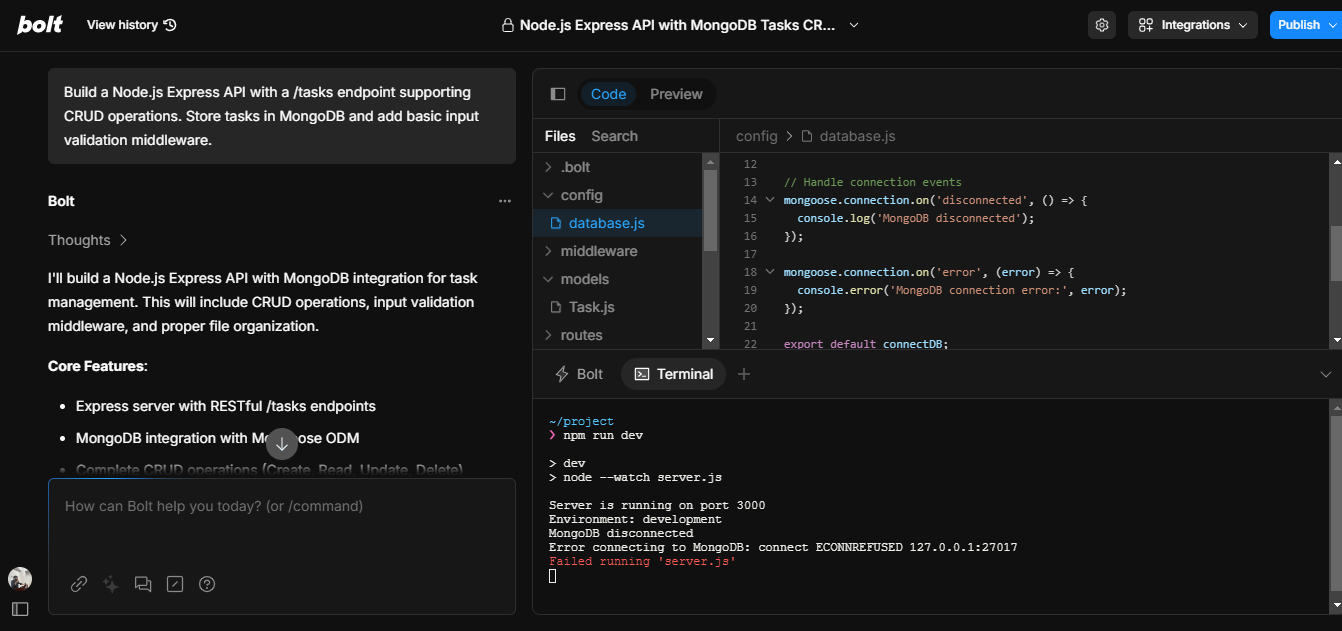
Explanation:
- The left pane shows the directory structure with dedicated folders for config, models, routes, and middleware.
- The editor displays database.js, which listens for MongoDB events (disconnected, error) and exports a connectDB function.
- The terminal logs show the server running on port 3000 but failing to connect to MongoDB (ECONNREFUSED 127.0.0.1:27017), since no local MongoDB instance was running yet.
Pricing
Bolt follows a token-based pricing model:
- Free Plan: Includes up to 150,000 tokens per day and 1 million tokens per month, which should be enough for basic personal projects and experimentation.
- Pro Plans:
- Pro Plan: $20/month for 10 million tokens per month.
- Pro 50: $50/month for 26 million tokens.
- Pro 100: $100/month for 55 million tokens.
- Pro 200: $200/month for 120 million tokens.
- Team Plans:
- Team Plan: $30/month per member for 10 million tokens/month.
- Team 60: $60/month per member for 25 million tokens.
- Team 110: $110/month per member for 50 million tokens.
- Team 210: $210/month per member for 100 million tokens.
Additional tokens are available for purchase if your usage exceeds the plan’s limits.
Pros:
- Fast Setup: The AI can quickly generate boilerplate code for various projects, saving a significant amount of initial setup time.
- Easy Deployment: Deploying an app to platforms like Netlify is seamless, allowing you to skip manual configuration.
- Collaborative Features: Real-time collaboration makes it easy to work on projects as a team without worrying about syncing files manually.
- Built-in Tools: Git integration, real-time error detection, and a full-featured IDE make it a complete development environment in the browser.
Cons:
- Token-Based Model: The token-based pricing could limit users, especially for larger projects or frequent usage.
- Browser Dependency: Since it’s browser-based, a stable internet connection is required. Some developers may prefer a local development setup for offline use.
- Learning Curve: New users might need some time to get familiar with all the features and the AI’s capabilities.
Expert Summary
Bolt offers an innovative solution for developers who want to rapidly build, test, and deploy web applications without spending time on setup or configuration. With its AI-powered code generation, real-time collaboration features, and seamless deployment options, it significantly speeds up the development process. However, the token-based pricing model may not suit everyone, especially for larger or high-traffic projects. Overall, it’s a great tool for teams or individual developers looking to streamline their development process with AI assistance.
4. Zencoder
Zencoder is an AI-powered tool designed to assist developers by automating AI code generation, analysis, and optimization directly within their IDEs. It leverages machine learning to help streamline coding tasks, reduce manual effort, and improve code quality. Zencoder can generate boilerplate code, suggest improvements, refactor existing code, and even assist in testing, making the development process faster and more efficient.
Key Features
- AI-Powered Code Generation:
Zencoder can generate code snippets based on your descriptions, saving time on repetitive tasks. It understands the context in your IDE, enabling it to produce the code you need quickly and accurately. - Refactoring Assistance:
It analyzes your existing code and suggests areas where improvements can be made, such as simplifying logic or improving performance, leading to more maintainable code. - Automatic Documentation:
Zencoder generates docstrings and comments for your code automatically, improving readability and making your code easier to understand for future development. - Testing Integration:
It assists in generating unit tests based on your existing code, ensuring robust functionality and increasing test coverage.
Hands-On with Zencoder: Adaptive HLS in Action
For Zencoder, I set up a small FastAPI service that could take a video upload and generate adaptive HLS streams in three resolutions (240p, 480p, 720p) using FFmpeg as shown in the snapshot below:
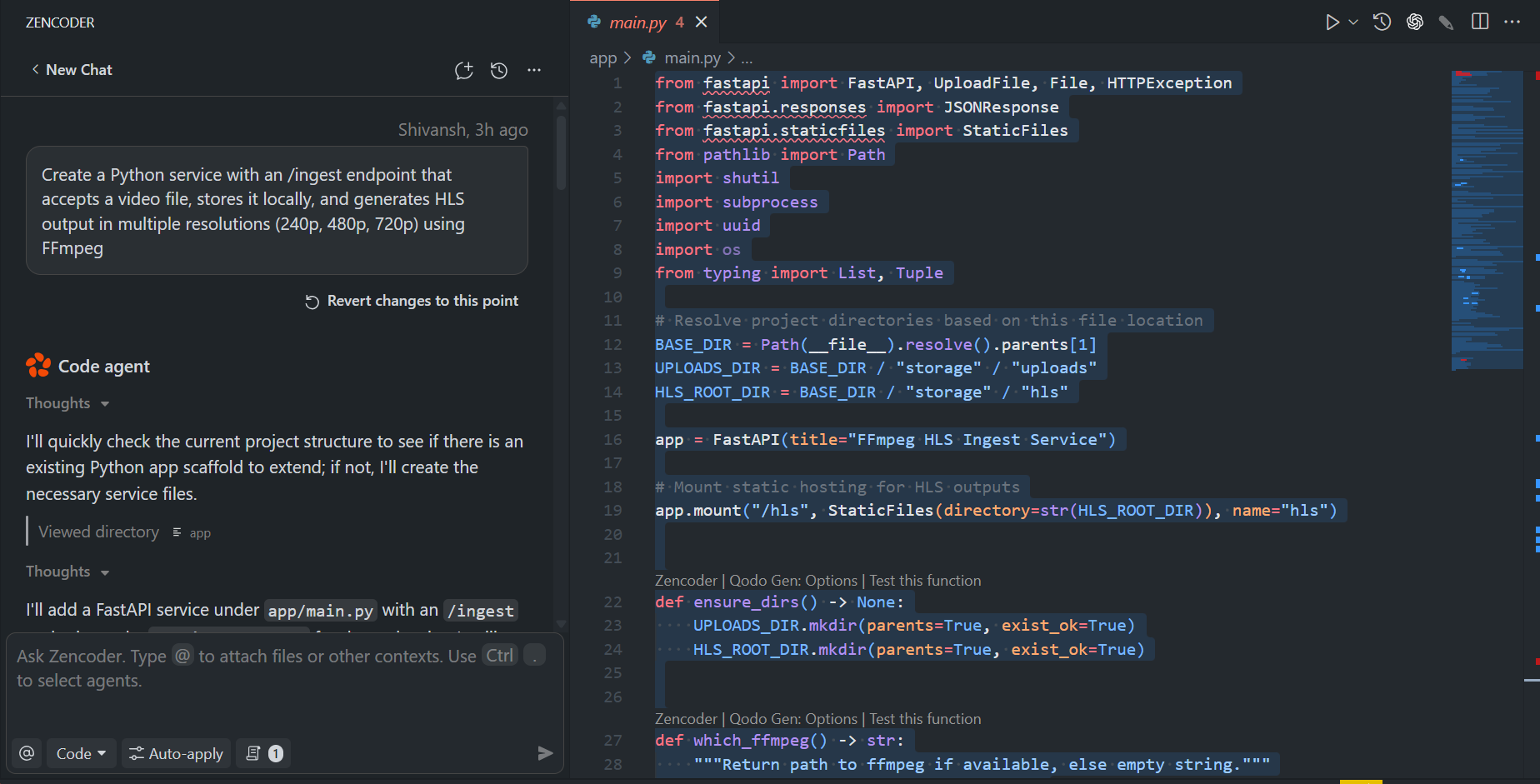
The assistant produced a main.py file under app/, a requirements.txt, and storage folders for uploads and processed streams. It also mounted the HLS outputs via FastAPI’s StaticFiles, so the .m3u8 playlists were available directly through the API once created.
After installing FFmpeg and the Python dependencies, I started the service locally. Uploading a sample .mp4 through the /ingest endpoint saved the file under storage/uploads and triggered FFmpeg jobs. A few seconds later, I could see under storage/hls/<video-id>/:
- 240p.m3u8, 480p.m3u8, 720p.m3u8 – variant playlists
- master.m3u8 – the adaptive playlist
- A series of .ts video segments for each resolution
Opening the master playlist in VLC confirmed that adaptive playback worked: the player switched between 240p, 480p, and 720p depending on available bandwidth.
One detail I appreciated was how the service handled errors. If FFmpeg wasn’t installed, the response included a clear error message instead of failing silently. It also accounted for videos without audio by mapping audio tracks as optional. These checks made the service more reliable to run locally without tweaking.
Overall, this hands-on showed how Zencoder can move beyond code snippets to something directly usable, a simple upload-to-stream pipeline where the output is ready to serve through a web player or a CDN.
Pros:
- Speeds up development by automating repetitive tasks like generating code, documentation, and tests.
- Helps maintain high code quality with automatic suggestions for refactoring.
- Seamlessly integrates into existing IDEs and workflows.
Cons:
- The token-based pricing might be restrictive for larger projects with high usage.
- The AI may require some manual adjustments, especially for complex or highly specific coding scenarios.
Pricing
Zencoder follows a token-based pricing model:
- Free Plan: 150,000 tokens per day and 1 million tokens per month for light usage.
- Pro Plans:
- $20/month for 10 million tokens per month
- $50/month for 26 million tokens per month.
- $100/month for 55 million tokens per month.
- $200/month for 120 million tokens per month.
- Team Plans:
- $30/month per member for 10 million tokens per month.
- $60/month per member for 25 million tokens per month.
- $110/month per member for 50 million tokens per month.
- $210/month per member for 100 million tokens per month.
Additional tokens can be purchased if usage exceeds the limit.
Expert Summary
Zencoder is a solid tool that can boost developer productivity by automating key aspects of coding, such as generating boilerplate code, refactoring, and writing documentation. While the token-based pricing could be a limitation for larger teams or heavy usage, its features are beneficial for developers who want to speed up their workflow and maintain high-quality code.
5. GitHub Copilot
GitHub Copilot is an AI-powered code completion tool developed by GitHub and OpenAI. It integrates directly into popular code editors like Visual Studio Code, providing developers with real-time code suggestions tailored to the context of the code they are writing. Copilot aims to improve developer productivity by reducing the need for manual boilerplate code, allowing developers to focus on more complex aspects of development.
Key Features
- Context-Aware Code Suggestions: Copilot analyzes the code you’re writing and offers relevant suggestions, including entire functions or code blocks. It adapts to your project’s specific context and understands the overall structure, improving the relevance of the suggestions it provides.
- Multi-Language Support: Copilot supports multiple programming languages such as Python, JavaScript, TypeScript, Ruby, Go, C++, and more. This makes it a versatile tool that works well across different tech stacks.
- Documentation Generation: Copilot helps generate comments and docstrings for your code, improving its readability and maintaining consistency in documentation. This feature helps developers write clean, understandable code without spending additional time documenting manually.
- Unit Test Generation: Copilot can automatically generate unit tests for your code, helping developers practice test-driven development (TDD) or ensure that their code is well-tested. The suggestions it provides can be adapted to your specific testing framework.
Hands-On with GitHub Copilot: Building a Django REST API
To test GitHub Copilot in a real workflow, I asked it to generate a Django project with an API for managing projects and team members. The flow started with Copilot suggesting the setup commands:
python -m venv venv
venv\Scripts\activate
python -m django startproject core .
python manage.py startapp api
From there, Copilot automatically added the files. For example, for serializers, it created serializers.py and also added URL routing, generating urls.py. It also updated settings.py and the project-level urls.py to wire everything together.
As shown in the snapshot below:
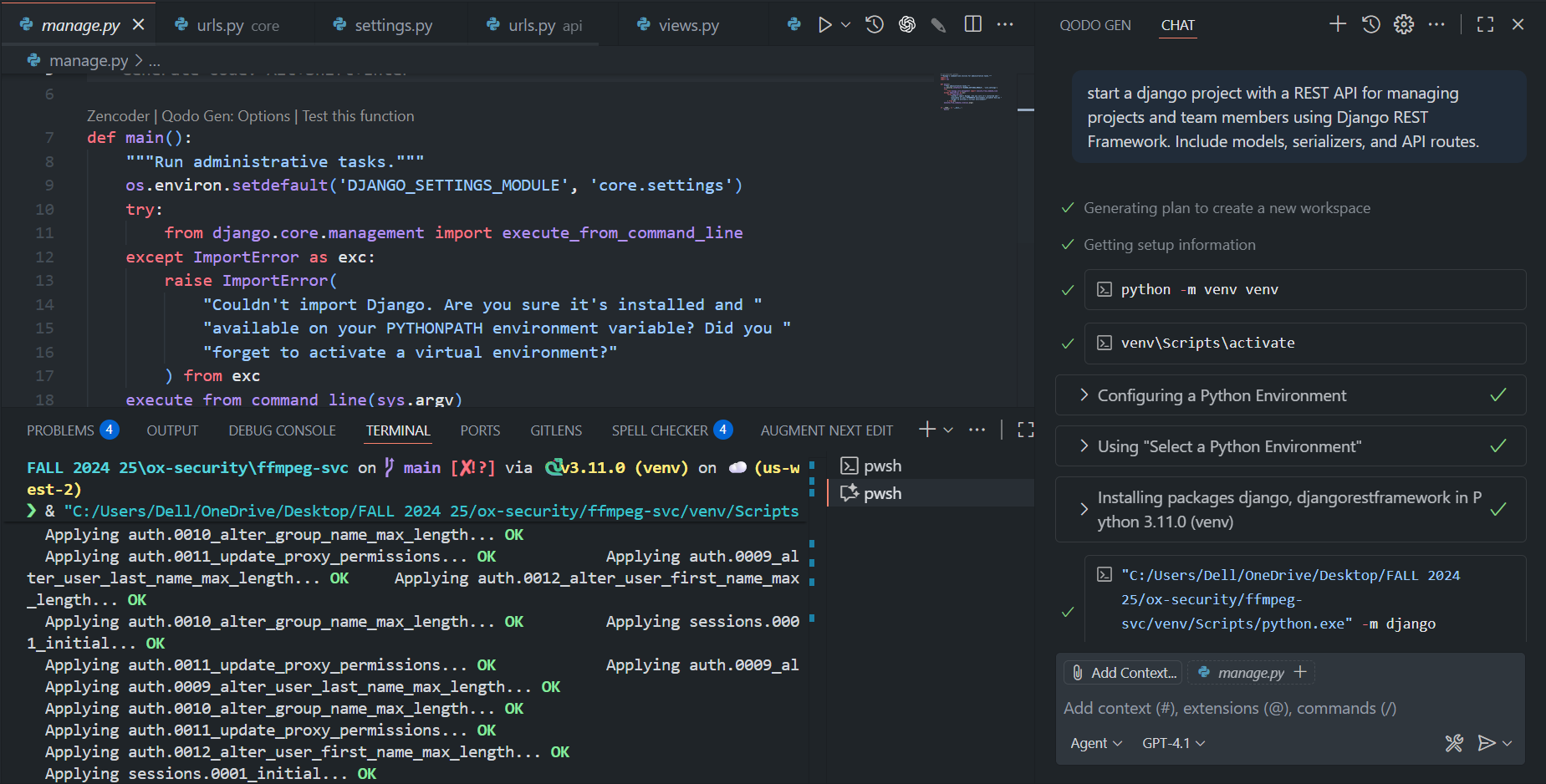
The generated code included:
- Models: Project and TeamMember classes inside models.py.
- Serializers: JSON serialization for both models via Django REST Framework.
- Views & URLs: CRUD endpoints mounted under /api/projects/ and /api/team-members/.
- Migrations: After running makemigrations and migrate, the database schema was ready.
At this point, I could POST to /api/projects/ to create a new project, list them at the same endpoint, and manage team members at /api/team-members/. The APIs returned structured JSON without requiring manual boilerplate. By the end, I had a fully functional REST API running locally without writing much glue code myself, just iteratively refining prompts and letting Copilot generate the missing pieces.
Pros:
- Time-saving: Copilot significantly speeds up development by automating repetitive coding tasks such as writing boilerplate code, error handling, and generating unit tests.
- Multi-Language Support: It supports a wide range of languages, making it a versatile tool for different kinds of projects.
- Documentation Generation: Copilot generates meaningful comments and docstrings, ensuring that your code remains well-documented with minimal effort.
- Seamless GitHub Integration: The deep integration with GitHub repositories makes it easy to incorporate Copilot into existing GitHub workflows.
Cons:
- Quality of Suggestions: While Copilot’s suggestions are generally useful, they’re not always perfect. Developers may need to adjust the AI-generated code to better fit the specific context of their project.
- Complexity Limitations: Copilot may struggle with highly specialized or complex coding tasks, requiring manual input or refinement.
Pricing
- Free Plan: Available for verified students and maintainers of popular open-source projects, providing full access to Copilot’s features.
- Individual Plan: $10/month for individual developers, granting full access to all of Copilot’s features for personal use.
- Business Plan: $19/month per user for teams, offering additional collaboration tools, security features, and administrative controls suitable for organizations.
Expert Summary
GitHub Copilot is an essential tool for developers looking to boost productivity by automating repetitive coding tasks. The real-time, context-aware suggestions help reduce development time significantly. While the quality of suggestions may vary for complex use cases, Copilot is highly effective for handling routine tasks, code completion, and generating documentation. Its pricing is reasonable, especially for individual developers, and the business plan adds great value for teams looking for enhanced collaboration and workflow features. Overall, GitHub Copilot is a powerful tool for developers who want to accelerate their coding process without compromising quality.
6. GitHub Codespaces
GitHub Codespaces is a cloud-based development environment that allows developers to create, configure, and access a fully functional development environment hosted directly in the cloud. It seamlessly integrates with GitHub repositories, enabling instant access to development environments with all the dependencies and configurations required for the project. This eliminates the need for local setup and ensures that all contributors work in a consistent environment, speeding up collaboration and reducing the “it works on my machine” issues.
Key Features
- Cloud-Based Development: GitHub Codespaces allows developers to work directly in a cloud-hosted environment. With this setup, there’s no need to install or configure a local environment, and you can access your development workspace from any device with an internet connection.
- Customizable Configurations: You can define custom development environments using configuration files such as devcontainer.json to specify dependencies, extensions, and machine types. This ensures that the environment is consistently replicated across all developers, teams, or contributors.
- Seamless GitHub Integration: GitHub Codespaces is fully integrated with GitHub, allowing you to open your repositories in a fully configured development environment with just a few clicks. It supports managing branches, commits, and pull requests directly from within the environment, streamlining the workflow for GitHub users.
- Preconfigured Development Environments: Codespaces allows you to pre-define development environments with the necessary dependencies, such as Python, Node.js, Docker, and any other tools or services your project requires. This makes it easy to onboard new developers, as they can access the same environment with minimal setup.
- Remote Development: With Codespaces, you can spin up fully remote development environments that are accessible via a browser or through Visual Studio Code. This is especially beneficial for working on shared projects without worrying about hardware limitations or local configurations.
Hands-on
When I prompted GitHub Codespaces to set up a full-stack starter with Express, React, PostgreSQL, and Docker Compose, it generated the entire project in one go. The workspace came with two main parts: a backend built with Express and a frontend built with React.
Both were initialized with their own package.json and starter files, index.js on the backend and App.jsx with index.jsx on the frontend, so the applications were ready to run without any extra setup.
As shown in the snapshot below:
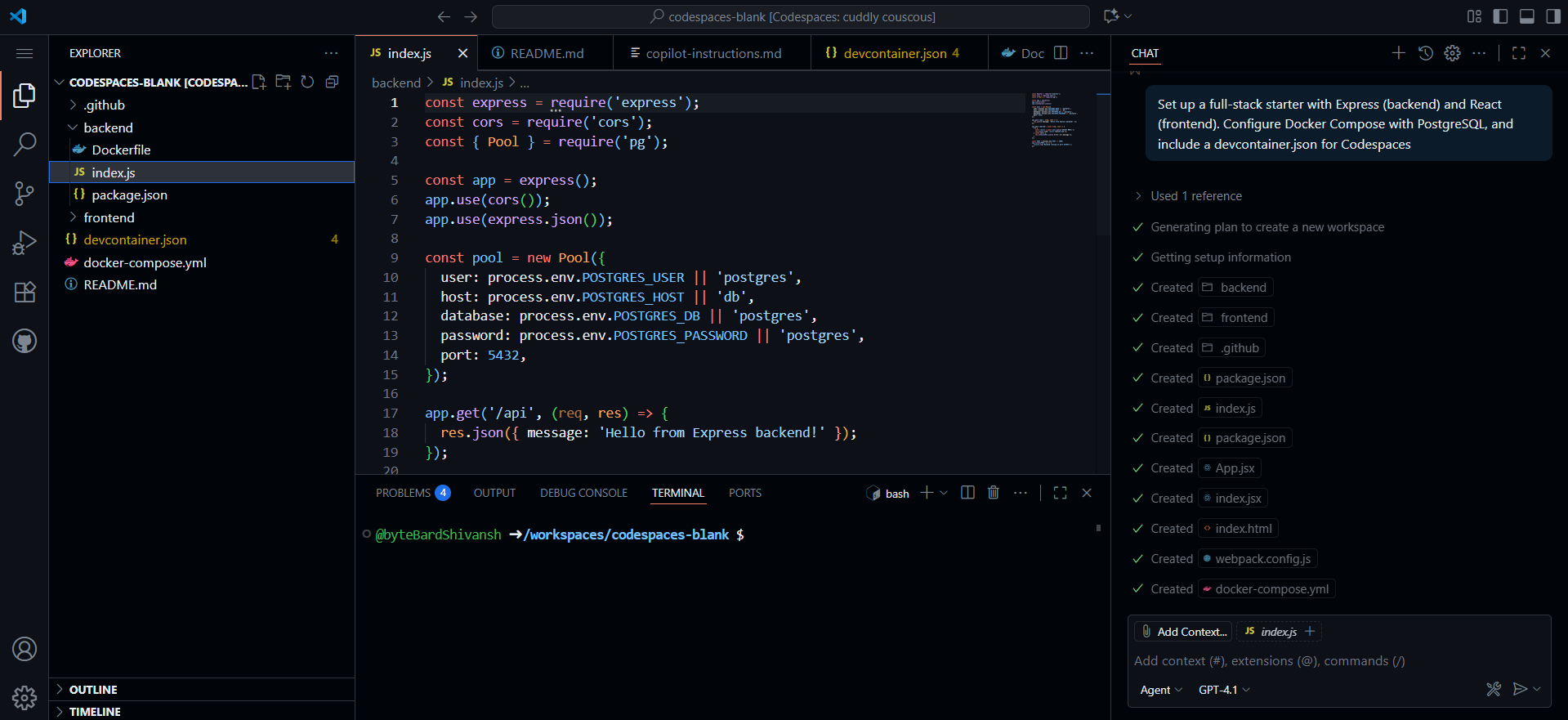
In the snapshot alongside the app code, Codespaces created container definitions for each service. The backend runs on port 4000 and connects directly to the database, while the frontend runs on port 3000 and automatically hot-reloads changes.
PostgreSQL was included as a third service running on version 16, with a persistent volume (pgdata), so data isn’t lost when containers restart. The generated docker-compose.yml ties these services together, mapping ports and mounting local code so you can develop and test in real time. Here’s the docker-compose.yml you can go through:
version: '3.8'
services:
  backend:
    build: ./backend
    ports:
      - "4000:4000"
    environment:
      - POSTGRES_USER=postgres
      - POSTGRES_PASSWORD=postgres
      - POSTGRES_DB=postgres
      - POSTGRES_HOST=db
    depends_on:
      - db
    volumes:
      - ./backend:/app
    working_dir: /app
    command: npm run dev
  frontend:
    build: ./frontend
    ports:
      - "3000:3000"
    depends_on:
      - backend
    volumes:
      - ./frontend:/app
    working_dir: /app
    command: npm start
  db:
    image: postgres:16
    restart: always
    environment:
      POSTGRES_USER: postgres
      POSTGRES_PASSWORD: postgres
      POSTGRES_DB: postgres
    ports:
      - "5432:5432"
    volumes:
      - pgdata:/var/lib/postgresql/data
volumes:
  pgdata:
To make the project truly plug-and-play, a devcontainer.json was also added. This means that when you open the repository in Codespaces, the development environment already has Node, Postgres, and other dependencies configured. You don’t need to install anything locally, just open the workspace and start coding.
In the end, the generation also included a README with instructions on how to run the stack, either directly in Codespaces or on your own machine with docker-compose up. At this point, you have a working full-stack starter: a React frontend wired into an Express backend, which in turn connects to PostgreSQL. Running the stack spins up the database, serves the API on port 4000, and launches the frontend on port 3000, giving you a ready-to-extend environment for building out features.
Pros:
- No Local Setup: Eliminates the need for local environment setup, saving time and ensuring consistency across all developers.
- Easy Collaboration: Since all contributors work in the same cloud-based environment, collaboration is streamlined. Developers can join a project and start coding immediately without worrying about differing setups or environments.
- Fully Integrated with GitHub: GitHub Codespaces integrates deeply with GitHub repositories, allowing you to manage code, pull requests, branches, and commits directly within the development environment.
- Customizable Environments: Developers can define their exact development environment, ensuring consistency and reducing onboarding time for new developers.
Cons:
- Requires an Internet Connection: Since the development environment is cloud-based, a stable internet connection is required. This could be limiting for users with unreliable internet access.
- Resource Limitations: Resource-heavy tasks may experience some latency due to the limitations of cloud infrastructure. For example, large projects or complex builds may not perform as efficiently as on a local machine.
Pricing
GitHub Codespaces operates on a flexible pricing model:
- Free Plan:
- 120 core hours per month.
- 15 GB of storage per month.
- Ideal for light usage, individual developers, or small projects.
- Pay-As-You-Go:
- Charges based on usage, including the compute power and storage used. Pricing varies depending on the selected machine type (e.g., 2-core, 4-core configurations).
- This model is suitable for larger or more resource-intensive projects, as you pay for what you use.
- Team and Enterprise Plans:
- For teams and larger organizations, GitHub Codespaces provides enhanced features, including improved resource limits, advanced security features, and enhanced administrative controls.
- Pricing is customized to meet the specific needs of the organization.
Expert Summary
GitHub Codespaces is an excellent tool for modern development workflows, particularly for teams that need a consistent and scalable development environment. It eliminates local setup, integrates well with GitHub, and allows for quick access to pre-configured development environments. While it requires an internet connection and may have some latency with resource-intensive tasks, it’s an ideal solution for cloud-first development teams or individual developers looking to simplify their setup and streamline collaboration. The flexible pricing options make it suitable for a range of use cases, from small projects to enterprise-level development.
7. Amazon Q
Amazon Q is a set of generative AI tools from AWS designed to streamline how developers and organizations work with conversational AI and code assistance. It consists of Amazon Q Developer (for developer-focused tools like IDE/CLI integrations) and Amazon Q Business (for building production-grade chat applications powered by enterprise data).
Key Capabilities
- Context-Aware Code Assistance: Q Developer uses your workspace and repository context to generate code, create pull requests (PRs), and produce documentation or tests from natural-language prompts.
- Terminal/CLI Integration: With Q’s native CLI, you can chat, autocomplete commands, and translate natural language into shell commands. It also supports custom agent extensions.
- Enterprise Chat & Data Connectors: Q Business powers web chat applications (Q Apps) that can connect to and index enterprise content from sources like S3, OneDrive, and more. These apps filter metadata and return answers attributed to their source.
- Agentic RAG & Hallucination Controls: Built-in retrieval-augmented generation (RAG) improves answer accuracy by allowing the system to pull relevant context from external sources, while hallucination mitigation ensures the system doesn’t provide inaccurate information.
- Model Context Protocol (MCP) Support: Amazon Q supports MCP-style integrations, allowing assistants to call tools, retrieve context, and handle multi-step reasoning across multiple processes.
Hands-On: Deploying to ECS with Amazon Q
When I asked Amazon Q to set up a GitHub Actions workflow for deploying to ECS with Fargate, it automatically generated two core components: the workflow itself and a task definition.
In the screenshot below, you can see how Q created the task-definition.json and confirmed the setup in less than a second:
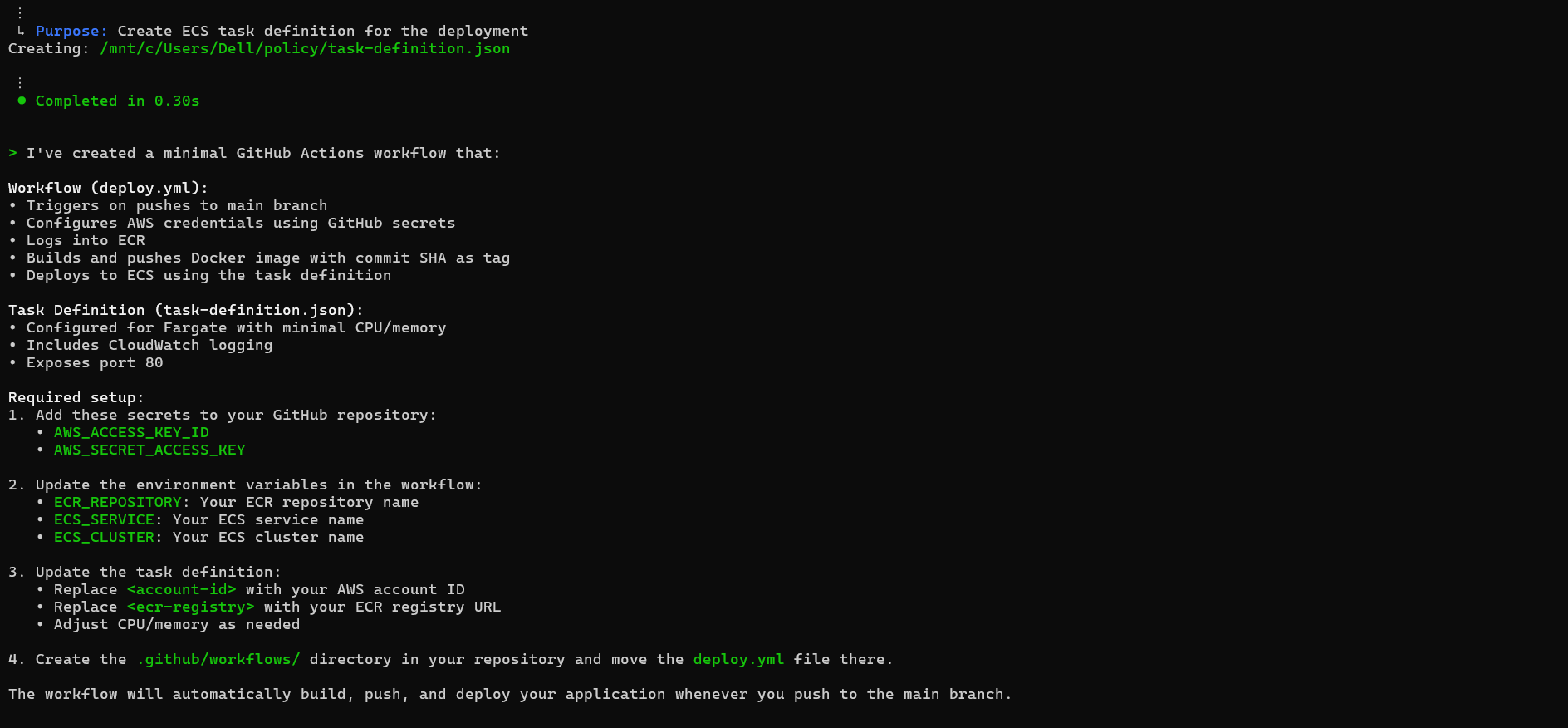
The workflow created in the above snapshot runs every time you push to the main branch. It authenticates with AWS using credentials stored in GitHub secrets, logs into ECR, builds a Docker image tagged with the current commit SHA, pushes it to your repository, and finally updates the ECS service to run that image. This means each commit is tied to a specific container version, making rollbacks and audits easier.
The task definition provides the runtime details for ECS Fargate: minimal CPU and memory allocation for lightweight services, port 80 exposure for HTTP traffic, and CloudWatch logging for observability. All that’s left is replacing placeholders with your own values, account ID, ECR registry, repository, service, and cluster names.
Once wired up, this pipeline creates a direct path from git push to production: code changes automatically get packaged into a container, published to ECR, and deployed on Fargate without manual steps.
Pros:
- Deep integration with AWS services and data sources makes it especially useful for organizations that rely on AWS infrastructure.
- Flexible form factors (IDE, CLI, and web apps) allow developers and end-users to choose the best tools for their workflow.
- Designed with enterprise-scale usage in mind, offering subscription management, capacity scaling, and identity integrations to support governance and security.
Cons:
- Some features are exclusive to the Pro-tier and vary by region, so make sure to check what’s available before rolling out.
- The two product offerings (Q Developer vs. Q Business) serve different use cases, developer productivity vs. customer-facing applications, so it’s important to choose the right product based on your needs.
Pricing
- Q Developer: Available in two tiers, Free and Pro. Pro offers higher limits and additional features for professional developers.
- Q Business: Has two subscription tiers, Lite and Pro. Pricing is per-user and also based on the capacity of data indexing. The tier selected affects features and scale, with certain features being region-specific.
- Quotas & Billing: Subscription levels determine the usage limits, with upgrades taking effect immediately and downgrades at the start of the next month. Admins manage subscriptions and capacity through AWS Identity and Access Management (IAM).
Expert Summary
Amazon Q is a robust AWS-first generative AI platform, divided into two main products: Q Developer for improving developer productivity in IDEs and Q Business for creating production-grade chat apps. Both products focus on providing accurate, context-aware responses backed by external data and powerful admin controls for enterprise-scale deployment.
8. Gemini CLI
Gemini CLI is a terminal-based AI agent. Instead of just giving text suggestions, it actually runs tools in your local environment and loops on the results until it solves the task. It knows how to use common shell utilities (like grep, file read/write, running commands), and it can connect to MCP (Model Context Protocol) servers to pull in extra context from APIs or internal systems. It’s designed for developer workflows that require more than single-file autocomplete, such as fixing bugs across multiple files, adding features, or generating tests.
Key Features
- Reason-and-act loop: The agent doesn’t just suggest code; it thinks about the problem, runs a tool, checks the output, and repeats until it reaches a solution.
- Local tools built in: Commands like grep, file search, editing, and terminal execution are available for the agent to call.
- MCP server support – You can connect it to local or remote MCP servers to expose APIs or company-specific tools, which the agent can call during a task.
- Slash commands – Useful for debugging the agent session. /tools shows what tools it can call, /mcp lists MCP servers, /memory shows what instructions it’s keeping in context.
- Web access – It can fetch from the web or run a search if external context is needed.
- Flexible hosting – Same agent engine powers Gemini Code Assist in VS Code; quotas are shared between CLI and IDE.
Hands-On: Building a Pub/Sub → BigQuery Enrichment Pipeline with Gemini CLI
I asked Gemini CLI to generate a Python pipeline that ingests messages from a Pub/Sub topic, enriches them using BigQuery, and publishes results to another Pub/Sub topic. It scaffolded a project with Apache Beam as the core engine, requirements.txt for dependencies, and a clear separation of main.py (pipeline entrypoint) and pipeline/enrichment.py (BigQuery lookup logic).
When running locally, the pipeline uses the DirectRunner. This is Beam’s built-in runner for testing and small workloads, so you can check your logic without incurring GCP costs:
python main.py \
  --input_topic projects/my-proj/topics/input \
  --output_topic projects/my-proj/topics/output \
  --bq_table my-proj.dataset.table \
  --runner DirectRunner
Here, you provide the Pub/Sub input and output topics, the BigQuery table for lookups, and tell Beam to run everything locally. This is perfect for quick validation with test messages.
For production, the same code runs on Google Cloud Dataflow with the DataflowRunner. This takes care of scaling, fault-tolerance, and distributed execution. You just add project, region, and GCS staging paths:
python main.py \
  --input_topic projects/my-proj/topics/input \
  --output_topic projects/my-proj/topics/output \
  --bq_table my-proj.dataset.table \
  --runner DataflowRunner \
  --project my-proj \
  --region us-central1 \
  --temp_location gs://my-bucket/temp/ \
  --staging_location gs://my-bucket/staging/
The transformation step is where the enrichment happens. Each incoming Pub/Sub JSON message includes a key (like user_id). Beam queries BigQuery for a matching record and merges that data back into the event:
Input:
{ "transaction_id": "abc-123", "user_id": "user-456", "amount": 99.99 }
Output:
{ "transaction_id": "abc-123", "user_id": "user-456", "amount": 99.99,
  "enriched_data": { "user_profile_data": { "name": "Jane Doe", "tier": "Gold" } } }
This design keeps the SQL query in pipeline/enrichment.py, so you can easily change the enrichment logic to match your schema without rewriting the pipeline. Locally you validate it fast; on Dataflow, it scales automatically with production traffic.
Pros
- Runs real commands and file edits, not just text suggestions.
- Open source, easy to install, and script into CI/CD or local workflows.
- Supports multiple LLM backends and MCP servers, so you can extend it with your own tools or APIs.
Cons
- Still in pre-GA; features and limits may change.
- Shares quotas with IDE agent mode, so heavy CLI use can eat into your daily budget.
- Some modes (like “Yolo mode”) can be risky since the agent makes bigger edits automatically , best used with safeguards.
Pricing & Availability
Gemini CLI isn’t sold separately; it uses the same quotas as Gemini Code Assist. That means if you’re on an Individual plan, you get 60 requests/minute and 1,000 requests/day, Standard gets 120 req/min and 1,500 req/day, and Enterprise gets 120 req/min and 2,000 req/day. Each CLI task may use multiple requests since the agent loops with tools, so you’ll want to factor that into your usage.
Expert Summary
Gemini CLI is best for multi-step, cross-file work where you’d normally run shell commands and edit files by hand. It doesn’t just autocomplete; it reasons, runs tools, and applies changes. The power comes from how you configure it: the more tools and MCP servers you connect, the more useful it becomes. Just keep in mind that it’s pre-GA, it shares quotas with Gemini Code Assist, and agent modes like “Yolo” should be used carefully. For teams that want to automate tricky debugging, refactoring, or test generation directly in the terminal, it’s a strong option.
Now that we’ve explored the top Replit alternatives and compared their core features, let’s take a quick look at how these tools stack up against each other in terms of key capabilities.
Quick Comparison Table
| Task / Capability | Bolt (The Builder) | GitHub Codespaces (The Workspace) | Qodo Gen (The Reviewer) | Gemini Code Assist (The Orchestrator) |
| Boilerplate generation | Generates full-stack scaffolding from natural language. | Preconfigured dev environments, less focus on boilerplate. | Code review-driven, generates scaffolds aligned to enterprise rules. | AI completions with multi-step task support. |
| Large-scale refactor | Not designed for multi-file edits, more for starting projects. | Can run containerized tests for refactored projects. | Specialized agents handle coordinated multi-file refactoring. | Agent Mode handles multi-step refactor tasks. |
| Onboarding to projects | Quick setup from prompt to full stack app. | Consistent containerized environment setup. | Generates compliance-aligned onboarding docs/tests. | Can generate repo-level summaries and code tours. |
| Testing & QA | Generates starter tests with app scaffold. | Can preconfigure CI/CD testing containers. | Dedicated testing agents enforce standards. | Multi-step test creation and execution. |
| Data privacy & control | SaaS-based, less control. | Enterprise controls via GitHub; dependent on GitHub’s security model. | SOC 2 compliant; SaaS, VPC, and on-prem deployment models. | SOC 2 compliant; SaaS, VPC, and on-prem deployment models. |
Now that we’ve compared the top Replit alternatives and how they handle everyday developer tasks, it’s clear that general-purpose IDEs and cloud-based AI assistants work well for small projects, but at enterprise scale, they hit practical limits. Hundreds of repositories, each with multiple branches, pull requests, and CI/CD pipelines, spread across different platforms and teams, make cross-repository understanding and dependency analysis extremely challenging. Cloud-only tools may struggle with strict access controls, proprietary data, or compliance requirements, and performance can degrade when indexing millions of lines of code.
In my experience, on-prem or hybrid AI platforms address these gaps: they provide deep, context-aware analysis across repositories, trace relations between services, integrate with existing workflows, and enforce security and compliance policies, all without slowing down development or forcing teams to work around tooling limitations.
Managing Large-Scale Enterprise Codebases
In enterprise engineering teams, challenges come from scale and complexity. Teams maintain hundreds of repositories, each with multiple branches, pull requests, and CI/CD pipelines. Code is spread across platforms like GitHub, GitLab, Bitbucket, and Gerrit, and every repository may have its own access controls, branching strategies, and service or module relations.
At this scale, certain operational requirements become critical:
- Cross-repository search and indexing: Being able to query across all repositories quickly is essential for impact analysis, debugging, and feature development. Traditional search tools often fail when codebases exceed millions of lines.
- Version control system integration: Tools must work consistently across multiple platforms, respecting access controls and permissions.
- Performance and scalability: Indexing millions of files and keeping search queries under sub-second response times requires optimized storage, caching, and incremental indexing.
- Security and compliance: Many enterprise codebases contain proprietary or regulated information. Any tooling must enforce access controls, support on-premises deployment, and comply with internal auditing requirements.
- Workflow integration: Integration with CI/CD pipelines, issue trackers, and internal dashboards is essential. Teams need tooling that can automate checks, generate reports, or feed into code intelligence systems.
In practice, handling these requirements manually is exhausting. Even experienced engineers can spend hours tracing relations across repositories, evaluating the impact of a code change, or trying to understand how a new feature will integrate with existing systems. This is exactly the kind of problem Qodo Aware is built to solve.
Through Deep Research (/deep-research), it lets teams ask complex questions about the system and get structured insights across repositories, for example:
- How authentication flows through microservices
- Where to integrate new features without breaking existing patterns
- Which services will be affected by a change in their relations
With Impact Analysis (/find-issues), it goes further by predicting the ripple effects of code changes, identifying potential breaking changes, and providing actionable recommendations before code hits production.
Instead of manually hunting for information or mentally mapping hundreds of repositories, teams can rely on Qodo Aware to provide clear, contextual insights, allowing engineers to focus on design, quality, and delivery.
FAQs
What are the best AI code training platforms for software engineers in 2025?
In 2025, AI code training platforms like Qodo, GitHub Copilot, and Sourcegraph Cody are expected to evolve further, leveraging deep machine learning models to enhance code completion, bug fixing, and optimization processes. These platforms use AI to learn from the vast amount of code available across multiple repositories, offering developers smart suggestions and real-time assistance tailored to their specific needs.
For software engineers, platforms that combine AI with enterprise-grade integration (like Qodo, GitHub Copilot, or even Gemini Code Assist) will be crucial in bridging the gap between human expertise and AI-driven support, making daily development tasks faster, more efficient, and less error-prone.
Which AI model is best for coding in 2025?
The best AI model for coding in 2025 will likely be one that is trained on a vast array of open-source code, with specific adaptations for enterprise-level needs. OpenAI’s GPT models (used in GitHub Copilot and other platforms) are likely to remain among the leading choices, given their proven capabilities in generating code and understanding developer intent.
However, as AI models evolve, specialized models like Google Gemini (which powers Gemini Code Assist) and Qodo’s proprietary models will bring more tailored solutions for complex enterprise-scale workflows, improving code quality, security, and team collaboration.
Which AI coding solutions support multiple programming languages?
Several AI coding solutions today support a broad array of programming languages, but GitHub Copilot, Qodo, and Sourcegraph Cody stand out for their multi-language capabilities. These platforms support everything from Python, JavaScript, and Java, to less common languages like Go, Rust, and Swift. Their versatility makes them ideal for teams working in polyglot environments, where different projects might use different languages or frameworks.
What are the best AI coding tools for enterprises?
For enterprise-level coding, Qodo, GitHub Codespaces, and Gemini Code Assist are among the best tools available. These platforms offer seamless integration with enterprise systems, enterprise-grade security, and advanced AI-driven features like code reviews, large-scale refactoring, and testing automation. Their scalability and ability to handle complex workflows make them suitable for large teams, diverse tech stacks, and intricate projects.
How does AI-powered code search benefit enterprise engineering teams?
AI-powered code search helps enterprise engineering teams by offering more intelligent and context-aware searches across massive codebases. Instead of relying on traditional keyword searches, these platforms use AI to understand the context, dependencies, and structure of the code, providing relevant search results faster and with greater precision. This enhances developer productivity by enabling them to quickly locate pieces of code, identify bugs, and suggest improvements, reducing the time spent on troubleshooting and improving overall code quality.
About the author