Best Automated Code Review Tools for Enterprise Software Teams

TLDR;
- Enterprise teams ship more code than reviewers can validate. AI coding agents increased output by 25-35%, but most review tools don’t address the widening quality gap larger PRs, architectural drift, inconsistent standards across multi-repo environments, and senior engineers buried in validation work instead of system design.
- Scale demands context-aware review systems, not diff analyzers. Teams operating across 10-1000+ repos need persistent multi-repo context, policy enforcement, automated workflows, and ticket-aligned validation. Tools limited to diff-level analysis cannot interpret system-wide behavior, enforce standards across repos, or validate changes against Jira/ADO requirements.
- This guide evaluates tools on enterprise-critical capabilities. Context depth (cross-repo understanding vs. single-file analysis), review accuracy (high-signal findings vs. noise), policy enforcement (centralized standards vs. per-repo config), workflow automation (15+ automated checks vs. manual triage), and governance (VPC/on-prem/SOC2 vs. cloud-only SaaS). The tools evaluated here include Qodo, GitHub Copilot, Cursor, CodeRabbit, and Graphite.
- Qodo delivers what diff-only tools cannot, using a persistent Codebase Intelligence Engine that understands architectural patterns across repos, 15+ automated PR workflows (scope validation, missing tests, standards enforcement, risk scoring), ticket-aware validation against Jira/ADO intent, and enterprise deployment options (VPC/on-prem/zero-retention, SOC2/GDPR compliance).
The primary pain point for any enterprise, especially those with 1000s of repositories, is the compounding cost of technical debt compromising delivery capacity. This is not a failure of individual engineers; it is a structural liability. Gartner states that organizations that fail to actively manage technical debt face higher operating expenses and a longer time to market.
The introduction of Generative AI has made this liability immediate and pervasive. AI is now a fundamental part of the Software Development Life Cycle (SDLC): the 2025 Stack Overflow Developer Survey shows 84% of developers are using AI tools. However, the same survey reveals a critical disconnect: 46% of developers actively distrust the accuracy of the AI output, up significantly from the previous year.
“This is the central problem: AI writes a high volume of code fast, but that code is not inherently production-ready. It is frequently almost right, passing basic tests but containing hidden security flaws, performance regressions, or architectural inconsistencies.”
Megan K
The quote reflects what many teams observe: AI is excellent at code generation, but far less consistent at code that is safe to ship. And as AI-generated code now represents a meaningful share of enterprise codebases, the output curve has overtaken human capacity to review it.
Senior engineers, who should focus on deeper architectural decisions and business logic, are often pulled into checking large batches of AI generated boilerplate for style issues, complexity and recurring security patterns. This slows the delivery pipeline and pushes them toward repetitive, low value reviews.
This becomes even more visible when governance and compliance are added to the workflow. Teams today must validate every change against internal standards, policy rules and audit requirements. Doing this by hand across fast growing AI contributions is unrealistic, which increases the chance of missed violations and inconsistent enforcement.
Automated code review platforms like Qodo act as a quality control layer for fast-moving engineering teams. They apply the same checks consistently across many repositories, enforcing security and compliance rules early so technical debt does not enter the codebase in the first place. This reduces the burden on high-value human time and ensures that the foundation of the codebase remains structurally sound.
Closing this verification gap at enterprise scale requires a dedicated review layer. Qodo sits between AI-generated changes and production, applying structured validation across the software development life cycle so code is reviewed with the same rigor before it is merged.
At enterprise scale, the issue is not review speed alone, but review capacity and consistency. Technical debt remains a financial liability, and the practical response is not additional headcount, but reliable code quality automation that integrates quality, security, and standards enforcement directly into the development workflow.
In this blog, we will go through the 5 Best Automated Code Review Tools used by enterprise software teams to help manage this risk as development velocity continues to increase through 2026.
AI Increases Code Generation Output, But Widens Review Gaps
AI coding agents have pushed developer output forward at a pace most engineering leaders expected to reach only after several hiring cycles. Internal data across large product groups shows a 25 to 35% growth in code developed per engineer, which means teams move through feature plans faster, look into alternative solutions more often, and open far more pull requests in a typical sprint.
The delivery side of the pipeline is expanding, yet the code review stage remains tied to the same human capacity limits it had 5 years ago. That gap widened to an estimated 40% quality deficit projected for 2026, where more code enters the pipeline than reviewers can validate with confidence.
The below graph illustrates the widening gap between the volume of code generated by AI-augmented teams and the human capacity to review it.
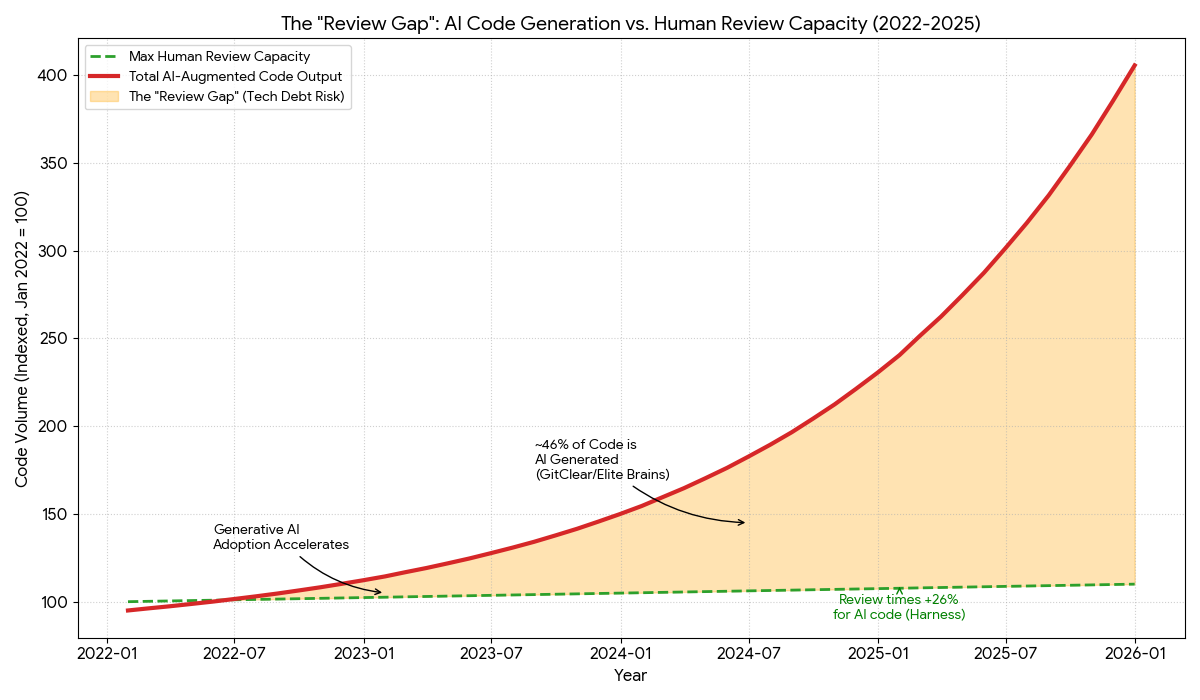
While generative AI has exponentially increased the velocity of code production (Red Line), human review capacity (Green Line) remains finite and linear. The expanding delta between these two forces represents a critical risk zone where the sheer volume of output outstrips the ability to verify it, leading to the silent accumulation of ‘unchecked’ technical debt and a higher probability of shipping complex, unreviewed errors into production.
This imbalance shapes the day-to-day reality of enterprise teams. Review queues stack up, which encourages developers to batch unrelated updates into larger pull requests that require deeper scrutiny but seldom get it. Quality varies between teams because each group builds and reviews code slightly differently, and those differences compound as organizations adopt multiple languages and frameworks.
Over time the gaps show up as architectural drift, duplicated logic, and understated breaking changes that cross repository boundaries.
These issues are rarely the result of negligence. They come from human reviewers trying to keep up with an output curve that keeps rising while context becomes harder to hold in a single mental model.
Most leaders initially framed automated review tools as a way to reduce cycle time, but the operational reality changed. With AI contributing more code and systems growing in interconnected ways, review depth is now tied directly to governance, safety, and long term maintainability.
Automated code review is no longer a speed improvement. It is a control point that ensures changes entering production are understood, verified, and consistent with the organization’s technical direction. Without this layer, the gap between generated output and validated quality continues to expand, and teams lose visibility into how the codebase evolves over time.
Understanding Automated Code Review Tools (With the Right Enterprise Lens)
Most definitions describe automated code review tools as systems that scan pull requests and comment on issues. That framing is too narrow for enterprise teams. Leaders care less about shallow suggestions and more about whether the tool can understand intent, avoid regressions, and create predictable review quality across a large engineering organization.
One of the clearest signals comes from the Qodo AI Code Quality Report. It says:
Among those who say AI degrades quality, 44% blame missing context- and even among AI champions, 53% still want better contextual understanding.
This is why “automated code review” in an enterprise sense now includes capabilities far beyond line comments. Teams look for tools that can trace how a pull request relates to other services, detect when implementation decisions diverge from standards, and provide consistent reasoning regardless of who reviews the code. When output volume increases, these elements become the control points that keep systems coherent over time.
How Enterprises Evaluate Code Review at Scale?
Enterprises evaluate automated tools for code review by a shared group of criteria because each one maps to a real production risk. Review depth and accuracy to determine whether the system can spot issues humans often miss, especially when 76% of developers report frequent hallucinations. Context level matters because file-level checks cannot detect architectural drift or breaking changes across repositories.
Governance ensures standards and compliance do not rely on tribal knowledge. Integration with GitHub, GitLab, Bitbucket, and Azure DevOps keeps review signals inside the workflow rather than in an isolated dashboard. Data privacy and deployment flexibility shape whether the tool can operate under regulatory constraints.
Evidence traceability supports audits and post-incident analysis. Test intelligence catches coverage gaps and brittle test behavior before they reach production. PR workflow automation reduces review debt by enforcing policy and handling routine approvals.
Together, these criteria reflect the operational reality facing enterprise teams: higher output, rising complexity, and the need for predictable, defensible quality across thousands of pull requests.
Criteria for Choosing The Right Automated Code Review Tool
Enterprise engineering groups do not choose review systems based on suggestion quality alone. They evaluate tools against a regular lineup shaped by scale, governance, audit needs, and the complexity of multi-repo development. These criteria form the evaluation framework used for every code review automation tool discussed in the blog.
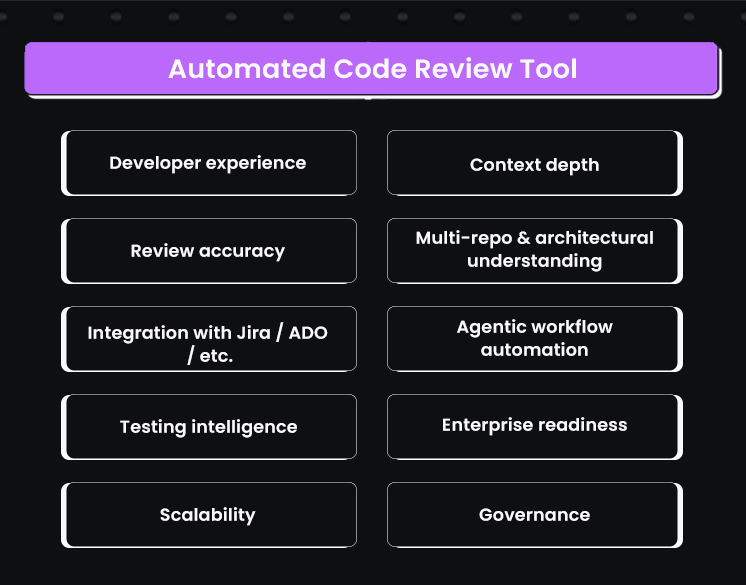
Context depth
Whether the system understands code at a level that reflects real architectural behavior. Gartner ranked Qodo as the top product in this category, and that metric signals how much review accuracy depends on context, not pattern matching.
Review accuracy
A tool must detect genuine issues and avoid noise. Teams already deal with alert fatigue, and inaccurate suggestions increase review debt instead of lowering it.
Multi-repo and architectural understanding
Large organizations maintain distributed systems. A review tool must interpret how changes ripple across repositories and shared services, not just within a single file.
Integration with Jira, Azure DevOps, Bitbucket, and GitLab
Review insights only matter when they appear in the systems where engineers work. Shifting between tools slows reviews and reduces adoption.
Agentic workflow automation
Auto approvals, rule enforcement, and structured workflows reduce the load on senior engineers. Without these features, automated review becomes another layer of comments rather than a genuine workflow improvement.
Testing intelligence
Coverage insights, test generation, and detection of brittle or flaky tests help stabilize releases. Review quality depends on understanding both the code and the tests meant to protect it.
Enterprise readiness
Support for on premises deployments, virtual private cloud installs, SOC2 compliance, and zero data retention policies determines whether the tool can operate within strict security boundaries.
Scalability across thousands of developers and repositories
A tool must perform consistently across large organizations. Slow indexing, long feedback cycles, or inconsistent results create bottlenecks that undermine trust.
Governance
Org wide rules, compliance controls, and evidence trails ensure that standards remain consistent, auditable, and independent of individual reviewer preferences.
Developer experience across IDE and pull requests
Review insights must appear where developers write and review code. Strong IDE coverage and PR integration are required for daily adoption.
These criteria reflect how enterprise teams actually measure value. They will serve as the foundation for the tool evaluations in the following sections, ensuring each product is assessed through the same lens.
Best 5 Tools Comparison: How Each Product Performs Against Enterprise Requirements
As a senior engineering lead, I tend to evaluate tools based on how they behave in real review environments, not how they are marketed. Here are the top 5 AI code review tools that enterprise software teams can choose from:
We will discuss each tool and understand what features they extend that can be valuable for enterprises. The following sections also reflect hands-on use across large repositories, distributed services, and teams where review consistency matters as much as speed.
1. Qodo
Qodo is the AI Code Review Platform built for enterprise engineering organizations operating at significant scale, typically across hundreds to thousands of repositories, multiple programming languages, and distributed teams. It is designed for environments where pull request review is no longer a single-repo exercise, but a system-level validation problem.
What differentiates Qodo in practice is how it approaches review depth and consistency. Gartner ranked Qodo highest for code understanding, reflecting its ability to reason across full codebases rather than isolated diffs. This allows it to detect breaking changes, duplicated logic, and architectural drift whether a change affects ten repositories or a thousand. Instead of treating each pull request as a standalone artifact, Qodo evaluates how changes interact with shared utilities, downstream services, and established architectural contracts.
Qodo operationalizes review through agentic workflows. It runs the same checks senior engineers typically perform manually: security posture, CI signals, test impact, schema and API compatibility, cross-repo usage, and compliance requirements, and turns those checks into repeatable, automated review sequences.
When violations are detected, Qodo generates remediation patches aligned with existing code conventions, enabling one-click fixes rather than extended comment threads.
Why Enterprise Teams Choose Qodo
- Multi-repo context
Detects breaking changes, duplicated logic, and architectural drift across ten repositories or thousands. Gartner ranked Qodo number one for code understanding. - Agentic review workflows
Runs more than fifteen automated workflows covering scope validation, missing tests, compliance checks, and risk assessment. - One-click remediation
Generates patches aligned with existing coding standards instead of generic fixes or advisory comments. - Organization-wide governance
Enforces standards consistently across languages, teams, and repositories without per-repo configuration overhead. - Enterprise deployment models
Supports on-premises, virtual private cloud, and zero-data-retention deployments with SOC 2 alignment. - Proven at scale
monday.com reports preventing more than eight hundred issues per month, and a Fortune 100 retailer cites savings of roughly four hundred fifty thousand developer hours per year.
The platform is built to operate within enterprise constraints. It supports on-premises, virtual private cloud, and zero data retention deployments, and aligns with SOC 2 requirements for regulated environments.
In production use, teams such as monday.com report preventing hundreds of issues per month before merge, while large retail organizations have cited substantial reductions in developer review time through automated verification.
This positioning matters because Qodo is not designed as a suggestion engine. It functions as a systematic quality control layer between AI-generated code and production systems.
This shifts a large portion of verification earlier in the development cycle and allows reviewers to focus on design intent and system behavior rather than mechanical validation.
As one senior technical lead involved in deploying Qodo described it, the value comes from encoding institutional knowledge into the review process and applying it consistently, even as code volume and change velocity increase.
For enterprises, Qodo’s value comes from its ability to maintain consistency across thousands of repositories, show cross-repo breakages, and enforce standards without relying on individual reviewer judgment.
The platform supports on-premises, VPC, and zero-data-retention deployments, integrates with GitHub, GitLab, Bitbucket, and Azure DevOps, and generates audit-ready evidence for compliance teams.
It functions as the control layer between instant code generation and production, ensuring that every change is understood, validated, and aligned with the organization’s technical direction.
Hands-on: How Qodo Performs Against Enterprise Review Requirements
My current setup uses a multi-repo environment with an open PR in orders-service on the branch feature/big-update, a local payments-service repository, and a shared-utils library that will later introduce a breaking API change.
This structure mirrors the conditions where most review tools lose context, especially when changes ripple across repositories. Running Qodo against this setup demonstrates how each enterprise criterion behaves when applied to real code, real CI failures, and real architectural interactions.
CI Failure Detection and Traceability
When the PR triggers the pipeline, Qodo attaches an automated CI analysis card that identifies the missing dependency lock file and pinpoints the failing action in the build-and-test stage. Here’s a snapshot:
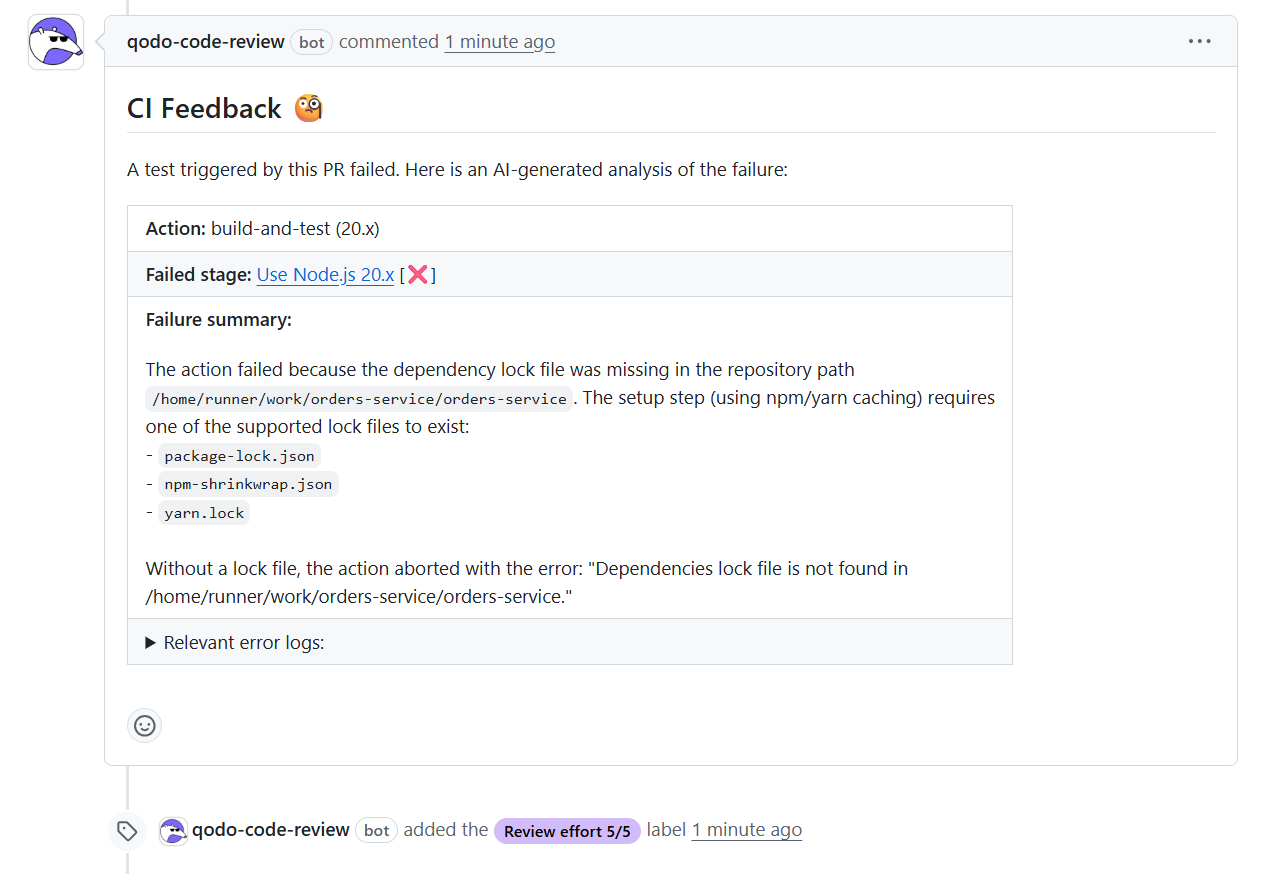
The message includes the failing step, the trigger path, and the lock file requirement, which matches the exact failure reason from GitHub Actions. This satisfies the need for reproducible and traceable evidence, because the system links reviewers directly to the logs and provides a root-cause summary without requiring them to search through CI output. At enterprise scale, this eliminates review friction and cuts the time senior engineers spend interpreting infrastructure noise.
Security and Compliance Checks
Qodo’s compliance guide aggregates hardcoded secrets, inconsistent configuration structures, insecure defaults, and exported sensitive values across the PR. In the demo, it surfaced production credentials embedded in source code, flagged raw configuration exports that could expose sensitive data, and identified inconsistent casing and duplication across repos.
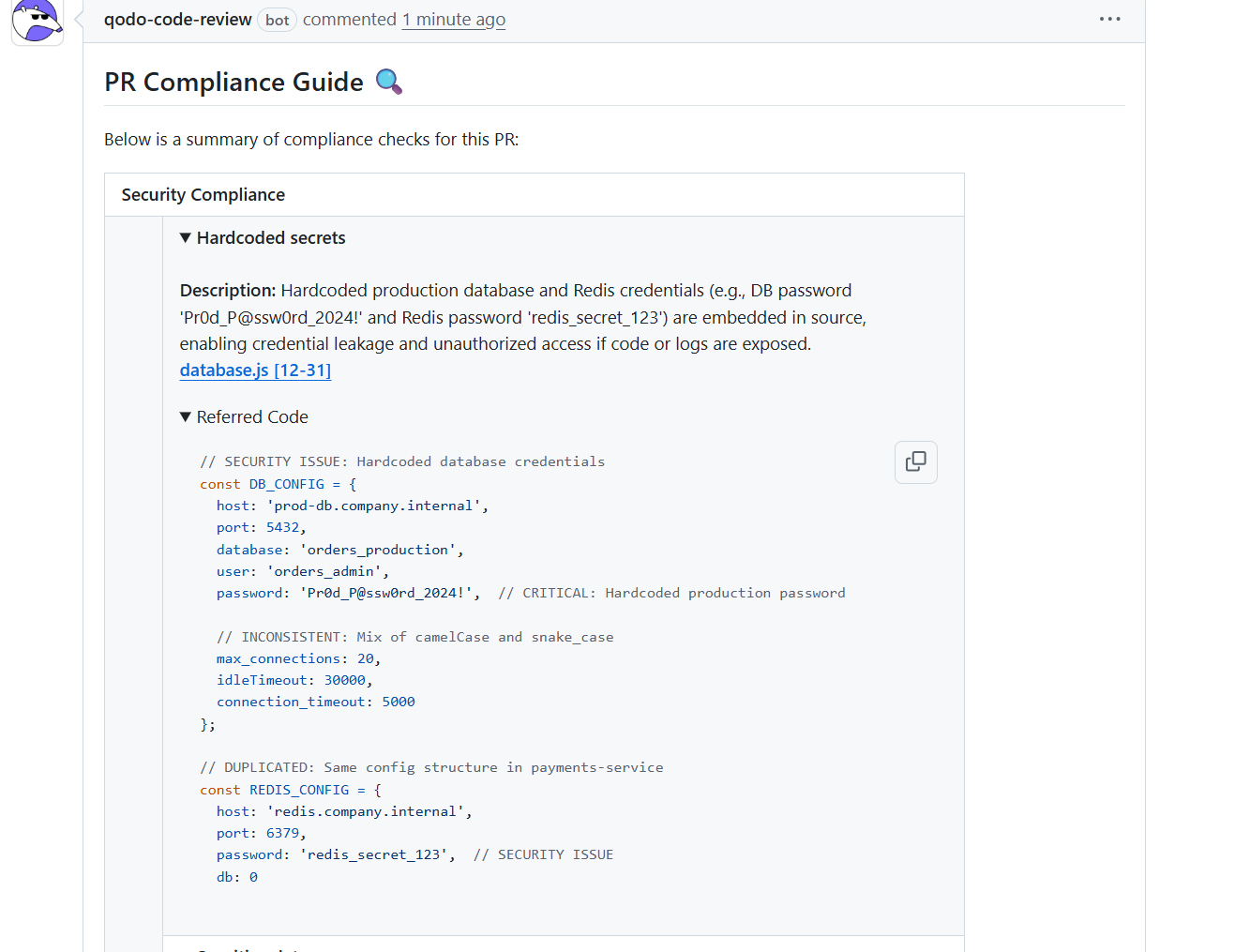
These findings map directly to review accuracy and governance criteria, because the tool provides the exact file, line range, and the reasoning chain that explains the security impact. This output is consistent with how compliance teams audit changes: evidence attached to the PR, remediation diff included, and a ticket-ready explanation that aligns to internal policy language.
Architectural and Multi-Repo Understanding
The multi-repo evaluation becomes clear when introducing the formatCurrency signature change in shared-utils. Qodo identifies that the orders-service code continues to call the outdated signature and lists every location where the function is used incorrectly.
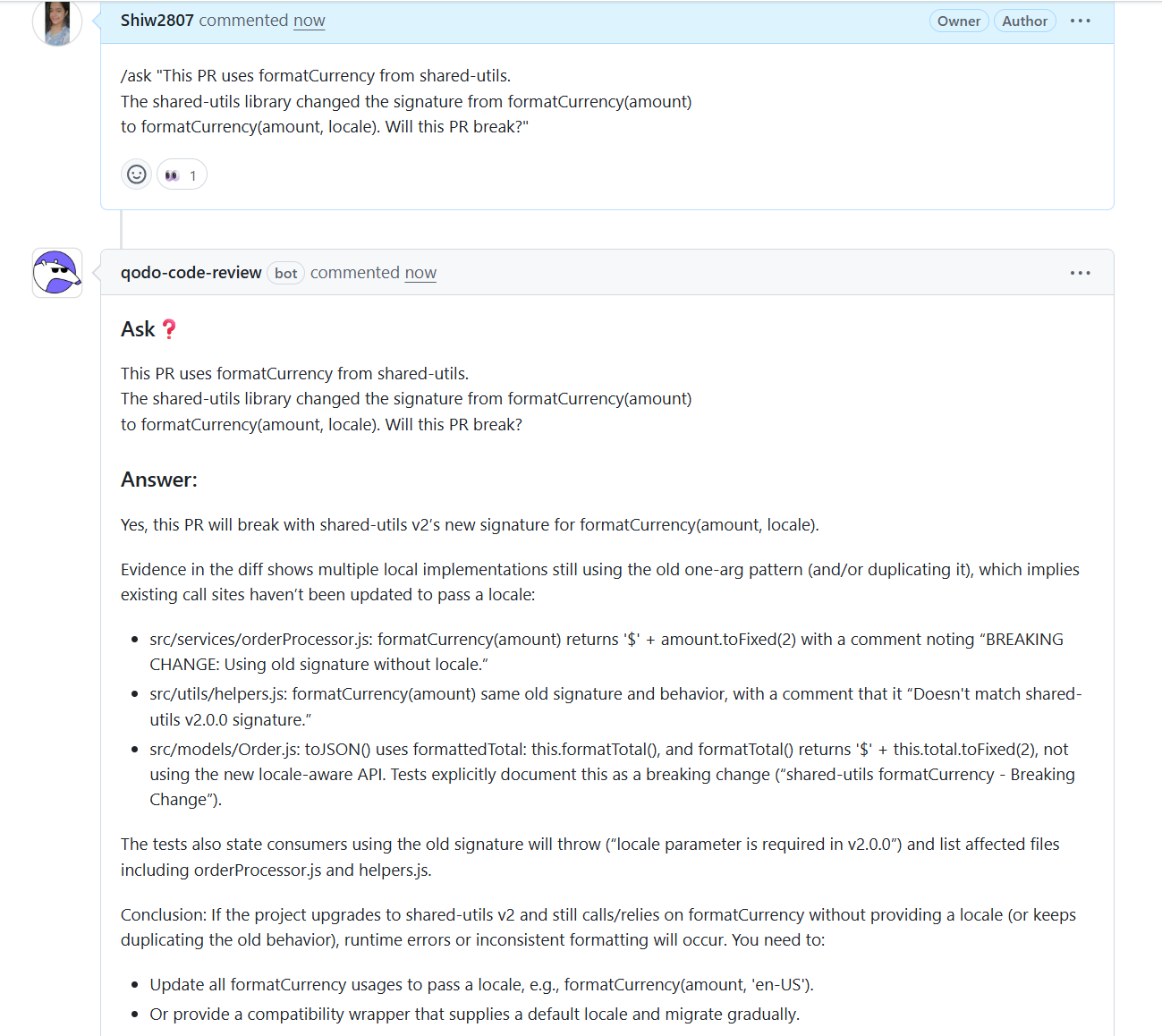
The formatCurrency example shows why local review is not enough in large engineering organizations. The orders-service PR looked correct when viewed in isolation, yet the shared-utils library introduced a new signature.
Several downstream call sites across the estate still used the old version, and Qodo surfaced every affected file with evidence. This is the key value of cross-repo analysis: reviewers no longer rely on partial visibility or memory of how shared libraries propagate through dozens of services.
Enterprises benefit from this because most regressions originate at the boundaries between teams and repositories, not within single files. Intuit adopted Qodo for this reason, using it to enforce consistency across multiple languages and shared library structures where a small signature change can ripple through the system.
Gartner ranked Qodo highest in context depth, and the demo reflects why: it interprets how a change interacts with the wider estate and provides concrete evidence before merge, not after a production incident.
This capability prevents breaking changes from slipping through routine reviews, reduces coordination overhead between teams, and maintains stability across fast-moving codebases where no single reviewer can hold the entire architecture in their head.
Testing Intelligence and Suggested Fixes
The suggested patches show how Qodo improves review quality by generating actionable fixes instead of general guidance. The JWT validation rewrite in your screenshot replaces weak, pattern-based token checks with verified cryptographic validation using jsonwebtoken.
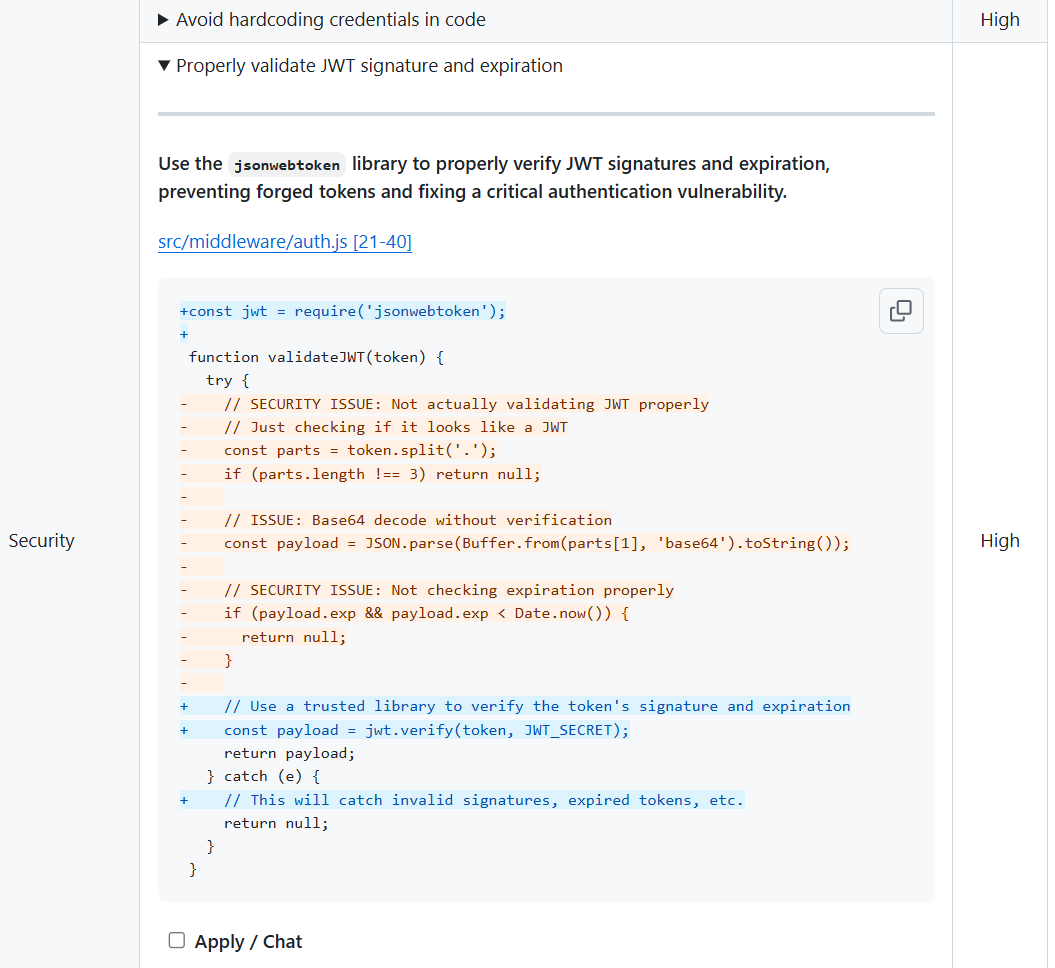
The patch contains the new code, a cleanup of insecure logic, and an explanation of the vulnerabilities it mitigates. This satisfies the testing intelligence and review depth criteria because the system not only identifies high-risk issues but provides a correct, reproducible fix aligned with the organization’s secure coding guidelines.
Developer Experience Across PR and IDE
The Ask-style interactions demonstrate Qodo’s ability to answer targeted engineering questions such as whether a PR changes the /charge endpoint contract or whether a dependency update will break consumers. The responses include the supporting diff, affected call paths, and the reasoning behind the conclusion.
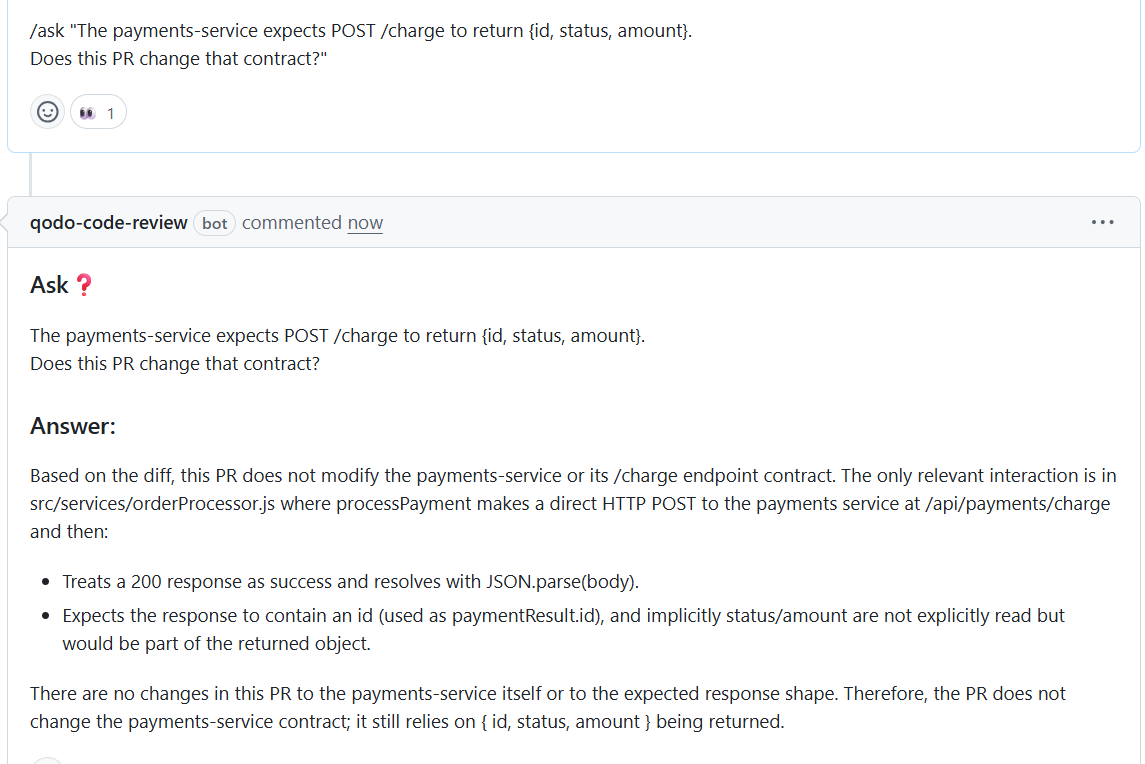
This defines a practical developer experience: answer what the reviewer needs to know, show the evidence, and keep the explanation tied to the code. It works the same way inside the IDE, where developers preview the impact before opening a PR, lowering review load further.
Enterprise Readiness and Compliance Evidence
Across each of these interactions, Qodo produces artifacts that reviewers and compliance teams can rely on: referenced code snippets, security breakdowns, call-site lists, suggested patches, and an audit trail for each workflow action.
In large engineering organizations, these artifacts become the verifiable evidence needed for governance, incident review, and policy enforcement. They also demonstrate why enterprise readiness matters: reproducibility, auditability, and consistent application of standards across repositories.
Pros
- Provides system-level context by indexing multiple repositories, allowing it to catch breaking changes and architectural drift that diff-based tools miss.
- Uses agentic code review workflows that follow the same steps senior engineers take, producing consistent and repeatable review outcomes at scale.
- Presents one-click remediation by generating patches that match the team’s coding standards, decreasing multi-threaded back-and-forth during reviews.
- Enforces organization-wide rules and governance across languages and repositories, avoiding standards from drifting as teams grow.
- Supports enterprise deployment models and produces audit-ready evidence, making review outcomes traceable for security and compliance teams.
Cons
- Requires initial indexing time for very large repositories
- Best suited for teams that want predictable, repeatable review processes
Qodo’s Pricing
- 14-day trial — full platform, unlimited reviews and credits, no credit card required. At the end of the trial, an in-product screen recommends the right credit pack based on usage.
- Pro Teams (designed for up to 30 users) — unlimited users per workspace, monthly billing, customer-set overage cap, switch packs anytime, overage credits never expire. Pick a credit pack that fits your volume:
- $30/mo → ~18 reviews/mo (2,500 credits)
- $60/mo → ~36 reviews/mo (5,000 credits)
- $240/mo → ~143 reviews/mo (20,000 credits)
- …and larger packs up to ~1,200+ reviews/mo
- Enterprise (built for 30+ users) — custom pricing; adds SSO/SAML, audit logs, BYOK, governance analytics dashboard, single-tenant SaaS or on-prem, priority support and dedicated CSM
Qodo Evaluation Table
| Criterion | Capability |
| Context depth | High (Gartner #1) |
| Review accuracy | High |
| Multi repo understanding | Yes |
| Jira–ADO–Bitbucket–GitLab integration | Yes |
| Workflow automation | Yes, more than fifteen workflows |
| Testing intelligence | Yes |
| Enterprise readiness | On-prem, VPC, ZDR |
| Scalability | Yes |
| Governance | Strong |
| Developer experience | IDE and PR |
2. GitHub Copilot
GitHub Copilot provides automated suggestions during pull request review, focusing mainly on file level and diff level reasoning. It detects localized logic issues and style inconsistencies but does not evaluate how a change interacts with other repositories, shared components, or system level patterns.
When used in larger or interconnected estates, the review behavior stays confined to the modified file, which limits its ability to bring up risks that extend beyond the diff.
Copilot fits teams already anchored in GitHub’s ecosystem and gives consistent behavior for individual contributors, but it does not include policy enforcement, governance controls, workflow automation, or enterprise deployment options.
It operates as a coding assistant rather than a system wide reviewer, so its value is strongest for small or self-contained changes rather than cross-repo evaluation.
GitHub Copilot: Hands-on Review Evaluation
During a code review, GitHub Copilot brings up a consolidated summary of issues directly inside the GitHub UI. In this example, it scanned the diff and created a list of security concerns such as hardcoded secrets, missing authentication steps, SQL injection risks, and exposed sensitive values.
Copilot’s analysis stays focused on the modified files and the local behavior of the code, and it presents the output as a single, high-level summary rather than a step-wise or workflow-driven review.
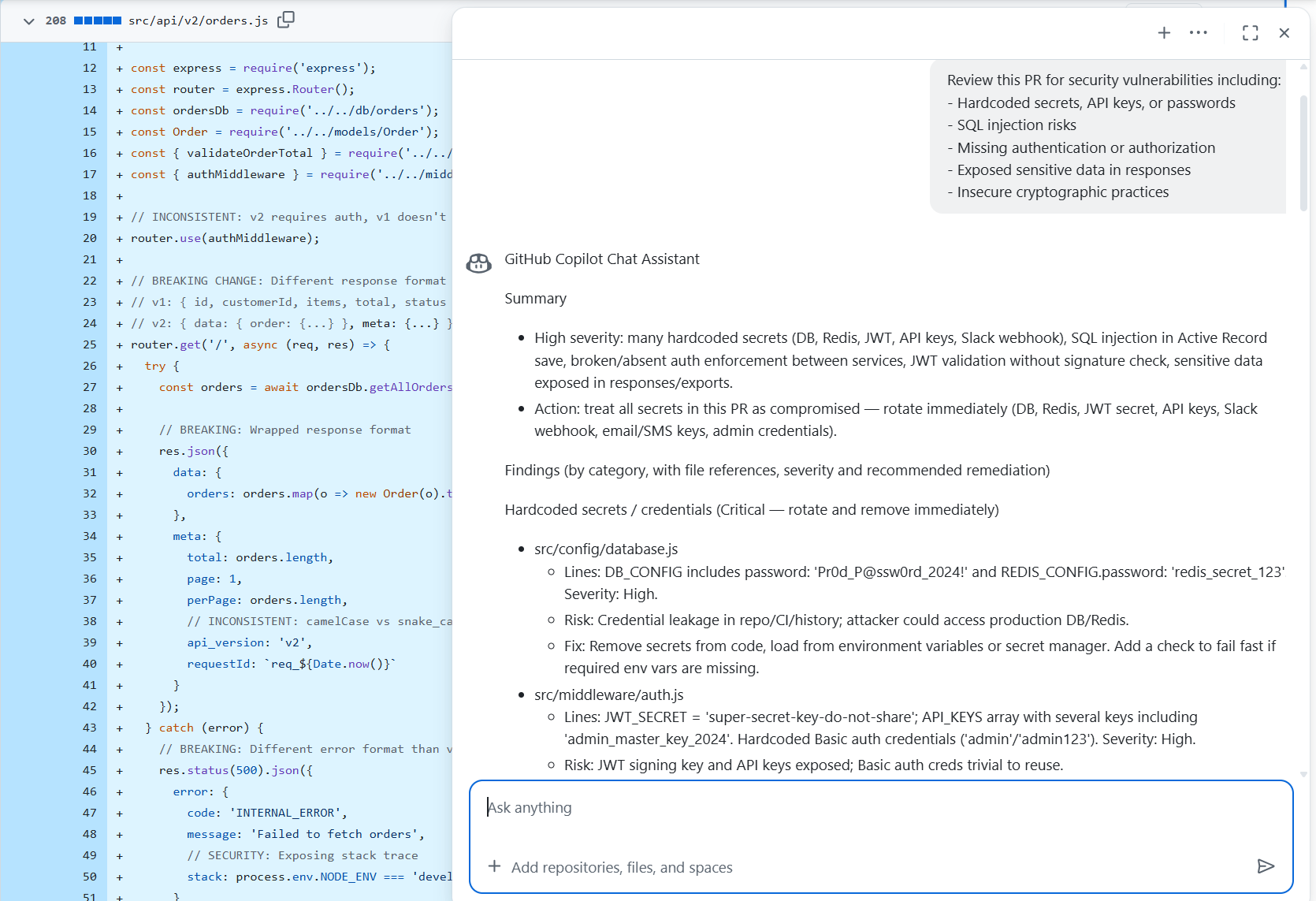
The tool highlights specific lines that contain risks, including passwords embedded in configuration objects and unverified JWT handling. These findings are presented as localized patterns, and its recommendations focus on immediate corrections like removing secrets from code and improving validation logic.
The review does not reference interactions across repositories, shared utility packages, or upstream contracts; instead, it limits itself to what is visible in the current file group. This makes Copilot most useful when the primary requirement is surfacing direct vulnerabilities inside the diff.
In this hands-on run, Copilot acted as a supplemental code reviewer that points out security issues at the file level. It provides a fast first pass for teams working entirely inside the GitHub ecosystem, but the scope remains centered on the code under review rather than how the change affects the surrounding architecture or related services. This keeps the feedback lightweight and accessible, though it does not extend into deeper governance, system-wide reasoning, or multi-repo understanding.
Pros
- Presents security issues directly inside the GitHub UI, keeping review feedback close to the pull request workflow.
- Provides categorized summaries such as hardcoded secrets, SQL risks, authentication gaps, and data exposure.
- Points to specific files and line ranges, making it easy for reviewers to navigate the problem areas.
- Suggests concrete fixes for issues detected within the modified code.
Cons
- Review is limited to the code shown in the diff and does not evaluate relationships across repositories or external services.
- Does not include policy enforcement, PR gating, or compliance checks within the review workflow.
- Runs as a cloud service and does not give on-premises or VPC deployment options for teams with strict data-control requirements.
Evaluation Table
| Criterion | Capability |
| Context depth | File level |
| Review accuracy | Localized |
| Multi repo understanding | No |
| Jira–ADO–Bitbucket–GitLab integration | GitHub focused |
| Workflow automation | No |
| Testing intelligence | Basic |
| Enterprise readiness | Cloud only |
| Scalability | Individual and team use |
| Governance | None |
| Developer experience | IDE and PR support |
3. Cursor

Cursor operates as an AI-assisted development environment rather than a full review system. During pull request evaluation, it provides file level reasoning and helps clarify logic within the modified code. In trials across larger services,
Cursor handles local context effectively but does not extend its analysis to architectural relationships or multi-repo dependencies. Its behavior remains centered on the immediate change rather than the broader system that the change interacts with.
This makes Cursor suitable for teams focused on quick iteration inside the editor, but it does not handle enterprise requirements such as governance, workflow automation, evidence tracking, or strict deployment boundaries.
For review tasks that rely on understanding how updates affect shared libraries or long-lived service contracts, Cursor’s scope is intentionally limited, and the tool operates best in smaller or self-contained repositories. So, if you’re looking for cursor alternatives, Qodo is the best option.
Hands On: How Its PR Review Agent Handles Code Changes
Bugbot is Cursor’s automated review agent that runs inside pull requests and focuses on identifying clear, high-severity issues directly from the diff. It follows a predictable pattern: read the changed lines, detect behavior that would break at runtime, and leave short, targeted comments that point to the exact location of the problem.
The Bugbot agent posts focused PR comments that call out concrete issues in the diff. In this case, it identifies that the /api/test-connection endpoint is no longer functional because the GET handler and the related imports were commented out.
Here’s the snapshot:
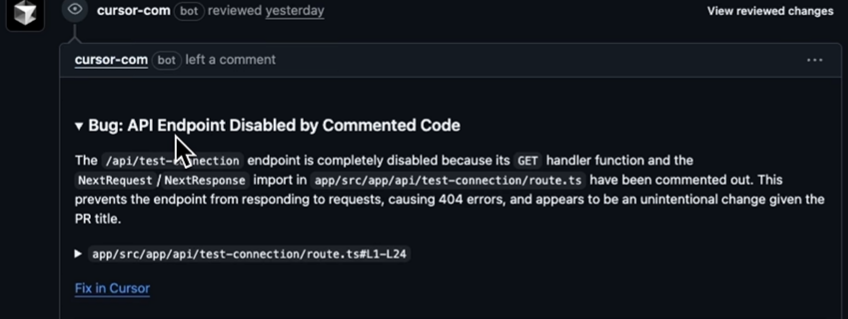
The feedback explains the direct outcome, a 404 response, and links to the exact file and line range (app/src/app/api/test-connection/route.ts#L1-L24). It also provides a “Fix in Cursor” action link, keeping the workflow anchored to the code being reviewed. The comment stays tightly scoped, presenting one clear issue tied to the modified lines rather than attempting a wider repository analysis.
This reflects how Bugbot behaves during pull-request reviews: it leaves short, line-level observations that describe the immediate defect, points directly to the affected code, and gives an integrated path to remediation. The feedback is easy to act on because it remains local to the diff, helping authors resolve problems without navigating additional context. At the same time, the tool stays within the boundaries of the changed files and does not attempt cross-repo or architectural reasoning.
Pros
- Provides short, targeted inline comments tied directly to the changed lines in a pull request, which keeps feedback easy to scan and resolve.
- Gives an integrated “Fix in Cursor” action, allowing developers to open and handle issues directly from the PR without switching tools.
- Avoids long, multi-file reports by limiting its analysis to the diff, which helps keep the signal-to-noise ratio manageable.
- Automatically handles review hygiene tasks such as avoiding duplicate comments and marking issues as resolved when the underlying code changes.
Cons
- Review scope is limited to the diff and does not account for behavior across other files, repositories, or shared libraries.
- Does not provide workflow automation features like policy gating, compliance checks, or structured multi-step review processes.
- Requires cloud execution and does not give on-premises or self-hosted deployment options for teams with strict data-control requirements.
Evaluation Table
| Criterion | Capability |
| Context depth | File and partial project |
| Review accuracy | Local scope |
| Multi repo understanding | No |
| Jira–ADO–Bitbucket–GitLab integration | Limited |
| Workflow automation | No |
| Testing intelligence | Limited |
| Enterprise readiness | Not targeted |
| Scalability | Individual workflows |
| Governance | None |
| Developer experience | Editor focused |
4. CodeRabbit
CodeRabbit provides automated pull request comments within GitHub and focuses on surfacing issues at the diff level. In use across small and mid-sized services, it presents consistent, readable suggestions that help standardize feedback for routine updates.
Its evaluation remains anchored to the modified files, so it does not account for relationships across repositories or dependencies that sit outside the immediate change. This limits its suitability for environments where architectural drift or shared-library impact is a primary concern.
For teams that want lightweight review assistance without adopting a broader governance or workflow framework, CodeRabbit can fit cleanly into existing GitHub processes. It does not include policy enforcement, system-wide reasoning, or enterprise deployment options, and therefore operates best in environments where review needs remain focused on localized correctness rather than organization-wide standards or compliance requirements.
CodeRabbit: Hands-On Look on Review Flow
CodeRabbit operates in two complementary modes: inline code review inside the editor and automated comments on pull requests. In the editor, it provides contextual refactor suggestions that appear alongside the code.
The tool identifies patterns that may lead to runtime issues or performance bottlenecks and presents them with a short explanation and an example fix. These suggestions are rendered directly next to the relevant block, making it easy for developers to evaluate and apply the patch without leaving their workflow.
Here’s the snapshot:
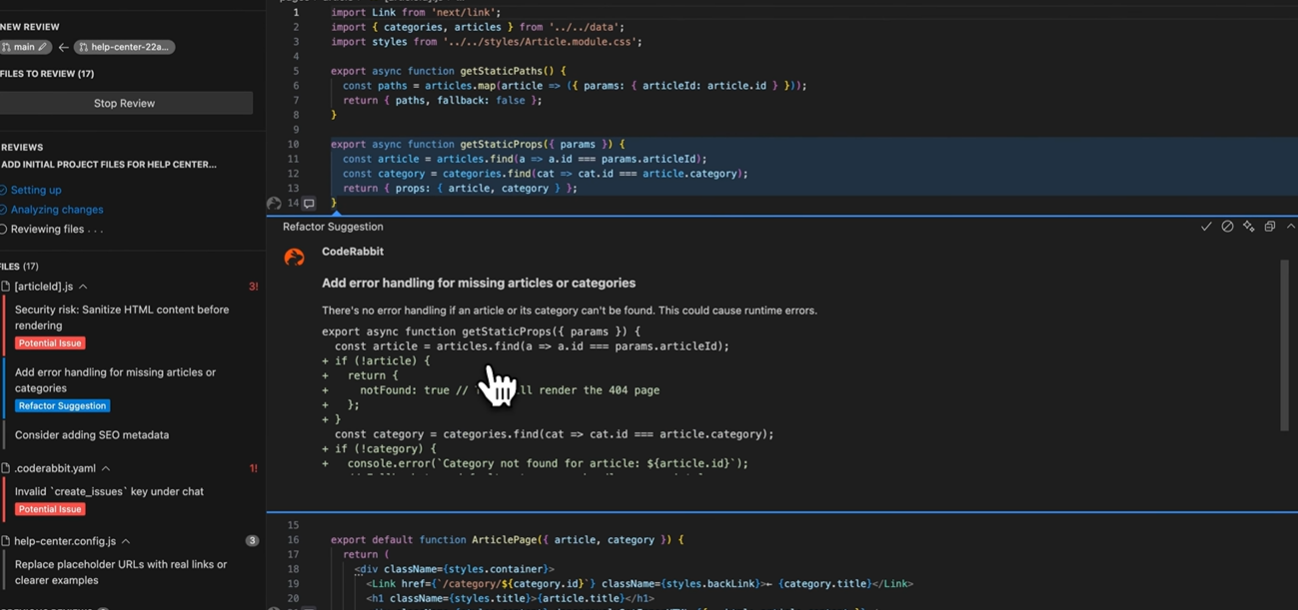
Inside VS Code, CodeRabbit proposes adding error handling when required data is missing and points to potential runtime risks. It shows a refactor suggestion to add explicit error handling in getStaticProps (example: return a notFound response when article is missing), a sidebar with categorized findings (security risk: sanitize HTML, refactor suggestion, and a YAML config warning), and an inline suggested diff rendered in the editor.
CodeRabbit follows a similar pattern in pull requests. In GitHub, the bot posts targeted comments tied to specific lines, such as a performance suggestion for optimizing array operations.
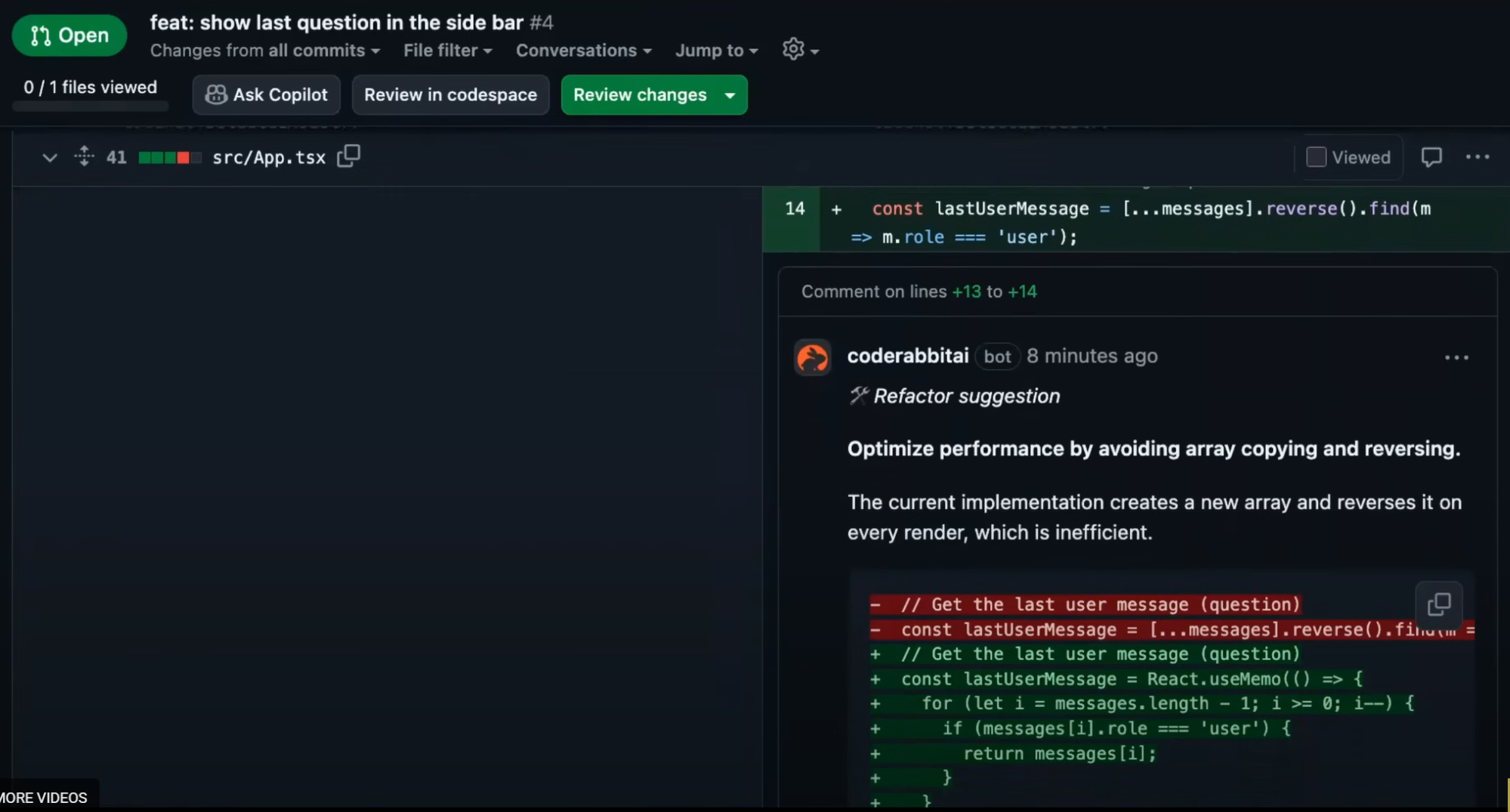
These comments include a brief rationale and an inline diff a developer can copy or adapt. This workflow keeps the review lightweight and contained within the modified code, helping authors handle issues without sifting through large reports or unrelated checks.
Pros
- Provides inline code suggestions directly in the editor and in pull requests, making feedback immediate and easy to act on.
- Groups findings into categories such as security, performance, and configuration, giving developers a quick way to triage issues.
- Presents ready-made code examples showing how a fix might look, lowering down iteration time during review.
- Works well for local reasoning within the file being modified, helping teams catch correctness and performance issues early.
Cons
- Scope remains limited to the file or diff under review and does not evaluate cross-file or cross-repo impact.
- Does not give organization-wide governance mechanisms like policy enforcement, compliance checks, or review gating.
- Cloud-based operation and editor integration do not include on-premises deployment options for environments requiring full data isolation.
Evaluation Table
| Criterion | Capability |
| Context depth | Diff level |
| Review accuracy | Moderate |
| Multi repo understanding | No |
| Jira–ADO–Bitbucket–GitLab integration | Basic |
| Workflow automation | Partial |
| Testing intelligence | Limited |
| Enterprise readiness | Limited |
| Scalability | Suitable for smaller teams |
| Governance | None |
| Developer experience | Clear PR comments |
5. Graphite

Graphite is structured around stacked pull request workflows, giving teams a way to break large changes into manageable sequences. This helps engineers navigate related updates and maintain clearer review boundaries.
When analyzing it across larger systems, the review assistance remained focused on the diff and the structure of the stacked changes. It has limited features on assessing how updates interact with shared libraries or cross-repo components, so its scope stays within the boundaries of the current stack rather than the broader architecture.
For teams that already use stacked development patterns, Graphite provides workflow clarity and improves PR organization. It has quite limited support to multi repo evaluation, system-level analysis, governance controls, or enterprise deployment models.
As a result, it fits environments where review needs remain centered on workflow structure rather than architectural impact or compliance requirements.
Hands-On: Stacked PR Review Workflow
Graphite is built around stacked pull requests, and the hands-on view reflects this design clearly. Instead of reviewing a single isolated change, you see a structured sequence of related PRs that represent a multi-step feature or refactor.
Each PR sits in a chain, with upstream and downstream dependencies shown in the UI. This layout helps reviewers understand the order in which changes land and whether a given PR can be merged, especially when earlier PRs are still open. The interface flags mergeability based on stack status rather than individual diff correctness.
Here’s the snapshot:
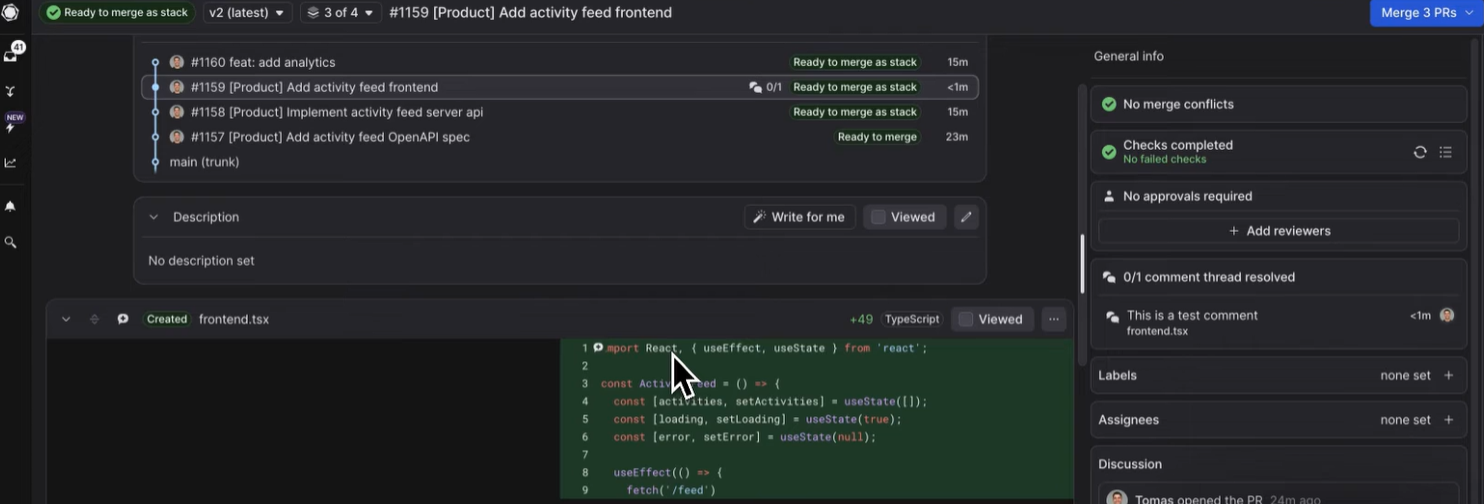
The PR sidebar shows that checks are complete, no merge conflicts are present, and the stack is ready to merge once all downstack requirements are satisfied. A warning message makes it clear that the PR cannot be merged via GitHub until the stack is resolved, redirecting the reviewer back to Graphite. This reinforces Graphite’s opinionated workflow: PRs are managed as part of a stack, not as independent units. The code view itself remains standard, but the stack indicators and merge gating provide additional context that GitHub alone does not supply.
Pros
- Helps teams structure large changes into smaller, reviewable PRs through stacked development, lowering the cognitive load on reviewers.
- Displays dependency relationships across a stack so reviewers understand ordering and merge constraints without manually tracking branches.
- Provides merge gating tied to the stack state, lowering accidental merges that break sequencing.
- Integrates directly with GitHub, allowing developers to keep their existing workflows while adding stack awareness.
Cons
- Does not provide deep code analysis or reasoning about program behavior; its focus is workflow management rather than review depth.
- Best suited for teams already comfortable with stacked development workflows, which may require process adjustments for others.
Evaluation Table
| Criterion | Capability |
| Context depth | Diff and stack level |
| Review accuracy | Moderate |
| Multi repo understanding | No |
| Jira–ADO–Bitbucket–GitLab integration | Basic |
| Workflow automation | Partial |
| Testing intelligence | No |
| Enterprise readiness | Limited |
| Scalability | Team level |
| Governance | None |
| Developer experience | Strong for stacked workflows |
Top 5 Automated Code Review Tools Comparison Table
Let’s evaluate all the tools based on the evaluation framework we had discussed before after discussing all the tools and understand their working with hands-on examples. This table reflects practical scope, documented capabilities, and enterprise fit, not marketing language.
| Feature | Qodo | Copilot | Cursor (Bugbot / CLI) | CodeRabbit | Graphite |
| Multi-repo context | ✔ | ✖ | ✖ | ✖ | ✖ |
| Rules enforcement | ✔ | ✖ | ✖ | ✖ | ✖ |
| PR workflow automation | ✔ (agentic workflows) | ✖ | Partial (Bugbot rules + comment handling) | Partial (inline suggestions) | Partial (stack merge gating) |
| On-premises / VPC deployment | ✔ | ✖ | ✖ | ✖ | ✖ |
| Test intelligence | ✔ | ✖ | ✖ | ✖ | ✖ |
| Governance & compliance | ✔ | ✖ | ✖ | ✖ | ✖ |
| IDE + PR coverage | ✔ | Partial (IDE + GitHub PR) | Partial (IDE + GitHub PR) | ✔ (VS Code + PR) | Partial (PR only) |
| Context depth | Deep (multi-repo, system-level) | File-level | File/diff-level | File-level | Workflow-level (stack context, not code context) |
Qodo is the only tool in this comparison group that supports multi repo reasoning, structured review workflows, and enterprise deployment options, and it is the only product cited by Gartner for top context depth. The other tools remain focused on local or file level behavior, which fits smaller teams but does not handle enterprise scale review requirements.
Why the Best Enterprise Teams Choose Qodo?
Large engineering organizations adopt Qodo for reasons tied to operations, scale, and review accuracy rather than preference for any particular tooling style. In multi-repo environments, Qodo’s context engine interprets how changes interact with shared components and long-lived dependencies, which is why Gartner ranked it first in context depth.
That depth is central in enterprise settings where a single modification can influence behavior across several services. Monday.com recorded prevention of more than eight hundred issues per month after deployment, and Walmart used Qodo to reduce the manual load associated with high-volume pull request flows.
The system fits enterprises because it supports multi-repo and multi-language codebases where review standards must remain consistent regardless of team boundaries. Qodo enforces rules at the organization level, maintains evidence for compliance, and produces structured reasoning that reviewers can trace during audits or incident reviews.
These capabilities apply across thousands of repositories without requiring teams to rewrite their existing workflows. Integrations with GitHub, GitLab, Bitbucket, and Azure DevOps place review insights directly where engineers work, and the deployment model covers on premises, virtual private cloud, and zero data retention setups for groups with strict security requirements.
Teams that operate at scale tend to choose Qodo because it supports the full lifecycle of a pull request rather than commenting on the diff alone. It evaluates system impact, handles policy and workflow steps, and gives reviewers a consistent method to judge changes across diverse services.
In environments where output has increased and review accuracy must keep pace, Qodo provides the depth, coverage, and governance needed to maintain code quality across the entire engineering organization.
FAQs
1. What makes Qodo different from other automated code review tools?
Qodo reviews code with full system context, not only the diff. It understands multiple repositories, shared libraries, and cross-service dependencies. This helps it detect issues that single-file or diff-only tools cannot see.
2. How does Qodo enforce engineering policies?
Qodo applies organization-wide rules to every pull request. It checks naming standards, API contracts, security patterns, and dependency requirements. The same rules are applied everywhere, so review quality stays consistent across teams.
3. What is an agentic workflow in Qodo?
An agentic workflow is a step-by-step review process that Qodo runs automatically. It checks security, CI results, test updates, API changes, and cross-repo usage. Qodo uses these steps to create decisions, not just suggestions.
4. Does Qodo give fixes or only comments?
Qodo can generate one-click remediation patches. These patches follow the team’s coding style and fix the issue it found. Developers can apply them directly in the pull request.
5. Can Qodo run in secure enterprise environments?
Yes. Qodo supports on-premises, VPC, and zero-data-retention modes. This lets companies review code without sending it outside their secured environment.
6. What’s the difference between AI code review and static analysis tools like SonarQube?
Static analysis tools check patterns. AI code review understands systems.
SonarQube, ESLint, and similar tools excel at catching style violations, known vulnerabilities, and code smells but they operate file-by-file. They don’t know if your change breaks a downstream service, duplicates logic across repos, or drifts from the architecture your team actually follows.
AI review tools reason about behavior. They understand cross-repo dependencies, lifecycle interactions, and whether your PR actually solves the problem in the ticket. For example, Qodo’s Context Engine maintains a persistent model of your entire codebase so when you modify a shared SDK, it catches breaking changes in services that depend on it. Static analyzers can’t do that because they don’t see beyond the diff.
If your codebase is small and isolated, static analysis might be enough. If you’re operating across microservices, shared libraries, and distributed teams, you need a reviewer that understands the system, not just the syntax.
7. Can AI code review actually enforce standards across multiple repos and languages?
Most can’t. They either require you to configure rules separately for every repo (which doesn’t scale) or they apply generic suggestions that don’t reflect how your team actually builds.
The problem gets worse in polyglot environments. Your TypeScript frontend, Python backend, Go services, and Terraform infra all follow different conventions but they should still align with your organization’s architecture, naming patterns, and security policies.
Qodo solves this with a centralized rules engine. You define standards once API patterns, error handling, logging structure, test conventions and they’re enforced across all repos and languages automatically. No per-repo YAML files. No drift. Teams can add repo-specific rules when needed, but the foundation stays consistent.
If you’re managing 10+ repos with distributed teams, centralized governance isn’t optional. It’s the only way to keep quality predictable as you scale.
8. How do AI review tools handle cross-repo dependencies and breaking changes?
Most don’t. They review the diff in front of them and miss what happens downstream.
Here’s the scenario: you update a shared internal SDK maybe you rename a method or change a response structure. The PR looks clean. Tests pass. It merges. Then three services that depend on that SDK start failing in production because they expected the old contract.
Diff-only review tools can’t catch this. They don’t index your other repos. They don’t track which services consume which packages. They review in isolation.
Qodo indexes your entire codebase 10 repos or 1000 and understands the dependency graph. When you change a shared library, it flags which services are affected. When you modify an API contract, it checks if downstream consumers will break. It’s the difference between reviewing code and reviewing systems.
If you’re running microservices, shared SDKs, or internal platforms, cross-repo awareness isn’t a nice-to-have. It’s table stakes.
9. What should engineering leaders actually look for when evaluating AI code review tools?
Most evaluation checklists focus on features. The real question is simpler: can this tool absorb engineering load at scale?
Here’s what matters:
- Context depth. Does it understand your entire system, or just the files in the PR? Can it catch breaking changes across repos, or does it operate in isolation?
- Ticket alignment. Does it validate whether the code actually solves the problem in the Jira ticket, or does it just check syntax?
- Policy enforcement. Can you define standards once and apply them everywhere, or do you configure every repo separately?
- Workflow automation. Does it handle the repetitive checks missing tests, scope drift, compliance violations or does it just add comments?
- Deployment options. Can you run it in your VPC or on-prem with zero-retention, or is it cloud-only SaaS?
Qodo was built around these constraints. It’s why organizations with 100-10,000+ developers use it—not because it suggests better variable names, but because it scales review capacity to match AI-driven development velocity.
If your team is <50 people working in a monorepo, lightweight tools work fine. If you’re distributed across repos, languages, and regions, you need a platform that treats review as infrastructure.
10. How do you keep AI code review from becoming noisy and unhelpful?
Signal matters more than volume. Teams reject AI reviewers that spam PRs with style nitpicks, hallucinated suggestions, or comments that don’t understand the system.
The difference between noise and signal:
- Noise: “Consider adding a comment here.” “This variable name could be more descriptive.” “You might want to refactor this function.”
- Signal: “This change breaks the authentication flow in the billing service.” “You’re duplicating logic that already exists in shared-utils.” “This PR modifies behavior outside the scope defined in JIRA-1234.”
High-signal reviewers focus on bugs, security risks, architectural drift, and ticket misalignment issues that require human attention. They skip cosmetic suggestions unless they violate defined standards.
Qodo’s review agents filter for impact. They flag cross-repo breaking changes, lifecycle bugs, and logic gaps not formatting preferences. Monday.com’s team put it this way: “It doesn’t feel like just another tool, it learns how we work.” That’s what signal looks like.
If your AI reviewer feels like a linter with an LLM wrapper, it’s generating noise. If it catches issues your senior engineers would flag, it’s generating signal.
About the author