Claude Code vs Cursor: The Missing Layer Between Coding and Shipping

TLDR;
- Claude Code runs in the terminal, maintains a 200k-token context window across CLI sessions, and navigates multi-file codebases without requiring manual file selection.
- Cursor is a VS Code fork that adds inline AI completions, chat-based prompting, and an Agent Mode for multi-step edits inside the editor. However, it can reduce the token capacity as the Cursor may shorten the input or drop older context to keep the response fast.
- Claude Code and Cursor focus on code generation velocity; neither evaluates whether a merged change is safe to ship in a multi-service production system.
- In real workflows, issues show up after code is written. Schema changes break older records, new endpoints expose data unintentionally, and frontend behavior shifts due to backend assumptions. These problems pass CI and static checks.
- Qodo operates at the pull request level. Its Context Engine with multi-repo indexing and PR history awareness evaluates how a change affects data, APIs, and cross-service behavior before merge.
- With Qodo’s /review, /implement, and /ask commands run directly on pull requests, grounded in multi-repo context and PR history, not on individual files in an editor session
Developers have been debating Claude Code vs. Cursor across Reddit and developer forums, specifically around context window reliability, automation depth, and whether CLI or IDE-first tooling better fits production workflows.
As a Senior Engineer who has run both tools across real codebases, here is what each one actually does, and where each one stops. Claude Code is a terminal-first AI agent that scans and modifies files across an entire codebase without requiring manual file selection. According to Anthropic’s documentation, it “lives in your terminal, understands your codebase, and helps you code faster through natural language commands.”
Meanwhile, Cursor presents itself as a fully featured AI-augmented IDE, forked from VS Code, offering intuitive code completion, IDE-integrated actions, and smart refactoring within a familiar GUI.
Both tools focus on how fast and effectively code gets written. Neither is designed to answer a more critical question:
Is this code actually safe to ship?
In a change with a new reporting endpoint and a schema update, the diff looks clean, middleware is in place, and CI passes locally. Static analysis and unit tests don’t evaluate cross-layer data behavior, so the PR merges without surfacing downstream failures.
While reviewing, Qodo traces the schema change making a field required, follows how older records fail under overwrite-style updates, connects that to the frontend where null values break chart mappings, and flags that the endpoint now exposes aggregated sales data that wasn’t previously accessible, all of which would have gone unnoticed otherwise.
Claude Code and Cursor focus on code generation and editing. Qodo’s Review Agent Suite, guided by rules in Qodo, evaluates how the change propagates across services, shared modules, and PR history, catching failures that static checks and unit tests don’t reach..
This article examines how Claude Code and Cursor behave across real workflows such as onboarding, refactoring, and CI/CD automation, then contrasts that with where Qodo sits, at the point where teams decide whether a change should merge.
Overview of the Tools: How Claude Code and Cursor Are Built to Solve Different Problems
Before getting started on the feature-by-feature comparison, let’s review the tools’ overview and their Key Capabilities. This will help us understand the comparison better. Let’s start with Claude Code first:
Claude Code
Claude Code is Anthropic’s terminal-first AI coding assistant that deeply understands your full codebase by using agentic search to scan, map, and interpret your entire project without requiring manual file selection. Running locally helps everything from natural-language-based code modifications to documentation generation, test execution, and CI/CD tasks, all from the CLI.
Key Capabilities:
- Full codebase context: Terminal-based agents can navigate files and branches, and run tests or deployments across environments. It is ideal for headless servers and remote workflows.
- Minimal friction in shell workflows: Helps in high-level operations like “@ file: run integration tests, then fix errors” without leaving your terminal.
- Model access: Runs on Sonnet and Opus models via API and CLI; Opus 4 supports long-running refactors and multi-step logic tasks.
Cursor
Cursor is a standalone, AI-augmented IDE forked from VS Code. It offers natural-language prompts, deep codebase querying, smart refactoring, and inline autocomplete, combining GUI convenience with agentic code assistance.
Key Capabilities:
- Editor experience: VS Code-based environment with tab-triggered multiline completions and inline rewrites applied via Cmd+K.
- Context-aware agents: Users can inject custom documentation or “Cursor Rules” for project-specific behavior.
- Privacy and enterprise readiness: SOC 2 certified, with privacy mode and team/SAML support.
How Do Claude Code and Cursor Compare Across Context, Automation, and Code Review?
I’m sure you would have understood the overview of Claude Code vs Cursor now. It’s time we get started on the feature comparison to evaluate which tool is suitable for your needs.
The table below compares Claude Code, Cursor, and Qodo across context handling, prompting style, automation, and pricing. It gives a quick overview of each tool’s strengths.
| Feature | Claude Code | Cursor | Qodo |
| Interface | Terminal-first | VS Code-based IDE | Git Plugin (PR-native), IDE Plugin (VS Code, JetBrains), CLI Plugin |
| Context Handling | 200k tokens (reliably exposed) | Max Mode: up to 200k (often 70k–120k usable) | Context Engine with multi-repo indexing (10 repos or 1,000), semantic vector analysis, and PR history indexing |
| Prompting Style | Natural-language CLI prompts | Inline + chat (Cmd+K, Cmd+I), Ask/Manual/Agent modes | /review, /implement, /ask applied directly to PRs and files, powered by a Context Engine with multi-repo and PR-aware context |
| Instruction Following | Strong multi-step reasoning, vague prompts supported | Precise with scoped prompts; planning supported | Config-driven execution + Context Engine with multi-repo indexing and PR history awareness helps with consistent, production-grade outputs |
| Automation & Agents | Parallel agents, Task Tool, .claude scripts | Agent Mode + MCP chaining, background execution | Review Agent Suite with custom agents and multi-step Git workflows |
| Customization | Prompt files, multi-dir access, CLAUDE.md | Cursor Rules, doc injection, model switch | .qodo/config.toml defines rules and Context Engine scope (multi-repo indexing, semantic vector analysis, PR history indexing); outputs are grounded in relevant files, diffs, and PR context |
| Model Support | Anthropic (Sonnet, Opus) | Claude, GPT-4.1, Gemini (managed or BYOK) | Anthropic, OpenAI, Gemini, Deepseek (via config) |
| IDE Integration | Supports VS Code, and JetBrains via CLI | Native IDE with autocomplete, diffing, BugBot | VS Code extension + PR-native workflows (operates directly in pull requests) |
| Pricing | Usage-based ($20–$100/month) | Flat tiers ($20–$200/month), model metering | Free 14-day trial, Pro Teams from $30/month & Enterprise Plan built for 30+ users |
Context Window (Token Capacity)
Claude Code uses Anthropic’s Claude models (Opus, Sonnet, etc.) with a 200K token context window available through API and CLI agents. This allows it to handle large codebases, extended conversations, and sizable files without losing context.
Anthropic explains that Claude’s models support extended reasoning, also known as “thinking,” during a response. These internal reasoning steps can be lengthy and complex.
However, Anthropic’s documentation clarifies that these internal “thinking” blocks are automatically removed from the conversation history before being used as context for future turns, ensuring the full context window remains available for user-visible messages and inputs.
From Dev Communities:
A user on r/ClaudeAI shared how they have uploaded a document of 34K, yet Claude says that 70% of the knowledge size is filled ( if it’s 200k?) To which a user has replied:

Near saturation of the 200k window, new messages may displace earlier context, even when the nominal token limit hasn’t been reaches.
In this regard, Cursor auto-manages context. It limits chat sessions to around 20,000 tokens by default and inline commands (like cmd-K) to about 10,000 tokens, ensuring speed and low latency.
Max Mode for Expanded Context
Cursor offers a “Max Mode” setting that provides higher token capacity. Normally, this extends support to the model’s full context window; models such as Claude 4 Sonnet/Opus can access up to 200k tokens in Max Mode.
Cursor’s Models documentation confirms:
- Normal Mode for Claude 4 Sonnet: 128k tokens
- Max Mode for the same model: 200k tokens
However, in my experience, Max Mode comes with trade-offs. Max Mode increases response latency and API cost; Cursor’s documentation acknowledges that enabling full context windows is slower and more expensive for large models like Opus and Gemini 2.5 Pro.
Despite the 200k token claim, developers have reported on Cursor’s community forum that usable context often falls short, sometimes limited to 70k–120k tokens. This is likely due to internal truncation, performance safeguards, or cost controls applied silently during execution.
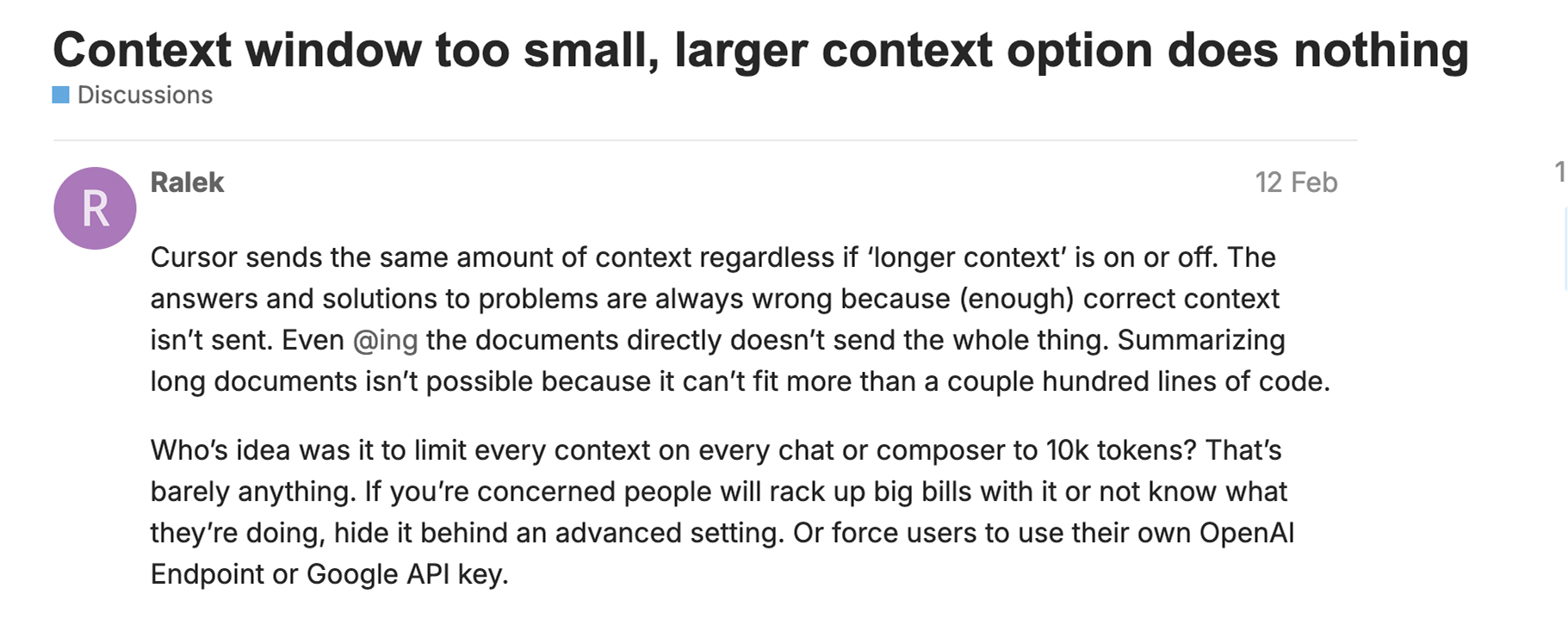
This suggests users may experience limited token usage, potentially due to internal truncation for performance or cost management. In simple terms, Cursor may automatically shorten the context it sends to the model by trimming older files or deprioritizing less relevant content to maintain responsiveness, reduce latency, and manage API costs. So, even though the model supports 200k tokens in Max mode, the full window isn’t always used.
Which Tool Maintains Full Context Across a Large Multi-File Refactor?
Claude Code provides a more dependable and explicit 200K-token context window, particularly valuable for CLI-based workflows and multi-file reasoning. Cursor’s Max Mode nominally supports 200k tokens, but community reports and Cursor’s own documentation indicate the usable range is often 70k–120k, because Cursor silently trims older files to maintain response speed, meaning a refactor spanning 80+ files may lose early context mid-session
Claude Code Runs Across Any Environment; Cursor Is Scoped to Open Editor Files
Now, let’s compare the integration and interface of Claude Code vs Cursor.
The most significant difference is that Claude Code runs in the terminal across any environment, local, remote, or CI, while Cursor operates inside the editor, limiting AI-driven actions to files open in that session.
Claude Code runs entirely in the terminal, giving it broad flexibility across environments, from local development to remote servers and CI pipelines. To get started, you need to install it via the command:
npm install -g @anthropic-ai/claude-code
After running the command, your terminal will look like this:

Now, you can get started with Claude Code by running the command claude.
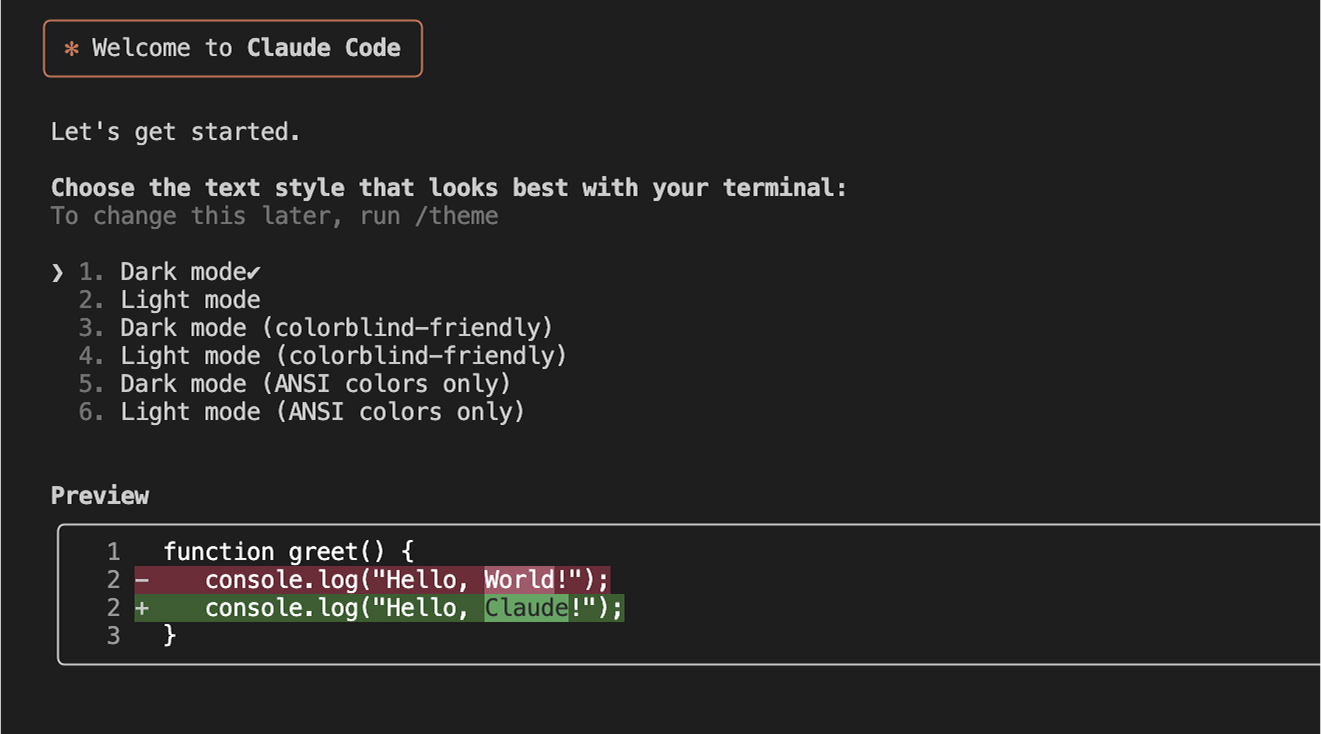
You can invoke it with commands like claude -p to perform actions such as editing files, running tests, or committing code. It supports shell piping and scripting and can be embedded directly into build workflows. For example, running claude -p ‘Run integration tests, fix failures, and explain the changes’ executes the test suite, applies relevant fixes across failing files, and returns a structured explanation, all within the same shell session. It also supports multi-directory context, custom prompt files, and .claude project folders for consistent configuration.
Cursor is a VS Code fork that adds AI natively into the editor: inline completions via Cmd+K, a side-panel chat, and an Agent Mode that plans and applies multi-step changes without leaving the IDE.
With Cursor, I can trigger inline completions with Cmd+K, chat in the side pane using Cmd+I, or use Agent Mode to automatically plan and apply multi-step changes. So, it’s designed for developers who want AI help without leaving the editor.
Cursor includes diff previews, versioned checkpoints, and an integrated terminal, all accessible without leaving the IDE. It has Bug Bot, a built-in tool that reviews files or projects using AI during the coding process. Since Cursor is a VS Code fork, existing extensions, themes, and keybindings import via the built-in migration tool. No reconfiguration required.
Which Tool Fits Headless Automation vs GUI-Driven Development?
The right choice depends on workflow: terminal-first automation or GUI-driven in-editor development. Claude Code handles automation, scripting, and cross-environment workflows. Cursor handles in-editor development with visual diff previews and scoped AI assistance. The gap between them is the gap between headless orchestration and interactive coding
Which Tool Handles Multi-File Prompts Without Breaking Down?
Regarding how well the tools understand and follow natural language instructions, Claude Code and Cursor take fundamentally different approaches, shaped by their underlying design philosophy and interfaces.
Claude Code is built on Anthropic’s Claude models (Sonnet and Opus), which are known for strong language understanding and multi-turn reasoning. This gives it a major advantage when handling open-ended like:
claude -p “Refactor this module to use async/await, remove duplication, and improve readability.”
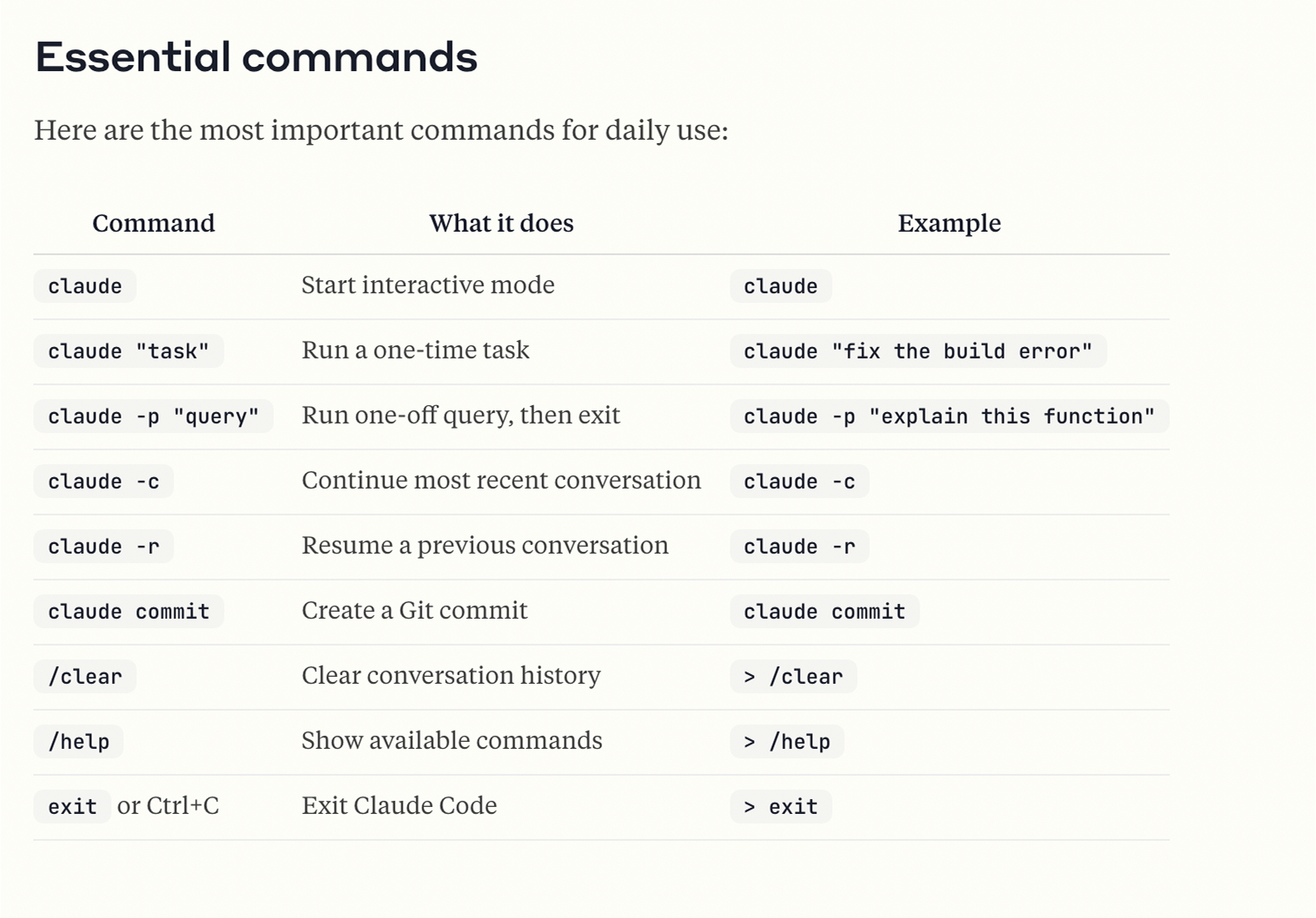
There are several commands that you can use for Claude Code. I have shared a list of them in the image below:
Conversely, Cursor’s documentation highlights that it supports multiple “Agent” modes tailored to developer prompts: Ask, Manual, and Agent.
Ask mode: Ideal for planning tasks; Cursor prompts the AI to break down the task, clarify ambiguities, and propose steps.
Manual mode: Executes highly precise user instructions without exploratory autosuggestions.
Inline/Cmd‑K: Best for single-file edits with natural-language prompts like “Refactor this to async/await.”
Background: run agents in backgrounds
For example, in the below image, I have a helper function that asynchronously fetches a list of focus areas, transforms each entry into a UI-friendly format, and passes the result to a provided callback.
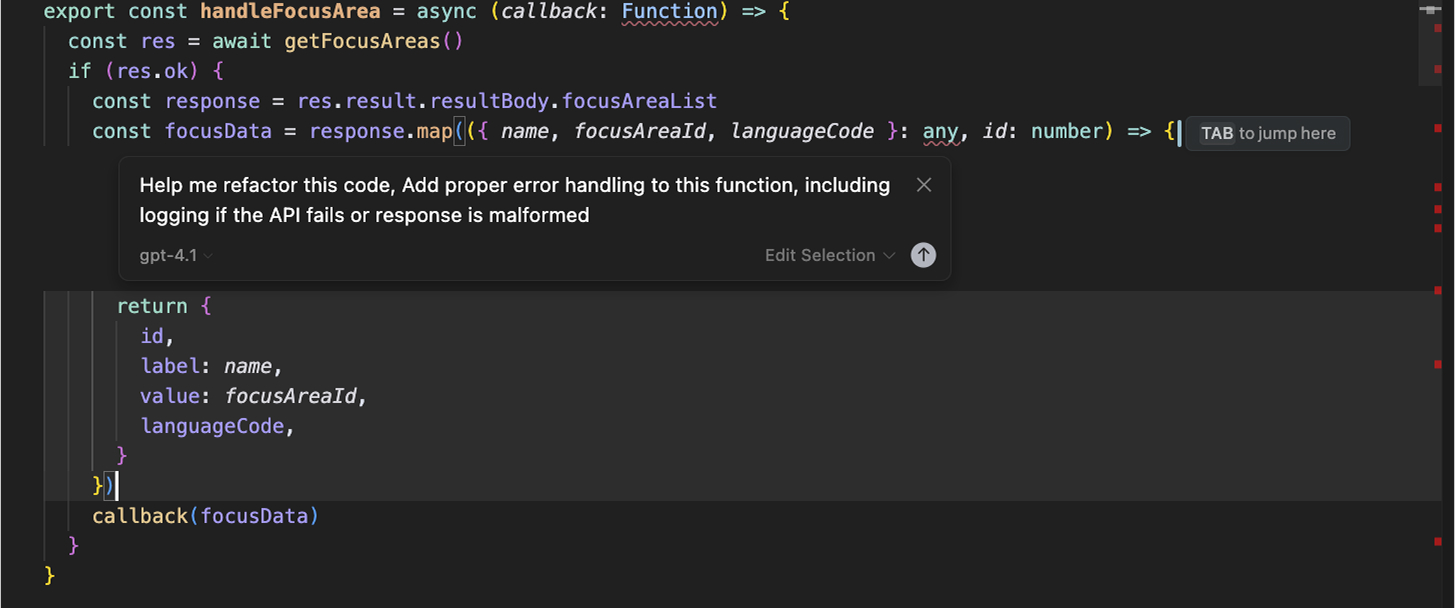
I wanted to add proper error handling to this function, including logging if the API fails or the response is malformed, to just this helper function in the entire file, so I just used Cmd+K and it opened the chat where I entered my prompt. I can use this from the Agent, too, using Cmd+I will give the same output.
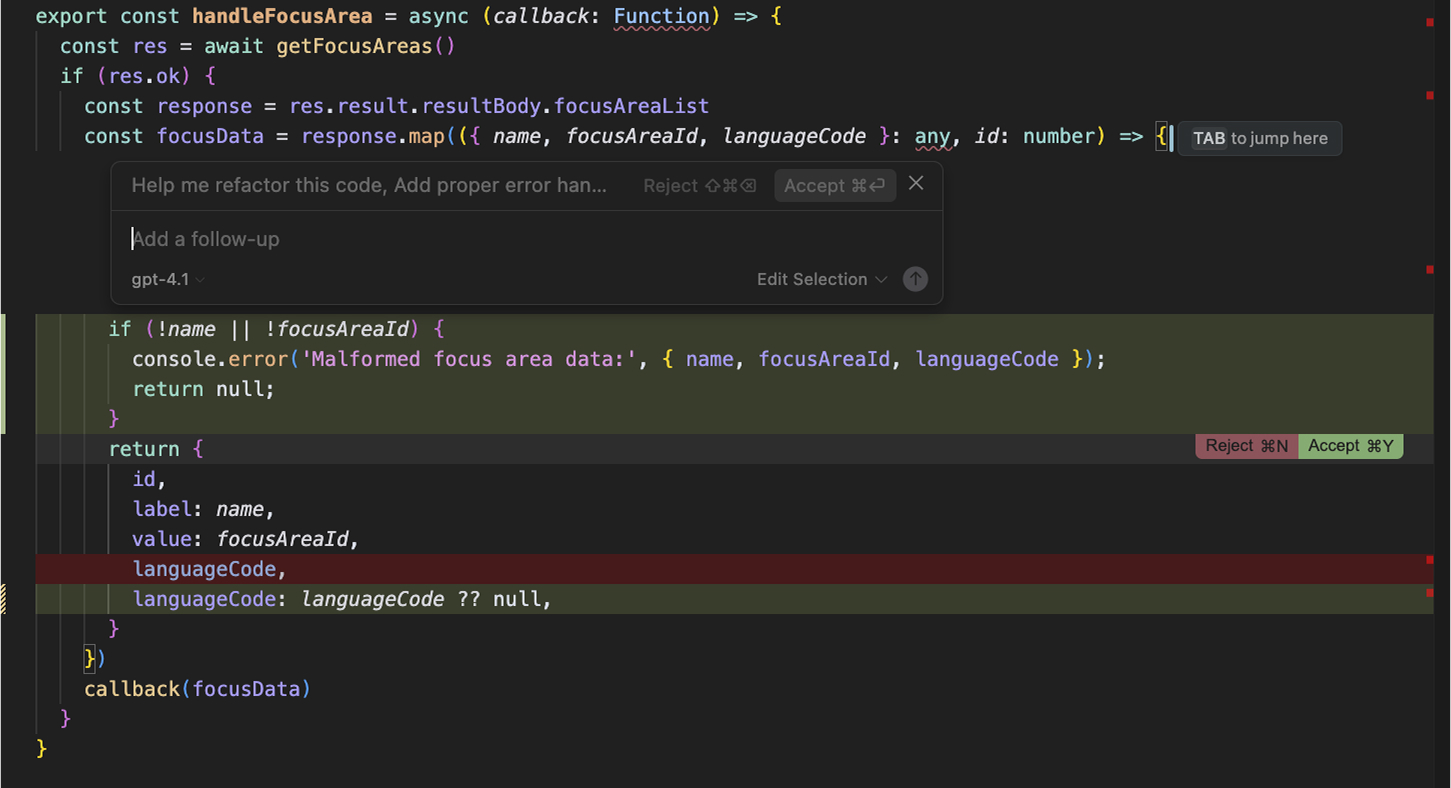
Cursor suggested a quick improvement by adding a validation check inside the .map() loop. The updated version now logs any entries missing name or focusAreaId. Cmd+K scoped the edit to the highlighted function and applied the change inline, without opening a separate panel or requiring file-level context.
However, when you’re using any AI coding tools for refactoring or vibe coding, you need to be very specific about your prompts. Without a scoped prompt, Cursor Agent may apply changes across files outside the intended scope, or miss conditional branches that only activate under specific input states.
Which Tool Follows Complex Multi-File Instructions Without Prompt Scoping?
Claude Code offers superior instruction following, especially in terminal-based or multi-file workflows. Cursor is better for granular, in-editor guidance, provided prompts are scoped. For terminal-based, multi-file, or cross-environment workflows where prompts span multiple actions, Claude Code executes more completely without requiring prompt scoping.
Pro Tip: How Qodo Enforces Consistent Code Review Standards
- Developers run /review, /implement, and /ask directly on pull requests and files, grounding every decision in real codebase context
- Qodo executes reviews as a system-level process, not a reviewer-dependent activity
- The Context Engine with multi-repo indexing, semantic vector analysis, and PR history awareness evaluates how changes propagate across services, shared modules, and existing implementations, not just a single diff
- Qodo’s Rules System defines and enforces review standards across the repository, ensuring every PR is evaluated against the same criteria.
- Context-grounded feedback: Anchors suggestions in real usage patterns across the codebase, not generic best practices.
- Closed loop enforcement: Review feedback continuously informs and strengthens rules, creating a system that improves over time.
Can Claude Code or Cursor Run Parallel Agents Across Directories and CI Pipelines?
Claude Code and Cursor both support multi-step task execution, but they differ significantly in how they handle orchestration, autonomy, and developer control.
Claude Code supports parallel sub-agents: a main agent spawns independent workers to read, edit, or test different parts of the codebase simultaneously, then consolidates their output. This feature allows you to launch multiple sub-agents for parallel reading, editing, testing, or analysis. The main agent then coordinates the work and consolidates results for a summary.
In one of my recent projects, I used Claude Code to create a website with a glass morphism theme. I started by generating a header and footer component, then moved on to designing a contact and blog page. Claude handled the entire flow in the terminal: it created a directory structure, scaffolded components, and even applied layout changes across files.
Here’s a snapshot of the header component that it created:
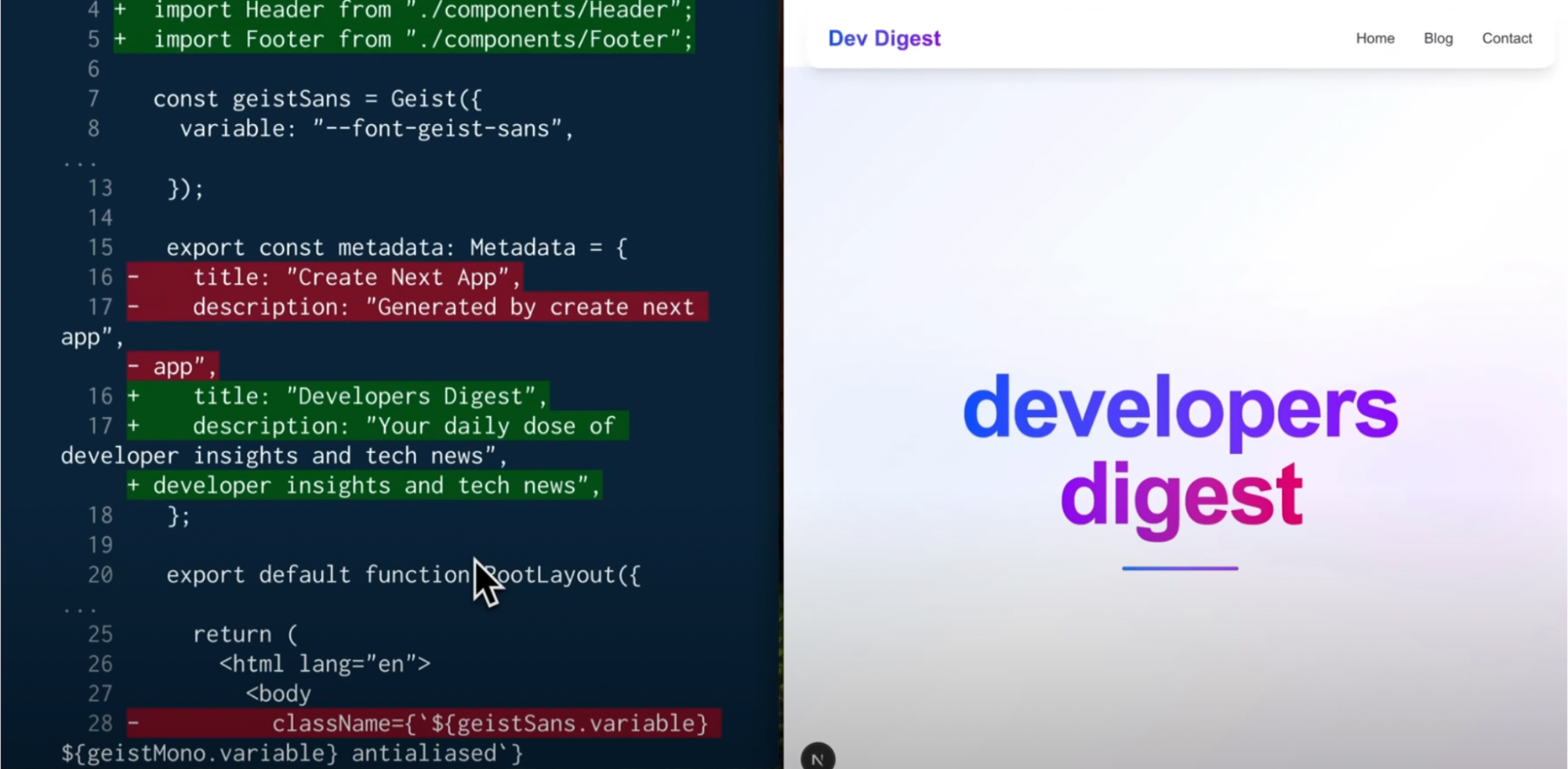
Now, in the image above, Claude Code automatically updated import paths to ./components/Header and ./components/Footer after creating those files, and replaced the placeholder <title> with ‘Developers Digest’, inferred from the glass morphism branding
context in the CLAUDE.md.
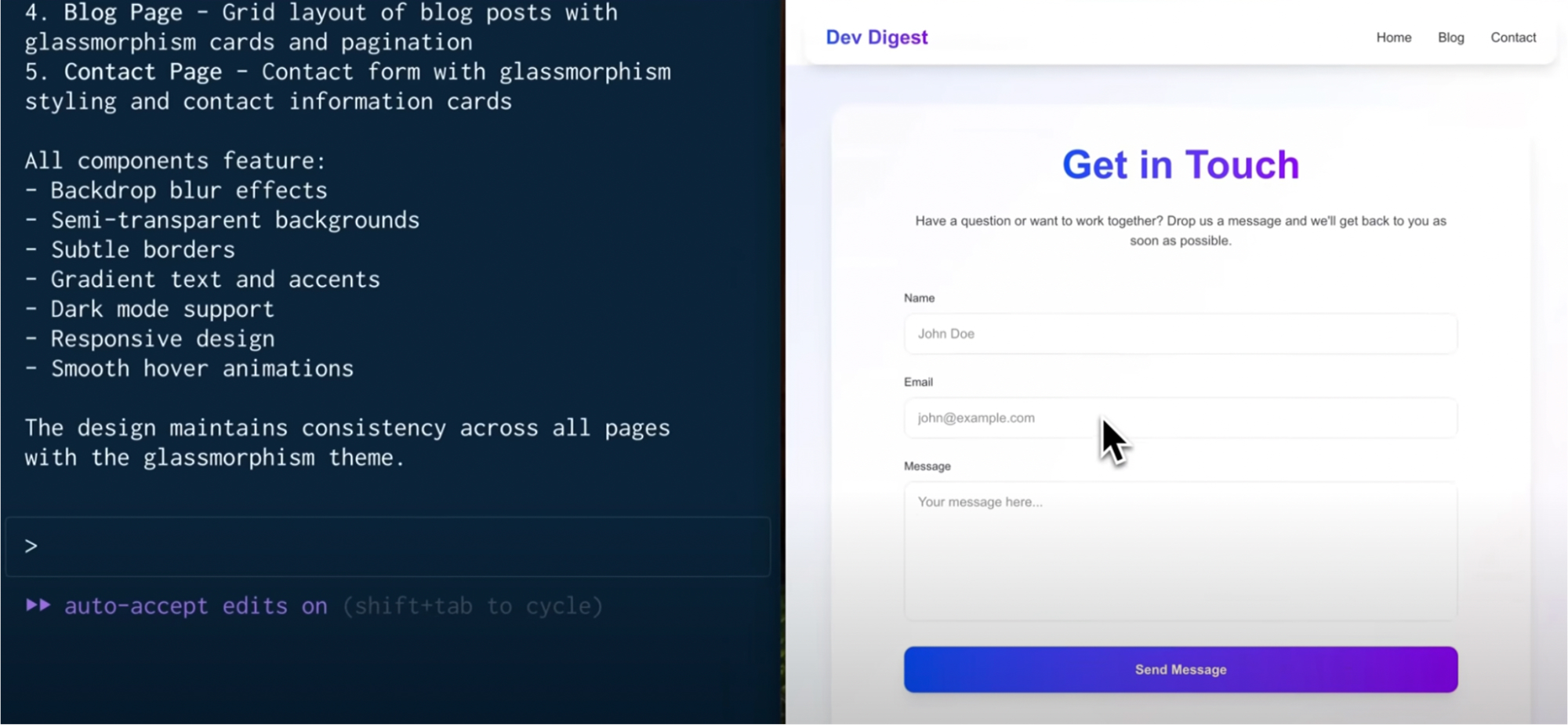
In the final stage of the project, Claude Code ensured the UI design remained consistent with the glass morphism theme across all components. It suggested and applied styling principles such as backdrop blur effects, gradient text, subtle borders, and smooth hover animations. These enhancements were reflected uniformly on pages like the contact form, which was styled with a translucent card layout and responsive design.
It also supports custom-scripted workflows via .claude directories. For instance, I created a create-feature.js script that generated a boilerplate, updated routes, and added test stubs, all triggered through a single Claude run command. Scripts in the .claude directory run with access only to directories explicitly granted via –add-dir; CLAUDE.md defines naming conventions and component patterns that Claude applies when generating new files.
Claude allows direct access to files and directories beyond the project root. Use the –add-dir flag to give Claude access to additional directories outside your main working folder, making it better suited for monorepos, shared libraries, or multi-service architectures that span beyond the boundaries of a single workspace. However, you need to explicitly set this in commands, as this is not automatic.
In the case of Cursor, it approaches automation through its Agent Mode, which runs entirely inside the IDE. When you activate it via Cmd+I, it launches a multi-step execution flow where the AI first plans the task, outlines a sequence of actions, and then proceeds to modify files, run terminal commands, or suggest edits.
Cursor also allows for shell-level control through its command-line tools. You can install cursor and code commands to interact with Cursor from your terminal, enabling you to open files and folders and integrate them with your development workflow.
For example, when I asked Cursor to: “Add API error logging across all React components.”
Here’s a snapshot of what Cursor gave me:
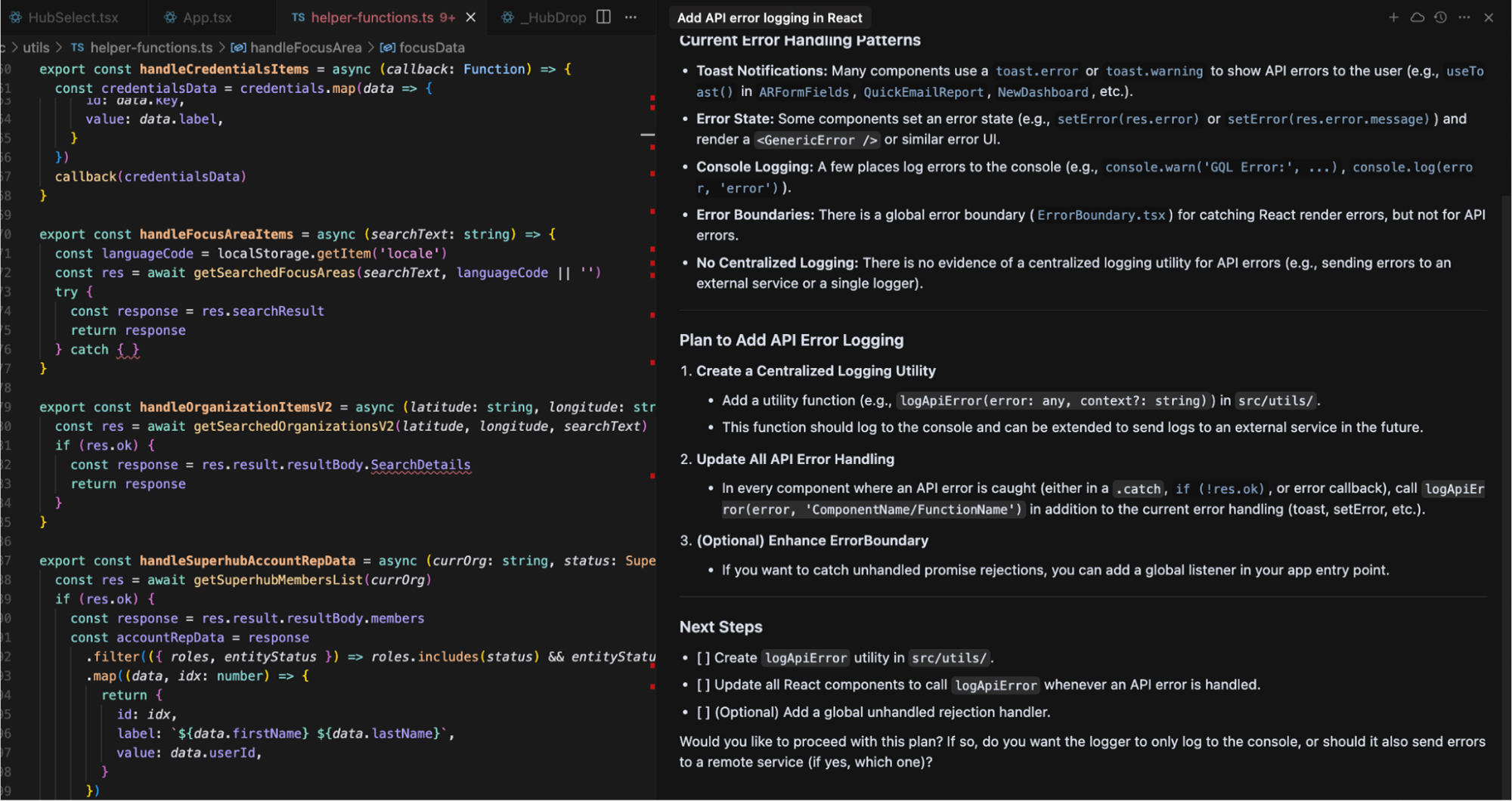
It reviewed existing error patterns like toast.error, setError, and missing centralized logging, then outlined a plan to create a logApiError utility, update all API handlers to use it, and optionally extend the global ErrorBoundary.
The output also included a checklist and follow-up questions, showing that Cursor approaches broad prompts with code awareness and practical implementation guidance, rather than just inserting snippets mindlessly.
Cursor supports external tool chaining through its Model Context Protocol (MCP) integration. Developers can configure multiple MCP servers, such as a doc-string generator and a GraphQL schema linter, via a .cursor/mcp.json file or the UI. When an agent runs, it can invoke these tools sequentially.
Which Tool Supports System-Level Orchestration Beyond the Editor?
Claude Code handles automation scenarios Cursor cannot: parallel sub-agents, cross-directory access via –add-dir, scripted .claude workflows, and CI pipeline execution, all from the terminal without an IDE open It supports parallel agents, custom scripts, and system-level orchestration across directories and environments, all from the terminal.Cursor’s Agent Mode operates on files open in the editor session; it cannot access remote servers, run CI jobs, or execute scripts across directories outside the project root.
Automated Code Review: Does Claude Code or Cursor Fix Issues ?
Claude Code runs code review from the terminal by scanning files, flagging issues, and applying fixes in a single prompted session, without requiring an IDE or a manual diff workflow. During one of my component-based projects, I used Claude Code to run a structured code review before beginning implementation.
Claude Code flagged foundational issues first: inconsistent use of var, let, and const; functions written in mixed declaration styles; and hardcoded values spread across the codebase. It also identified missing input validations and flagged API routes that were exposed without any rate limiting or authentication checks.
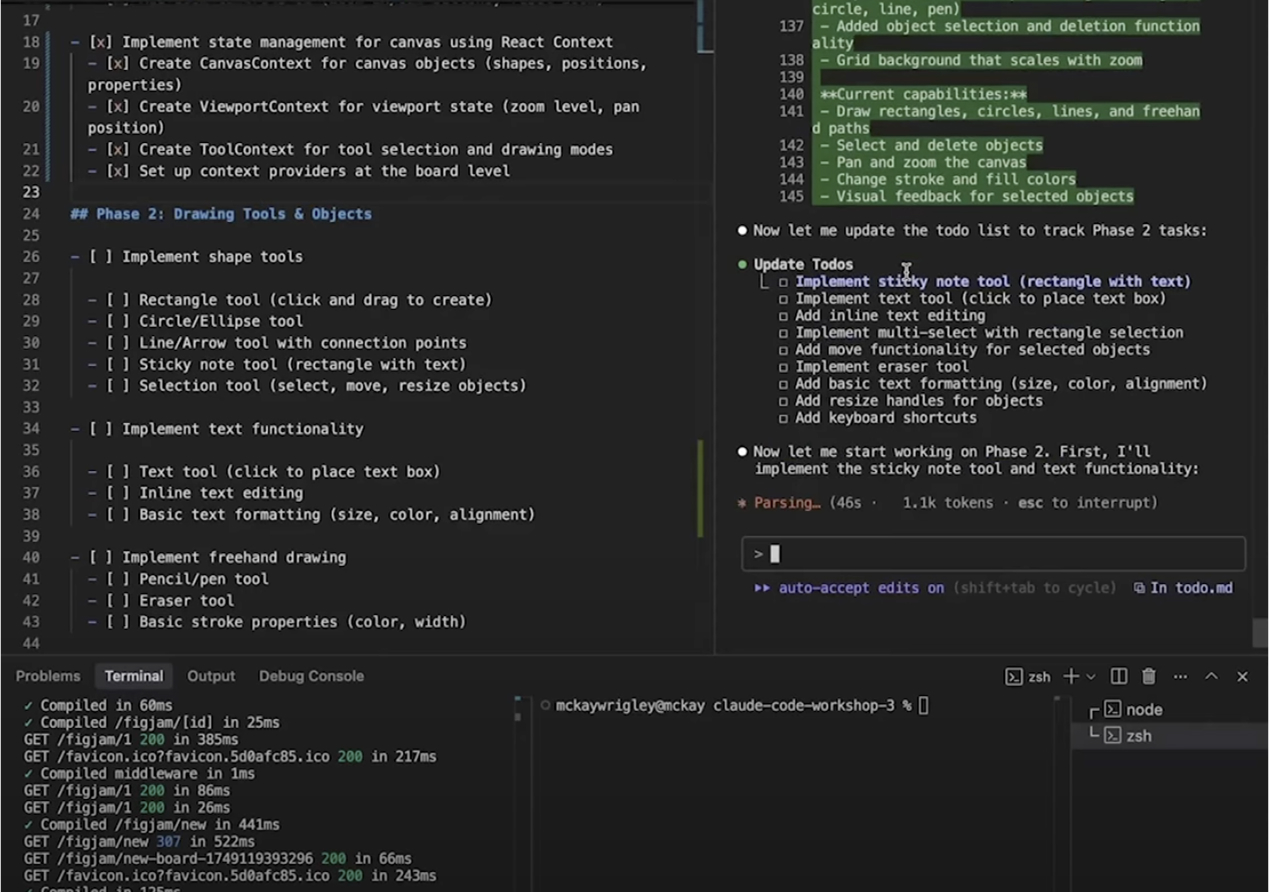
Claude parsed the prompt, updated the checklist in real-time, and executed changes across relevant files. This setup allowed me to work incrementally while Claude handled the implementation, edits, and file coordination directly from the terminal within my editor.
After applying those changes, I prompted Claude again:
“Are there any other issues?”
The second review pass identified structural gaps: missing test coverage, absent ESLint and Prettier configs, no input validation wrappers, and hardcoded environment values that should have been environment variables.
Claude added a complete test suite, ESLint and Prettier configs, helper utilities, input validation wrappers, and a new README. It also introduced environment variables we hadn’t planned, improving the foundation without heavy refactors.
Cursor provides built-in code review capabilities directly inside the IDE through Agent Mode and inline assistants. According to its official documentation and user examples, you can ask Cursor to review a file, and it will analyze the code for common issues like TypeScript errors, code quality problems, linter violations, and architectural inconsistencies.
I asked Cursor to review the FreshChat.tsx component by simply prompting,
“What are the issues in this file?”
It returned a clear breakdown of problems across three categories: TypeScript errors, general code quality issues, and linter violations. Cursor flagged the use of any in-event handlers, pointed out an undeclared variable (test), and noted that window.fcWidget was being used without extending the global Window interface.
Here’s a snapshot of the output:
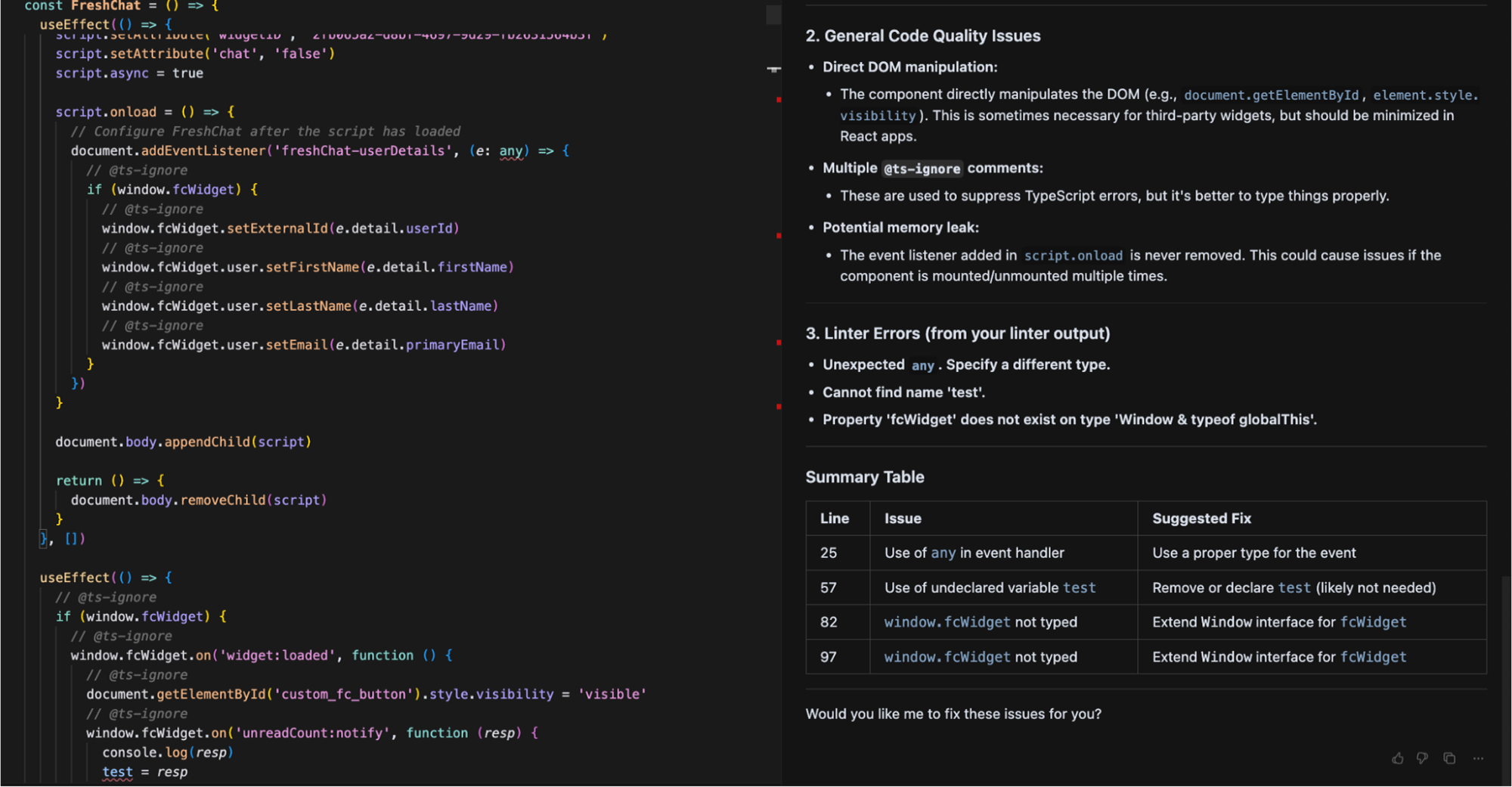
It also highlighted direct DOM manipulations and unreleased event listeners that could lead to memory leaks. What made this useful was the structure; it even gave a summary table with line numbers and suggested fixes. This helped me fix type safety, clean up debug code, and avoid potential runtime bugs in just one review cycle, all without needing a manual code audit.
Claude Code combines diagnosis and fix in one prompt: when asked to review a file, it generates a structured diff with proposed changes already applied, rather than listing issues for the developer to resolve manually. Cursor, on the other hand, separates diagnosis from resolution. It does not apply any fixes automatically unless you explicitly click to apply them.
Which Tool Applies Fixes Inline vs Waiting for Manual Approval?
Claude Code applies fixes across multiple files in a single session, useful for removing a deprecated pattern across a codebase. Cursor lists issues first and waits for explicit approval before changing each file, useful when you need to review every change before it lands.
What Does Claude Code vs Cursor Actually Cost for Teams Running Opus-Heavy Workflows?
Claude Code and Cursor follow very different pricing structures, one based on usage and model access, the other on tiered subscriptions with optional metered limits.
Claude Code uses a usage-based billing model tied to Anthropic’s Claude models. The CLI is included in the Pro plan at $20/month, which gives access to Claude 3.5 Sonnet and basic usage of Claude Code. The Max 5× plan ($100/month) provides higher usage limits, priority model access (Claude 4 Opus), and faster sessions for heavier workflows.
In contrast, Cursor follows a tiered subscription model. It comes with a Hobby Plan with limited agent requests. The Pro plan ($20/month) offers unlimited inline completions, around 500 fast agent requests using frontier models, and access to Max Mode, BugBot, and basic team features. Teams ($40/month) and Ultra ($200/month) plans raise those limits for heavier users.
Unlike Claude, Cursor handles model usage internally, though requests to premium models like Claude 4 Opus are still metered. Cursor also allows using your API key to avoid markups and directly control usage.
Who Wins?
Claude Code’s Max plan ($100/month) provides priority access to Claude Opus 4 and higher usage limits, making it more expensive for teams running Opus-heavy workflows than Cursor’s Pro tier at $20/month.
How Qodo Brings Up Real Runtime & Exposure Issues in PRs?
Qodo is the AI Code Review Platform, the missing quality layer in your AI stack. Where Claude Code and Cursor focus on how fast code gets written, Qodo focuses on what happens after: ensuring every change is safe, consistent, and production-ready before it reaches production. It combines an intelligent rules system with context-aware agentic review, operating across IDE, Git, and CLI, not just at the PR level.
That behavior is powered by Qodo’s Review Agent Suite, specialized agents that analyze changes for issues like breaking schema updates, inconsistent data handling, and downstream impact across services.
Qodo applies the same rule set to every PR across every repository, independent of which engineer opens it, and surfaces deviations before merge. Its Context Engine with multi-repo indexing, semantic vector analysis, and PR history awareness analyzes diffs alongside related files, past changes, and repository structure. This allows it to evaluate changes in the full scope of your system, not just isolated snippets.
According to Monday.com, Qodo now prevents an average of 800 potential issues from reaching production every month, while saving developers approximately one hour per pull request.
To see how this works in example, I ran Qodo on a PR that introduced a new reporting endpoint and a schema change. The diff looked clean, no obvious errors, proper middleware in place, and the feature worked locally. But Qodo’s Review Agent Suite analyzed the change in context and surfaced issues that typically only appear in production.
The first signal came from the schema update where Sale.region was made required. Qodo didn’t just flag the change, it traced how it interacts with existing data and update patterns. It identified that overwrite-style updates could now fail validation if region isn’t included, and that older records without this field would behave inconsistently depending on how they’re accessed or modified. This is the kind of regression that passes tests but breaks real workflows.
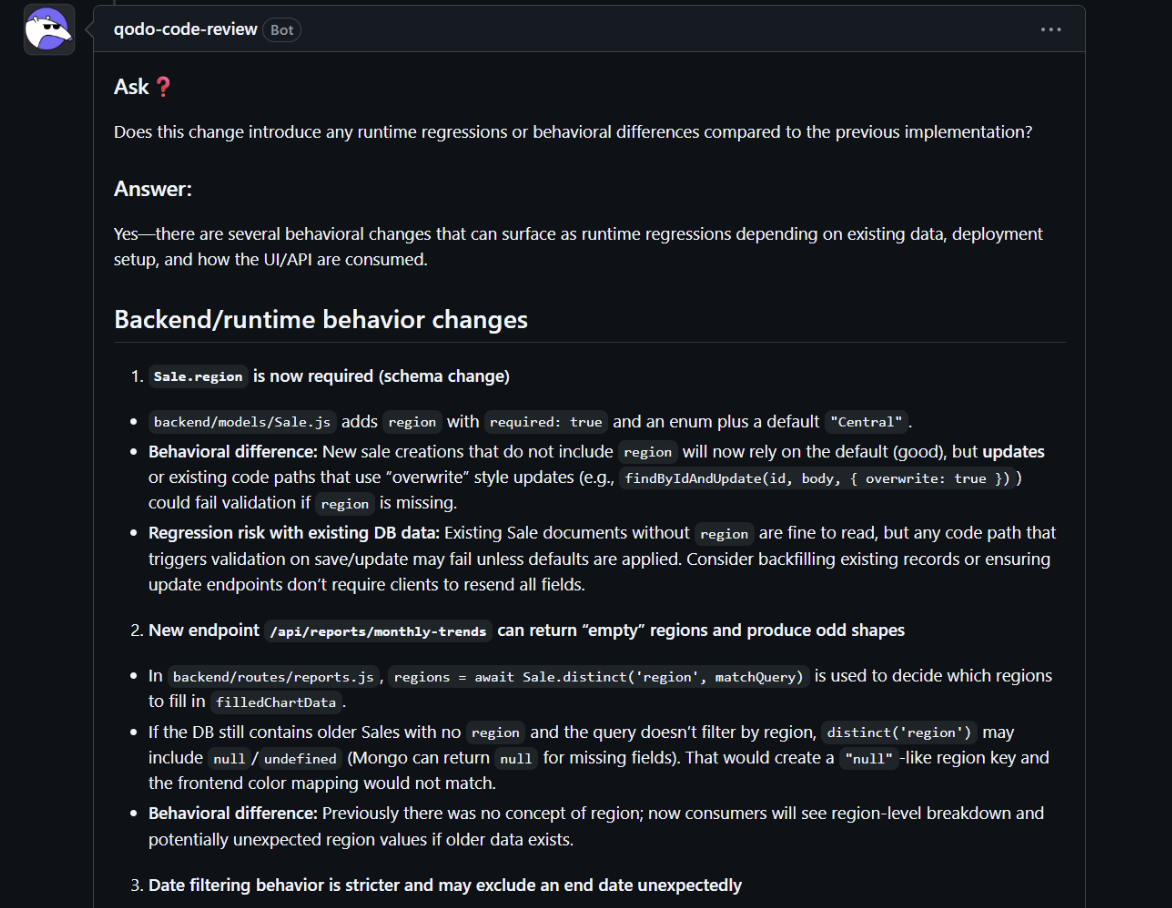
This kind of issue is exactly what rules in Qodo are designed to standardize, ensuring checks for data consistency, backward compatibility, and contract integrity are applied uniformly across every PR.
It then followed the impact into the reporting layer. By analyzing the query using distinct(‘region’), Qodo detected that legacy records could introduce null values into the dataset. Instead of stopping there, it connected this to frontend behavior, highlighting that these unexpected values could lead to broken chart mappings or inconsistent UI output. Most PR review tools analyze the diff in isolation, they don’t follow a null value from a schema query through the API response into the frontend rendering layer.
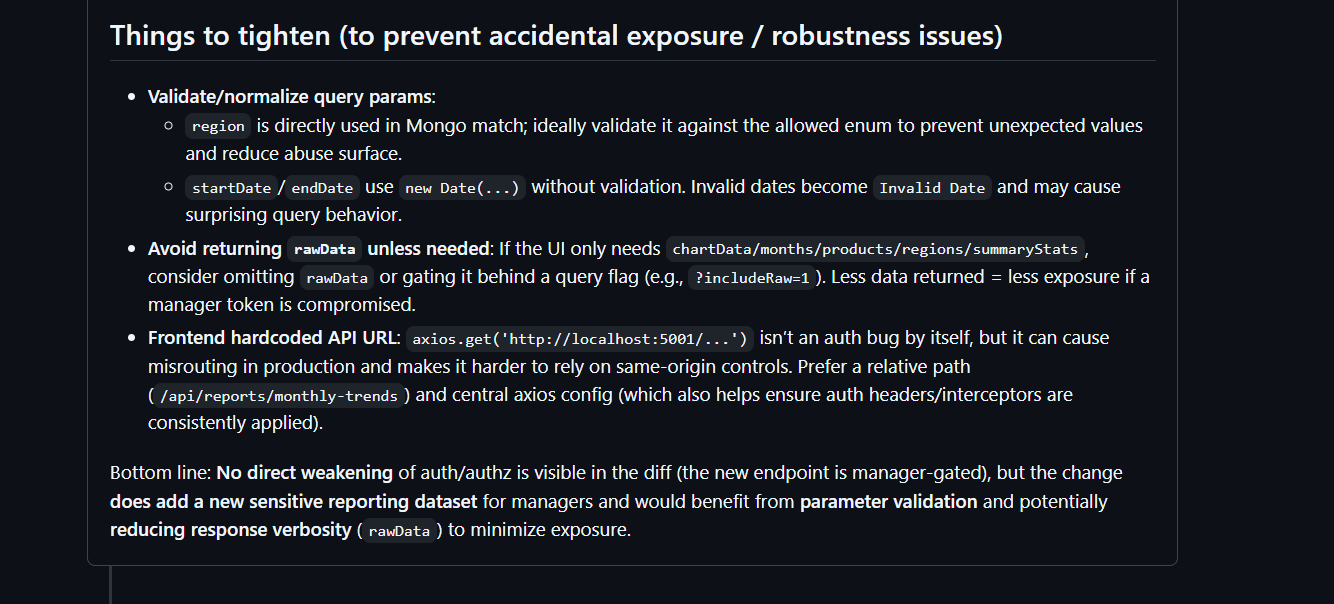
Qodo also evaluated access and exposure. While the new endpoint was protected by middleware, it checked how it’s consumed on the frontend and pointed out that if the Reports page isn’t properly restricted, non-manager users could still discover the endpoint. It also flagged that the endpoint now exposes aggregated sales intelligence across regions and products, data that isn’t PII but is still business-sensitive. That shift in exposure was treated as part of the review, not an afterthought.
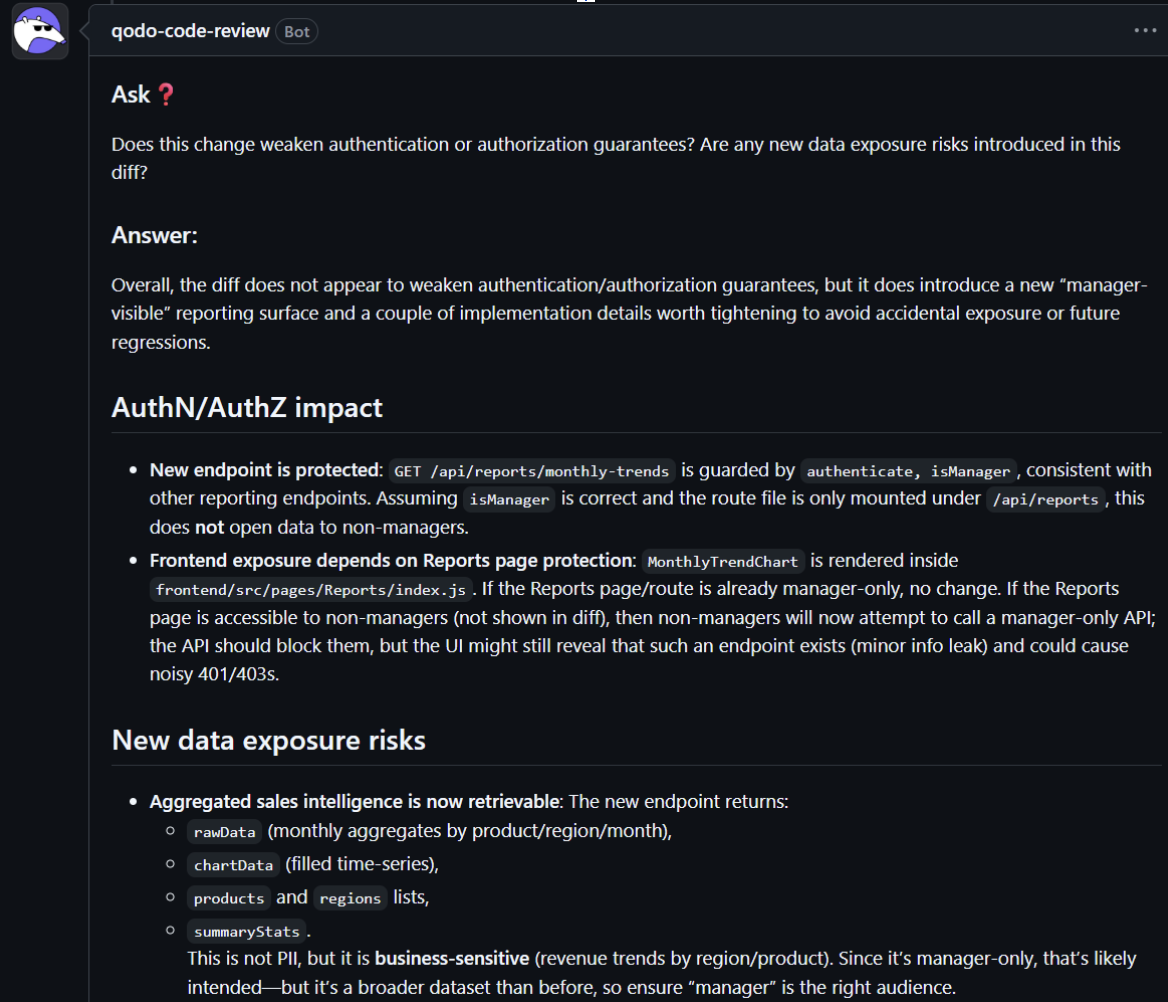
Finally, Qodo suggested targeted ways to tighten the implementation, validating query parameters like region, handling invalid date inputs before they reach the database, and reducing response verbosity by avoiding unnecessary raw data. These aren’t generic suggestions such as validating the region before the query reaches the database prevents malformed aggregations; limiting response verbosity reduces the risk of exposing unanticipated data fields to the frontend.
After running both tools across real projects, here’s the honest breakdown: Claude Code handles terminal-based orchestration and multi-file refactors better than anything else in the CLI. Cursor handles in-editor completions and scoped edits with less friction than any IDE alternative. Both are good at what they do.
But neither was built to answer the question that matters most at merge time: is this change actually safe to ship? That’s where Qodo sits. It evaluates every PR against the actual data flow, service contracts, and access boundaries defined in your system, not against the prompt a developer happened to write. With 4M+ PRs reviewed every year across the platform, that’s the difference between catching issues before merge and discovering them in production.
Conclusion
Claude Code and Cursor represent two approaches to AI-assisted development; one focused on terminal-first automation, the other on in-editor productivity. Claude Code stands out for its deep reasoning, multi-agent workflows, and flexible CLI-based orchestration, making it ideal for large-scale projects, CI/CD pipelines, and infrastructure-level tasks.
Cursor, by contrast, offers a polished IDE experience with features like inline prompting, diff previews, and agent modes suited for day-to-day application development within the editor.
While both tools are powerful in their domains, their effectiveness depends on how your team works. Claude Code is the better fit if your workflows demand system-wide automation, large context windows, and programmable agents. If you prefer a guided, GUI-driven development experience with fast iterations and structured prompting, Cursor delivers that with minimal setup.
Cursor helps you write code faster. Qodo helps you decide if it’s safe to ship. For Claude Code: Claude responds to prompts. Qodo owns the process. These are different problems, and at enterprise scale, the second one is the one that blocks deployment.
FAQs
1. What are the limitations of Claude Code?
Claude Code is designed for terminal-based workflows, making it well-suited for developers who prefer command-line control and custom scripting. Teams looking for visual features or inline interactions may find their interface better aligned with automation and system-level tasks rather than GUI-based development.
2. What is the best Claude Code alternative for enterprise?
Qodo operates at a different layer. Claude Code and Cursor focus on generating and editing code. Qodo is the AI Code Review Platform, it reviews code in the IDE as you write it, in pull requests before merge, and via CLI across automated workflows, enforcing the same rules across every repo and surfacing cross-service issues that static checks and unit tests don’t reach. Most teams run Qodo alongside their AI coding tools, not instead of them.
3. Can Claude Code or Cursor handle enterprise-scale code securely?
Yes, both tools can be used securely at scale. Claude Code supports local usage and can be deployed through AWS Bedrock or GCP Vertex services. Cursor includes workspace scoping and privacy settings to ensure controlled access to project data.
4. Are Claude Code and Cursor SOC2 compliant?
Yes, both tools meet SOC 2 compliance standards. Claude Code, developed by Anthropic, is SOC 2 Type I and Type II certified, with additional certifications such as ISO 27001 and ISO 42001. Cursor is also SOC 2 Type II certified and supports enterprise features like SAML authentication, team access control, and privacy mode without data retention.
About the author