Cline vs Cursor: Which AI Coding Tool Is Better?

Last updated: July 31, 2026
TL;DR
- Cline is good at handling large, complex projects with deep cross-file context and advanced architectural understanding, making it ideal for senior developers working on scalable systems.
- Cursor focuses on speed, simplicity, and smooth IDE integration, providing fast, relevant autocomplete and real-time error checking, best suited for smaller projects or fast-paced feature development.
- Cline supports stronger multi-file code generation and project-wide refactoring but requires more setup and resources compared to Cursor’s lightweight, easy-to-use design.
- Cursor lacks deep architectural awareness and struggles with complex, interconnected codebases, while Cline provides proactive debugging and comprehensive project insights.
- For teams where AI is generating code at volume, Qodo adds the code review and governance layer that neither tool provides, catching bugs, enforcing standards, and determining whether that code is actually safe to ship.
Cline and Cursor are two of the most widely used AI coding tools on the market, built to solve different problems. Cline handles large, complex codebases with deep cross-file context and architecture-aware suggestions. Cursor is faster and lighter, built for in-editor flow with minimal setup and strong real-time autocomplete.
The short answer: choose Cline if you work on multi-service, multi-file systems where architectural consistency matters. Choose Cursor if you want fast, low-friction productivity gains for smaller projects or fast-paced feature work. If you’re on an enterprise team managing complex, multi-repo environments, neither fully fits; that’s where Qodo becomes a stronger option.
This comparison is based on hands-on testing across real projects: a Go microservices system, a legacy Java refactor, a Django monolith, and several React and Node.js sprints. The goal is to give senior developers a direct breakdown of where each tool adds value and where it falls short.
How Cline and Cursor Have Changed in 2026
Both tools kept moving through the first half of 2026. Cline rebuilt its entire engine into an open SDK. Cursor turned itself into something closer to a fleet of remote agents than an editor, most recently shipping a native iOS app in late June so agents can be launched and monitored from a phone. Neither company is selling the same product it was twelve months ago, and this comparison reflects that.
Not sure which tool fits your workflow? The decision comes down to three questions: how complex your codebase is, how much setup time you’re willing to invest, and whether you need governance on top of generation. Here’s a quick decision tree before we get into the details:
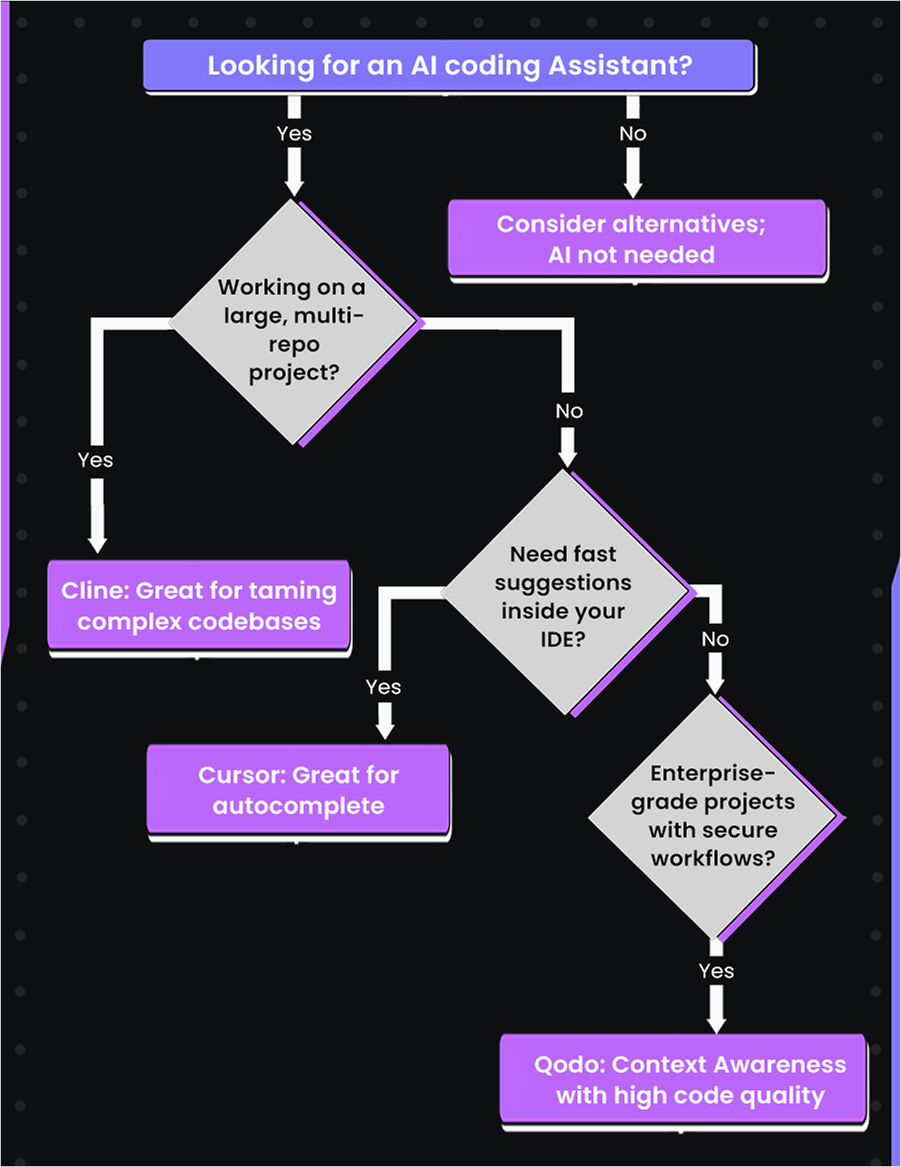
The tree maps cleanly to the three tools: Cline for large, multi-repo complexity, Cursor for fast in-editor autocomplete, and Qodo when enterprise-grade security and code quality governance enter the picture.
What Is Cline?

Cline is an open-source coding agent, and since May 2026 it’s no longer tied to one editor. Install it in VS Code, JetBrains, Cursor, Windsurf, or Zed, or run it headless from a terminal CLI, same agent, same @cline/sdk runtime underneath, wherever you put it.
You bring your own API key (Anthropic, OpenAI, OpenRouter, or a local model via Ollama), and Cline creates files, runs terminal commands, and works across all relevant files for a task instead of stopping at the cursor.
Billing is per token, and Cline can rack up a real bill on a deep session. This year, it added a spend-limit setting to cap that and more recently launched ClinePass, a subscription option that gives teams a predictable monthly cost instead of pure usage-based billing. Cline also shipped a custom marketplace for installing Skills, MCP servers, and Plugins directly from the extension and rebuilt its CLI with its own cline skill command and a Kanban board for tracking agent tasks across a session.
| Best for | Large, complex, multi-file projects |
| Setup | Requires API key configuration and project profiles |
| Pricing | Token-based (BYOK), or ClinePass for predictable subscription billing |
| Strength | Cross-file context, architectural awareness, CI/CD integration |
| Limitation | Steeper setup curve, higher cost on deep sessions |
What Is Cursor?
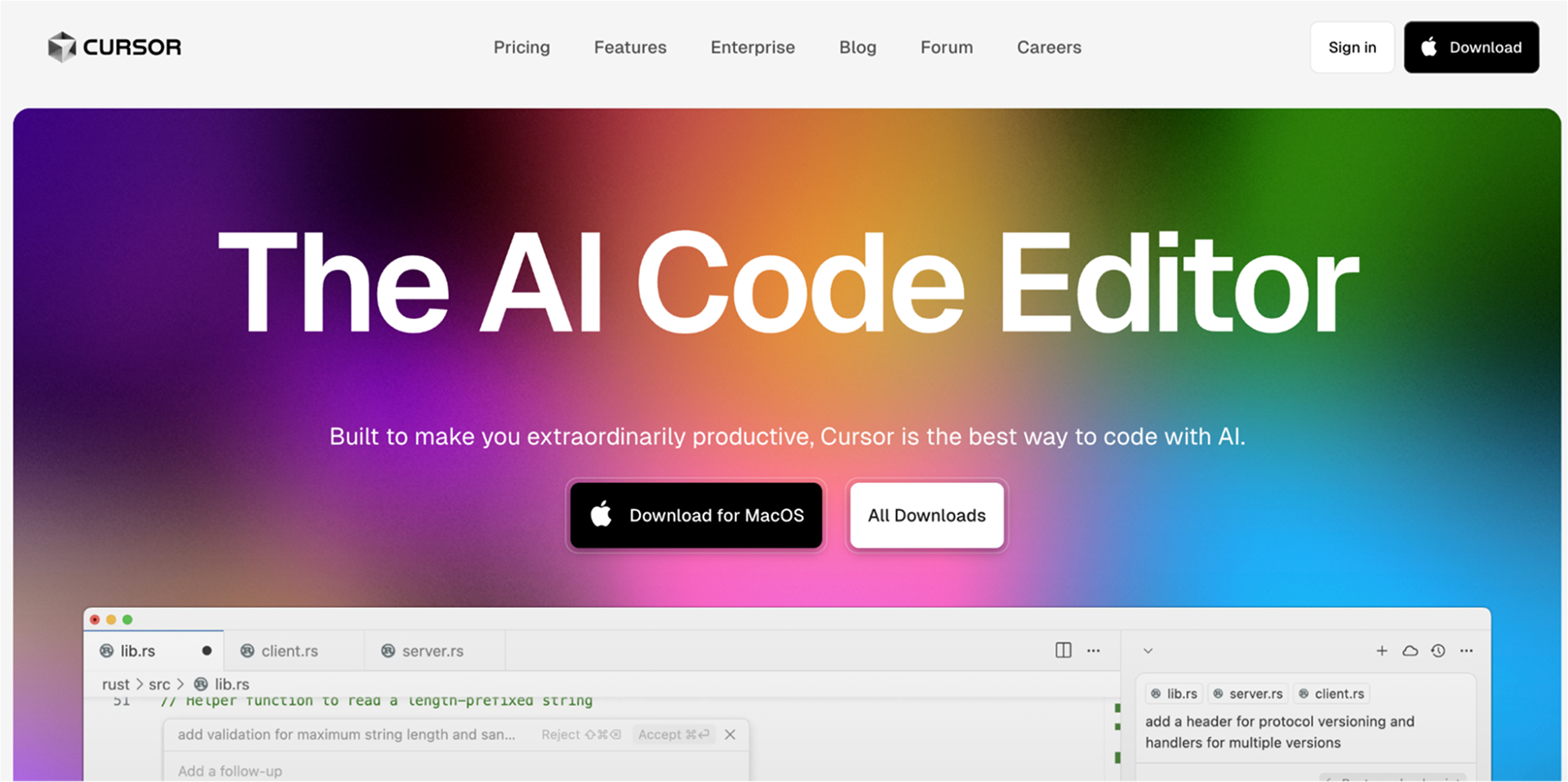
Anysphere still builds Cursor as a VS Code fork, but Agent Mode, not autocomplete, is what most teams reach for these days, point it at a task and it reads the codebase, edits files, runs terminal commands, and keeps going without waiting on you to accept each line.
Cursor kept shipping through the summer. Cursor 3.3 added the ability to fan one prompt out to several subagents running in parallel; Cursor 3.5 handed the whole loop off to Cloud Agents, an isolated VM that works while you’re doing something else and reports back when it’s done. By July, Cursor 3.11 added side chats and searchable agent transcripts, and Cursor shipped a native iOS app, letting you launch and monitor cloud agents from your phone. Bugbot has gotten sharper along the way too, average review time is now around 90 seconds, down from roughly five minutes, and it catches about 10% more bugs per review while costing less to run.
Pricing followed the product: the flat, unmetered $20/month plan ended in March 2026, replaced by a $20 credit pool at Pro with usage-based coverage above it.
| Best for | Fast in-editor work, smaller projects, feature development |
| Setup | Works without any API configuration needed |
| Pricing | Pro starts at $20/month for a $20 credit pool, with overage billed at usage rates; Pro+ ($60) and Ultra ($200) exist for heavier agent use |
| Strength | Speed, simplicity, real-time in-editor feedback |
| Limitation | Limited cross-file context, no post-commit analysis |

Feature-by-Feature Comparison: Cline vs Cursor
The comparison below covers autocomplete, code generation, context handling, debugging, usability, and pricing, based on hands-on testing across real production projects.
| Feature | Cline | Cursor | Qodo |
| Autocomplete depth | Deep, cross-file, intent-aware | Fast, in-editor, syntax-focused | Context-aware across repos |
| Code generation scope | Multi-file, architecture-aligned | Single-file, quick scaffolding | Multi-repo, policy-aware |
| Cross-file context | Strong | Limited | Full repository scope |
| Debugging | Proactive, flags logic and runtime risks | Reactive, in-editor error highlighting | Integrated with the PR review pipeline |
| Refactoring | Project-wide, handles dependencies | File-level, fast but shallow | Cross-repo with impact analysis |
| Setup effort | High requires configuration | Low works out of the box | Moderate, integrates into existing CI/CD |
| Pricing | Token-based (API keys), variable, can exceed $50/day | Flat $20/month subscription | Usage-based credit packs ($30, $60, $240+) with Enterprise pricing |
| Enterprise fit | Partial, no SOC2, no audit logging | Partial, no SOC2, no governance | Strong, SOC2, access control, multi-IDE |
| Best for | Senior devs on complex, multi-service systems | Small teams, rapid feature work | Engineering teams with complex development workflows |
Which Tool Has Better Autocomplete: Cline or Cursor?
Cline and Cursor both provide autocomplete, but they operate at different depths. Cline reads across files and services to suggest completions that fit your architecture. Cursor prioritizes speed and stays tightly focused on what you’re currently editing.
On a Go and Rust microservices project, Cline pulled in interfaces and utility patterns from other services mid-completion, not just local syntax but cross-service intent. It handled transitions between Python scripts and the Rust backend without losing context. Below, Cline works across a multi-file Go microservices project, generating main.go, user.go, and user_repository.go simultaneously with cross-file context.
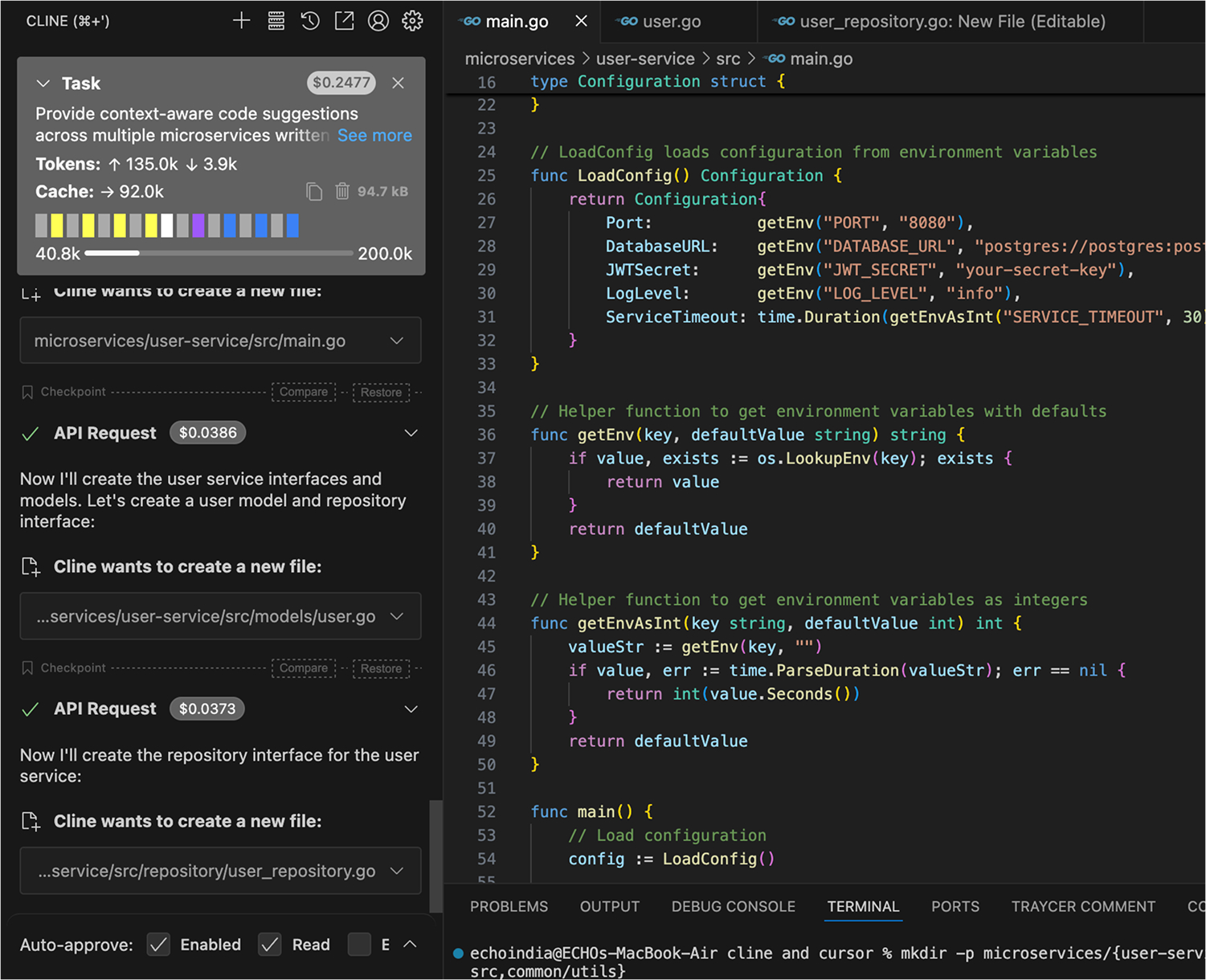
Notice the Task panel on the left: Cline is tracking token usage (135k up, 3.9k down) and cache state across the entire session, not just the current file. The generated main.go on the right shows a fully structured Configuration struct and helper functions that are consistent with the broader service architecture, not generic boilerplate.
It can over-engineer suggestions when you just need something quick, which interrupts fast iteration. Token costs can also climb quickly on sessions like this one, visible in the $0.2477 task cost shown in the panel.
Cursor behaved differently on a React sprint. Its autocomplete was near-invisible, fast, accurate, and non-intrusive. Unit test stubs and TypeScript type additions came back correctly on the first suggestion almost every time. Here is how Cursor’s in-editor generation looks on a real React TypeScript component, applying a focused edit to HubSelect.tsx with custom hooks and typed state:
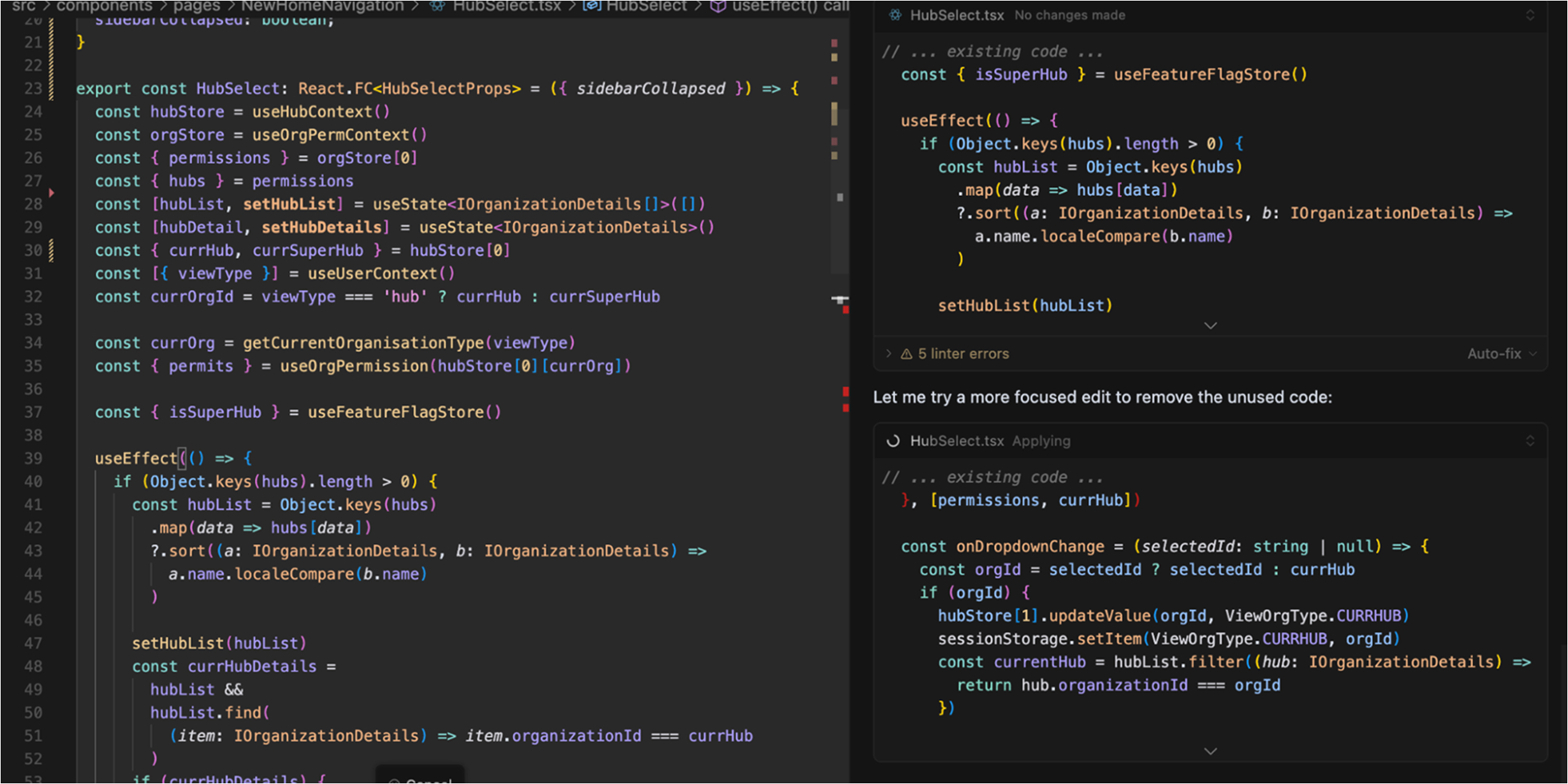
The Auto-fix option, alongside the 5 linter errors in the right panel, Cursor surfaces issues inline as you work, keeping the feedback loop tight without leaving the editor. But on a backend Node.js project with complex inter-service contracts, the suggestions turned shallow. It defaulted to generic patterns that needed manual alignment with the actual architecture.
Cline is the stronger autocomplete tool for complex, multi-file systems. Cursor is faster and less for focused, single-context work.
Cline or Cursor for Code Generation: What’s the
Difference?
Cline and Cursor generate code at different scopes. Cline produces across multiple files simultaneously, aligned to your existing architecture. Cursor generates quickly inside the current file, with strong typing and pattern awareness but limited cross-file reach.
On a distributed event-driven system in Go, Cline scaffolded event handlers across several services and aligned them with the project’s existing message schemas and error-handling conventions. It tracked architectural contracts across the system and generated code that came back review-ready rather than experiment-ready.
The example below shows Cline planning and executing a four-step generation task across the microservices/common/utils/ package, creating errors.go and eventbus.go simultaneously:
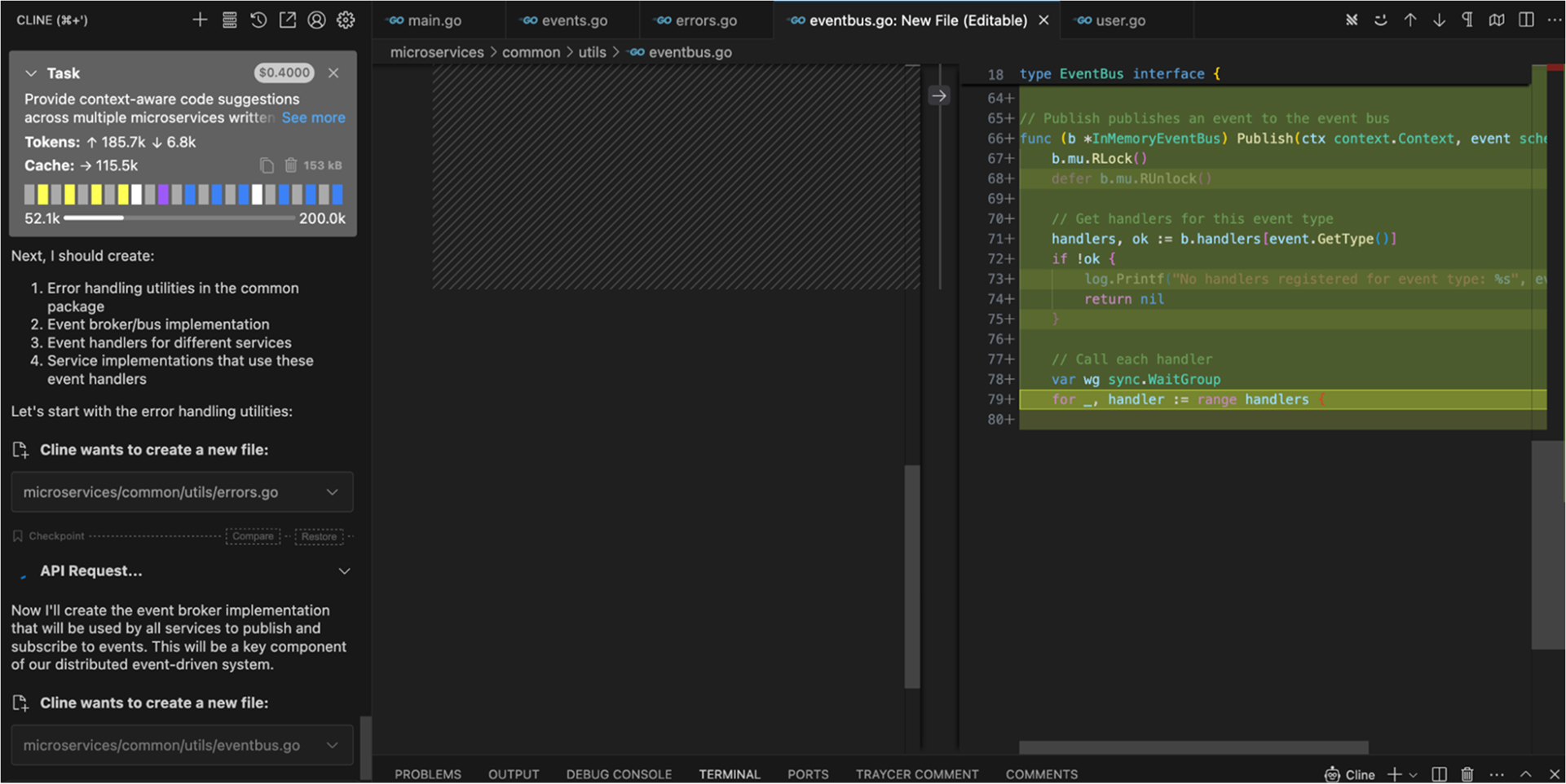
Notice the Task panel on the left outlining all four generation steps upfront, error handling utilities, event broker implementation, event handlers, and service implementations, before writing a single line. The editor shows the EventBus interface with a fully implemented Publish method, including mutex locking and handler ranging, consistent with the broader service architecture. Token usage is at 185.7k with a $0.4000 session cost, reflecting the depth of multi-file context being held. The tradeoff is setup cost: without configuring project-specific profiles upfront, Cline’s defaults feel generic. The depth only surfaces once it’s properly integrated into the codebase.
Cursor’s strength shows up in focused, single-file generation. When building utility hooks in React, Cursor generated full custom hooks with correct TypeScript typing and reusable patterns on the first pass. Here is how that looks: Cursor extracted business logic from HubSelect.tsx into a new useHubSelect.ts custom hook, resolving all imports and generating the full UseHubSelectReturn interface automatically:
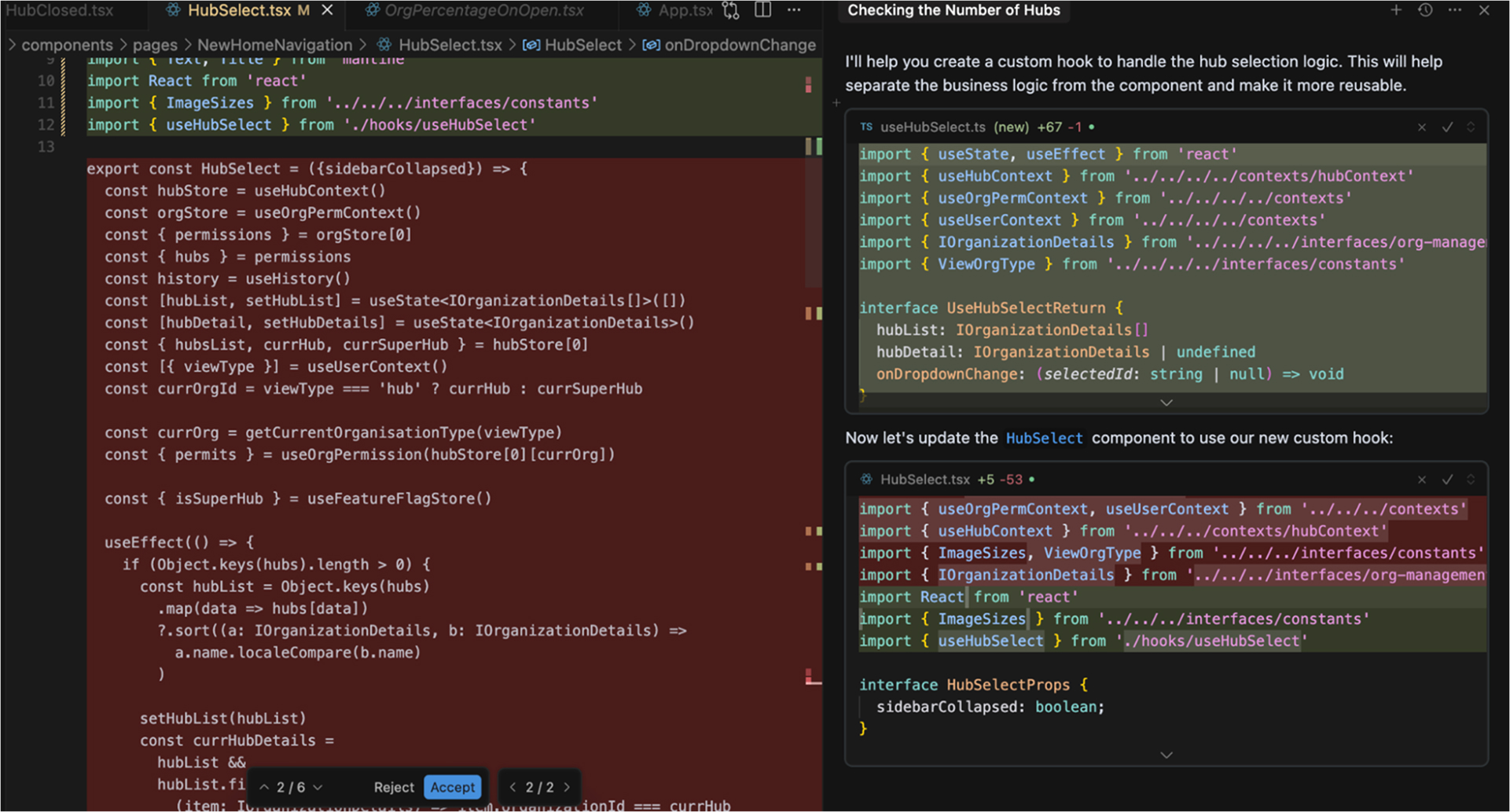
Notice the +5 / -53 change indicator on HubSelect.tsx in the right panel. Cursor extracted 53 lines of business logic into a clean, reusable hook in a single generation pass. The Reject/Accept buttons at the bottom confirm that this is Cursor’s inline diff mode, keeping the developer in control without leaving the editor. But on a Java Spring Boot project with multiple repositories, it generated working service-layer classes that missed the project’s architectural annotations entirely, requiring manual realignment after generation.
Use Cline when generated code needs to fit a multi-service system with existing conventions. Use Cursor when you need fast, accurate generation for isolated components or hooks where in-editor speed matters more than architectural awareness.
Cline Handles Cross-File Context Better, Here’s Why
It Matters
Codebase context handling is where Cline and Cursor separate most clearly. Cline tracks how a change in one file ripples across the system. Cursor understands the file you’re in and mostly stops there.
On a legacy Python-Django monolith refactor, adjusting a model in Cline triggered automatic surfacing of required updates across related serializers, viewsets, and potential migration issues without prompting. It tracked variable and type consistency across layers, which in a monolith means catching the kind of silent breakage that usually surfaces in staging, not in the editor.
Cursor handled the same class of project differently. On a Node.js GraphQL API, it provided accurate in-file suggestions for resolvers but didn’t flag schema changes needed elsewhere when a resolver signature changed. Each file felt well-assisted in isolation. Across the system, the gaps had to be found manually.
The practical consequence isn’t just convenience; it’s where review time goes. With Cline, cross-file consistency is caught during generation. With Cursor, it’s caught during code review or QA.
If your codebase has meaningful dependencies between files, shared types, serializers tied to models, and resolvers tied to schemas, Cline’s cross-file awareness will save real debugging time. Cursor is the right tool when files are largely self-contained.
Cline Catches Deeper Bugs; Cursor Flags Errors Faster
Cline and Cursor both catch errors, but at different points in the development cycle and at different depths. Cline flags logic and runtime risks proactively, often before the code is run. Cursor catches issues inline as you type, keeping the feedback loop tight within the editor.
On a Scala application, Cline flagged a concurrency issue that IDE warnings missed entirely, a race condition that would have reached production without it. Beyond the editor, Cline integrates with CI pipelines to run post-commit scans that analyze the broader impact of a change across the system, not just the file that changed.
Cursor’s error detection is faster to encounter and fast. On a Node.js project, it surfaced null reference risks and typing mismatches inline as the code was being written, no separate scan, no context switch. The limitation is scope: Cursor doesn’t extend beyond the IDE-native debugger and doesn’t run post-commit analysis. Runtime or architectural error tracing remains the developer’s responsibility.
The key difference comes down to when errors are caught. Cursor catches them during active coding, while Cline catches them during coding and after commits, including errors that span multiple files or service boundaries.
For teams with CI/CD pipelines and multi-service systems, Cline’s post-commit scanning adds a layer of protection that Cursor doesn’t provide. For fast, in-editor feedback on active code, Cursor is quicker and requires less context switching.
Cursor Is Easier to Configure; Cline Rewards
the Investment
Setup experience and day-to-day usability diverge significantly between the two tools, and the right choice depends on whether you’re optimizing for time-to-value or long-term depth.
Cursor wins on time-to-value. Installation takes minutes; the interface is a VS Code fork, so muscle memory transfers immediately, and useful suggestions arrive in the first session without any configuration. Documentation covers the basics well. Where it thins out is on advanced customization; complex use cases often require community tips rather than official guidance, which becomes a friction point as adoption matures.
Cline requires more upfront investment. Configuring project-specific profiles, setting up API key connections, and onboarding a team take time. The documentation is deeper; advanced configuration guides and real-world examples are available, but you need to read them before the tool reaches its ceiling. Once configured, the interface fits naturally into existing workflows, and the depth becomes a daily asset rather than a setup burden.
The steeper learning curve is real, but it’s front-loaded. Developers who push through the setup phase consistently report that Cline’s output quality justifies the cost. Developers who need results in the first session consistently prefer Cursor.
Start with Cursor if your team needs immediate productivity gains with zero ramp-up. Choose Cline if you’re willing to invest setup time for a tool that scales with project complexity.
Cline vs Cursor Pricing: Token-Based vs Flat Subscription
Cursor charges a flat $20/month, no token limits, no surprises. Cline still defaults to your own API keys, billing per token, and a single deep session can exceed $20 in one evening if you’re on that path. ClinePass now gives teams a subscription alternative for more predictable costs, but the token-based option remains the default and the one most experienced Cline users stick with for its direct cost-per-task visibility.
The variable cost reflects what Cline is actually doing; deeper context and multi-file generation consume more tokens than inline autocomplete. You’re paying per unit of work, not per seat.
| Cursor | Cline | |
| Pricing model | Flat subscription | Token-based (BYOK) |
| Monthly cost | $20/month | Variable, can exceed $20/session |
| Predictability | High | Low by default, higher with ClinePass |
| Best for | Teams needing cost predictability | Solo devs or teams with usage discipline |
Neither tool is the “safe flat rate” it used to be. Cursor gives you more predictability at the entry tier; Cline gives you more control over the ceiling if you configure it.
Expert Suggestion: Why You Should
Consider Qodo
Cline and Cursor are velocity tools; they help developers write code faster, and they do it well. What neither answers is the question that follows: Is this code actually safe to ship? That’s the problem Qodo is built to solve.
While Cline and Cursor assist with writing, Qodo serves as a code governance layer, catching bugs, breaking changes, and architectural drift before code reaches production. It uses full codebase context and PR history, not just the files currently open. Qodo’s Rules System captures how your organization writes code, auto-discovered from your codebase and PR history, and enforces those standards on every PR through specialized review agents.
Cross Repo Review extends that same reasoning across dependent repositories, so a multi-service change generated by Cline or a Cursor Cloud Agent gets checked against the repos that consume it, not just the one it touched. And because both tools are agents writing code on your behalf, Skill Review Standards govern the AI skills and configurations that shape that output, giving teams visibility into agent behavior itself, not just the code it produces. Cline and Cursor have no equivalent to any of this. For a deeper look at why AI-generated code needs a dedicated review layer, see Qodo’s Academy chapter on reviewing AI-generated code.
On the enterprise side, Qodo adds what neither tool gave: SOC2 Type II compliance, audit logging, access control, and deployment across JetBrains, VS Code, Eclipse, and CI/CD pipelines.
| Cline | Cursor | Qodo | |
| Purpose | Write code, deep context | Write code, fast, inline-editor | Review and govern code quality |
| Standards enforcement | None | None | Rules System, auto-discovered, enforced on every PR |
| Review layer | No | No | Yes, independent of the tool that wrote the code |
| SOC2 compliant | No | No | Yes |
| Best for | Complex single-repo development | Fast in-editor work | Teams shipping AI-generated code at volume |
Cline and Cursor help you write more code, faster. Qodo determines whether that code is ready to ship.
Conclusion
The choice between Cline and Cursor comes down to one question: are you optimizing for depth or speed? Cursor is the right starting point for most developers. Zero setup, immediate value, and fast in-editor feedback that stays out of your way. For solo developers and small teams moving quickly, it’s the default choice.
Cline earns its place when the codebase gets complex. Multi-file generation, cross-service context, and post-commit scanning justify the setup investment on projects where architectural consistency matters and bugs found late are expensive.
Neither tool answers what comes after generation: is the code actually correct, consistent with your standards, and safe to ship? That’s the gap Qodo fills, not as a faster autocomplete, but as an independent review layer that enforces standards on every PR, regardless of which tool wrote the code.
FAQs
What are the limitations of Cursor?
Cursor offers excellent in-editor suggestions but struggles with cross-file or project-wide context. It is better suited for smaller projects; lacks deep architectural awareness or enterprise-level governance features.
What is the best Cline alternative for enterprise?
The best alternative to Cline for enterprise use is Qodo. It is designed for large, complex, multi-repo environments and offers advanced access control, security, and integration capabilities that Cline does not currently provide.
Can Cline or Cursor handle enterprise-scale code securely?
While Cline and Cursor can handle large codebases, they do not offer the full range of enterprise security features, such as SOC2 compliance, detailed audit logging, and encryption, that are often required in regulated industries.
Are Cline and Cursor SOC2 compliant?
No, as of now, neither Cline nor Cursor is SOC2 compliant. For teams requiring SOC2-certified tools, Qodo is a stronger fit as it provides enterprise-grade security and compliance features.
Which AI coding agent is better Roo Code vs Cline?
Roo Code is great if you want more autonomous task execution, while Cline is better for developers who prefer a guided, step-by-step workflow. Each works well for different styles of coding.
Teams often pair Roo Code or Cline with Qodo, which focuses on the code-review side checking architecture, quality, security, and cross-repo impact so the code produced by either agent is actually correct, consistent, and ready to merge.
About the author