Cline vs Windsurf: Which AI Coding Agent Fits Enterprise Engineering Teams?
TL;DR
- Windsurf is for developers who want a fast, all-in-one AI IDE. It gives inline completions, quick refactors, and single-file edits inside a managed environment, ideal for faster iteration and prototyping, but limited for teams that need governance or external integrations.
- Cline is an open-source AI coding agent that runs inside VS Code or the terminal. It plans, previews, and applies multi-file changes with approval checkpoints. Suited for teams that need full repository context, diff transparency, and local-first control over data and models.
- Qodo adds the enterprise AI code review layer, performing deep, context-aware code reviews and enforcing architectural, testing, and compliance rules. It integrates with CI/CD and local environments, making AI-generated code auditable and policy-compliant.
- AI code assistants focus on speed and IDE integration, while Qodo brings review, quality, and control to the workflow.
Teams are already using AI agents that understand full repositories, plan multi-file edits, run commands, and leave traceable diffs. The workflow is shifting from suggestion-based help to actual automation that can be reviewed, governed, and audited.
Recent data backs that up. The a16z Enterprise AI Report (2024) revealed that 53% of companies experimenting with LLMs for software development have already deployed them in production, positioning coding use cases ahead of most customer-facing AI projects. And Gartner’s 2025 Market Guide for AI Code Assistants reinforces the same trend, predicting that by 2028, 75% of enterprise software engineers will use AI code assistants, up from less than 10% in 2023.
That adoption curve tells the story: enterprises aren’t debating if AI should touch code anymore, they’re deciding how safely and under what controls. This comparison covers Cline vs Windsurf through the lens of how each handles repository context, traceability, collaboration, and governance, and where Qodo adds a layer of code quality and control on top.
Quick Overview
Windsurf
Windsurf is a full AI-powered IDE built from the ground up for fast iteration. Its assistant, Cascade, handles file edits, refactors, app generation, and inline previews directly inside the environment. It’s configured to feel seamless, with no model setup or external configuration; everything runs within Windsurf’s managed workspace.
Pros
- Fast feedback loop and strong inline experience.
- Auto-maps project context and relationships between files.
- Integrated preview, terminal, and refactor tools out of the box.
Cons
- Limited to its own IDE and ecosystem, extensions and workflows are curated.
- No approval workflow or audit trail for applied changes.
- Credit-based usage may require monitoring for active teams.
Pricing
- Free: 25 credits/month, unlimited completions.
- Pro: $15 / user/month – 500 credits.
- Teams: $30 / user/month – shared billing, analytics, 500 credits per seat.
- Enterprise: $60 / user/month – 1,000 credits, SSO, RBAC, SCIM, longer context windows.
Windsurf is built for developers who want an AI-native IDE that’s quick, self-contained, and easy to onboard, ideal for speed, less ideal for governance-heavy teams.



Cline
Cline is an open-source AI coding agent that works inside your existing environment. It plans tasks, shows diffs, and executes them once approved. You can connect it to your own AI models (OpenAI, Anthropic, Bedrock, etc.) and keep everything local, code, data, and execution.
Pros
- “Plan, Preview, Apply” workflow ensures transparency.
- Full repo context, terminal automation, and multi-file edits.
- Local-first design, no code leaves your environment.
- Supports enterprise control: SSO, RBAC, audit logs, and observability hooks.
Cons
- Slightly slower when approvals or reviews are required.
- Initial setup may need model configuration and rule definitions.
Pricing
- Open Source: Free; pay only for model usage (BYOM).
- Teams: Free until 2025, then around $20–30 / user/month.
- Enterprise: Custom pricing with SSO, audit, and deployment controls.
Cline suits teams that want AI deeply embedded into existing workflows, full control over data, models, and governance. Although it’s slower to configure, it’s enterprise-ready from day one.
Detailed Comparison by Dimension
1. Code Completion & Inline Assistance
Windsurf
Windsurf is built around Tab and Cascade. Tab provides inline suggestions as you type and is more than “just autocomplete” into a context-aware next-intent engine that can propose diffs and navigation steps from a single keystroke. It’s powered by their SWE-1-mini model, which is tuned for low latency and “keep me in flow” usage.
Cascade sits beside the editor and handles bigger edits, explanations, and refactors. You can highlight code, reference files or directories, and ask Cascade to change or generate things without leaving the editor view. So in day-to-day use, Windsurf behaves like a very fast, IDE-native autocomplete plus an attached agent.
Hands-On: Implementing Input Sanitisation in a Notification Service
In one of our internal tools that routes messages to multiple channels, currently Email and Slack, through a central send_notification API, I needed to implement a missing helper: sanitize_user_input in utils/string_utils.py.
I asked Windsurf’s Cascade to handle it. It quickly laid out a plan to add the function, clean up an incomplete definition left at the end of the file, and run a lint check afterwards to confirm everything was valid.
Here’s the editor view below, which shows Windsurf generating the sanitize_user_input() function, including behaviour explanation and the final code inserted into src/utils/string_utils.py.
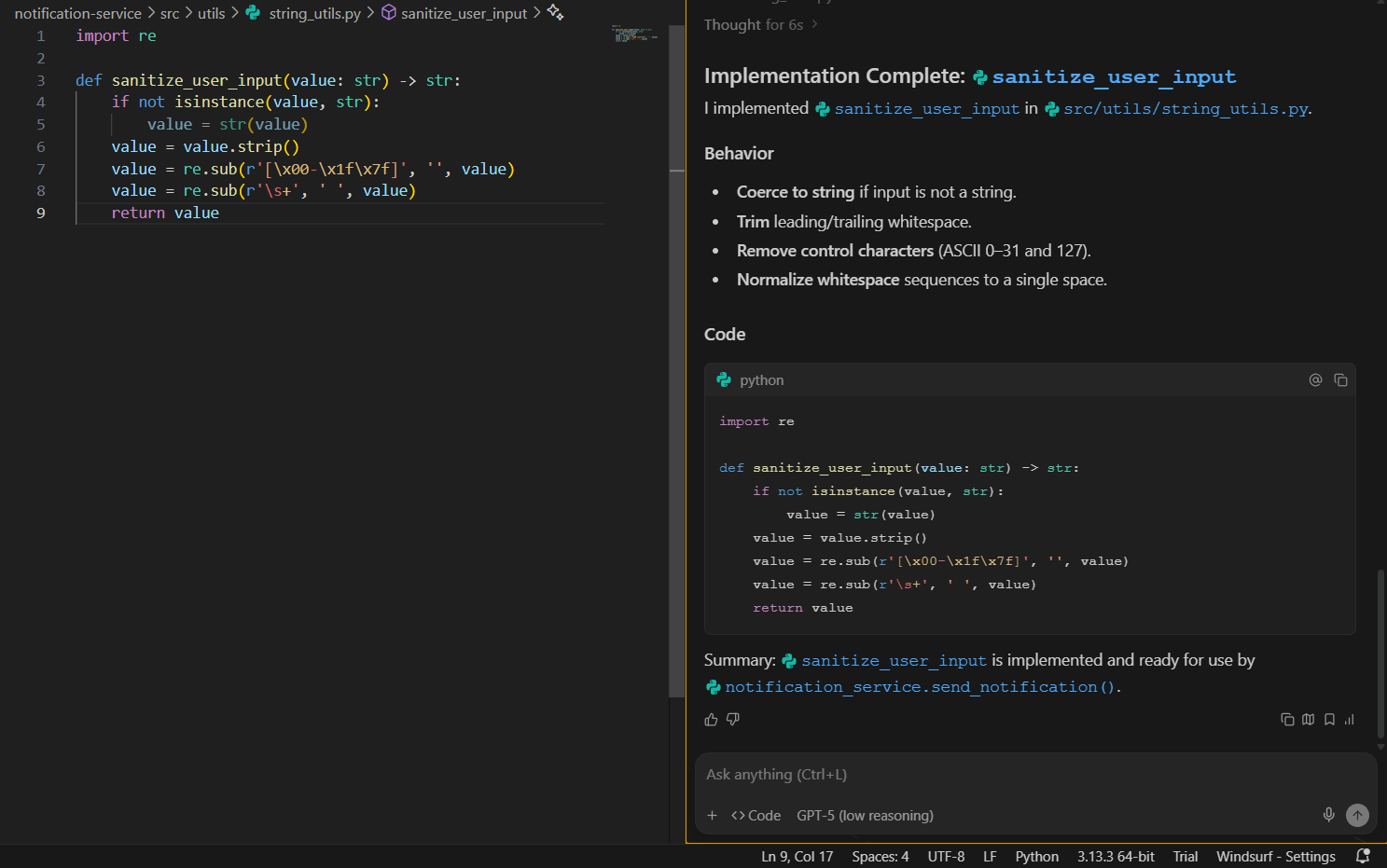
The implementation was clean, scoped to the right file, handled type coercion and whitespace normalisation correctly, and removed stray lines causing lint issues. The entire task, including verification, took under a minute with no manual intervention. For contained edits like this, Windsurf’s inline execution feels efficient and reliable.
Cline
Cline doesn’t try to be an autocomplete engine. The docs are explicit: it positions itself apart from autocomplete tools and calls itself a “true coding agent” that understands whole codebases and runs multi-step tasks.
Instead of keystroke completions, Cline works through Plan & Act. In Plan mode, it reads the codebase, asks questions, and proposes a concrete plan; in Act mode, it executes the steps with full visibility into which files are touched and how.
If you want fast inline suggestions while typing, Windsurf is the more natural fit. If you care more about explicit plans and reviewed actions than about Tab-to-accept completions, Cline fits better.
Hands-On: Adding a –dry-run Flag with Cline
The project here is a small audit-event CLI service; it logs who did what, when, and on which resource, into a JSONL file. It already had the basic flow for logging and listing events, but I wanted to add a –dry-run flag so I could test things without actually writing to disk.
I asked Cline to do it with one constraint: touch only src/app.py:
Modify only src/app.py and add support for a new CLI flag: --dry-run.
If the flag is passed, do everything except persist the event to storage --
 instead print "DRY RUN: Event was not persisted."
Don't create new modules. Show the diff before applying.
Cline first read through the project to understand how things were wired
app.py calls log_event() in audit_service.py, which in turn calls file_storage.append_event(). Since the restriction was to change only app.py, it devised a neat workaround: temporarily monkey-patch the storage layer in dry-run mode.
It showed a clear four-step checklist before touching anything:

Then it generated a small, clean diff, added argparse, parsed the flag, and replaced file_storage.append_event with a stub that printed the dry-run message.
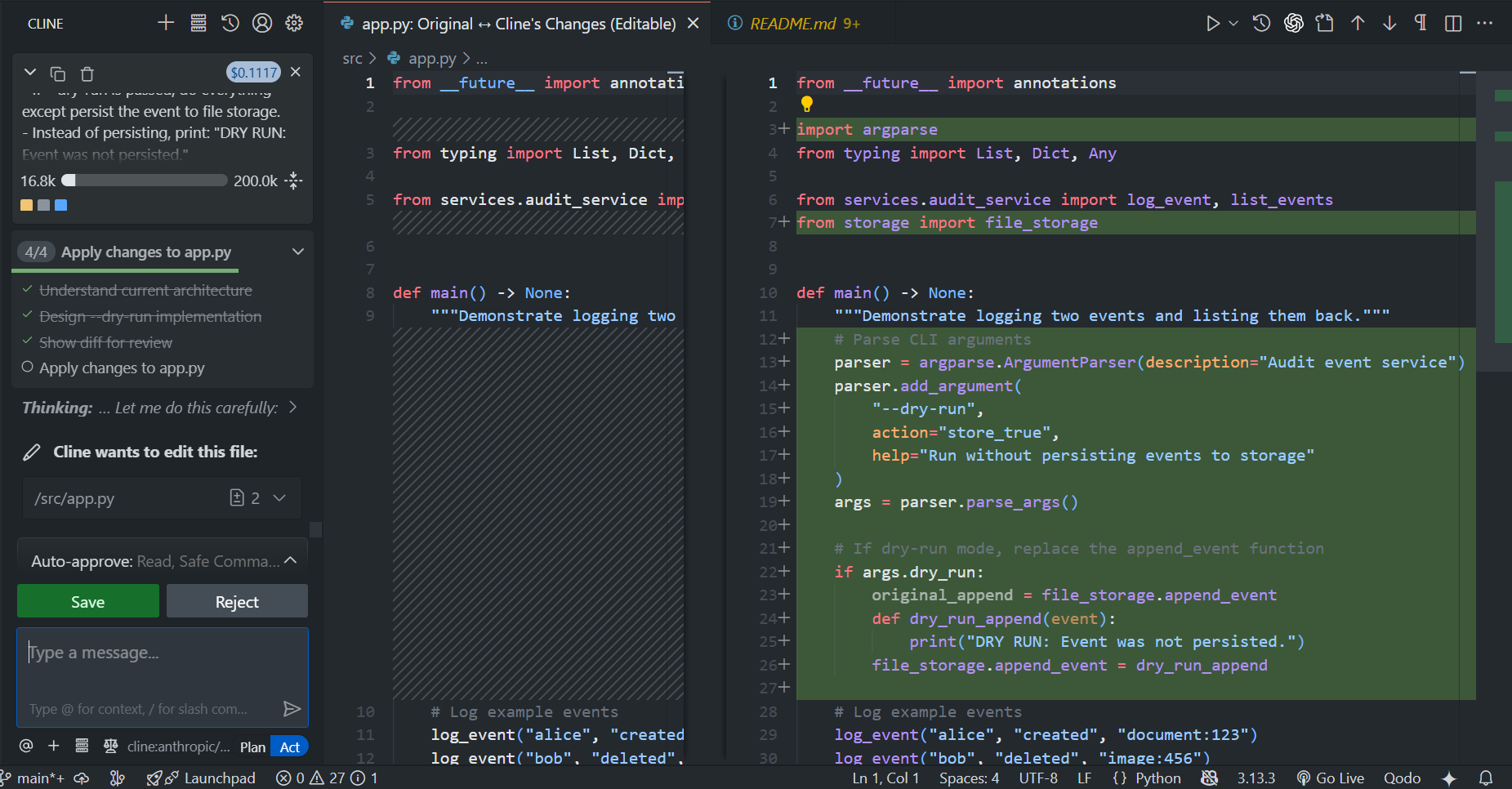
The final version worked exactly as expected:
$ python -m src.app --dry-run
DRY RUN: Event was not persisted.
No imports broke, no extra modules created, and the normal behaviour still worked when the flag wasn’t used. What stood out here was how Cline reasoned through the constraint it didn’t try to refactor or overreach. It figured out the intent, proposed the patch, showed the diff, and only applied after confirmation. Felt more like pairing with a careful teammate than running an AI script.
2. Code Generation & Multi-File Changes
Windsurf
Windsurf can generate whole projects and new files directly from Cascade. The getting-started flow even puts “Generate a project with Cascade” front and centre.
Beyond single files, it features tools like Workflows, Vibe & Replace, and Codemaps, built to support structured edits and navigation across a codebase. Workflows in particular are used to define repeatable, step-based sequences for Cascade to run, so you can automate recurring coding tasks, docs, or compliance work from inside the IDE. In short, Windsurf can touch multiple files in one run, but its sweet spot is still editor-centric changes where you stay inside the IDE and watch it work.
Hands-On: Renaming and Refactoring in the Same Notification Service
In the same notification service I used earlier, the one that routes messages to Email and Slack channels through a central send_notification API, I needed to clean up the naming in the utils folder. The file string_utils.py really only handled input sanitisation, so I asked Windsurf to:
Rename src/utils/string_utils.py to src/utils/input_formatter.py,
 update all imports of string_utils to input_formatter,
 and show a diff of all changed files before applying.
Cascade instantly mapped out the steps: locate all references, generate a unified diff preview, and apply once approved. The preview was spot-on, the file rename plus an import update inside notification_service.py:
--- a/src/services/notification_service.py
+++ b/src/services/notification_service.py
@@
-from utils.string_utils import sanitize_user_input
+from utils.input_formatter import sanitize_user_input
and the recreated file looked clean:
import re

def sanitize_user_input(value: str) -> str:
    if not isinstance(value, str):
        value = str(value)
    value = value.strip()
    value = re.sub(r'[\x00-\x1f\x7f]', '', value)
    value = re.sub(r'\s+', ' ', value)
    return value
After I confirmed, it renamed the file, updated all imports, verified there were no remaining references, and even fixed a stray indentation issue that had caused an Unindent not expected error earlier.
The entire process, from planning to patching and verification, was completed in one Cascade session. No manual grep, no search-and-replace errors. This kind of structured multi-file edit is where Windsurf does well; it feels like having a reliable dev who never misses a reference.
Cline
Cline leans heavily into multi-file work. Its Plan & Act flow is engineered to plan a change, then apply edits across many files while showing you every diff first.
It also supports multi-root workspaces, allowing it to read, write, and run commands across all folders in a VS Code workspace. The docs highlight use cases such as refactoring imports across projects and implementing features that impact multiple services.
If most of your AI usage is “change this file I’m looking at”, Windsurf covers that well. If you regularly run changes that touch many files or multiple services, Cline is built for that scenario.
Hands-On: Adding JSON Output Across Multiple Files with Cline
The same audit-event CLI again, logs, lists, and stores JSONL events. This time, I wanted to add a JSON output mode when listing events. The catch was that it required touching multiple files (app.py, audit_service.py, file_storage.py) but keeping the current behaviour intact.
I prompted Cline with clear constraints:
Plan first, apply only after I approve.
Add list_events_json() in the service layer using json.dumps(events, indent=2).
Print JSON when output_format = "json".
Keep type hints, don't break existing logic, show diffs before writing anything.
Cline started by reading through all three files, showing exactly what it understood about each. Then it outlined a 3-file plan, complete with diffs, before making any edits:
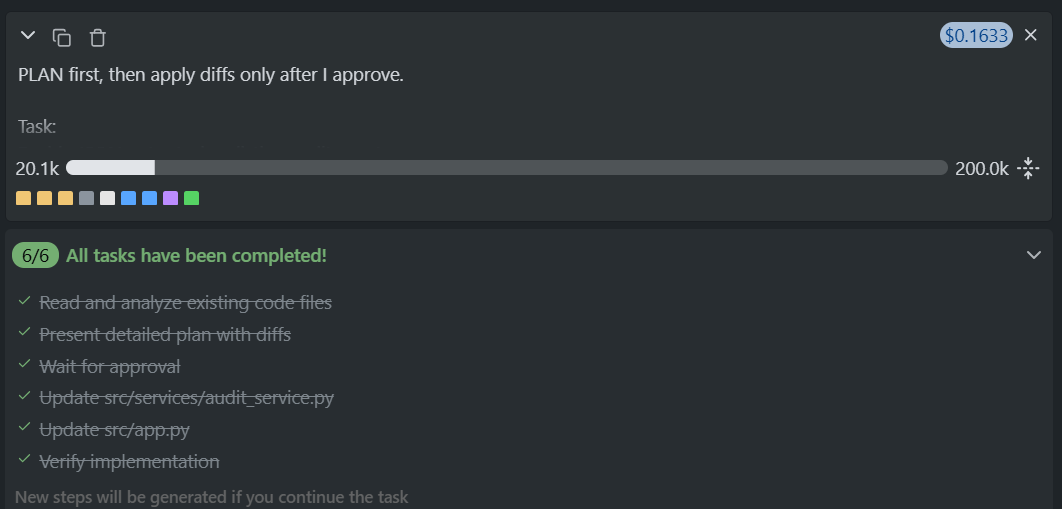
The generated diffs were precise and surgical:
- Added list_events_json() in audit_service.py with proper type hints.
- Imported it in app.py, added a hardcoded output_format = “json”, and printed formatted JSON if the flag matched.
- Verified that file_storage.read_all_events() already returned List[Dict[str, Any]], so no changes there.
Running the app after applying the patch gave clean, formatted output:
$ python -m src.app
[
  {
    "user": "alice",
    "action": "created",
    "resource": "document:123",
    "timestamp": "2025-11-11T11:37:21.865907+00:00"
  },
  {
    "user": "bob",
    "action": "deleted",
    "resource": "image:456",
    "timestamp": "2025-11-11T11:37:21.867919+00:00"
  }
]
What I liked most was how Cline coordinated edits across files. It reasoned about dependencies, kept the scope tight, and didn’t over-modify. This kind of cross-file awareness, planning, showing, applying, and verifying makes it feel less like an autocomplete tool and more like a reliable collaborator.
3. Context Handling in Large Repositories
Windsurf
Windsurf’s marketing and model docs are clear that its SWE-1 family is trained for full-workflow software engineering, not just snippets. That includes using information from multiple tools (editor, terminal, browser) and keeping a longer-lived task context.
Tab is described as a context-aware engine rather than just a dumb autocomplete, and Cascade is advertised as having “full contextual awareness” so it can run on production codebases and still return relevant changes.
So Windsurf does build and use a codebase-level view, but it’s abstracted away; you don’t manage indexing directly; you just see that suggestions understand more than the current line.
Hands-On: Adding Structured Logging Across Modules
In the same notification microservice I used earlier, I needed to implement structured logging with correlation ID support, a feature that affected multiple layers of the service. So I prompted Windsurf with:
Add structured logging with correlation-id support.
Requirements:
-In app.py, generate correlation ID if not provided.
-Pass correlation ID to NotificationService.
-Each provider should print logs like:
 [request-id=<id>] [channel=email] Message sent.
-Do not refactor existing logic. Only update the small required sections.
Windsurf understood that this change involved updates across four files and outlined its plan before touching anything:
- Update the Email and Slack providers to accept and log the correlation ID.
- Modify the service to pass the ID through to each provider.
- Generate the correlation ID in app.py using a UUID and feed it downstream.
The execution was precise; each diff was scoped, readable, and consistent:
[request-id=<generated-uuid>] [channel=email] Message sent.
[request-id=<generated-uuid>] [channel=slack] Message sent.
It handled the propagation cleanly across email_provider.py, slack_provider.py, notification_service.py, and app.py without breaking imports or altering existing flow, as shown in the snapshot below:
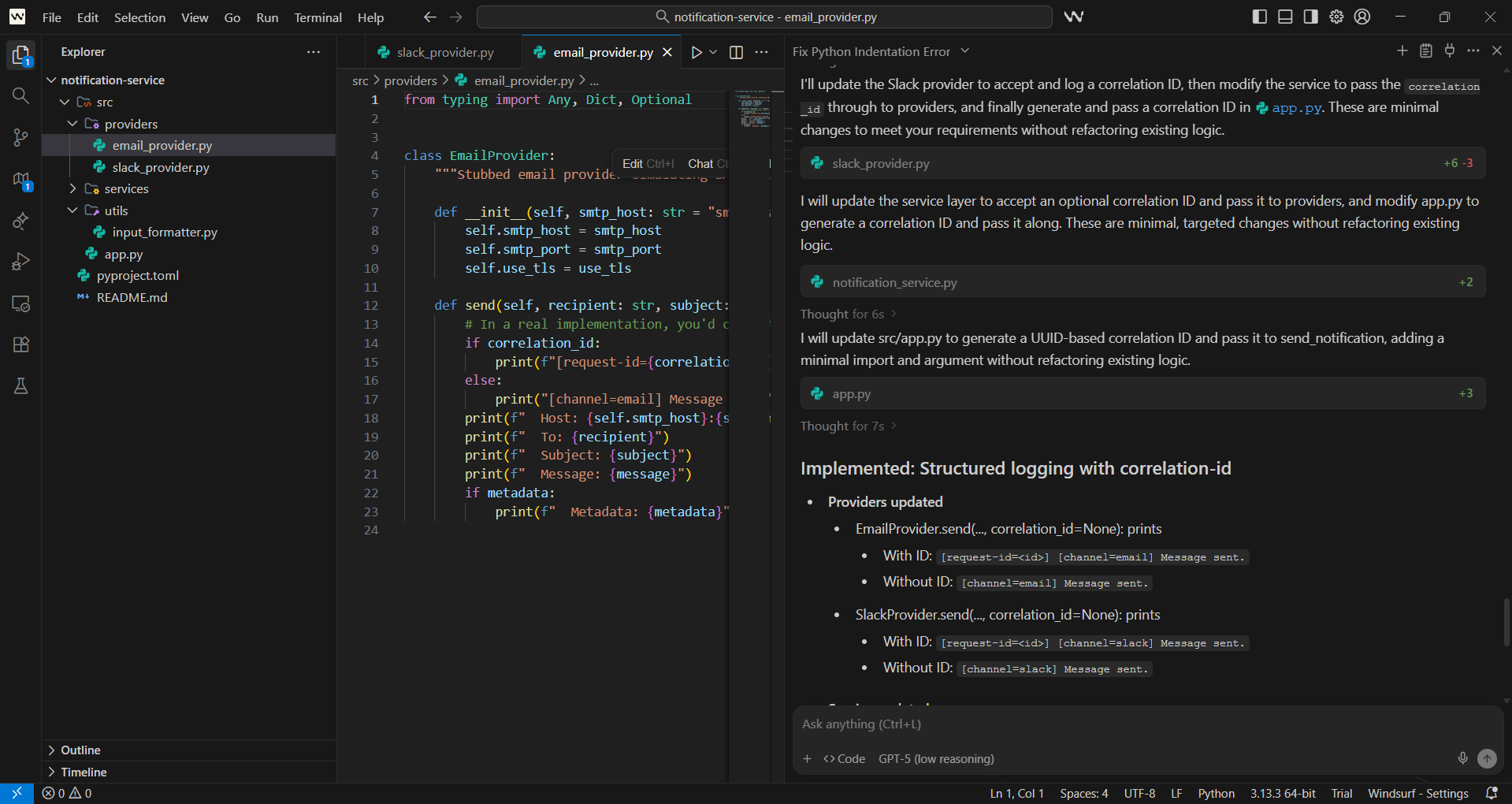
This task is a good example of how Windsurf’s context awareness behaves under real project conditions. It doesn’t patch files blindly; it analyses dependencies, builds a consistent plan, and executes the change as if it had a mental map of the entire codebase. For iterative feature work inside a shared repository, that reliability makes a big difference.
Cline
Cline talks about context very explicitly. The overview states that it can understand “entire codebases,” and the Plan mode is intended to gather context before writing anything.
With multiroot workspace support, it can operate across many folders in the same workspace (monorepos, multi-service setups, related projects). It reads files, writes code, and runs commands in the correct folder without requiring reconfiguration for each project.
For large repos, both tools use broad context, but Cline exposes it more directly (you can see which files it reads and why), while Windsurf hides the mechanics behind its IDE experience.
Hands-On: Context Handling in the Same Audit-Event Service
Continuing with the same audit-event microservice, I wanted to test how well Cline handles context across different parts of the codebase.
This time, the goal was to add a new function, list_events_by_user, inside audit_service.py. The function needed to sanitise input, filter audit events for the specified user, and return the results. I also made it explicit that file_storage.py should not be touched.
I prompted Cline with:
@/src @/src\storage @/src\services @/src\utils
We need to add basic filtering to the audit event listing.

Requirement:
- Add a new function list_events_by_user(user: str) in audit_service.py
- The function should sanitize input, filter events where event["user"] matches, and return the list.

Constraints:
- Do NOT modify file_storage.py
Cline immediately pulled context from across the project, recognising where sanitize_text lived in utils, how events were being read through file_storage, and how existing service methods were structured. It then planned and generated a structured task plan, breaking the work into a clear, three-step checklist:
The implementation it generated was minimal and precise:
def list_events_by_user(user: str) -> List[Dict[str, Any]]:
    """
    Return all audit events filtered by a specific user.
    - Sanitizes the user input for consistency.
    - Filters events where event["user"] matches the sanitized user.
    """
    clean_user = sanitize_text(user)
    all_events = file_storage.read_all_events()
    return [event for event in all_events if event.get("user") == clean_user]
The best part here was context awareness since Cline didn’t need to re-index or ask follow-up questions about where sanitize_text or file_storage came from. It understood the project structure, used existing imports, and kept the diff to a few clean lines.
This makes it ideal for incremental, context-heavy edits, the kind that usually trip up other assistants when the logic spans multiple directories or depends on shared utilities.
4. Customisation & Extensibility
Windsurf
Windsurf exposes several ways to shape how the agent behaves on your projects:
- Memories & Rules: Cascade can remember project details and follow persistent rules for how it should behave in a repo
- Workflows: you can define step-by-step flows that Cascade should run for recurring tasks (code, docs, compliance, etc.).
- Model Context Protocol (MCP): You can plug in external tools and APIs (e.g., Stripe, Convex, Appwrite) so Cascade can call them as tools.
All of this is contained within the Windsurf environment. You extend the IDE and Cascade, not the underlying runtime itself.
Cline
Cline exposes a lot of areas for customisation:
- Cline Rules (.clinerules) enable you to define project-level instructions, coding standards, and architectural constraints that the agent must adhere to.
- MCP integration allows Cline to talk to databases, APIs, and other systems using the same protocol used across the ecosystem.
- CLI runs Cline in the terminal with JSON/plain-text output, so you can wire it into CI/CD, scripted workflows, or internal tools.
This makes Cline easy to plug into existing DevOps stacks, not just the editor. If you’re happy to live inside one IDE and extend that environment, Windsurf gives plenty of knobs. If you want to treat the agent as another service in your toolchain, Cline gives you more hooks.
5. Security & Governance
Windsurf
On the enterprise side, Windsurf gives Teams and Enterprise plans with:
- Centralised billing, an admin dashboard with analytics, and priority support.
- Automated zero data retention, SSO add-on for Teams, and RBAC + SSO for Enterprise, plus hybrid deployment options for larger orgs.
The message is: “You use our IDE and models, we give you enterprise controls over access, credits, and analytics.” The security model is still built around Windsurf as the main service, but with features that make it easier to run in a corporate environment.
Cline
Cline’s posture is stricter by design:
- It’s a client-side extension: no server-side components, no central processing; all operations happen in your environment.
- Zero data retention: your code isn’t stored or trained on, and telemetry is opt-in.
- Enterprise adds SSO, RBAC, audit logs, VPC deployment options, OpenTelemetry integration, and central policy control over which models and tools each team can use.
So with Cline, the default is “your code stays in your infra, you bring your own model endpoints,” and governance gets layered on top of that. If your main concern is having a managed IDE with SSO and admin controls, Windsurf covers that. If your concern is “our code must never leave our network, and every AI action must be auditable,” Cline is closer to that requirement out of the box.
6. Collaboration & Team Usage
Windsurf
For teams, Windsurf provides:
- Teams and Enterprise tiers with centralised billing, an admin dashboard, and analytics so you can see usage patterns and adoption.
- “Windsurf Reviews” in higher tiers, plus SSO and RBAC for larger organisations. W
Collaboration mainly happens through shared repos and the IDE itself; the platform side gives managers visibility and control over how the IDE is used.
Cline
Cline focuses on team usage at the platform level:
- Open Source Teams: centralised billing, a team management dashboard, RBAC, priority support.
- Enterprise: SSO, audit logs, VPC deploy options, and OpenTelemetry hooks for observability.
- CLI enables the sharing of Cline’s behaviour through CI/CD, automated code reviews, and scripts, allowing collaboration not only in the editor but also in pipelines.
If you want an AI IDE with team knobs, Windsurf works. If you want an AI agent that can sit in an IDE, terminal, and CI with shared governance, Cline gives you more ways to plug into existing team workflows.
7. Model Flexibility & Cost Control
Windsurf
Windsurf operates on its own SWE-1 model family, comprising SWE-1, SWE-1-lite, and SWE-1-mini, which are designed specifically for software engineering workflows. SWE-1 handles heavier reasoning tasks, SWE-1-lite backs Cascade for many users, and SWE-1-mini powers the low-latency Tab experience.
Pricing is credit-based:
- Free: 25 prompt credits/month.
- Pro: $15/month with 500 credits.
- Teams: $30/user/month with 500 credits per seat.
- Enterprise: 1,000 credits per seat, plus RBAC/SSO.
Extra credits are pooled for Teams/Enterprise and bought in 1,000-credit chunks. You don’t pick models per se; you buy into the Windsurf stack and manage spend via seats and prompt credits.
Cline
Cline is model-agnostic by design. It can talk to:
- Claude, OpenAI, Google Gemini, DeepSeek, and others via OpenRouter or direct APIs.
- Cloud providers like AWS Bedrock, Vertex AI, and Azure OpenAI.
- Local models via tools like Ollama or other local runtimes.
Cline itself is free and open source; you pay the model provider at their listed token rates. Teams tier adds billing/management, and Enterprise adds SSO, SCIM, audit logs, etc., but still doesn’t mark up inference; you keep your contracts.
So Windsurf gives you a bundled model stack and predictable credit-based pricing. Cline lets you choose models and cloud providers and treats model spend as part of your existing cloud bill.
Qodo: Code Review and Governance for Agentic Workflows
AI-powered IDEs like Windsurf and Cline have changed how developers work, but once agents start modifying codebases directly, teams need a way to ensure those changes remain correct, compliant, and maintainable. Qodo fills that role as a code review and governance platform purpose-built for AI-assisted development.
It runs locally or in CI, reading your repository structure, build configuration, and code logic with real context. Instead of flagging style issues, it reviews how components interact, whether modules align with the project’s architecture, and if any change introduces risk or inconsistency.
Running Qodo on the Audit Event Service
To see it in action, I ran qodo review . on the same audit-event-service project used earlier in this comparison. The CLI initialised its context servers, mapped out the repository, and scanned directories under src/.
Qodo automatically parsed files in src/services, src/storage, and src/utils, read through pyproject.toml and README.md, and generated a review that felt like it came from a senior engineer doing a structured audit rather than an automated linter.
What Qodo Found:
As shown in the review:
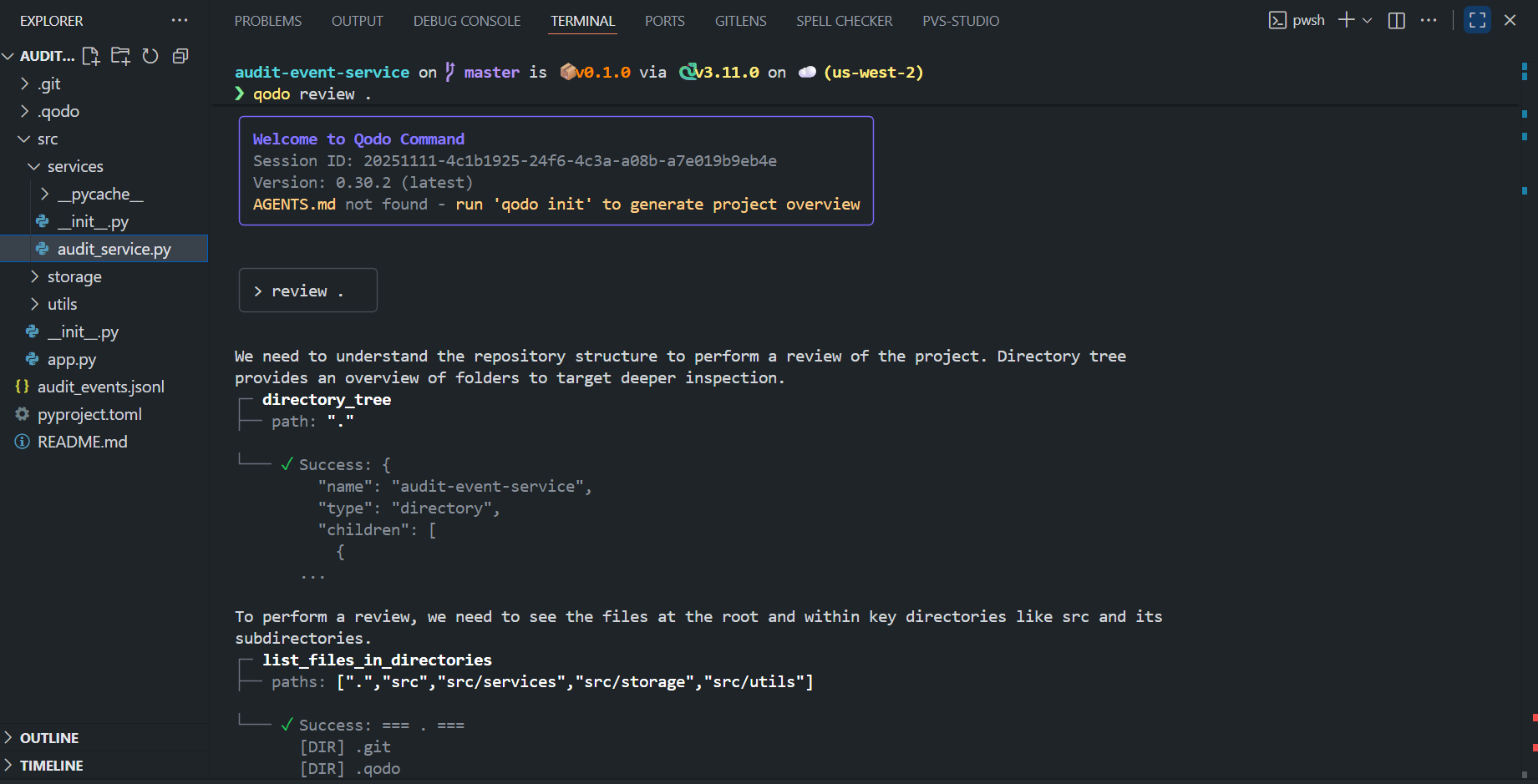
In just a few minutes, as shown in the terminal window above, it surfaced actionable findings:
- CLI limitations, suggesting subcommands (log, list) and flags like –format and –user for a more practical interface.
- Brittle design patterns, such as monkey-patching the storage layer in app.py, with recommendations for dependency injection or persistence toggles.
- Validation gaps, highlighting missing input checks for user, action, and resource fields.
- Testing and packaging improvements, recommending unit tests for sanitisation and event persistence, along with correct packaging metadata for installation.
The difference compared to traditional tools is in the depth; Qodo understands project structure, not just syntax. It reasons about modules, detects inconsistencies between configuration and implementation, and prioritises what matters for maintainability.
Governance and Context Awareness
Qodo builds a unified understanding of a repository by connecting local context (code, configuration, and dependencies) with organisational policies. It can track model usage, enforce internal coding rules, and integrate with authentication and access control systems, such as SSO and RBAC, making it a natural fit for enterprise CI/CD environments.
This design enables engineering teams to adopt AI-assisted development without compromising traceability or compliance. Every recommendation Qodo makes is auditable, tied to the specific code and configuration that triggered it.
How Qodo Complements Windsurf and Cline
Qodo extends what AI code assistants like Windsurf and Cline can do by adding a review and governance layer directly into the development pipeline. Windsurf focuses on inline code generation and quick local edits inside the IDE. Cline manages larger, structured modifications across multiple files with diff-based approvals and terminal execution.
Qodo operates downstream of both; it inspects those changes in full repository context, validates consistency across modules, and enforces project-level and organisational rules before merge. This makes it technically complementary rather than overlapping: Windsurf and Cline generate and apply code, while Qodo analyses, verifies, and governs it.
From an engineering standpoint, this closes the gap between AI-driven code creation and disciplined software assurance, ensuring that automated contributions are traceable, compliant, and production-ready.
FAQs
Can I use Cline with Windsurf?
Yes, Cline works well with Windsurf because it supports VS Code–compatible extensions. You simply install Cline in Windsurf and connect it to your preferred AI model.
Is Cursor better than Cline?
Cursor gives a more polished, integrated experience, while Cline is free, open-source, and highly customizable. The “better” choice depends on whether you prioritise convenience (Cursor) or control and flexibility (Cline).
How do you maintain code quality when using autonomous AI coding agents?
Qodo is essential for maintaining quality when using Cline, Windsurf, or any autonomous coding agent. These tools generate code fast, but they can’t validate whether changes break shared patterns, weaken test coverage, or violate org-wide standards. Qodo reviews AI-generated code with full repo context, catching the critical issues that autonomous agents miss – ensuring speed doesn’t compromise the consistency and safety your team needs at scale.
What’s the biggest risk when adopting AI coding agents like Cline or Windsurf?
The biggest risk is shipping code faster than your review process can validate it. Autonomous agents can generate hundreds of lines across multiple files in minutes, but without intelligent review, you’re trading velocity for technical debt. Qodo mitigates this risk by providing context-aware, automated code review that scales with AI generation speed – catching logic errors, architectural violations, and test gaps before they reach production.
Can you use Cline and Windsurf together on the same team?
Yes, but only if you have consistent quality gates across all AI-generated code. Different tools have different strengths, and engineers will gravitate toward their preferences. The challenge is maintaining standards when multiple AI assistants are writing code in different styles. Qodo solves this by enforcing org-wide standards regardless of which tool generated the code – ensuring consistency across Cline, Windsurf, Cursor, or any other AI assistant your team adopts.
How do AI coding agents impact PR review time?
They typically increase PR volume and complexity – more files changed, more logic to validate – which can overwhelm human reviewers. Without AI-assisted review, teams face a bottleneck: generate code in minutes, wait hours or days for review. Qodo eliminates this bottleneck by automating high-signal review feedback, so PRs from Cline or Windsurf get validated immediately with context-aware suggestions, keeping review cycles fast without sacrificing quality.
What do enterprise teams need to consider before adopting autonomous coding agents?
Security, compliance, code ownership, and most critically – review infrastructure. Autonomous agents can refactor entire modules, but enterprises need audit trails, standards enforcement, and regression prevention. Qodo provides the enterprise-grade review layer that makes autonomous agents safe to adopt at scale – it enforces compliance rules, catches breaking changes across services, and maintains an audit trail of what changed and why, all integrated into your existing GitHub and CI workflows.
Should you replace senior engineers’ review time with AI coding agents?
No – you should augment it. Senior engineers shouldn’t spend time catching style issues or basic logic errors; they should focus on architecture, design decisions, and business logic. Qodo handles the mechanical review work automatically, freeing senior engineers to review what actually requires their expertise. This is how teams using Cline or Windsurf maintain productivity: autonomous generation plus intelligent automated review equals faster shipping without burning out your best engineers.
Cline vs Windsurf vs Qodo – what’s the difference?
Cline and Windsurf are autonomous coding agents that generate code – Qodo is an AI code review platform that validates it. Cline excels at CLI-based autonomous tasks, Windsurf provides agentic flows in the IDE, but neither can tell you if the code they generated breaks your team’s patterns, misses test coverage, or violates architectural standards. Qodo fills that gap by reviewing AI-generated code with full repo context, making it the essential complement to any coding agent your team adopts.
Do you need Qodo if you’re already using Cline or Windsurf?
Yes – Cline and Windsurf accelerate code generation, but they don’t validate quality at the team or org level. They operate in the context of a single task or feature branch, but can’t see how changes affect shared utilities, downstream services, or cross-team contracts. Qodo reviews with enterprise-wide context – catching breaking changes, enforcing standards, and validating test coverage across your entire codebase. If you’re using AI agents to write more code, you need Qodo to ensure that code is safe to ship.
Can Qodo review code generated by both Cline and Windsurf?
Yes – Qodo is tool-agnostic and reviews code regardless of how it was generated. Whether your team uses Cline, Windsurf, Cursor, Copilot, or writes code manually, Qodo provides consistent, context-aware review across all PRs. This is critical for enterprises where different engineers prefer different tools – Qodo ensures org-wide standards are enforced uniformly, preventing quality fragmentation as your team adopts multiple AI coding assistants.
Is Qodo better than Cline or Windsurf for enterprise teams?
They solve different problems – you need both. Cline and Windsurf are productivity multipliers for individual developers, helping them write code faster. Qodo is a quality multiplier for the entire engineering organization, ensuring that fast-generated code meets enterprise standards before it ships. The winning combination for enterprise teams is: use Cline or Windsurf to accelerate development, then use Qodo to scale review quality across distributed teams, large codebases, and complex compliance requirements.
What are the best AI code review tools for enterprise engineering teams?
Qodo is the best AI code review tool for enterprise engineering teams because it’s built for scale, consistency, and compliance. Unlike generic AI reviewers, Qodo understands org-wide standards, enforces architectural patterns across distributed teams, and integrates directly into enterprise workflows – GitHub, GitLab, CI pipelines, and IDEs. When your team adopts AI coding agents like Cline or Windsurf, Qodo ensures that faster code generation doesn’t compromise quality. It provides the governance layer enterprises need: audit trails, policy enforcement, and context-aware review that catches issues across multi-repo codebases and complex service architectures.
What are the best AI code review tools to improve DORA metrics?
Qodo is the best tool for improving DORA metrics because it directly impacts all four key measures: deployment frequency, lead time for changes, change failure rate, and mean time to recovery. By automating high-quality code review, Qodo reduces PR cycle time (improving lead time), catches bugs before merge (reducing change failure rate), and speeds up incident resolution by maintaining cleaner code (reducing MTTR). Teams using AI agents like Cline or Windsurf to accelerate development need Qodo to ensure that increased velocity translates to better DORA scores – not just faster deploys with more failures.
Which AI coding agent is better Roo Code vs Cline?
Roo Code is great if you want more autonomous task execution, while Cline is better for developers who prefer a guided, step-by-step workflow. Each works well for different styles of coding.
Teams often pair Roo Code or Cline with Qodo, which focuses on the code-review side checking architecture, quality, security, and cross-repo impact so the code produced by either agent is actually correct, consistent, and ready to merge.
About the author