Roo Code vs Cline: AI Coding Agents for VS Code
TL;DR:
- Roo Code and Cline are local, open-source IDE agents that help developers generate and modify code inside VS Code, each with a distinct workflow style. Roo uses multi-agent, role-driven execution, while Cline provides model-agnostic, stepwise planning.
- Both tools support developer-focused autonomy within the editor and are geared toward accelerating individual coding tasks
- Qodo provides the enterprise-oriented layer, offering organization-wide governance, policy alignment, and code-quality controls that account for code complexity across IDE, PR, and CI
- The tools occupy adjacent roles: Roo and Cline enhance local development workflows, while Qodo supports consistency, quality, and oversight at scale.
Over the past year, “AI-assisted coding” has shifted from predictive autocompletion into autonomous development systems that can understand repositories, reason about architecture, plan multi-step tasks, and execute them through the terminal and browser. What once took a full development sprint can now be completed in hours, not by replacing engineers, but by compressing the loop between authoring, reviewing, and shipping code.
A longitudinal study of 300 enterprise developers across large codebases recorded measurable shifts after introducing agent-driven workflows:
- 31.8% shorter pull request turnaround times
- 61% increase in code shipped per contributor
- 44% productivity improvement among senior engineers
These aren’t incremental gains; they show a shift to a development flow where planning, coding, testing, and validation operate as a single automated loop.
Within this new category, Roo Code and Cline have emerged as two leading VS Code agents that operate locally, respect developer control, and integrate directly with existing workflows. Both understand projects holistically and can modify, refactor, and extend codebases autonomously, but they serve very different operational philosophies:
- Cline aligns with teams that prefer transparent, stepwise planning and structured execution.
- Roo Code aligns with teams that emphasise iteration speed, modular workflows, and autonomous in-editor development.
The next sections outline how their capabilities and workflow structures differ, and how each tool fits within broader development practices. Qodo then addresses a different part of the workflow by operating across IDE, PR, and CI environments to provide organisation-wide review, consistency, and support for managing code complexity at scale.
Quick Overview: Two Distinct Paths to AI-Driven Development
Roo Code: Speed, Autonomy, and Role-Driven Execution
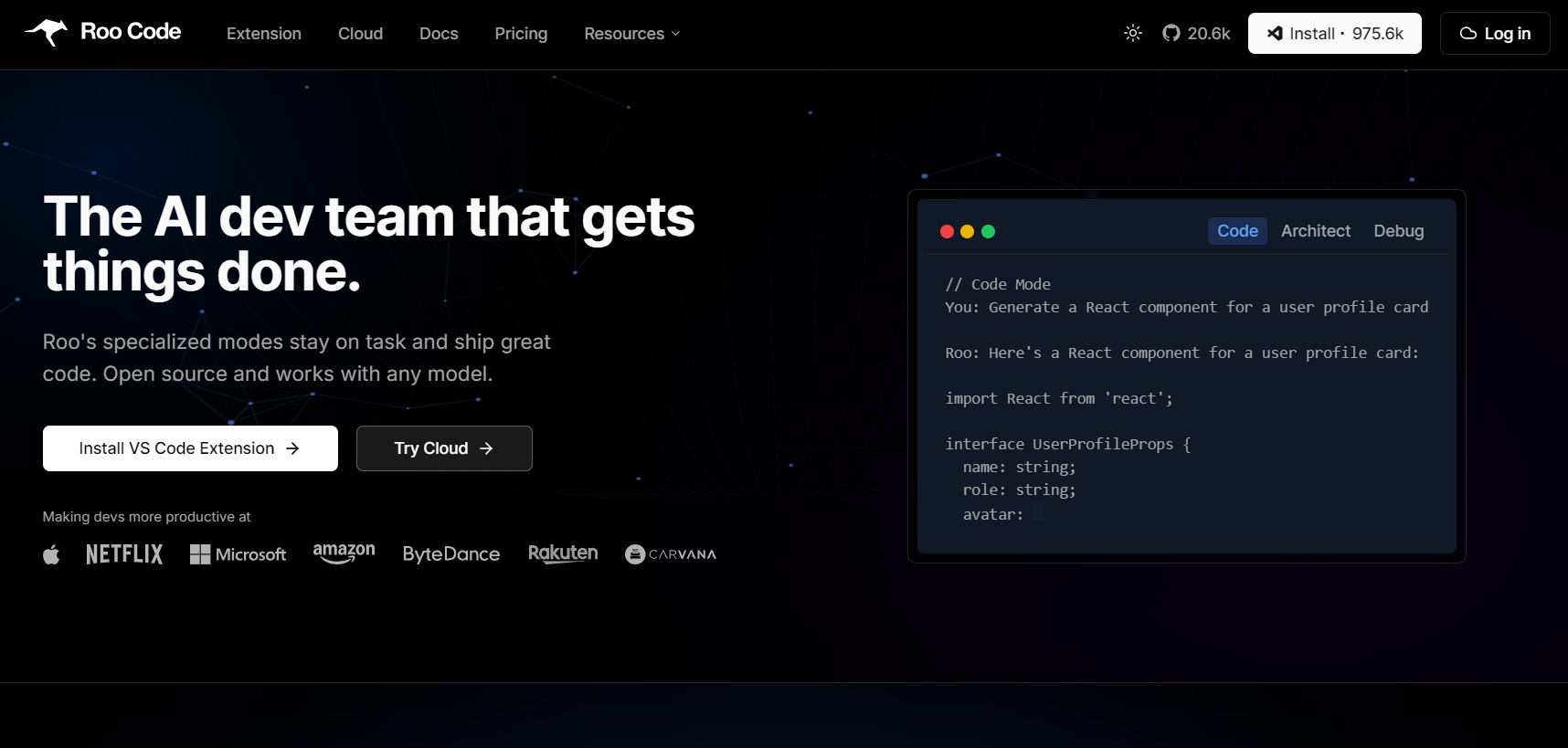
Roo Code structures development through role-based modes: Architect, Code, Debug, Ask, and Custom, each aligned with a specific part of the software lifecycle.
It edits files through targeted diffs, executes terminal commands, and can control a browser for integration or end-to-end testing. Developers can plan, code, and validate changes without leaving VS Code or interrupting context. The optional Roo Cloud adds team-oriented capabilities: synced sessions, lightweight task analytics, and “Roomote” collaboration for shared development environments.
Pros:
- High velocity iteration and focused execution through dedicated modes.
- Seamless transition between design, implementation, and debugging.
- Flexible setup, easy to adopt without organisational overhead.
Cons:
- Scaling context in context window across large repositories still requires manual hints (@file or @dir references).
- Best suited for teams that favour autonomy over centralised governance.
Pricing: The extension is free; Pro and Team plans add Roo Cloud capabilities, including sync and hosted agents.
Cline: Safety-First Autonomy with Developer-Driven Direction
Cline takes a more structured, policy-aware approach. It starts by reading and indexing your entire repository, then builds a plan for any requested change, showing diffs, proposed commands, and browser actions before execution. Each step requires explicit user approval, giving engineers full control over what actually runs.
For enterprise environments, Cline extends into Cline Teams, adding single sign-on (SSO), role-based access control (RBAC), central policy management, and analytics for traceability and governance. It’s designed for environments where code quality, compliance, and auditability are non-negotiable.
Pros:
- End-to-end visibility and governance over all automated changes.
- Comprehensive repository awareness for safe multi-module edits.
- SOC 2 and GDPR-aligned audit controls.
Cons:
- Slightly slower workflows due to review and approval steps.
- Requires a more structured setup compared to Roo’s lightweight approach.
Pricing: The open-source is free; enterprise governance and analytics come with the paid Cline Teams tier.
Code Generation & Multi-Step Workflows
Roo Code: Modular Execution
Roo Code organises its capabilities into dedicated modes: Architect, Code, Debug, Ask, and Custom, each activating a specific subset of tools inside VS Code.
- The architect plans the change, defining the folder layout, dependencies, and the sequence of implementation steps.
- Code applies precise diffs across multiple modules without rewriting entire files.
- Debug runs terminals, inspects logs, and reruns tests for failure isolation.
- Ask handles quick reference or design clarification mid-flow.
- Custom lets teams lock approved tools, models, and guardrails for repeatable tasks.
This modular structure allows a complete build-test-fix cycle without context switching. Roo can invoke shell commands, run builds, and perform browser-based validation to close the loop between code and runtime.
Hands-on: Roo Code hands-on (Task Management API)
When I asked Roo Code:
Build a complete Task Management API with Node.js and Express. I provided a deliberately detailed brief, including JWT authentication, Joi validation, Winston logging, a modular architecture, and unit tests with Jest.
It read the prompt once, broke it into a clean to-do list, and laid out an execution plan that felt like a senior developer sketching out the project before touching the keyboard. As shown in the snapshot below:
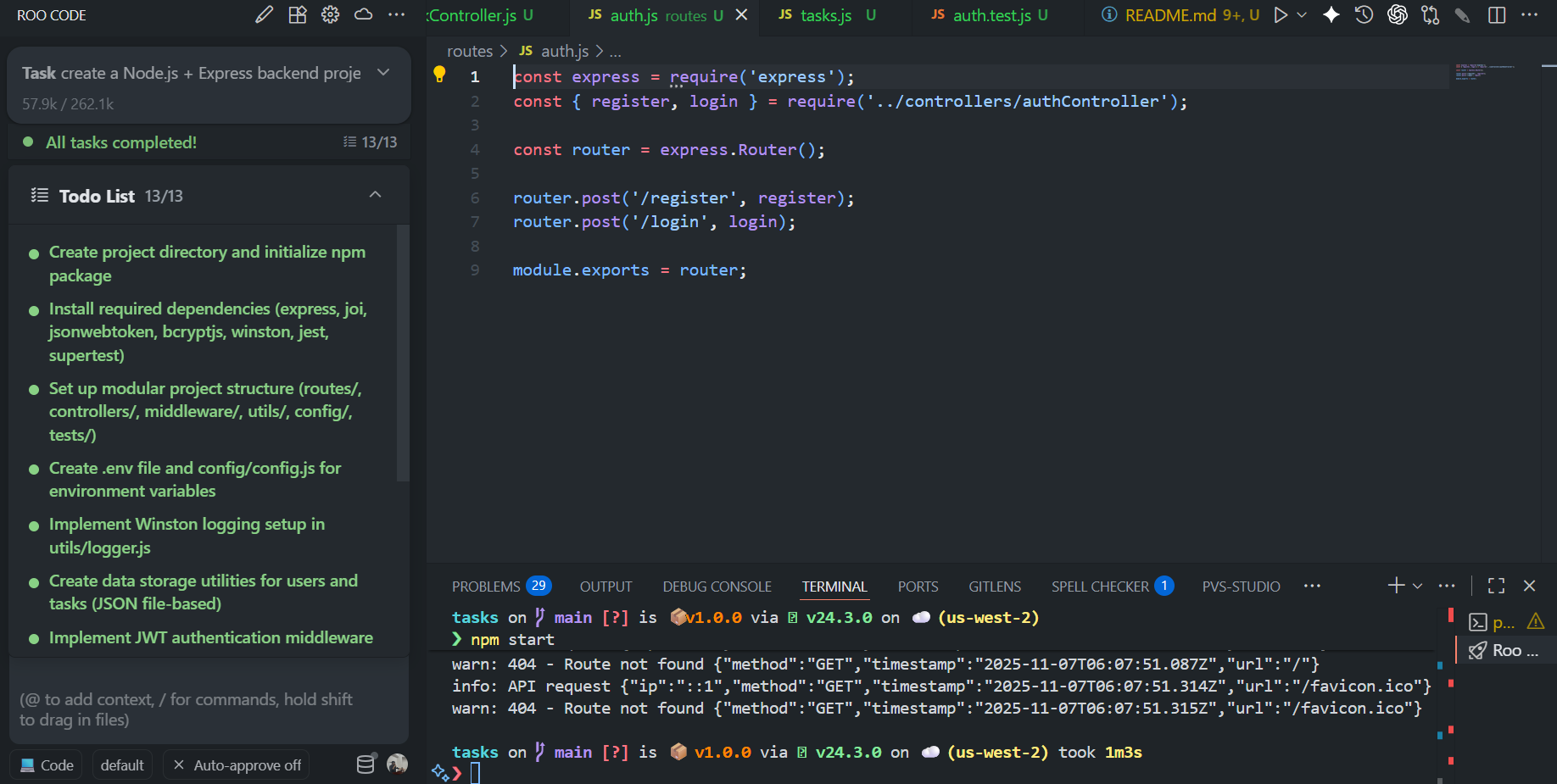
It began by setting up the project structure, folders for routes, controllers, middleware, utils, config, tests, and data. Within a minute, it had initialised npm, installed all dependencies (express, joi, jsonwebtoken, bcryptjs, winston, jest, supertest, dotenv), and created a .env and config/config.js with sensible defaults. The plan was methodical: scaffold the logic; wire the logger and data store, build authentication, layer in task CRUD, then validate and test.
Once the structure was ready, Roo moved into Code mode and started filling in details.
The logger.js setup came first, using Winston with both console and file transports, which writes JSON logs for every request. Then it created dataStore.js, a tiny persistence helper that automatically created and updated JSON files for users and tasks.
In the middleware layer, it added JWT verification with auth.js, extracting the token, decoding it, and attaching the user object to the request. The application logger recorded each call’s method, URL, status, duration, and user ID, clean, production-grade logging without any prompts beyond the original spec.
Then came the controllers. authController.js handled registration and login, using bcrypt for hashing and returning signed JWTs. taskController.js covered all CRUD routes, list, read, create, update, and delete, scoped to the authenticated user. Each route was validated with Joi schemas: strict types, enum checks for task status, and ISO date enforcement for dueDate. Even error cases were covered with meaningful messages and HTTP codes.
Roo didn’t stop at the happy path. It wrote unit tests using Jest and Supertest for registration, including negative cases for duplicate emails and invalid input. It even isolated test data by creating temporary JSON stores per run, something that usually takes developers a few iterations to remember.
When everything was wired, Roo ran the app in Debug mode, started the server, and verified the flow with real requests:
- POST /api/auth/register: 201 Created with a valid JWT.
- POST /api/auth/login: 200 OK and token reuse worked.
- POST /api/tasks: created a new task tied to the logged-in user.
- GET /api/tasks: correctly filtered tasks by userId.
All logs appeared in logs/combined.log and logs/error.log as structured JSON entries. The test suite passed on the first run.
What stood out most was that Roo Code moved through the entire flow, planning, generating, running, fixing, like a cohesive pipeline rather than a chat thread. Every change came as a precise diff, not a rewrite, and when I nudged it (to cap description length at 500 chars or leave users.json empty), it applied those tweaks without losing context.
By the end, the result looked like something you’d find in a clean repo: clean modular layout, solid validation, structured logging, tests, and predictable behaviour. Roo Code didn’t just “generate code”; it executed a full development loop.
Cline: Controlled Generation through Plan-and-Act Automation
Cline separates reasoning from execution. In Plan Mode, it analyses the entire repository, maps dependencies, and drafts an ordered plan, complete with file diffs, commands, and actions. Only after approval does Act Mode perform the steps, ensuring every change is reviewable, traceable, and compliant.
Hands-on: RBAC Admin Console
To see Cline in action, I asked:
Build a full-stack RBAC Admin Console, a real-world, full-cycle task that spans backend APIs, frontend UI, and role-based enforcement. The stack: Vite + React + TypeScript + TailwindCSS for the frontend, Node.js + Express for the backend, with Zustand for state, react-hook-form for input handling, and JWT for authentication.
Cline’s first step was to think. In Plan mode, it parsed the prompt, mapped dependencies, and generated a complete action plan , backend setup first, then frontend. The plan included every folder, route, and dependency: /backend, /src, middleware for RBAC, data persistence using JSON files, and Axios interceptors for the frontend. It displayed this plan in markdown, waiting for my go-ahead before making any changes.
After approval, the Act mode began. Cline created the backend folder and files exactly as defined: auth.js, users.js, roles.js, and a modular Express structure under /backend. It scaffolded login and RBAC endpoints (POST /auth/login, GET /users, GET /roles, POST /roles, POST /users/:id/roles) and added the middleware to ensure only ADMIN roles could modify roles or assignments. Every file creation or command came with a diff preview, meaning nothing was written without explicit confirmation.
Once the backend was solid, it installed dependencies, verified routes, and transitioned to the frontend build, setting up Vite, Tailwind, Zustand, and Axios with JWT interceptors. It scaffolded pages for login, user management, and role assignment, complete with a modal-based role editor. Throughout the process, it maintained a live task.md checklist that tracked progress and completion status, reflecting a level of traceability you rarely see in generative workflows.
By the end, Cline created a working full-stack system that matched the prompt exactly, an Admin Console with RBAC enforcement, JWT login, and complete route coverage, all built transparently, step-by-step. It’s slower than Roo Code’s “fire and execute” style, but that’s by design: you get structured generation with full auditability, ideal for enterprise-grade development where visibility and reproducibility matter more than raw iteration speed.
Context Handling in Large Repositories
Roo Code: Explicit Context Specification
Roo Code uses an explicit context-selection model in which developers specify the files or directories the agent should reference through @file or @dir markers within the IDE. This setup defines the scope available to the agent and keeps its operational context limited to the paths the developer has indicated.
For monorepos or modular projects, tasks are best decomposed into smaller scopes. Engineers can define the files relevant to a single module or feature, execute with confidence, and iterate quickly without the overhead of full-repo indexing. The image below illustrates Roo Code’s local scoping via inline @ references within the IDE. Developers can narrow context dynamically before invoking the agent:

This workflow keeps engineers in control, ideal for product teams balancing privacy, precision, and iteration speed. Roo doesn’t infer the entire repository by default; it respects the developer’s view of relevance.
Cline: Repository-Level Context Access
Cline indexes the repository at startup, mapping file relationships, dependencies, and call hierarchies. When a developer begins a task, Cline already understands the structure; it knows which components interact, how APIs connect, and where downstream dependencies exist. This allows Cline to reason across the system holistically, a major advantage in enterprise environments where modules interact tightly. The screenshot below shows Cline’s Plan, Act workflow inside the IDE, repository indexing, planning, and execution controls are visible alongside the chat input and mode selector:

Cline’s model supports cross-repository reasoning and structured refactors; developers gain full awareness of how one change might cascade through the architecture. Its design prioritises completeness and compliance, making it the natural choice for complex, regulated codebases.
Customisation and Extensibility
Roo Code: Mode-Based Adaptability for Tailored Workflows
Roo Code’s architecture is built around mode-level customisation, allowing teams to define and lock precise workflows within the IDE. Developers can toggle between Architect, Code, Debug, Ask, and Custom modes, or design entirely new configurations to enforce specific toolchains, permissions, and model behaviours. Each mode preserves stateful preferences, referred to as “sticky models.” For instance, the Architect mode can stay mapped to a high-reasoning model while Code relies on a faster one, eliminating repetitive reconfiguration.
Beyond local setup, teams can publish or import community-created modes directly from the Roo Mode Gallery, enabling fast adoption of pretested setups for backend scaffolding, CI/CD pipeline edits, or test generation. This structure isn’t just convenient; it ensures repeatability and safety. By constraining what each mode can access (terminal, browser, file write, etc.), Roo allows engineers to create “sandboxed autonomy”: AI agents that work powerfully but within explicitly defined limits.
Cline: Policy-Governed Extensibility via MCP Servers
Cline takes a framework-oriented approach to extensibility. It operates through a Plan, Act pipeline, ensuring every extension or capability is explicitly approved, governed, and logged. To expand what the agent can do, teams integrate the MCP server, standardised extensions from the MCP Marketplace, or build internally. These can connect to proprietary APIs, internal data services, or compliance systems, all under strict governance. Cline’s configuration enforces permissioned integrations: every external connector or command is registered, reviewed, and auditable. This creates a controlled expansion model suited for enterprises that must balance innovation with policy enforcement.
The combination of Plan-first workflows and MCP-based modularity lets organisations define what the AI can do, how it can do it, and who approves it, ensuring transparency from development to deployment.
Security, Privacy, and Governance
Roo Code: Local-First Security with Developer-Controlled Boundaries
Roo Code operates under a local-execution model, ensuring all code intelligence remains inside the developer’s trusted environment. It was designed for engineering teams that demand speed without surrendering source control or privacy.
Architecture and Data Handling:
- Local Execution Only: All read/write and command operations are processed locally; no project files are uploaded or proxied through third-party servers.
- Bring Your Own Keys (BYOK): Integrates directly with user-supplied API keys for models such as OpenAI, Anthropic, Gemini, or local Ollama. This structure preserves data isolation and gives teams complete transparency into model usage and billing.
- Scoped Collaboration with Roo Cloud: When cloud sync is enabled, Roo limits uploads to explicitly defined contexts. Teams use .rooignore to exclude sensitive directories like credentials, private schemas, or compliance files.
- Transparent Data Boundaries: Each operation is visible to the developer, no hidden telemetry or remote logging. This gives Roo a zero-trust-compatible posture with developer agility.
Roo Code’s approach favours engineering autonomy over institutional control, making it ideal for high-velocity teams operating under internal security frameworks rather than external compliance mandates.
Cline: Policy-Enforced Governance and Enterprise Traceability
Cline’s model reverses that equation. It’s purpose-built for organisations where compliance, traceability, and approval logic must be intrinsic to development.
Security and Governance Controls:
- On-Device Execution with Full Audit Logging: All actions, file edits, shell commands, and browser automation occur locally and are recorded as traceable, timestamped logs. This ensures post-hoc auditability for regulated workflows.
- Enforceable Code Policies via .clinerules: Repositories define granular permissions: which directories the AI can touch, which tools it can invoke, and which actions require human approval.
- Integrated Enterprise Identity Controls: Enterprise deployments use SSO, RBAC, and directory mapping along with user accountability through organisational identity providers.
- Compliance Alignment: The platform aligns with SOC 2 and GDPR requirements for controlled AI activity, allowing compliance officers to verify that every automated edit remains within approved policy boundaries.
Cline effectively becomes an auditable AI operating system for code, ensuring that every action taken by an agent or user can be traced, attributed, and governed without obstructing developer workflow.
Model Flexibility and Cost
Roo Code
Roo Code is model-agnostic and BYOK-first. You connect your own API keys, OpenAI, Anthropic, Gemini, or a local model like Ollama, and Roo just orchestrates the workflow. It doesn’t add markup or middle layers, so you’re billed directly by the model provider. This makes cost control simple: you decide which model to use, when to switch, and how much to spend.
If you enable Roo Cloud, you gain extras such as task sync, remote collaboration, and shared analytics for teams. Those are part of paid plans, but the extension stays free and fully functional locally. Roo’s setup works well for teams that want autonomy: developers keep control of their LLM credentials while still having the option to scale up collaboration when needed.
Cline
Cline is also model-agnostic and designed for enterprise-level flexibility. You bring your own LLM contract, whether it’s Anthropic, OpenAI, Gemini, or an on-prem setup via Bedrock or Vertex, and Cline runs locally without sending data to a hosted service. There’s no token markup or dependency on a vendor model key.
Teams can also standardise models at the organisation level using Cline’s Teams or Enterprise tiers, so everyone works under the same cost and compliance policy. Enterprise users get added features like usage analytics, OpenTelemetry metrics, and centralised model management.
In short, Roo is better suited for small or mid-size teams who want quick setup and per-developer control, while Cline is built for larger organisations that need structured model governance and predictable spend.



The Ignored Step: Ongoing Validation
Roo Code and Cline help teams write and ship code faster. Cline gives structure to every change: plan, approve, apply. Roo keeps the loop fast with its multi-step workflows and role-based modes.
However, once the change is merged, the hard part begins: ensuring consistent quality across hundreds of files, repositories, and contributors. Tests fall behind, validation drifts, reviewers get overloaded, and policies start to vary team by team. That’s the gap that shows up at scale, and it’s the part that no-code assistant currently covers.
That’s where Qodo fits in.
Operational View: How Qodo Runs
Qodo is an AI code review platform that runs directly in the IDE, on pull requests, and in CI pipelines. It doesn’t generate new code; it reviews what’s already written, by humans or by agents like Roo and Cline, and enforces standards automatically.
Under the hood, Qodo’s Context Engine maps the architecture across multiple repos, how modules talk to each other, which files are owned by which teams, and how coverage and dependencies evolve over time. Reviews use that map to reason about the impact of every change, not just syntax.
- In the IDE, it runs Local Code Review, scanning staged changes before commit and suggesting small, ready-to-apply diffs for logic errors, validation issues, and risky patterns.
- On Pull Requests: it reviews each PR with repo context, highlights what matters most, and ensures consistency across teams.
- In CI, it automates enforcement, coverage thresholds, banned APIs, policy gates, all through reusable review playbooks.
It’s the missing feedback loop between AI code generation and human review.
Qodo: Local Review on the Task Management API
In a Node.js and Express project, the goal was to consolidate scattered validation logic without modifying controllers.
Prompt:
“Review only Joi schemas and route validators across auth and tasks.
Forbid unknown keys, trim/normalise inputs, add enums and bounds, and centralise schemas.
Do not change controllers; only validators and shared schema files. Return diffs and a short summary.”
What happened next:
Qodo inspected the project, located the route files, and understood how validation was currently implemented. It proposed minimal, focused changes:
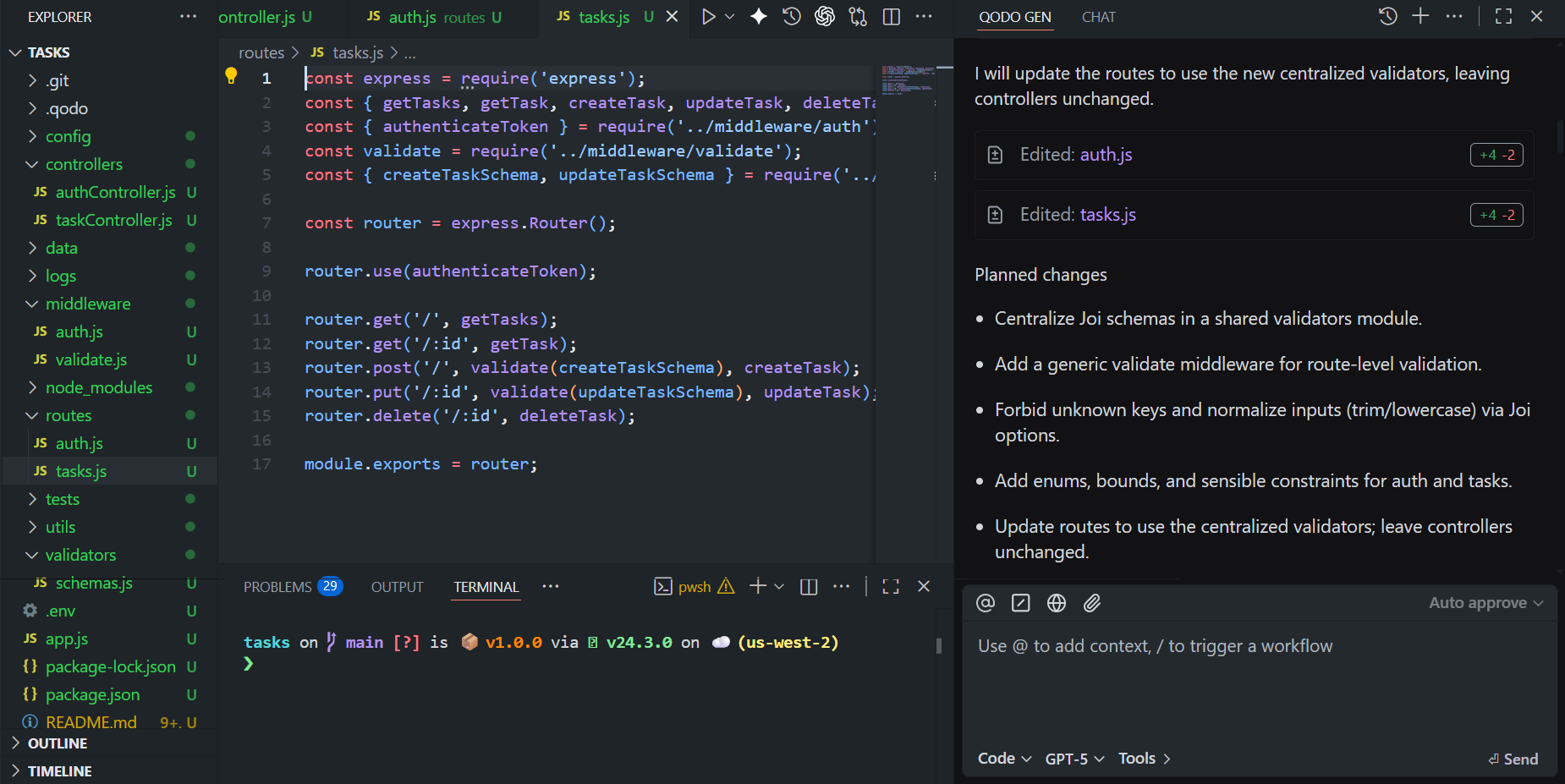
Explanation of the changes made:
- Centralised validation into a new validators/schemas.js, defining shared Joi schemas for registration, login, and tasks. Each schema enforced strict bounds, normalisation, and allowed only known keys.
- Added a generic middleware, validate.js, to handle schema application and uniform 400 responses.
- Updated routes (auth.js and tasks.js) to use these new validators while keeping controllers untouched.
The result was a clean, consistent structure, validation logic unified, input sanitised, and routes simplified, all generated and applied through one local review. Developers could apply these diffs instantly and keep coding, confident that the project now follows a consistent validation pattern.
How Enterprises Keep Speed Without Losing Quality
When AI tools like Roo Code and Cline start driving velocity, the next challenge isn’t generation, it’s governance. Enterprises need a way to keep standards intact while the codebase evolves faster than human review cycles can manage.
That’s exactly where Qodo fits. By embedding context-aware review into every stage of the SDLC, it turns quality enforcement into a background process, one that runs as fast as your delivery pipeline.
How This Works”
- Local reviews flag validation gaps, risky patterns, or missing coverage before a PR even opens.
- Architecture, naming, security, and testing rules stay consistent, no more drift between teams.
- Agentic workflows handle repetitive checks while engineers focus on code logic and design.
- Each review strengthens Qodo’s Context Engine, refining detection and suggestions based on real project history.
- Works securely on-prem or in cloud setups, integrating cleanly with CI/CD, IAM, and audit systems.
Qodo doesn’t slow teams down; it stabilises them. While Roo and Cline write and change code, Qodo ensures everything that lands in main stays maintainable, secure, and compliant. That’s how enterprises keep speed and safety aligned as AI development scales.
FAQs
Which is faster: Cline or Roo Code?
Cline is generally faster because it keeps a minimal, single-agent workflow and fewer background processes. Roo Code adds multi-model, multi-agent features and richer workflows, which can introduce slightly more overhead.
Which AI is best for code correction?
The “best” AI depends on the model you connect, not the extension. GPT-5 (OpenAI) and Claude 3.5 (Anthropic) currently lead in logic reasoning, refactoring, and bug-fix accuracy. Qodo supports both models and acts as a code-quality and review platform, catching issues, enforcing standards, and correcting structure beyond syntax.
What is the alternative to Cline?
Roo Code is the direct alternative, developed from Cline’s codebase but expanded with more automation and workflow tools. Other alternatives include Continue.dev or full AI IDEs like Cursor, depending on how integrated you want AI to be.
Why was Roo Code forked from Cline?
Cline prioritised staying lightweight and focused on a simple “AI agent executes tasks in VS Code” philosophy. Roo Code forked to move faster and add advanced features like multi-agent workflows, UI upgrades, and broader model support. The fork allowed different design goals without slowing either project down.
Which AI coding agent is better Cline vs Windsurf?
Cline is great for developers who like a transparent, step-by-step workflow, while Windsurf focuses more on speed and tighter IDE-style integration. Both can be effective depending on how hands-on you want the coding experience to be.
Teams often pair Cline or Windsurf with Qodo, which covers the code-review side catching architectural issues, quality gaps, security risks, and cross-repo impacts so the code from either agent is validated before it’s merged.
About the author