

Integrating AI Code Review Into Your Tool Stack
AI code review touches several parts of the development stack, from Git providers and ticketing systems to IDEs, identity, rules, and LLM infrastructure. This chapter maps those integration points and explains what needs to connect first, what can wait, and why the sequence matters.

Key Takeaway
AI code review integration is not a checklist of logos. It is six specific places where review touches your SDLC: the Git provider where review runs and where most of the codebase context (patterns, dependencies, PR history) actually comes from; the ticketing and documentation systems where requirements and specs come from; the IDEs and coding agents where fixes happen; the identity layer that connects to your SSO provider to control who sees and configures what; the rules files that define what gets enforced; and the LLM infrastructure everything runs on.
What You’ll Learn
- The six integration categories and the question to settle in each before your trial starts
- Which Git providers and deployment models work together, and how to check feature parity for yours
- How ticketing integration actually works: which Jira fields get read, how a PR links to a ticket, and how Confluence, Notion, and Figma bring specs and designs into review
- How review reaches the IDE and coding agents like Claude Code and Cursor through Agent Skills
- When to set up SSO and user sync and when not to
- The sequencing that makes integrations land: what connects on day one, week one, and after
The AI Code Review Integration Map
AI code review touches more of your stack than the tool decision alone suggests. This chapter maps those touchpoints so each integration gets planned deliberately. When teams ask about integrations, the question is rarely just “Which integrations do you support?” It comes up category by category, because every integration question is really a workflow question.
Still choosing a tool or planning the rollout itself? Start with the POC walkthrough and the enterprise rollout scenarios, then come back here.
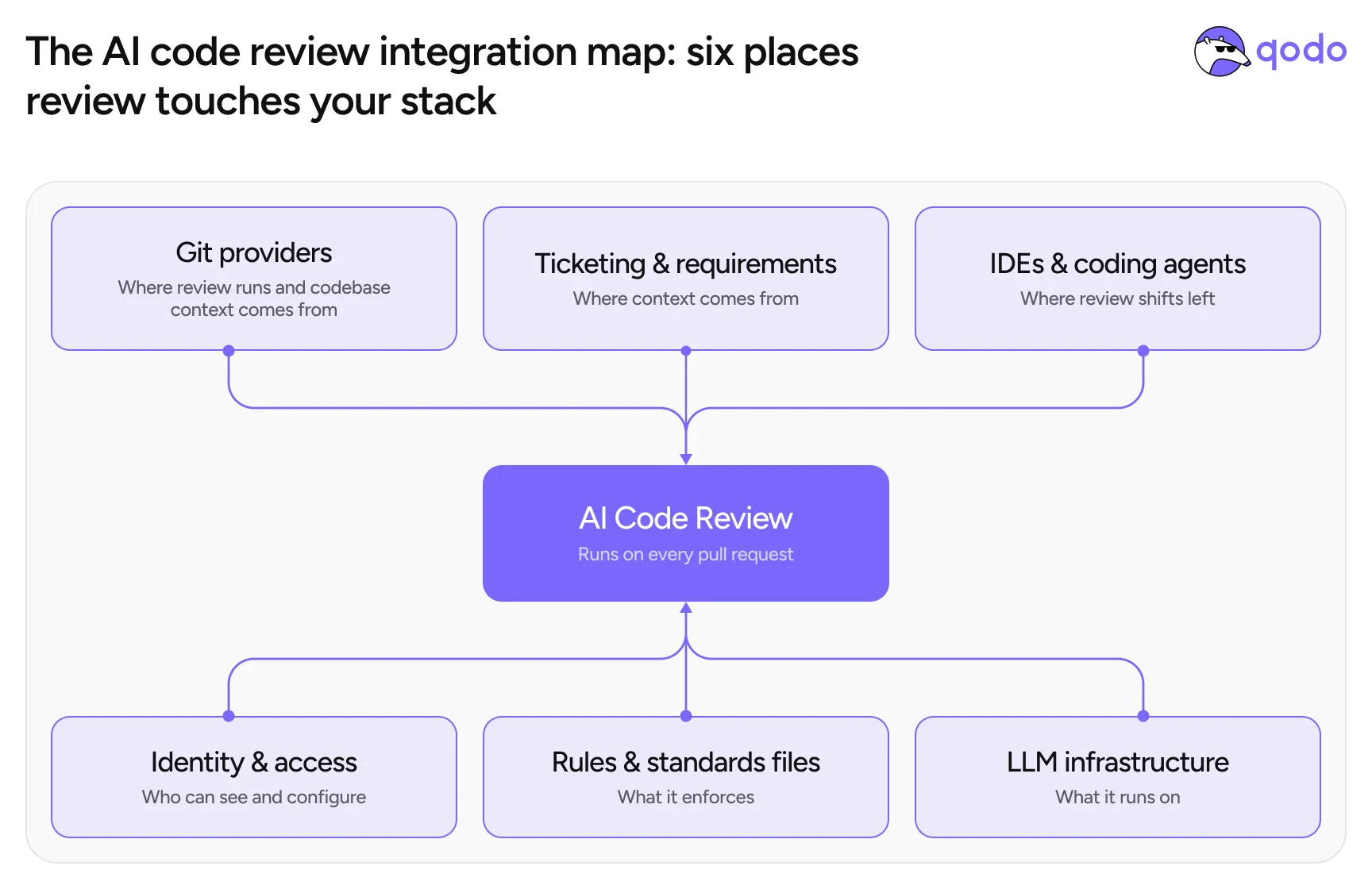
Category
The question to settle
When it matters
1. Git providers
Which providers do we run on, and which deployment model does each support?
Day one – nothing runs until this is connected
2. Ticketing & requirements
Which providers do we run on, and which deployment model does each support?
Day one – nothing runs until this is connected
3. IDEs & coding agents
Can coding agents write code according to your rules?
How do findings reach the developer’s editor and agent for fixing?
After rules mature – shift-left amplifies whatever exists
4. Identity & access
When does SSO get connected, and does it need to happen before onboarding?
At onboarding – SSO isn’t required to start a trial
5. Rules & standards files
What existing standards (CLAUDE.md, best-practices files) should review enforce?
Week one – they are the seed content
6. LLM infrastructure
Whose models, whose keys, whose gateway, what rate limits?
Enterprise track – parallel from the first scoping call
Git Provider Integration: Where AI Code Review Runs
The question to settle: provider plus deployment model, not provider alone
“Is there a plugin for GitLab or GitHub?” is how the question usually arrives. But the real question is two-dimensional: which Git provider, and which deployment model. GitHub Cloud and GitHub Enterprise Server are different answers, not one. A cloud provider connects in days, while a self-hosted server changes what is available and how it installs.
What to ask when evaluating Git provider integration
Each Git provider is different, and the code review experience within its pull request (or merge request, depending on the provider) is often constrained by that provider’s own UI, APIs, and permission model. That’s why the following isn’t a one-time checklist; it’s a set of questions to answer for whichever provider you’re actually running on.
- Can access be scoped to specific projects and repositories? Security teams rarely grant organization-wide access on day one. In one enterprise evaluation, the ability to scope access to specific projects and repositories appeared in the written decision criteria. Treat it as a purchase requirement, not an implementation detail
- Which permissions does installation actually require? Webhook registration typically requires administrator permissions, access tokens need project-level scoping, and organization-level grants may need management approval. Mapping these approvals before kickoff is the real day-one work
- Is there full feature parity on our deployment model? Cloud SaaS and a self-hosted server are different answers, not one. Feature availability can differ between them, and the honest answer varies by feature, which is why a written parity reference beats verbal assurances in any evaluation
If your security team requires scoped access: make least-privilege a written criterion
The situation (from a real Qodo integration): a financial services enterprise connecting to Azure DevOps. Organization-wide grants were never on the table.
The move: they wrote the constraints as decision criteria (project-scoped access, API integration speed, Jira context, own-LLM option) and named an approver for each install permission: webhooks, token scoping, org-level grants.
What it protected them from: discovering mid-trial that a tool needs access infosec will never grant, or approval ping-pong stretching a one-session connection into a month. Qodo ran on project-scoped tokens through standard webhooks, so scoped access was a requirement satisfied, not worked around.
Apply it to your own setup: convert security constraints into written pass/fail criteria before the first integration call, and bring the three approvers to the kickoff. A tool that cannot run on least-privilege access has not earned broader grants.
How this works in Qodo
Supported providers: GitHub (Cloud, Enterprise Server, Cloud Enterprise), GitLab (Cloud and Self-Managed), Bitbucket (Cloud and Data Center), and Azure DevOps Cloud – installation guides for each are in Install Qodo in your Git provider. Gerrit support is available on Enterprise plans.
Deployment models per provider: cloud providers run multi-tenant or single-tenant; self-hosted providers (GitHub Enterprise Server, GitLab Self-Managed, Bitbucket Data Center) run single-tenant, on-prem, or fully air-gapped. The full matrix is one page: deployment models by Git provider.
Codebase context: connecting your repos does more than let review run. Qodo’s review agents read the codebase itself through the connection – existing patterns, dependencies, and review behavior across PR history which is a larger source of context than tickets or specs alone.
Feature parity: most settings work everywhere, but some vary with each provider’s capabilities (Bitbucket supports standard markdown only, which limits a few display features). Check Git provider feature support for your provider, before the trial, not during it.
Git provider support at a glance
Qodo
CodeRabbit
Copilot code review
Greptile
Verified against vendor documentation,August 2026 – integration support changes frequently; re-check before relying on it.
Ticketing Integration: Jira and the Requirements Layer
The question to settle: where requirements live, and how a PR references them
This is the integration teams underestimate and then love. Connected to the ticketing system, review stops being “is this code correct?” and becomes “is this code what the ticket asked for?” Requirement gaps surface as findings, with the ticket linked as evidence. The mechanics matter: which fields get read, and how a PR declares which ticket it implements. Tickets are not the only context source, either: specification documents and design files can join the same review.
What to ask when evaluating ticketing integration
- Which ticket fields are actually read? Field-level coverage determines how useful the context is. For Jira, the full answer: title, description, custom fields, subtasks, acceptance criteria (when stored in a custom field), up to three image attachments, and labels
- How does a pull request declare its ticket? Two mechanisms: a direct ticket link in the pull request description, or a branch name matching the ticket pattern (feature/PROJ-123-add-feature). Branch detection is always on and case-insensitive
- What happens when tickets are thin? The honest answer: thin tickets produce thin context. In practice, requirement-gap findings tend to push teams toward better tickets, because product owners engage with review once their input visibly reaches the code
How this works in Qodo
Supported systems: Jira (Cloud and Data Center), Linear, Azure Boards, Monday.com, GitHub Issues, and GitLab Issues – with a per-provider table of exactly which fields are fetched in ticketing integrations, and a step-by-step Jira setup guide.
What it produces: requirement-alignment feedback appears as review findings – missing or incomplete requirements, changes that do not support the stated intent, or notes that the implementation looks right but needs manual validation. On by default; configurable via require_ticket_analysis_review, with optional detection of changes unrelated to the ticket.
Practical tip: validate the integration on day one with one PR: put the ticket URL in the PR description, open the PR, and confirm the ticket context appears in the review. If your Jira acceptance criteria live in a custom field, confirm that field is being read – that is where the requirement-gap findings get their teeth.
Ticketing system support at a glance
Qodo
CodeRabbit
Copilot code review
Greptile
Verified against vendor documentation, August 2026 – integration support changes frequently; re-check before relying on it.
Documentation and design sources: Confluence, Notion, and Figma
Requirements do not always live in tickets. Qodo also pulls specification documents and design files into review context: include a Confluence or Notion URL and a Figma URL in the pull request, and the review checks the change against the spec and the design. Each review uses up to one specification document and one design file; when several URLs of the same type are present, the first one wins. Put the spec URL next to the ticket link in the PR description, and one ticket, one spec, and one design is the full context set for a review.
Configure each tool in the Qodo portal – setup guides: Confluence, Notion, Figma, and the documentation and design integrations overview.
IDE and Coding Agent Integration: Shift-Left Review
The question to settle: how findings reach the coding agent, not just the IDE
Whether coding agents can act on review, not just whether findings reach the IDE, is usually the first question engineering teams raise once they’ve seen pull request review. It’s the right instinct. In a stack where Cursor, Claude Code, and Copilot generate a growing share of code, review that only lives at the PR gate arrives too late to matter; it catches an issue after the agent has already written it. The integration question is really whether the agent can write code against the right context and rules from the start, not just receive review findings as a service after the fact.
What to ask when evaluating IDE and coding agent integration
- Which editors and agents are supported – and through what mechanism? Editor plugins answer the first half; the second half is the mechanism. An open standard means any compliant agent can consume the review. Findings travel to wherever the agent runs, fixes happen locally, and resolved items appear struck through in the pull request with an audit trail of what was fixed, by whom, and when
- Can agents consume review as a service? The direction of travel in enterprise evaluations is review as a service every agent can call, including internal tooling via MCP, rather than a destination developers visit
How this works in Qodo
Agent Skills: open-source, agent-agnostic instruction sets compatible with Claude Code, Cursor, Windsurf, Cline, OpenAI Codex, and any agent supporting the Agent Skills standard. Two core skills do the heavy lifting: qodo-get-rules fetches your repository’s coding rules (with severity levels) into the agent’s context before it writes code, and qodo-pr-resolver pulls open review findings and resolves them interactively or in batch – across GitHub, GitLab, Bitbucket, and Azure DevOps. Install with npx skills add qodo-ai/qodo-skills. Details: Agent Skills.
IDE plugin: available for the major IDEs for local, pre-PR review – see Qodo IDE.
Practical tip: run qodo-get-rules before generation, not just qodo-pr-resolver after – an agent that writes against your rules from the start turns the PR gate into confirmation instead of correction.
Coding agent and IDE support at a glance
Qodo
CodeRabbit
Copilot code review
Greptile
Verified against vendor documentation, August 2026 – integration support changes frequently; re-check before relying on it.
Identity and Access Integration: SSO, User Sync, and the Portal
The question to settle: what the trial needs versus what the rollout needs
Identity is the integration most often over-scoped at the start and under-scoped at scale. A trial does not need SSO; insisting on it first just delays the evaluation. An organization-wide rollout absolutely does, plus automatic user and team sync, because adding people by hand stops working somewhere around wave two.
What to ask when evaluating identity integration
- Does the trial require SSO? It should not. Individual logins carry a trial; SSO gets configured with the vendor’s customer success team at onboarding, once the tool has earned the rollout. Gating the evaluation on SSO delays it for an integration that may never need to be finished
- How do users and teams stay in sync at scale? At pilot scale, by hand; at organization scale, only through identity-provider sync. One enterprise platform team made Okta integration one of exactly two requirements before scaling past the pilot, because manual user management is invisible at ten developers and painful at four hundred
How this works in Qodo
The management portal: users, teams, roles, permissions, and organization settings are managed centrally – see the administration docs. Portal access is role-based, so security and architecture leads can own rules and analytics without needing repository access.
SSO/SAML and audit logs are Enterprise plan features (plan comparison) and are set up with the CS team at onboarding.
Practical tip: sequence identity deliberately: individual logins for the trial, SSO at purchase, user/group sync before wave two. Putting SSO before the trial gates your evaluation on an integration you may never need to finish.
Rules and Standards Ingestion: Your MD Files Are the Integration
The question to settle: what standards already exist, and where they live
Most teams already wrote their standards; they are just scattered. A CLAUDE.md here, a copilot-instructions file there, best-practices markdown in half the repositories, agent skills adopted team by team, and the rest in senior engineers’ heads.
What to ask when evaluating standards ingestion
- Which existing standards files and skills can be ingested, and what wins when they conflict? The consolidation problem appears in nearly every enterprise evaluation: each code generation tool wants its own MD file or skill, and the security architect who owns the standard has no way into any of them. A central rules layer that reads the existing files and skills, and gives non-repository stakeholders a way to contribute, is the fix.
- How are different teams’ standards kept separate? Scoping is the answer to look for: rules applying organization-wide, to a group, a repository, a file, or a folder. The last two matter most in monorepos, where one repository holds many standards domains.
- Can coding agents write code that already follows your standards, or do they only get checked against those standards after the fact? Standards that only feed review catch violations after the code is already written. The stronger integration puts those same standards in front of the agent before it writes, not just in front of the reviewer after.
- How are ingested rules maintained as the codebase and team practices evolve? Standards ingested once and never revisited become exactly the stale wikis they were meant to replace. The rules layer should keep learning from new PR history, not just the initial import.
- What happens when a rule becomes outdated or is consistently ignored? A rule nobody follows anymore should get flagged or retired, not stay silently enforced. Look for whether the system tracks how often a rule fires versus how often it gets overridden, so decaying rules surface on their own instead of quietly eroding trust in the whole thing.
How this works in Qodo
Ingestion: existing best-practices files (CLAUDE.md, agents.md, copilot instructions and similar) are read from your repositories and consolidated into the rules portal, where each becomes a managed, scoped rule – see rule enforcement and the rules overview.
Discovery: the Rule Miner generates rule suggestions from your PR history and code patterns – every suggestion passes a human approval gate before it activates.
Beyond one repo: connected repositories get cross-repository code review – impact analysis across the dependency map, which is its own setup step covered in the rollout chapter.
Practical tip: inventory your MD files before kickoff – a one-hour grep across repositories for CLAUDE.md, agents.md, and best-practices files gives the trial its day-one rule set and surfaces the conflicts between teams’ standards before the tool does.
LLM Infrastructure Integration: BYOK, Gateways, and Model Control
The question to settle: whose models, whose keys, what limits
For most teams, this category is invisible: the platform runs its own model pool and that is that. For enterprises with AI gateways, model approval chains, or contractual model commitments, it is the category that determines whether the deployment is possible at all. The questions come from platform and security teams, not developers.
What to ask when evaluating LLM infrastructure requirements
- Can we bring our own LLM keys and restrict which models run? The deployment model determines the answer: in single-tenant deployments, bringing your own keys and restricting specific model families is standard; in multi-tenant, the shared model pool is benchmarked and managed for everyone. Confirm which deployment your requirements put you in before comparing anything else
- Will our AI gateway handle review-scale traffic? Gateway-routed deployments are established practice, including custom authentication headers. The number to check is throughput: in one enterprise deployment, gateway limits had to rise from 100 requests per minute to several thousand before reviews ran reliably. Review traffic is PR-scale, not chat-scale
- How does the model arrangement affect pricing? The interplay is real: BYOK deployments typically price per seat, and end-to-end deployments price on usage. Settle it at scoping because it changes the cost model at scale
How this works in Qodo
Deployment options: multi-tenant SaaS, single-tenant SaaS, and on-prem / air-gapped – the self-managed paths are documented in the on-premises docs, and BYOK is an Enterprise plan capability (enterprise overview).
Model management: the managed pool is continuously benchmarked; single-tenant customers can restrict which model families run. Security documentation for the infosec review is available through the Trust Center.
Practical tip: if your AI gateway is metered, size its rate limits for review traffic before wave one – a limit tuned for chat usage will fail review runs silently at PR volume.
Deployment model support at a glance
Qodo
CodeRabbit
Copilot code review
Greptile
Verified against vendor documentation, August 2026 – integration support changes frequently; re-check before relying on it.
Integration Sequencing: What Connects When
The map tells you what to plan; the sequence tells you what to actually do first. Integrations that land in the wrong order create the classic failure modes: SSO gating a trial, shift-left amplifying an empty rulebook, a gateway rate limit discovered in week two.
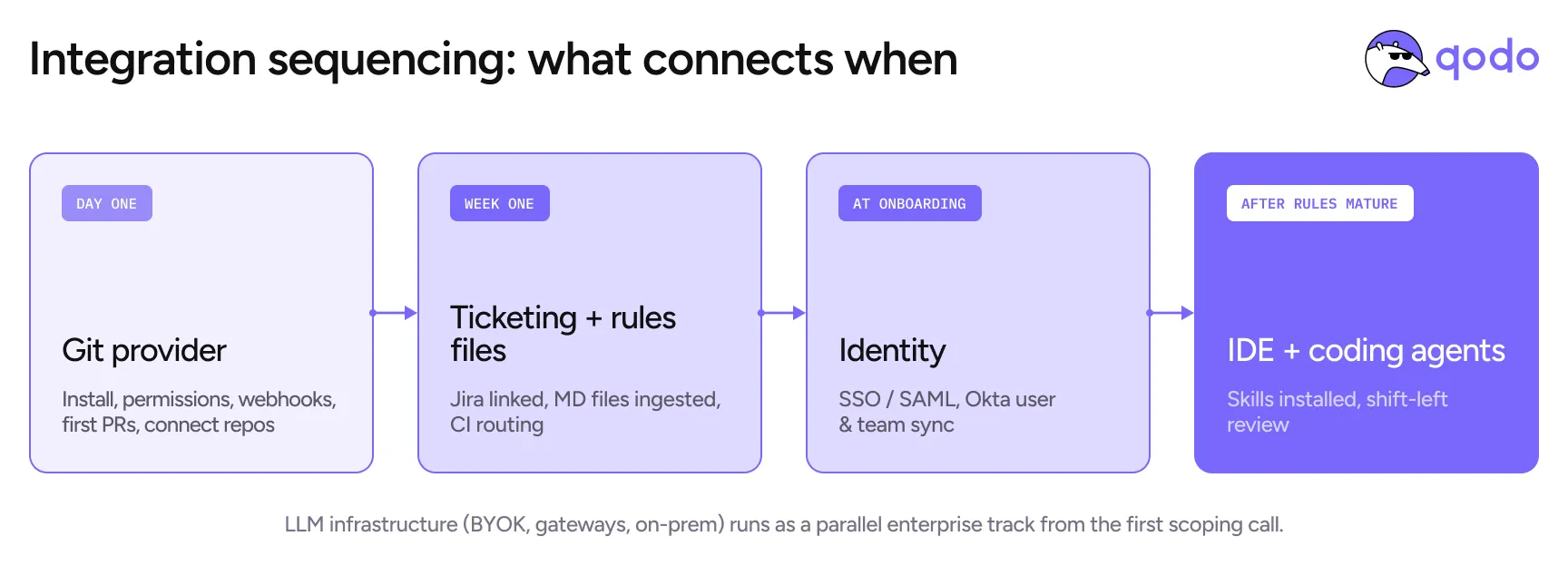
Phase
What connects
Why then
Day one
Git provider – install, permissions, webhooks, first PRs flowing
Nothing else can be evaluated until review runs
Week one
Ticketing (test with one linked PR) + existing rules files ingested + CI feedback routing decided
Requirement gaps and standards enforcement are the trial’s signal; they need their inputs early
At onboarding
SSO/SAML, Okta user and team sync, role-based portal access
Identity is a rollout requirement, not a trial gate. Sequence it at purchase
After rules mature
IDE plugin + Agent Skills into Claude Code / Cursor / other agents
Agents amplify whatever the rules say, shift left once there is something worth shifting
Parallel enterprise track
On-prem deployment, BYOK, gateway configuration, rate-limit sizing
Runs alongside everything from the first scoping call; its critical path is approvals, not technology
For the deployment sequencing inside regulated environments – the dependency owners, the approval choreography – see Scenario 3 in the enterprise rollout chapter. For how integration support compares across AI code review tools – Git providers, ticketing systems, agent integration, and restricted-environment deployment – see the comparison chapter. For everything setup-specific, the documentation has per-provider guides.
Let’s see what you’ve learned!
How does a pull request get linked to a Jira ticket?
Select the correct answer
When should SSO be set up?
Select the correct answer
Your organization runs self-hosted GitHub Enterprise Server. What should you check before the trial?
Select the correct answer
Want to see review running on your exact stack?
Questions?
Yes: Jira Cloud and Jira Data Center. Qodo reads the ticket title, description, custom fields, subtasks, acceptance criteria (when stored in a custom field), up to three image attachments, and labels, and uses them for requirement-alignment findings during review. A PR links to a ticket via a direct link in the PR description or a matching branch name.
GitHub (Cloud, Enterprise Server, and Cloud Enterprise), GitLab (Cloud and Self-Managed), Bitbucket (Cloud and Data Center), and Azure DevOps Cloud, with Gerrit available on Enterprise plans. Self-hosted providers support single-tenant, on-prem, and air-gapped deployment; the full matrix is in the deployment models documentation.
Yes. Qodo’s Agent Skills are open-source instruction sets compatible with Claude Code, Cursor, Windsurf, Cline, OpenAI Codex, and any agent supporting the Agent Skills standard: qodo-get-rules pulls your coding rules into the agent before it writes code, and qodo-pr-resolver fetches and resolves open review findings locally. An IDE plugin covers local pre-PR review.
Yes, as documentation and design context for reviews. Configure the tool in the Qodo portal, then include a Confluence or Notion URL (the specification) and a Figma URL (the design) in a pull request; Qodo checks the change against both. Each review uses up to one specification document and one design file.
In single-tenant deployments, yes: bring your own keys (BYOK), route traffic through your AI gateway with custom authentication headers, and restrict which model families run. BYOK is not available in multi-tenant deployments. BYOK deployments price per seat; end-to-end deployments price on usage.
Yes, and it is the primary rules integration. Qodo reads existing best-practices markdown files (CLAUDE.md, agents.md, copilot instructions and similar) from your repositories and consolidates them into a central rules portal, where they become managed rules scoped to the organization, a group, a repository, a file, or a folder.
Day one: the Git provider. Week one: ticketing (validated with one linked PR) and your existing rules files. Everything else (SSO, user sync, Qodo’s IDE plugin and Agent Skills, BYOK) sequences after the trial has produced a signal. The most common integration mistake is gating the evaluation on infrastructure the trial does not need.