Best Pull Request Automation Tools for Code Review and Bug Detection (2026)

TL;DR
- CI/CD pipeline checks are not code review. Lint, type checks, and unit tests validate local correctness. They don’t catch how a change breaks behavior across files, violates a contract between services, or introduces a regression that only surfaces under specific execution paths.
- The gap between what tests prove and what breaks in production is where PR automation operates. The tools that matter analyze the full diff, reason across files, and flag behavioral regressions, not just syntax issues.
- Signal quality matters more than feature lists. A tool that floods PRs with style comments gets ignored within weeks. What matters is whether findings are specific, tied to real code paths, and reproducible.
- Qodo, cross-file PR analysis with merge enforcement. GitHub Copilot, a coding assistant with a lightweight review layer. CodeRabbit, quick to set up, limited depth. Augment Code, context indexing for large codebases, developer-facing. Sentry, post-deploy error tracking, not a pre-merge tool. Greptile, transactional PR comments with codebase search. Cursor, a developer productivity tool, not a review system.
Look at a typical PR in a production codebase. The reviewer checks for null handling, missed edge cases in conditionals, unsafe state mutations, broken assumptions between functions or services, and regressions introduced by refactoring. This is mechanical work, but it’s not trivial. It requires carefully reviewing the diff, tracking how data flows, and validating behavior across multiple files.
In practice, this is where things fall apart. A reviewer is looking at a diff in isolation, often without reconstructing the full execution path. Large PRs get skimmed. Cross-file dependencies are assumed to be correct. Subtle issues: a retry loop causing duplicate writes, a missing guard on one code path, and a slip-through.
CI doesn’t close this gap. Unit tests don’t cover all execution paths. Static analysis operates at the file level. Integration tests are limited or slow. The result: a significant share of real bugs come from cases that neither humans nor traditional tooling reliably catch.
That’s the gap PR automation is built to fill. This guide covers which tools actually fill it, how to evaluate them on what matters, and how to integrate automated review without adding noise.
Best PR Automation Tools in 2026
What Actually Separates a Useful PR Automation Tool from One That Gets Ignored
Every PR automation tool ships with GitHub integration, automated PR comments, and an “AI review” badge. That’s the baseline, not a differentiator. What actually separates them is what happens when you point them at a 700-line diff across a distributed system: does the tool trace how a return type change in one module breaks a caller three files away, or does it leave a comment about missing semicolons?
1. Depth of Analysis
Does the tool analyze the full PR diff, or just changed files in isolation? Can it follow a change across function boundaries, modules, and service layers? Tools that only comment on what they see locally miss contract violations, broken call chains, and inconsistent state handling.
2. Signal Quality
Does it catch real issues with concrete failure scenarios and clear reasoning paths? Or does it surface vague suggestions, style comments disguised as findings, and generic “consider handling edge cases” warnings?
3. Noise Control
A tool that flags too many low-value issues gets ignored. Developers stop reading within weeks. Good noise control means prioritizing high-impact findings and not repeating lint-level observations that CI already catches.
4. PR-Scale Handling
Does it degrade on large diffs? Can it handle 500–1000 LOC changes across a multi-service repo without skipping files or producing shallow analysis? This is where most tools break.
5. Workflow Integration
Does it run automatically on PR open and update? Can it block merges on critical findings? A tool that only lives in the sidebar as an optional suggestion is not a review gate.
6. Customization
Can the team define org-specific patterns, security constraints, and infra assumptions? Examples: “all external API calls must have retries and timeouts,” “no direct DB writes in request handlers,” “feature flags must guard new logic paths.” Out-of-the-box rules are never enough. This is where the gap between demo performance and production usefulness shows up most clearly.
Here’s how the leading PR automation tools stack up against each of these criteria.
Best PR Automation Tools: Detailed Breakdown
1. Qodo
Qodo is a PR-native AI code review platform. It operates on the full diff, reasons across file boundaries, and produces structured findings that can block merges on critical issues. The goal isn’t to comment on everything; it’s to catch the class of bugs that pass tests, pass human review, and fail in production.
Best for:
- Backend-heavy systems with state consistency and data correctness requirements
- Distributed services where cross-file contract violations are the most common failure mode
- Teams with high PR volume who need consistent standards enforcement across every merge
Not for:
- Developers looking for inline autocomplete or code generation
- Teams without structured PR workflows or CI/CD pipelines
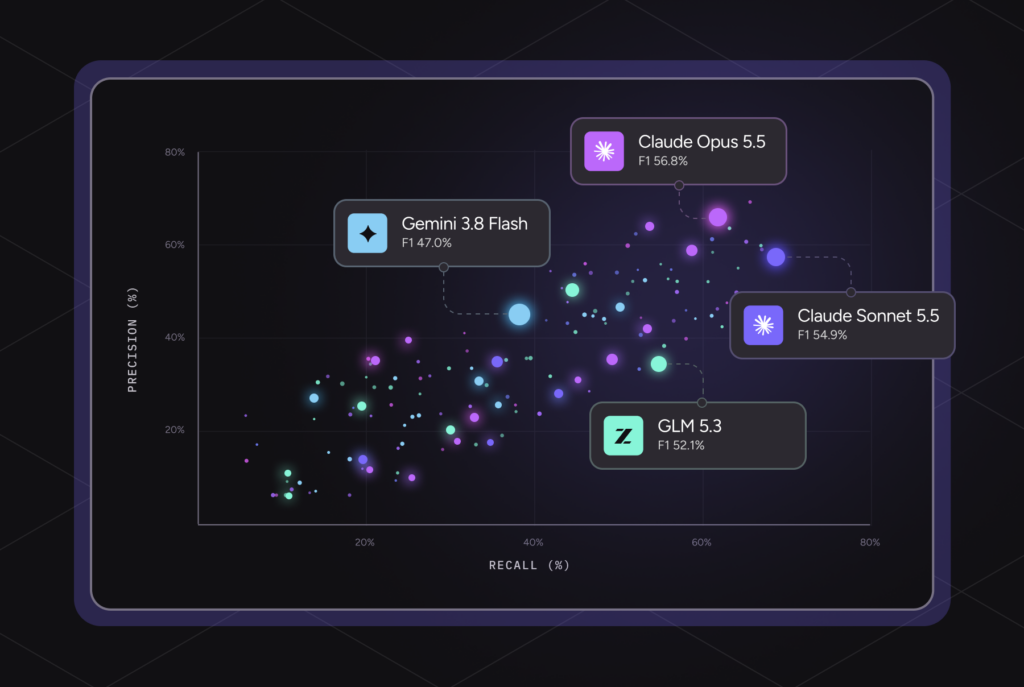
Qodo is Gartner’s #1 ranked tool for Code Understanding (Critical Capabilities for AI Code Assistants, Sept 2025) and a named Visionary in the 2025 Magic Quadrant for AI Code Assistants. On the AI code review benchmark, Qodo holds the highest F1-score, the combined measure of precision and recall that determines whether a tool actually catches real issues without flooding developers with noise.
In production: Monday.com, a 500-developer organization, uses Qodo across their entire engineering org. It prevents 800+ potential issues from reaching production every month while saving developers approximately one hour per pull request. With 4M+ PRs reviewed per year and a 73.8% acceptance rate on code suggestions, the signal quality holds at scale.
Depth of analysis: Qodo’s Context Engine indexes across repos and PR history, turning your entire codebase into a searchable knowledge layer, not just the current diff. When a function’s return type changes in one module, Qodo traces callers in other modules and flags the mismatch. When a refactor removes a null guard that protected a downstream consumer, it introduces a regression.
Signal quality: High recall with controlled precision. Findings are specific: not “this might be an issue” but “user can be null here based on the upstream flow in getUser(), leading to a runtime crash at this call site.” The specificity comes from diff-level reasoning, not a single LLM prompt in the file.
Workflow integration: Native to GitHub, GitLab, Bitbucket, and Azure DevOps. Runs on PR open and update. Merge gates enforce quality standards, and critical findings block merge without requiring a human to manually review and dismiss each one.
Customization: Qodo automatically discovers standards from your codebase and PR history, security constraints, infra assumptions, naming conventions, required test patterns, and manages their full lifecycle: Discover, Measure, Evolve. Rules aren’t static configuration. They’re a living standards system that learns which rules are working, flags ones that are noisy or outdated, and keeps enforcement aligned with how your organization actually writes code.
Hands-On: Two Bugs Caught in Dify’s Streaming Response Fix
Dify is an open-source platform for building production LLM applications, agentic workflows, RAG pipelines, and multi-model orchestration. The workflow engine is what routes execution between nodes.
This PR added blocks_variable_output to the v1 VariableAssigner node, a method that decides which conversation variables need to be resolved before streaming can start. 206 lines across three files, a targeted change, but one that touches the execution path directly. Two issues surfaced before any human reviewed it.
Issue 1: Wrong type annotations:
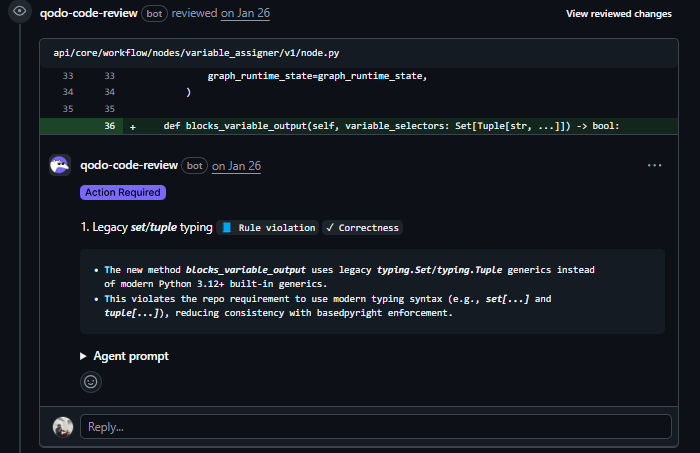
The repo requires Python 3.12+ built-in generics. Qodo caught this in the diff before any human reviewed it.
Issue 2: Crash in production for a specific workflow:
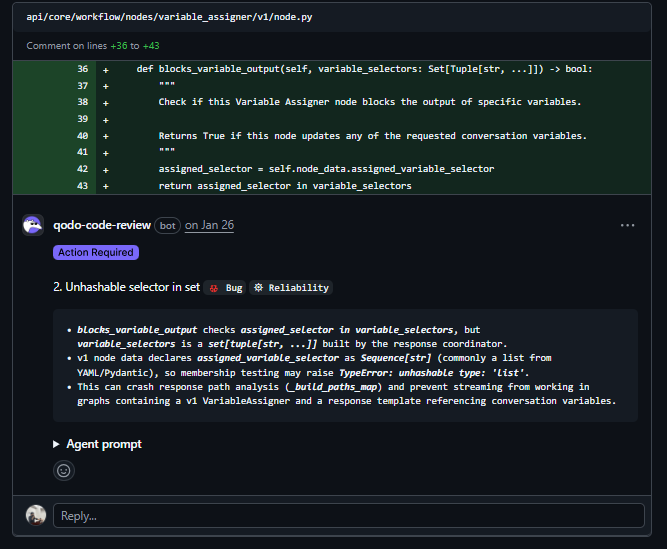
variable_selectors is a set of tuples. assigned_selector is a list from Pydantic. Checking if a list is in a set throws TypeError: unhashable type: ‘list’; this crashes the streaming path for any workflow using a v1 VariableAssigner with conversation variables. Tests won’t catch it unless someone writes a test for exactly that setup. Qodo traced the type mismatch across the call chain and flagged it before the PR was reviewed.
Pricing:
- Teams: ~$30/user/month (Git integration, IDE plugin, CLI plugin, PR workflows)
- Enterprise: Custom (Context Engine, Rules System, SSO, audit logs, private model, on-prem)
2. GitHub Copilot
GitHub Copilot has expanded beyond inline autocomplete into a broader review layer inside GitHub, a coding agent that creates PRs autonomously, a code review agent that posts structured comments on diffs, and Copilot Spaces for organizing repository context. For teams already operating entirely within GitHub, there’s no additional tooling to add.
The depth of analysis is lighter than dedicated review platforms, but the setup friction is minimal.
Best for:
- Small teams and early-stage projects where PR complexity is low
- Teams operating inside GitHub who want a lightweight review without adding a new tool
- Quick checks on small PRs before human review
Not for:
- Distributed systems with cross-file behavioral bugs
- Teams needing merge enforcement on critical findings
- A large number of PRs with complex inter-module dependencies
Depth of analysis: File-level with repository context through Spaces and MCP. Doesn’t track full execution paths across modules or trace how a change propagates through shared state. Strong on obvious issues and simple edge cases, not on behavioral regressions in complex systems.
Signal quality: Medium. Surface suggestions and improvements, more than bugs with concrete failure scenarios. It becomes less useful as code complexity grows.
Workflow integration: Native to GitHub Actions. Automated Code review agent posts structured feedback automatically. No native merge gating on review findings.
Customization: Limited. Follows GitHub’s instruction model without org-specific rule definitions or infra-aware policy enforcement.
Hands-On: Reviewing a Cal.com Booking API Change
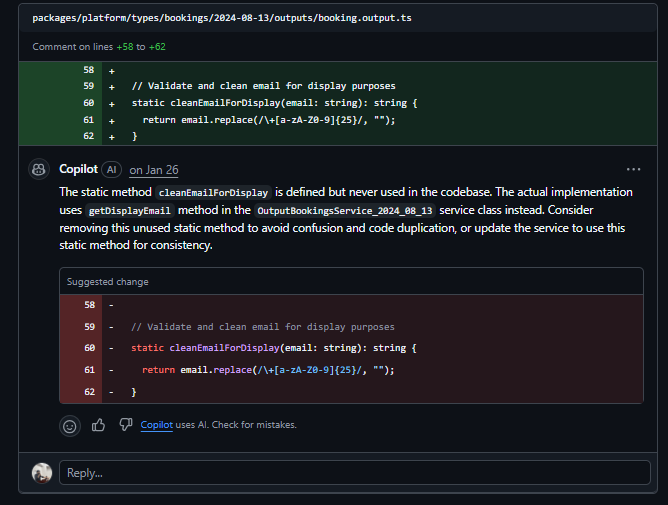
PR against Cal.com adding a displayEmail field to booking API responses, 234 additions across 14 files. Copilot left 6 comments across all 14 files.
Two comments pointed out actual problems. cleanEmailForDisplay is defined in booking.output.ts but never called; the real implementation lives in OutputBookingsService_2024_08_13, so the static method is just dead code.
The other: getOutputRecurringSeatedBookings had its sort by start date removed, nothing in the PR description mentioned it, and it has nothing to do with the displayEmail change.
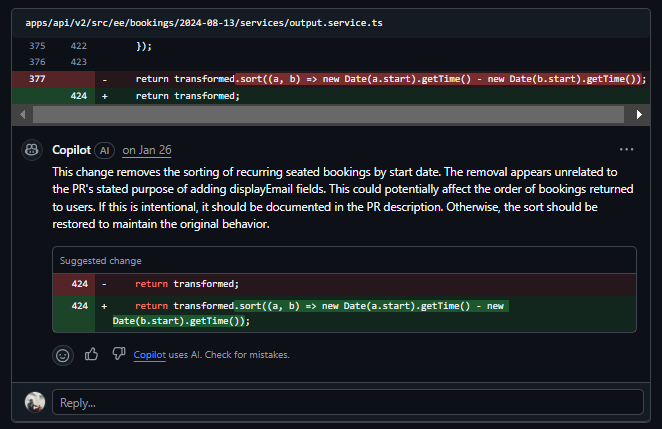
The remaining four comments flagged the same “required” indentation inconsistency in openapi.json, same issue, same file, posted four times with identical text. A reviewer scanning 6 comments, 4 of which say the same thing, will start skipping them, which is exactly when something important gets missed.
Pricing:
- Free: $0/month (limited usage)
- Pro: $10/month
- Business: $19/user/month
- Enterprise: $39/user/month
3. CodeRabbit
CodeRabbit is the easiest tool in this list to get started with. Install the app, connect the repo, and it starts commenting on PRs immediately. The depth of analysis is lighter than dedicated review platforms, but the setup friction is minimal, which makes it a reasonable starting point for teams moving from a fully manual review.
Best for:
- Teams starting with PR automation who want quick coverage on style, readability, and simple bugs
- Low-to-medium complexity codebases where shallow review adds value
- GitHub-native workflows where PR comments are the primary interface
Not for:
- Deep correctness validation across large, complex diffs
- Teams needing merge enforcement on critical findings
- Distributed systems where cross-file bugs are the primary risk
Depth of analysis: PR-level with limited cross-file reasoning. Good coverage on style, basic correctness, and readability. Struggles with behavioral regressions that span multiple files or require tracing execution paths.
Signal quality: Medium. Good on straightforward issues. Comments become noisy on large PRs, and recall on deeper edge cases is lower than that of dedicated review platforms.
Workflow integration: Native to GitHub and GitLab. Runs on PR open and update. Limited merge gating.
Customization: Configurable review instructions and focus areas. Less flexible than rule-based systems for enforcing org-specific technical standards.
Hands-On: Reviewing a Cal.com Webhook Consistency Fix
PR against Cal.com making BOOKING_CANCELLED webhook payloads consistent across regular cancellation and reschedule flows, 114 additions across 13 files.
CodeRabbit generated a walkthrough summary listing what changed: new metadata fields added to cancellation webhooks, a conditional flag to enable or disable webhooks, updated payload examples, and expanded test coverage. Accurate description of the diff.
On pre-merge checks, it flagged that docstring coverage was at 33% against a required threshold of 80%, as shown in the snapshot below:
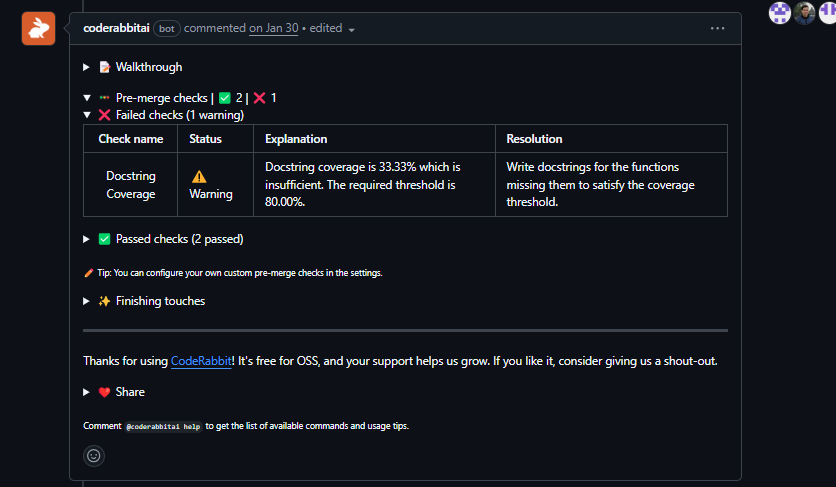
What it didn’t produce were inline findings on the actual code. No comments on whether the new payload fields were correct, whether the webhook firing logic handled edge cases in both cancellation flows consistently, or whether the conditional enable/disable flag was guarded correctly. The review was a summary of what the PR does, not an analysis of whether it does it correctly.
Pricing:
- Free: Limited usage for open source
- Pro: ~$15/user/month
- Enterprise: Custom
4. Augment Code
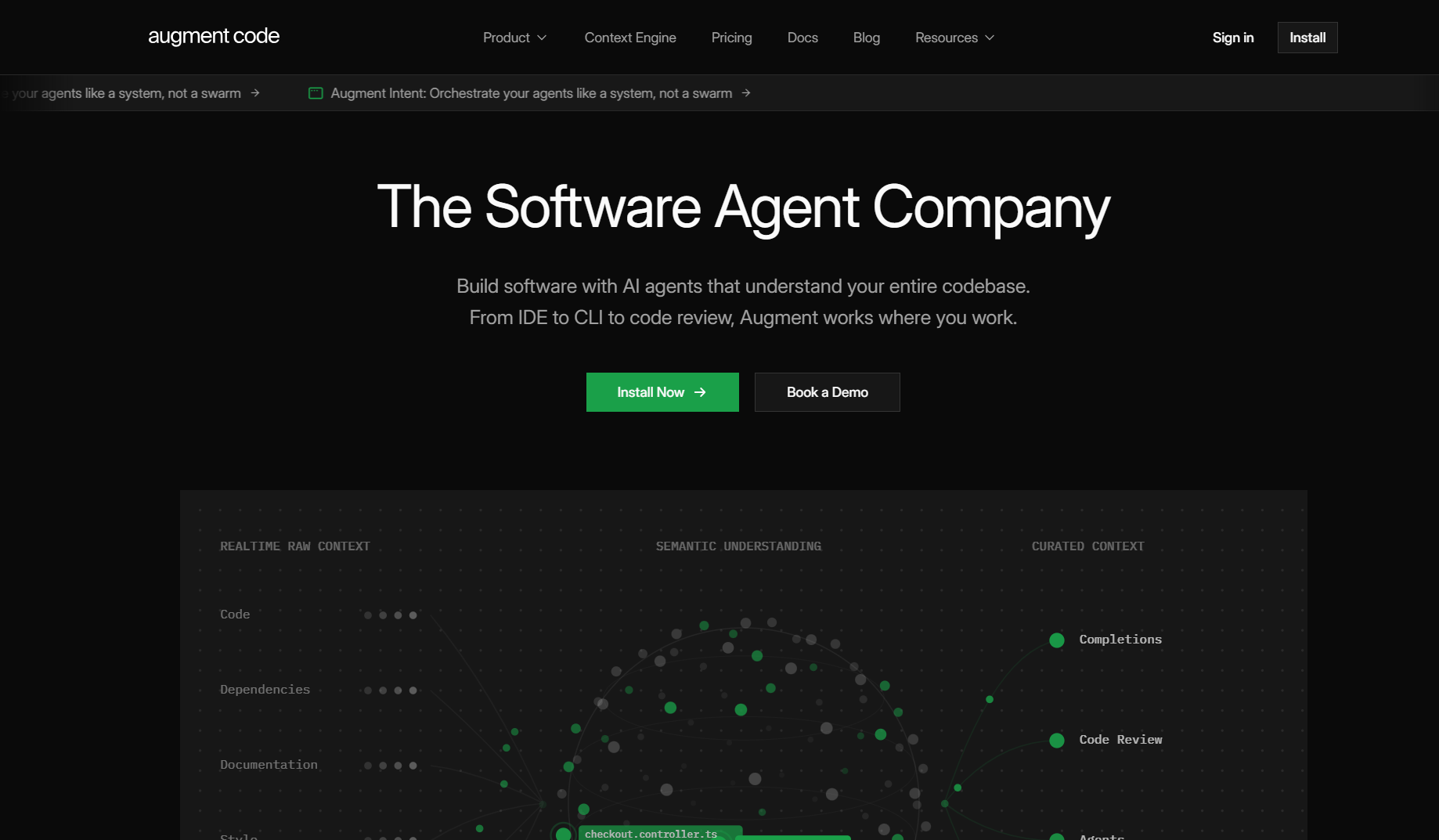
Augment Code is built for large, complex production codebases. Its Context Engine maintains a live understanding of the full stack, code, dependencies, architecture, and history, and applies that context to code authoring, refactoring, and review. As a PR review tool, it’s stronger on detection in large legacy systems than lightweight tools, but the primary use case is developer-facing rather than automated PR enforcement.
Best for:
- Staff and principal engineers working in large production codebases with complex dependencies
- Legacy modernization, where understanding cross-service impact is the bottleneck
- Teams where context retrieval during development matters as much as review findings
Not for:
- Teams looking for a pure PR automation gate with merge enforcement
- Simple greenfield projects where deep context indexing adds cost without benefit
Depth of analysis: Full codebase, live indexing. Indexes the entire stack, including dependencies and history. Strong for understanding how a change propagates through a large system.
Signal quality: High for context-powered analysis. Less focused on structured PR enforcement than on developer-facing insight.
Workflow integration: IDE, CLI, and GitHub PR review surface. Less native merge gating than dedicated review platforms.
Customization: Configurable context and rules. Enterprise deployment with SOC 2 Type II and ISO 42001.
Hands-On: Reviewing a Dify Workflow Refactor
Back in Dify, but a different part of the codebase, the Template Transform node. This node takes a Jinja2 template and renders it with input variables, used to format data between workflow steps. Before this PR, the rendering called CodeExecutor directly inline. The refactor pulled that out behind a Jinja2TemplateRenderer protocol with a CodeExecutorJinja2TemplateRenderer adapter, making the renderer injectable and easier to mock in tests. 849 additions across 4 files, mostly new test coverage, but the core abstraction lives in template_renderer.py.
Augment posted 2 comments, both on template_renderer.py, both about the same problem: the error handling contract between the renderer and the node that calls it.
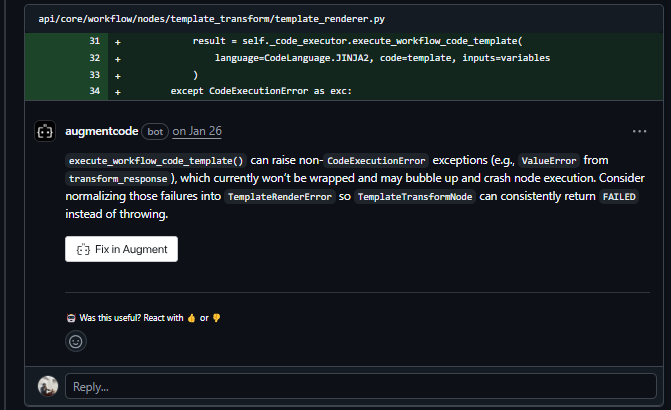
execute_workflow_code_template() can raise exceptions beyond CodeExecutionError, specifically, ValueError from transform_response. The current code only catches CodeExecutionError, so anything else bubbles up unhandled and crashes node execution instead of returning a clean FAILED state. Augment flagged this and suggested wrapping the broader exception surface in TemplateRenderError so TemplateTransformNode can handle failures consistently.
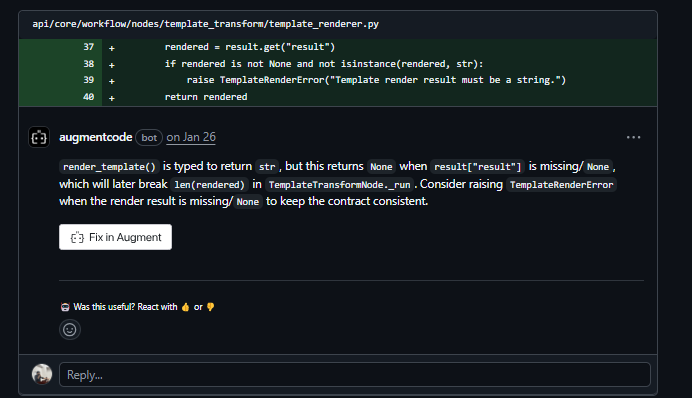
The second finding: render_template() is typed to return str, but returns None when result[“result”] is missing. TemplateTransformNode._run calls len(rendered) on that return value, which crashes on None. Augment caught the gap between the declared return type and the actual runtime behavior, and suggested raising TemplateRenderError when the result is missing to keep the contract honest.
Both findings came from reasoning about how template_renderer.py connects to TemplateTransformNode. The exception handling gap and the return type mismatch are real issues. What’s notable is that they weren’t flagged on the file in isolation, the call chain had to be in scope for them to surface. Whether that translates consistently across PR volume and complexity is a different question, and one the rest of the evaluation table addresses.
Pricing:
- Free: Community plan, limited usage
- Standard: ~$20–50/user/month
- Enterprise: $59/user/month
5. Sentry
Sentry is not a PR review tool. It’s a platform for monitoring production errors. It belongs in this list because it fills a distinct gap, not before merge, but after deployment, by surfacing runtime errors with full stack traces and linking them back to the code changes that introduced them.
Best for:
- Validating whether a deployed change introduced production errors
- Closing the feedback loop between PR review and production behavior
- Linking post-deployment incidents back to specific commits or PRs
Not for:
- Pre-merge code review or behavioral validation
- Finding bugs before they reach production
- Replacing any part of the review pipeline
Depth of analysis: Runtime only. Sentry sees what actually fails in production, real error rates, real stack traces, and real user impact. No pre-merge coverage.
Signal quality: Very high for what it measures. Every finding is a real production error. No false positives by definition.
Workflow integration: Integrates with deployment pipelines to track error rates per release. Can alert when error rates spike after a deployment. Not a merge gate.
Hands-On: Reviewing a Ghost Comment Form Fix
Ghost is an open-source Node.js CMS, with 100M+ downloads, used to run independent newsletters and membership publications. The comments system is a React package inside the monorepo (apps/comments-ui) that lets members reply to posts and to each other. There was a bug where the reply form was picking up the parent comment author’s name and expertise instead of the logged-in member’s own details, so members were seeing someone else’s information pre-filled when they tried to reply. This PR fixed it, 78 additions across 3 files. Looks contained, but two of the three changes in the fix introduced new problems.
Sentry reviewed form.tsx and flagged both of them.
The first: editor editability was changed from checking memberName to checking member?.expertise. Expertise is optional; users with a name but no expertise value set can no longer type in the editor.
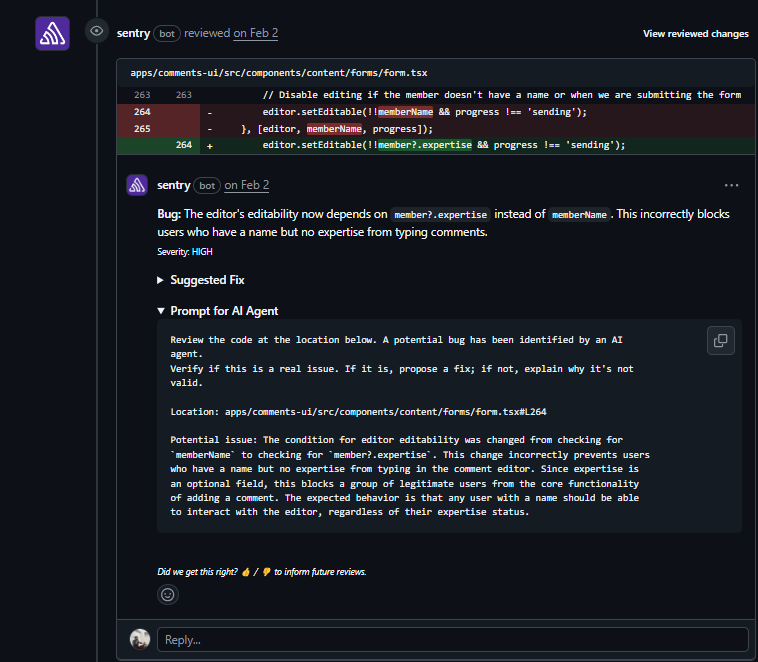
Sentry flagged this as a high-severity regression, explained that expertise is optional in the product, and identified the specific user group affected.
The second: optional chaining was removed from openForm.in_reply_to_snippet. openForm is an optional prop, not provided by MainForm when a user is adding a top-level comment. Accessing .in_reply_to_snippet on undefined throws immediately. Sentry flagged this as critical, named the exact component that doesn’t pass openForm, and described the exact crash scenario.
Both findings overlap with issues Qodo caught pre-merge on the same PR. The difference is timing: Qodo flagged them before the code was merged; Sentry surfaces them after deployment, when a real user has already hit the crash. Sentry tells you what broke. It doesn’t stop it from shipping.
Pricing:
- Developer: Free (limited events)
- Team: ~$26/month
- Business: ~$80/month
- Enterprise: Custom
6. Greptile
Greptile is strongest for navigating and querying large codebases, finding where a function is used, understanding the impact of a change, and surfacing relevant context across a repo. As a PR review tool, it’s useful for teams that need semantic code search alongside review comments, but structured review findings are less consistent than dedicated platforms.
Best for:
- Teams needing a semantic codebase search alongside PR review
- Navigating large, unfamiliar codebases with natural language queries
- Specific integrations where code search is the primary use case
Not for:
- Systematic PR review with high recall on behavioral issues
- Merge enforcement or structured findings
- Teams needing consistent coverage across high PR volume
Depth of analysis: Repo-level context through codebase indexing. Better at “where is this used” than “does this change break behavior downstream.”
Signal quality: Inconsistent on PR-wide behavioral analysis. Strong on code navigation and context retrieval.
Workflow integration: GitHub integration with automated PR comments. Limited merge gating.
Hands-On: Reviewing a Dify SQL Escaping Refactor
One more from Dify, this time in the API layer. SQL LIKE queries use % and _ as wildcards, so if user input goes into a LIKE clause without escaping those characters, an attacker can turn a search into a wildcard scan. Dify had inline escaping scattered across 13 service files, each handling it slightly differently. This PR centralized it into a single escape_like_pattern() utility in helper.py and updated every LIKE query across the codebase to use it. 650 additions across 18 files, the kind of security refactor where one wrong assumption in the new utility quietly breaks everything it was supposed to fix.
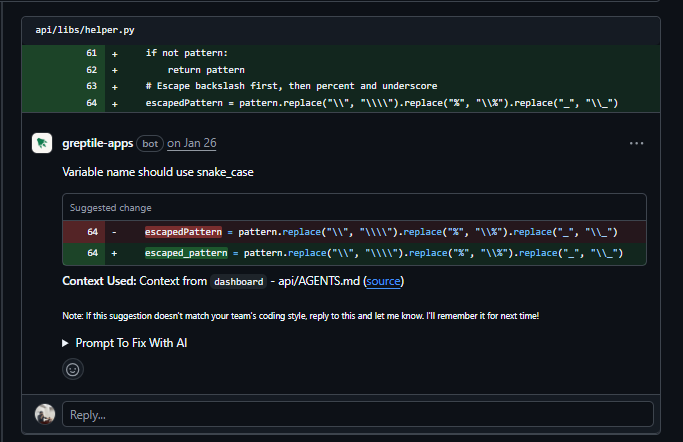
Greptile reviewed it, gave it a confidence score of 2/5, and left 4 comments.
The most important finding: iris_vector.py calls escape_like_pattern(), but the SQL clause uses ESCAPE ‘|’; the helper escapes with a backslash, so the escape character in the query and the one in the pattern don’t match.
The escaping is completely ineffective for IRIS database queries, leaving them open to SQL injection. Greptile flagged this and suggested changing ESCAPE ‘|’ to ESCAPE ‘\\’.
Second: dataset_retrieval.py uses escape_like_pattern() in the “not contains” case, but doesn’t pass escape=”\\” to notlike(). Every other LIKE operation in the same function passes it. Greptile caught the inconsistency and suggested adding the missing parameter. The other two comments flagged escapedPattern as a naming convention violation in helper.py; the repo uses snake_case. Same issue, posted twice on adjacent lines.
Pricing:
- Usage-based: contact Greptile for pricing
7. Cursor
Cursor is an AI-native code editor built for interactive development, exploring code paths, debugging with context, and refactoring within a session. It is not a PR automation tool. It doesn’t run on PRs automatically, doesn’t enforce standards across a team, and doesn’t produce structured findings that block merges.
Best for:
- Individual developer productivity during active coding sessions
- Interactive debugging and exploration of unfamiliar codebases
- Local refactoring with AI-assisted multi-file edits
Not for:
- Automated PR review
- Team-wide standards enforcement
- Merge gating or CI integration
Depth of analysis: Project-level during an active session. Can read and edit files across the repo and reason across modules, but only when a developer is directing it interactively. Doesn’t run autonomously on incoming PRs.
Workflow integration: None. Cursor is an editor. Pipeline integration requires external tooling.
Hands-On: Reviewing a Cal.com DI Wiring Change
Back in Cal.com. This PR wires FeatureOptInService and FeaturesRepository into the DI container, replacing direct new instantiation with container-resolved services. 131 additions across 15 files. Cursor Bugbot left 2 comments.
The first is a token mismatch that breaks DI lookups. FeaturesRepository.ts exports a moduleLoader with .token set to moduleToken (FLAGS_DI_TOKENS.FEATURES_REPOSITORY_MODULE), but the class is bound to token (FLAGS_DI_TOKENS.FEATURES_REPOSITORY).
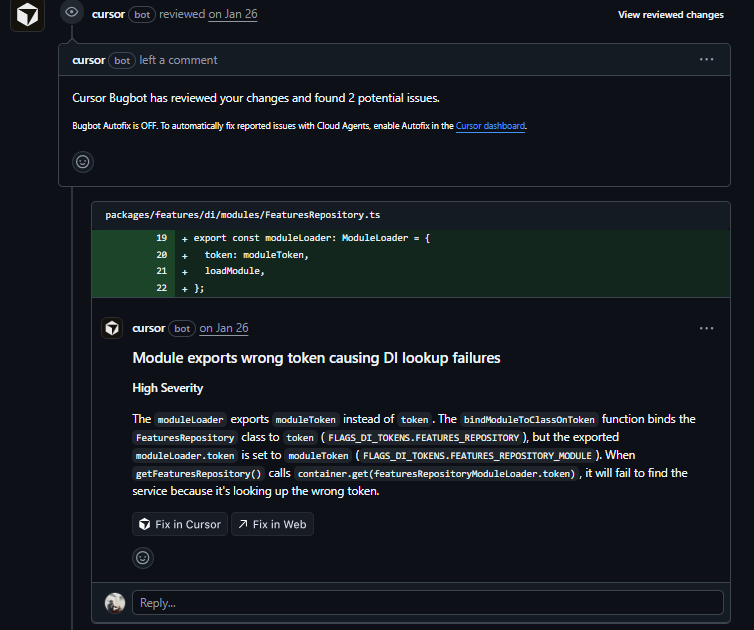
When getFeaturesRepository() calls container.get(featuresRepositoryModuleLoader.token), it looks up the wrong token and finds nothing. The service is registered under one token and looked up under another.
The second is a cache invalidation bug in the test refactor. Before the change, one FeaturesRepository instance was shared between featuresRepository and service.
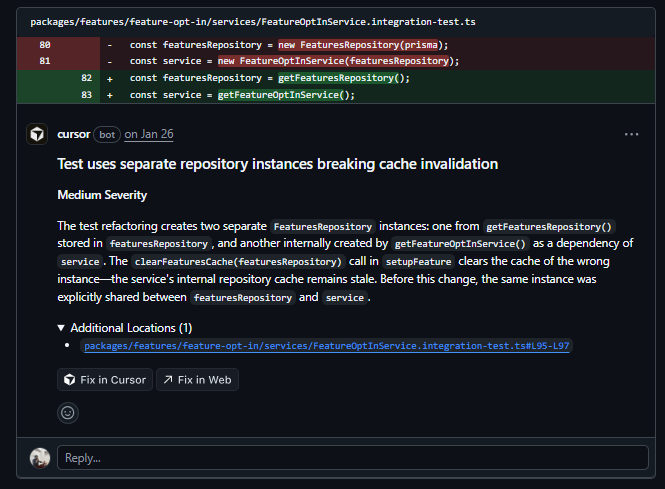
After, getFeaturesRepository() and getFeatureOptInService() each create their own. The test’s clearFeaturesCache(featuresRepository) clears the first instance, the service keeps using the second, with a stale cache between test cases.
Pricing:
- Pro: $20/user/month
- Teams: $40/user/month
- Enterprise: Custom
Which PR automation tool actually catches bugs before merge
The evaluation comes down to one question: Does the tool close the gap between what CI checks prove and what breaks in production? That requires reasoning across the full diff, tracking changes across file boundaries, and producing findings specific enough to act on.
Here’s how each tool performs against that bar.
| Tool | Depth of Analysis | Signal Quality | Noise Control | Large PR Handling | Merge Gating |
| Qodo | Full PR diff, traces changes across modules and service boundaries | Catches behavioral regressions, runtime crashes, and cross-file contract violations | Suppresses style findings, surfaces only correctness issues | Handles 500–1000 LOC diffs across multi-service repos without degrading | Yes, blocks merge on critical findings |
| GitHub Copilot | File-level misses how changes propagate across modules | Catches obvious bugs and simple edge cases; misses behavioral regressions | Low noise, but findings stay shallow | Reliable on small PRs; misses cross-file issues on large diffs | No merge gating |
| CodeRabbit | PR-level, limited cross-file | Decent basics, misses edge cases | Mixed noisy on large PRs | Struggles on large diffs | No merge gating |
| Augment Code | Full codebase, live indexing | High , context-powered | Moderate; not tuned for PR-specific noise reduction | Strong on large codebases; primary use case is developer-facing | Limited |
| Sentry | Runtime only , post-deploy | Very high , real errors only | Very high , no false positives | N/A | No |
| Greptile | Repo-indexed, variable depth | Inconsistent on PR findings | Inconsistent | Limited at scale | Limited |
| Cursor | Local session context only | N/A , interactive, not systematic | Controlled , user-driven | Not designed for PR scale | No |
The tools that close the gap reason at the diff level, trace changes across file boundaries, and enforce findings at the merge gate. If your postmortems keep pointing to cross-file regressions and broken contracts that slipped through review, the answer isn’t more reviewers; it’s catching them before merge.
The agentic review benchmark mappings are publicly available if you want to see how these tools perform against a standardized set of PRs.
FAQ
What is pull request automation, and how is it different from CI?
CI validates local correctness, syntax, types, and isolated test coverage. PR automation operates at the behavioral level: it analyzes the full diff, tracks how changes affect execution paths across files, and flags issues like missing guards, inconsistent state updates, and contract violations between modules. They’re complementary, not interchangeable.
What types of bugs do PR automation tools actually catch?
The most valuable catches are behavioral regressions: a null guard removed during refactoring, a state mutation that’s inconsistent across branches, a return type change that breaks a caller in another module, an API assumption that no longer holds after an upstream change. These are the bugs that pass tests and fail in production.
How do I avoid PR automation tools adding noise instead of value?
Start by disabling style and readability findings. Configure the tool to surface only correctness issues, edge cases, and security gaps. Add it as a required status check so findings have weight. Track how often developers act on comments vs. dismiss them. If the dismissal rate is high, the noise is too high.
Should PR automation replace human code review?
No. It removes humans from mechanical verification, checking null paths, tracking execution flows, and validating cross-file behavior. Human reviewers should focus on architectural intent, design decisions, and business logic. That division of labor makes both more valuable.
How do I make PR automation a merge gate without blocking developers unnecessarily?
Define severity levels explicitly. Critical findings, runtime crashes, data corruption paths, security gaps, and block merge. Medium findings produce warnings. Low-level findings are suppressed or handled by CI. The tool should only block things that a senior engineer would also block.
What makes Qodo different from the other tools in this list?
Qodo operates specifically at the merge layer with cross-file context. It runs multi-agent review across the full diff, applies org-defined rules consistently on every PR, and enforces findings as a merge gate, not as a sidebar suggestion. The other review tools in this list offer shallower analysis, less enforcement, or are designed for a different primary use case.
About the author